Codexity Part 1: Architecture of an Answer Engine
Codexity Part 1: Architecture of an Answer Engine
Perplexity takes a question, searches the web, reads the pages, and writes an answer with citations. That description fits on a napkin. The implementation does not.
This series builds a fully functional clone called Codexity. No frontend. Pure Python backend. By the end of the final chapter, you will have a working API that accepts a natural language question, searches the web, scrapes sources, synthesizes an answer through a local LLM, and streams it back token by token over Server-Sent Events.
What Perplexity Actually Does
Before building anything, we need to understand the pipeline. Every query flows through five phases:
- Query Understanding: The raw user question gets rewritten into search-engine-friendly queries. A vague question like “which database should I use” becomes multiple targeted searches.
- Web Search: Those rewritten queries hit a search engine. We use DuckDuckGo because it has no API key requirement and a solid Python library.
- Web Scraping: The top URLs from search results get fetched and their content extracted. This is where things get ugly. JavaScript-rendered pages, anti-bot measures, rate limiting.
- Content Processing: Raw HTML gets stripped down to clean text, chunked, and ranked by relevance to the original question.
- Answer Synthesis: A language model reads the ranked chunks and generates a cited answer, streamed to the client in real time.
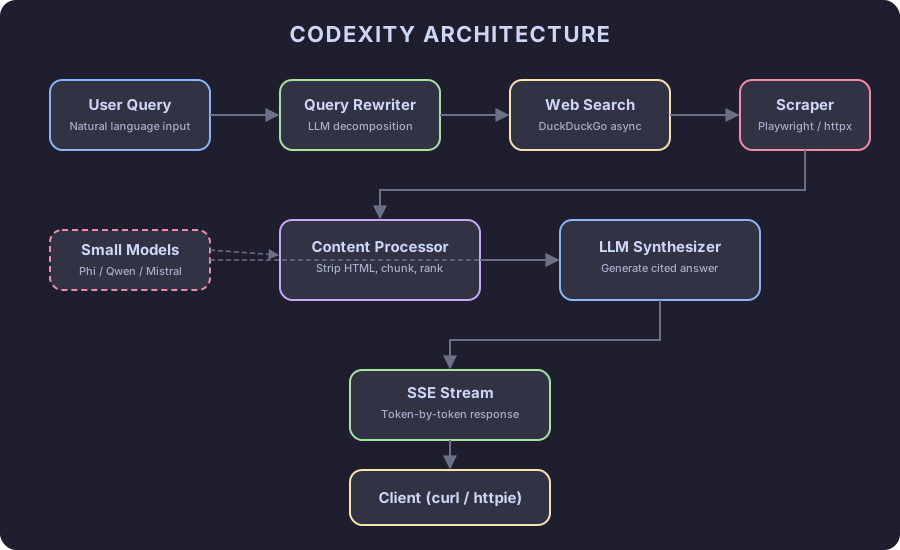
The Tech Stack
Everything runs on Python 3.12+. Here is the full dependency list and why each library was chosen:
| Library | Purpose |
|---|---|
fastapi | HTTP server with native async and SSE support |
uvicorn | ASGI server to run FastAPI |
httpx | Async HTTP client for scraping |
duckduckgo-search | Web search without API keys |
playwright | Browser automation for JS-heavy pages |
beautifulsoup4 | HTML parsing and content extraction |
readability-lxml | Article extraction (Readability algorithm) |
llama-cpp-python | Local LLM inference with OpenAI-compatible API |
rank-bm25 | BM25 scoring for chunk relevance |
sse-starlette | Server-Sent Events for FastAPI |
No OpenAI. No paid APIs. The entire stack runs on your machine.
Project Structure
codexity/
├── main.py              # FastAPI app + SSE endpoint
├── query_rewriter.py    # LLM-based query decomposition
├── searcher.py          # DuckDuckGo async search
├── scraper.py           # Tiered scraping (httpx + Playwright)
├── content_processor.py # HTML stripping, chunking, ranking
├── synthesizer.py       # LLM answer generation
├── llm_client.py        # Abstraction over llama-cpp-python
├── config.py            # Settings and constants
└── models.py            # Pydantic models
Nine files. Each one maps to a stage in the pipeline.
Setting Up the Project
mkdir codexity && cd codexity
python -m venv .venv
source .venv/bin/activate
Create pyproject.toml:
[project]
name = "codexity"
version = "0.1.0"
requires-python = ">=3.12"
dependencies = [
    "fastapi>=0.115.0",
    "uvicorn[standard]>=0.30.0",
    "httpx>=0.27.0",
    "duckduckgo-search>=6.3.0",
    "playwright>=1.48.0",
    "beautifulsoup4>=4.12.0",
    "readability-lxml>=0.8.0",
    "lxml>=5.0.0",
    "llama-cpp-python>=0.3.0",
    "rank-bm25>=0.2.2",
    "sse-starlette>=2.0.0",
    "pydantic>=2.0.0",
    "pydantic-settings>=2.0.0",
]
Install everything:
pip install -e .
playwright install chromium
The Playwright install downloads a Chromium binary. We will need it for JavaScript-rendered pages in Part 4.
The Data Models
Every stage of the pipeline passes typed data to the next. Define these models upfront so the contract between components is clear.
# models.py
from pydantic import BaseModel

class SearchResult(BaseModel):
    title: str
    url: str
    snippet: str

class ScrapedPage(BaseModel):
    url: str
    title: str
    content: str
    success: bool

class TextChunk(BaseModel):
    text: str
    source_url: str
    source_title: str
    relevance_score: float = 0.0

class SourceReference(BaseModel):
    index: int
    title: str
    url: str

class SearchEvent(BaseModel):
    event: str
    data: dict
SearchEvent is the SSE payload. Every message the server sends to the client follows this format: an event type (status, sources, token, done) and a data dictionary.
The Config Module
# config.py
from pydantic_settings import BaseSettings

class Settings(BaseSettings):
    # LLM
    model_path: str = "./models/qwen2.5-7b-instruct-q4_k_m.gguf"
    context_length: int = 8192
    max_tokens: int = 2048

    # Search
    max_search_results: int = 8
    max_queries: int = 3

    # Scraping
    scrape_timeout: int = 15
    max_concurrent_scrapes: int = 5

    # Content processing
    chunk_size: int = 512
    chunk_overlap: int = 50
    top_k_chunks: int = 10

    class Config:
        env_file = ".env"

settings = Settings()
Every magic number lives here. When we start tuning performance in later chapters, this is the file that changes.
The FastAPI Skeleton
# main.py
import asyncio
from fastapi import FastAPI, Query
from sse_starlette.sse import EventSourceResponse

from config import settings
from models import SearchEvent

app = FastAPI(title="Codexity", version="0.1.0")

async def search_pipeline(query: str):
    """
    Main pipeline generator. Yields SSE events as each phase completes.
    """
    # Phase 1: Rewrite query
    yield SearchEvent(event="status", data={"step": "rewriting_query"})
    # ... (implemented in Part 2)

    # Phase 2: Search
    yield SearchEvent(event="status", data={"step": "searching"})
    # ... (implemented in Part 3)

    # Phase 3: Scrape
    yield SearchEvent(event="status", data={"step": "scraping"})
    # ... (implemented in Part 4)

    # Phase 4: Process content
    yield SearchEvent(event="status", data={"step": "processing"})
    # ... (implemented in Part 5)

    # Phase 5: Generate answer
    yield SearchEvent(event="status", data={"step": "generating"})
    # ... (implemented in Part 6-7)

    yield SearchEvent(event="done", data={})

@app.get("/search")
async def search(q: str = Query(..., min_length=1)):
    async def event_generator():
        async for event in search_pipeline(q):
            yield {"event": event.event, "data": event.data}

    return EventSourceResponse(event_generator())

@app.get("/health")
async def health():
    return {"status": "ok"}
The /search endpoint is an SSE stream. The client opens a persistent connection, and the server pushes events as each pipeline phase completes. Status updates first, source URLs second, answer tokens last.
This is the skeleton. Run it:
uvicorn main:app --reload --host 0.0.0.0 --port 8000Test with curl:
curl -N "http://localhost:8000/search?q=what+is+python"You will see the status events fire, but nothing meaningful yet. The pipeline is hollow. Each subsequent chapter fills in one stage.
Why Async Everywhere
The entire pipeline is async. Search calls happen in parallel. Scraping runs concurrently with a semaphore. LLM tokens stream as they generate.
A synchronous implementation would work, but the latency would be brutal. Web searches take 500ms-2s. Scraping 10 pages sequentially at 3s each means 30 seconds of dead time. With asyncio.gather, those 10 pages fetch in parallel and complete in the time of the slowest one.
The async model also enables SSE naturally. While the LLM generates tokens, each one yields back to the event loop, which pushes it to the client immediately. No buffering, no polling.
What Comes Next
Part 2 covers query rewriting. A user types “what database for my startup”. The rewriter turns that into two or three search-engine queries that will actually return useful results. This is where we first touch the LLM, and where the quality of the entire system gets decided.
The series progresses like this:
- Part 2: Query rewriting and decomposition with LLMs
- Part 3: Async web search with DuckDuckGo
- Part 4: Web scraping, proxies, and anti-bot measures
- Part 5: Content processing and relevance ranking
- Part 6: Small model inference with llama-cpp-python
- Part 7: Server-Sent Events and streaming
- Part 8: Full integration, testing, and deployment
Each part builds on the previous one. By Part 8, every stub in search_pipeline will be replaced with real code.
Continue reading
Next article
Continuous Audio Playback on a Static Astro Site
Related Content
Codexity Part 8: The Complete Answer Engine
The final chapter. Assemble every module into a running application. Complete source code, Docker deployment, configuration, testing, and performance tuning for the full Codexity answer engine.
Codexity Part 3: Async Web Search with DuckDuckGo
Fire multiple search queries in parallel using DuckDuckGo's Python library and asyncio. Handle rate limiting, deduplicate results, and build a resilient search layer that does not depend on paid APIs.
Codexity Part 5: Content Processing and Relevance Ranking
Take raw scraped text from 12 web pages and transform it into a focused context window for an LLM. Chunk text, score relevance with BM25, select the best fragments, and format them with source citations.