Draft / Scheduled Content
This article is a draft or scheduled for future publication. The content is subject to change.
Codexity Part 7: Server-Sent Events and Streaming
Codexity Part 7: Server-Sent Events and Streaming
Tokens stream from the LLM. But between the model generating a token and the client receiving it, several things can go wrong. The client disconnects. The network drops a packet. The event loop gets blocked. A proxy buffers the response. The server runs out of memory holding partial responses.
SSE is simple in theory. One HTTP connection, one direction, text-based events. Getting it right in production requires attention to details that tutorials skip.
SSE Protocol Basics
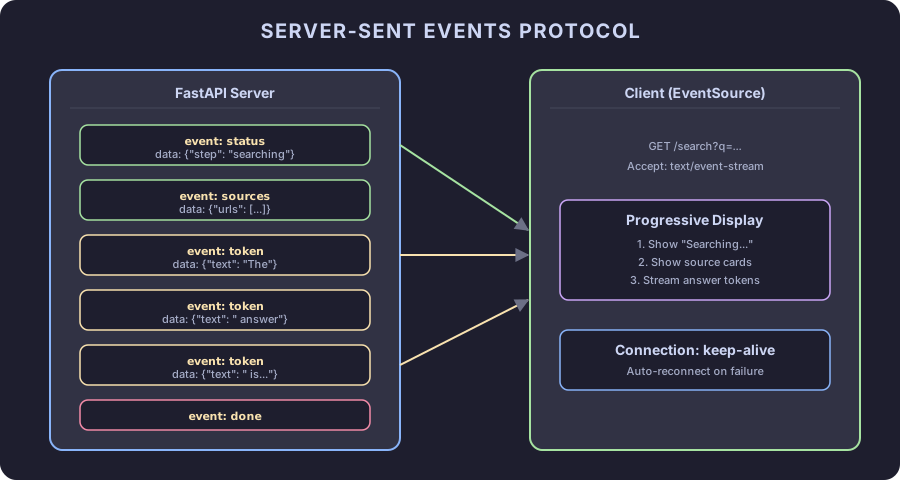
An SSE response is an HTTP response with Content-Type: text/event-stream. The body is a stream of text blocks separated by double newlines:
event: status
data: {"step": "searching"}

event: token
data: {"text": "The"}

event: token
data: {"text": " answer"}

event: done
data: {}
Each block has an optional event: field (the event type) and a required data: field (the payload). The client uses EventSource in JavaScript or curl -N in the terminal to read these events as they arrive.
FastAPI does not have built-in SSE support. The sse-starlette library provides EventSourceResponse, which handles the HTTP headers, formatting, and connection management.
The Complete Endpoint
Here is the full /search endpoint with proper error handling, heartbeats, and client disconnect detection:
# main.py
import asyncio
import json
import logging

from fastapi import FastAPI, Query, Request
from fastapi.middleware.cors import CORSMiddleware
from sse_starlette.sse import EventSourceResponse

from config import settings
from models import SearchEvent
from query_rewriter import rewrite_query
from searcher import search_parallel
from scraper import scrape_urls
from content_processor import process_content
from synthesizer import synthesize

logger = logging.getLogger("codexity")

app = FastAPI(title="Codexity", version="0.1.0")

app.add_middleware(
    CORSMiddleware,
    allow_origins=["*"],  # Restrict in production
    allow_methods=["GET"],
    allow_headers=["*"],
)

async def search_pipeline(query: str, request: Request):
    """Main pipeline. Yields SSE events. Checks for client disconnect."""
    try:
        # Phase 1: Rewrite
        yield event("status", {"step": "rewriting_query"})
        if await request.is_disconnected():
            return

        queries = rewrite_query(query)
        yield event("status", {"step": "queries_ready", "queries": queries})

        # Phase 2: Search
        yield event("status", {"step": "searching"})
        if await request.is_disconnected():
            return

        search_results = await search_parallel(queries)
        if not search_results:
            yield event("error", {"message": "No search results found"})
            yield event("done", {})
            return

        yield event("sources_preview", {
            "count": len(search_results),
            "urls": [r.url for r in search_results[:5]],
        })

        # Phase 3: Scrape
        yield event("status", {"step": "scraping"})
        if await request.is_disconnected():
            return

        urls = [r.url for r in search_results]
        pages = await scrape_urls(urls)

        if not pages:
            yield event("error", {"message": "Failed to scrape any pages"})
            yield event("done", {})
            return

        yield event("status", {
            "step": "scraping_done",
            "scraped": len(pages),
            "total": len(urls),
        })

        # Phase 4: Process
        yield event("status", {"step": "processing"})
        context, sources = await process_content(pages, query)

        yield event("sources", {
            "sources": [
                {"index": s.index, "title": s.title, "url": s.url}
                for s in sources
            ],
        })

        # Phase 5: Synthesize
        yield event("status", {"step": "generating"})
        if await request.is_disconnected():
            return

        async for token in synthesize(query, context, sources):
            if await request.is_disconnected():
                return
            yield event("token", {"text": token})

        yield event("done", {})

    except Exception as e:
        logger.exception(f"Pipeline error for query: {query}")
        yield event("error", {"message": "An internal error occurred"})
        yield event("done", {})

def event(event_type: str, data: dict) -> dict:
    return {"event": event_type, "data": json.dumps(data)}

@app.get("/search")
async def search(request: Request, q: str = Query(..., min_length=1, max_length=500)):
    async def generator():
        async for evt in search_pipeline(q, request):
            yield evt

    return EventSourceResponse(
        generator(),
        headers={
            "Cache-Control": "no-cache",
            "X-Accel-Buffering": "no",  # Disable nginx buffering
        },
    )

@app.get("/health")
async def health():
    return {"status": "ok"}
Several decisions here deserve explanation.
Client Disconnect Detection
if await request.is_disconnected():
    return
This check appears before each expensive phase. If the user closes the browser tab during scraping, the pipeline stops instead of wasting resources scraping, processing, and generating an answer nobody will read.
The check inside the token loop is more aggressive. Every token checks for disconnect. On CPU inference at 8 tokens/second, each token takes 125ms. A generation of 500 tokens takes a minute. Detecting disconnect early saves significant compute.
The X-Accel-Buffering Header
"X-Accel-Buffering": "no"If you put Codexity behind nginx (and you should, in production), nginx buffers responses by default. For normal HTTP responses, buffering improves performance. For SSE, buffering destroys the experience. Events pile up in nginx’s buffer and arrive in batches instead of individually.
This header tells nginx to disable buffering for this response. Other reverse proxies have similar settings:
- Caddy: Streams by default, no configuration needed
- Traefik: Add
traefik.http.middlewares.sse.buffering.retryexpression=IsNetworkError()(or just disable buffering middleware) - Apache:
SetEnv proxy-sendchunked 1
Heartbeats
SSE connections stay open indefinitely. Load balancers, proxies, and firewalls kill idle connections after 30-60 seconds. If the scraping phase takes 8 seconds, the connection appears idle for 8 seconds. Some proxies tolerate this. Some do not.
Heartbeats solve this:
async def search_pipeline_with_heartbeat(query: str, request: Request):
    heartbeat_task = asyncio.create_task(heartbeat_generator())
    pipeline_task = search_pipeline(query, request)

    try:
        async for evt in merge_generators(pipeline_task, heartbeat_task):
            yield evt
    finally:
        heartbeat_task.cancel()

async def heartbeat_generator():
    while True:
        await asyncio.sleep(15)
        yield {"event": "heartbeat", "data": ""}

async def merge_generators(*generators):
    """Merge multiple async generators, yielding from whichever produces first."""
    queue = asyncio.Queue()
    done = set()

    async def feed(gen, idx):
        try:
            async for item in gen:
                await queue.put(item)
        except asyncio.CancelledError:
            pass
        finally:
            done.add(idx)
            if len(done) == len(generators):
                await queue.put(None)

    tasks = [asyncio.create_task(feed(g, i)) for i, g in enumerate(generators)]

    while True:
        item = await queue.get()
        if item is None:
            break
        yield item

    for task in tasks:
        task.cancel()
Every 15 seconds, a heartbeat event fires. The client ignores it (unknown event types are silently dropped by EventSource). Proxies see activity and keep the connection alive.
Error Events
The pipeline yields error events when things go wrong:
yield event("error", {"message": "No search results found"})The error event is followed by a done event so the client knows the stream is over. Never leave a stream open after an error. The client will wait forever.
The error message is generic on purpose. Internal details like “Playwright timed out on https://example.com” leak infrastructure information. Log the details server-side, send a clean message to the client.
Testing with curl
# Basic test
curl -N "http://localhost:8000/search?q=what+is+asyncio"

# With headers visible
curl -N -v "http://localhost:8000/search?q=what+is+asyncio"

# Pipe to jq for readable JSON
curl -N "http://localhost:8000/search?q=what+is+asyncio" | while read -r line; do
    if [[ "$line" == data:* ]]; then
        echo "${line#data: }" | python -m json.tool 2>/dev/null || echo "$line"
    else
        echo "$line"
    fi
done
Testing with Python
import httpx

async def test_search():
    async with httpx.AsyncClient() as client:
        async with client.stream(
            "GET",
            "http://localhost:8000/search",
            params={"q": "what is asyncio"},
        ) as response:
            async for line in response.aiter_lines():
                if line.startswith("event:"):
                    event_type = line[7:]
                elif line.startswith("data:"):
                    data = line[6:]
                    print(f"{event_type}: {data}")
Backpressure
What happens when the LLM generates tokens faster than the network can deliver them? The tokens pile up in memory. For a single client, this is fine. For 100 concurrent clients, each with a growing buffer, memory usage spikes.
sse-starlette handles this by using Starlette’s streaming response, which respects TCP backpressure. If the client cannot read fast enough, the server’s send call blocks (asynchronously), which slows down the generator, which slows down token generation. The system self-regulates.
If you replace sse-starlette with a manual implementation, add explicit buffer limits:
MAX_BUFFER_SIZE = 1000  # Max events to buffer per client

async def buffered_generator(pipeline, max_size=MAX_BUFFER_SIZE):
    buffer = asyncio.Queue(maxsize=max_size)
    # ... fill from pipeline, yield from buffer
    # Queue.put() blocks when full, applying backpressure
Connection Lifecycle
A complete SSE session:
- Client sends
GET /search?q=... - Server responds with
200 OK,Content-Type: text/event-stream - Server yields
statusevents during processing - Server yields
sourcesevent with citation metadata - Server yields
tokenevents as the LLM generates - Server yields
doneevent - Server closes the connection
If the client disconnects at any point, request.is_disconnected() returns True and the pipeline exits cleanly. No zombie connections. No wasted compute.
What Comes Next
Part 8 puts everything together. We assemble the complete project, add configuration for different environments, write a Dockerfile, and run the full pipeline end to end. The final chapter includes the complete source code for every module.
Related Content
Codexity Part 8: The Complete Answer Engine
The final chapter. Assemble every module into a running application. Complete source code, Docker deployment, configuration, testing, and performance tuning for the full Codexity answer engine.
Codexity Part 3: Async Web Search with DuckDuckGo
Fire multiple search queries in parallel using DuckDuckGo's Python library and asyncio. Handle rate limiting, deduplicate results, and build a resilient search layer that does not depend on paid APIs.
Codexity Part 6: Small Model Inference with llama-cpp-python
Run a quantized 7B model locally to generate cited answers from scraped web content. Choose between Qwen, Mistral, Phi, and Llama models. Build prompts that make small models behave like large ones.