AI Agents from Scratch Part 2: Building the Tool System (Research Report Generator)
Previously in This Series
In Part 1, we learned that agents follow the ReAct pattern: Reason → Act → Observe → Repeat. The LLM thinks about what to do, but it can’t actually do anything without tools.
Today, we build those tools.
The Series:
- Understanding the ReAct Pattern
- Building the Tool System (You are here)
- State Management & Memory Architecture
- Human-in-the-Loop Validation
- The Agent Core & Loop
- Complete Agent & Best Practices
What Are Tools?
Tools are functions the agent can request to execute. The key word is request—the LLM doesn’t run code. It outputs a structured message like:
{
  "tool": "web_search",
  "arguments": { "query": "quantum computing finance 2024" }
}
Your code catches this, executes the actual search, and feeds the results back. This separation is crucial:
- LLM reasons about what to do
- Your code handles how to do it
This means you control every external interaction. The LLM can’t secretly access your filesystem or make unauthorized API calls—it can only use tools you explicitly provide.
The Tool Interface
Let’s start with a clean, reusable interface:
# tools.py
import json
from dataclasses import dataclass
from typing import Callable, Any

@dataclass
class Tool:
    name: str
    description: str
    parameters: dict  # JSON Schema format
    function: Callable[..., Any]

    def to_openai_format(self) -> dict:
        """Convert to OpenAI's function calling format."""
        return {
            "type": "function",
            "function": {
                "name": self.name,
                "description": self.description,
                "parameters": self.parameters
            }
        }

    def execute(self, **kwargs) -> str:
        """Run the tool and return JSON result."""
        try:
            result = self.function(**kwargs)
            return json.dumps(result) if not isinstance(result, str) else result
        except Exception as e:
            return json.dumps({"error": str(e)})
Three key pieces:
description— Helps the LLM choose the right toolparameters— JSON Schema telling the LLM what arguments are neededexecute()— Runs the function and handles errors gracefully
Tool #1: Web Search
Our research agent needs to find information. We’ll use DuckDuckGo’s HTML interface—no API key required:
import httpx
from bs4 import BeautifulSoup

def web_search(query: str, num_results: int = 5) -> dict:
    """Search DuckDuckGo and return structured results."""
    headers = {"User-Agent": "Mozilla/5.0 (Research Agent)"}
    url = f"https://html.duckduckgo.com/html/?q={query}"

    response = httpx.get(url, headers=headers, timeout=10)
    soup = BeautifulSoup(response.text, "html.parser")

    results = []
    for result in soup.select(".result")[:num_results]:
        title_elem = result.select_one(".result__title")
        snippet_elem = result.select_one(".result__snippet")
        link_elem = result.select_one(".result__url")

        if title_elem and link_elem:
            results.append({
                "title": title_elem.get_text(strip=True),
                "url": link_elem.get_text(strip=True),
                "snippet": snippet_elem.get_text(strip=True) if snippet_elem else ""
            })

    return {"query": query, "results": results}
Why return structured data?
The LLM processes the JSON results to decide what to do next. Clean, structured output makes reasoning easier:
{
  "query": "quantum computing finance",
  "results": [
    {
      "title": "JPMorgan's Quantum Computing Initiative",
      "url": "bloomberg.com/news/...",
      "snippet": "Major banks invest in quantum..."
    }
  ]
}
Tool #2: Fetch Webpage
Search results give us URLs. Now we need to read the actual content:
def fetch_webpage(url: str) -> dict:
    """Fetch and extract main text content from a URL."""
    headers = {"User-Agent": "Mozilla/5.0 (Research Agent)"}

    # Handle URLs without scheme
    if not url.startswith(("http://", "https://")):
        url = "https://" + url

    response = httpx.get(url, headers=headers, timeout=15, follow_redirects=True)
    soup = BeautifulSoup(response.text, "html.parser")

    # Remove noise: scripts, styles, navigation
    for tag in soup(["script", "style", "nav", "footer", "header", "aside"]):
        tag.decompose()

    # Find main content
    main = soup.find("main") or soup.find("article") or soup.find("body")

    if main:
        text = main.get_text(separator="\n", strip=True)
        # ⚠️ CRITICAL: Truncate to avoid context overflow
        text = text[:4000] + "..." if len(text) > 4000 else text
        return {"url": url, "content": text, "title": soup.title.string if soup.title else ""}

    return {"url": url, "content": "", "error": "Could not extract content"}
The truncation is essential. Web pages can be massive. Without limits, a single webpage could consume your entire context window (and your API budget).
Tool #3: File Operations
The agent needs to save its final report:
def save_to_file(filename: str, content: str) -> dict:
    """Save content to a file."""
    with open(filename, "w", encoding="utf-8") as f:
        f.write(content)
    return {
        "status": "success",
        "filename": filename,
        "bytes_written": len(content)
    }

def read_file(filename: str) -> dict:
    """Read content from a file."""
    try:
        with open(filename, "r", encoding="utf-8") as f:
            return {"status": "success", "filename": filename, "content": f.read()}
    except FileNotFoundError:
        return {"status": "error", "message": f"File {filename} not found"}
Simple, but notice the error handling. Agents must fail gracefully—returning an error message the LLM can understand, not crashing the entire process.
The Tool Registry
Now we assemble our tools with proper descriptions and schemas:
def get_all_tools() -> list[Tool]:
    """Return all available tools for the agent."""
    return [
        Tool(
            name="web_search",
            description="Search the web for information. Use this to find relevant sources on a topic.",
            parameters={
                "type": "object",
                "properties": {
                    "query": {
                        "type": "string",
                        "description": "The search query"
                    },
                    "num_results": {
                        "type": "integer",
                        "description": "Number of results to return (default: 5)",
                        "default": 5
                    }
                },
                "required": ["query"]
            },
            function=web_search
        ),
        Tool(
            name="fetch_webpage",
            description="Fetch and extract text content from a webpage URL. Use after web_search to read full articles.",
            parameters={
                "type": "object",
                "properties": {
                    "url": {
                        "type": "string",
                        "description": "The URL to fetch"
                    }
                },
                "required": ["url"]
            },
            function=fetch_webpage
        ),
        Tool(
            name="save_to_file",
            description="Save content to a file. Use to save the final report.",
            parameters={
                "type": "object",
                "properties": {
                    "filename": {
                        "type": "string",
                        "description": "Name of file to save"
                    },
                    "content": {
                        "type": "string",
                        "description": "Content to write to the file"
                    }
                },
                "required": ["filename", "content"]
            },
            function=save_to_file
        ),
        Tool(
            name="read_file",
            description="Read content from a file.",
            parameters={
                "type": "object",
                "properties": {
                    "filename": {
                        "type": "string",
                        "description": "Name of file to read"
                    }
                },
                "required": ["filename"]
            },
            function=read_file
        )
    ]
The descriptions matter! They’re part of the system prompt. Good descriptions help the LLM choose the right tool:
- ❌
"Search"— Too vague - ✅
"Search the web for information. Use this to find relevant sources on a topic."— Clear purpose
How Tools Flow Through the System
Here’s what happens when the agent uses a tool:
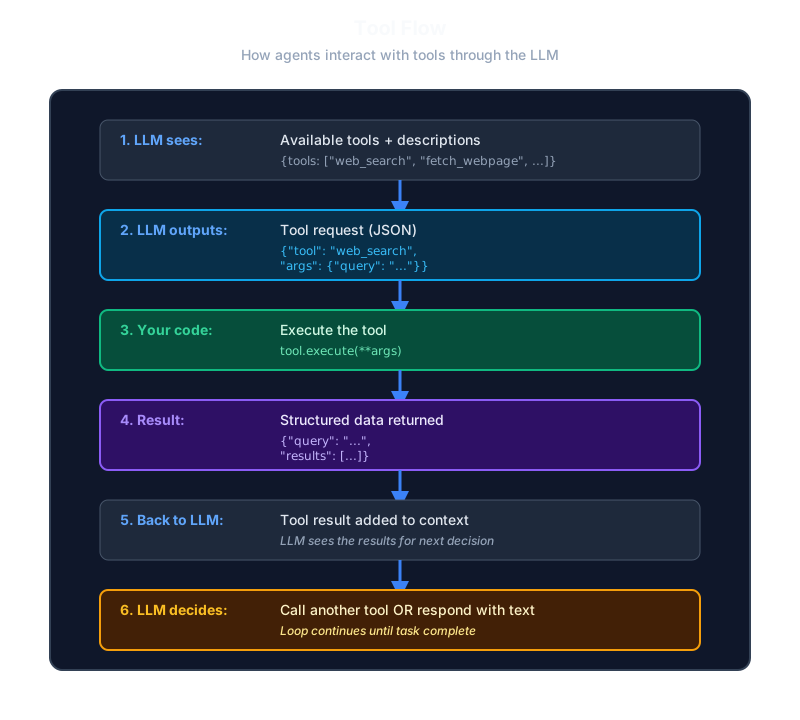
The tool execution flow follows a precise sequence: First, the LLM receives the available tools and their descriptions. Based on the current task, the LLM outputs a structured JSON request specifying which tool to call and with what arguments. Your code then executes the requested tool with the provided parameters. The tool returns structured data (typically JSON) containing the results. This result is added to the conversation context and sent back to the LLM. Finally, the LLM analyzes the tool result and decides whether to call another tool or respond with text to complete the task.
The loop continues until the LLM decides it has enough information and returns a text response instead of a tool call.
Complete tools.py
Here’s the full file:
# tools.py
import json
import httpx
from bs4 import BeautifulSoup
from dataclasses import dataclass
from typing import Callable, Any

@dataclass
class Tool:
    name: str
    description: str
    parameters: dict
    function: Callable[..., Any]

    def to_openai_format(self) -> dict:
        return {
            "type": "function",
            "function": {
                "name": self.name,
                "description": self.description,
                "parameters": self.parameters
            }
        }

    def execute(self, **kwargs) -> str:
        try:
            result = self.function(**kwargs)
            return json.dumps(result) if not isinstance(result, str) else result
        except Exception as e:
            return json.dumps({"error": str(e)})


def web_search(query: str, num_results: int = 5) -> dict:
    headers = {"User-Agent": "Mozilla/5.0 (Research Agent)"}
    url = f"https://html.duckduckgo.com/html/?q={query}"

    response = httpx.get(url, headers=headers, timeout=10)
    soup = BeautifulSoup(response.text, "html.parser")

    results = []
    for result in soup.select(".result")[:num_results]:
        title_elem = result.select_one(".result__title")
        snippet_elem = result.select_one(".result__snippet")
        link_elem = result.select_one(".result__url")

        if title_elem and link_elem:
            results.append({
                "title": title_elem.get_text(strip=True),
                "url": link_elem.get_text(strip=True),
                "snippet": snippet_elem.get_text(strip=True) if snippet_elem else ""
            })

    return {"query": query, "results": results}


def fetch_webpage(url: str) -> dict:
    headers = {"User-Agent": "Mozilla/5.0 (Research Agent)"}

    if not url.startswith(("http://", "https://")):
        url = "https://" + url

    response = httpx.get(url, headers=headers, timeout=15, follow_redirects=True)
    soup = BeautifulSoup(response.text, "html.parser")

    for tag in soup(["script", "style", "nav", "footer", "header", "aside"]):
        tag.decompose()

    main = soup.find("main") or soup.find("article") or soup.find("body")

    if main:
        text = main.get_text(separator="\n", strip=True)
        text = text[:4000] + "..." if len(text) > 4000 else text
        return {"url": url, "content": text, "title": soup.title.string if soup.title else ""}

    return {"url": url, "content": "", "error": "Could not extract content"}


def save_to_file(filename: str, content: str) -> dict:
    with open(filename, "w", encoding="utf-8") as f:
        f.write(content)
    return {"status": "success", "filename": filename, "bytes_written": len(content)}


def read_file(filename: str) -> dict:
    try:
        with open(filename, "r", encoding="utf-8") as f:
            return {"status": "success", "filename": filename, "content": f.read()}
    except FileNotFoundError:
        return {"status": "error", "message": f"File {filename} not found"}


def get_all_tools() -> list[Tool]:
    return [
        Tool(
            name="web_search",
            description="Search the web for information. Use this to find relevant sources on a topic.",
            parameters={
                "type": "object",
                "properties": {
                    "query": {"type": "string", "description": "The search query"},
                    "num_results": {"type": "integer", "description": "Number of results (default: 5)", "default": 5}
                },
                "required": ["query"]
            },
            function=web_search
        ),
        Tool(
            name="fetch_webpage",
            description="Fetch and extract text content from a webpage URL. Use after web_search to read full articles.",
            parameters={
                "type": "object",
                "properties": {
                    "url": {"type": "string", "description": "The URL to fetch"}
                },
                "required": ["url"]
            },
            function=fetch_webpage
        ),
        Tool(
            name="save_to_file",
            description="Save content to a file. Use to save the final report.",
            parameters={
                "type": "object",
                "properties": {
                    "filename": {"type": "string", "description": "Name of file to save"},
                    "content": {"type": "string", "description": "Content to write"}
                },
                "required": ["filename", "content"]
            },
            function=save_to_file
        ),
        Tool(
            name="read_file",
            description="Read content from a file.",
            parameters={
                "type": "object",
                "properties": {
                    "filename": {"type": "string", "description": "Name of file to read"}
                },
                "required": ["filename"]
            },
            function=read_file
        )
    ]
What’s Coming Next
We have tools, but our agent has no memory. Each LLM call starts fresh—it doesn’t remember what it already searched or what facts it found.
In Part 3, we build the State Management System:
- Short-term memory (conversation context)
- Long-term memory (persisted to disk)
- How to prevent context overflow
- Resuming interrupted research sessions
An agent without memory is just a fancy function call. An agent with memory can tackle multi-step tasks over hours or even days.
Key Takeaways
- Tools bridge LLM thinking and real-world action
- The LLM requests, your code executes — You control all external interactions
- Descriptions matter — Good descriptions help the LLM choose correctly
- Truncate aggressively — Web content can overflow your context
- Fail gracefully — Return error messages, don’t crash
Ready to give your agent a memory? Continue to Part 3: State Management →
Continue reading
Next article
Python Dataclasses vs Pydantic: The Complete Production Guide
Related Content
AI Agents from Scratch Part 5: The Agent Core & Loop (Research Report Generator)
Build the brain of your AI agent! Implement the ReAct loop, system prompts, tool execution, and phase handlers that orchestrate the entire research workflow.
AI Agents from Scratch Part 1: Understanding the ReAct Pattern (Research Report Generator)
Start your journey building AI agents without frameworks. Learn the foundational ReAct pattern that powers modern agents—with a hands-on Research Report Generator example.
AI Agents from Scratch Part 3: State Management & Memory (Research Report Generator)
Give your AI agent a memory! Learn short-term vs long-term memory, prevent context overflow, and enable agents to resume interrupted work.