AI Agents from Scratch Part 5: The Agent Core & Loop (Research Report Generator)
Previously in This Series
We’ve built all the components:
- Tools for interacting with the world
- State management for memory
- Human checkpoints for oversight
Now we wire it all together into a working agent.
The Series:
- Understanding the ReAct Pattern
- Building the Tool System
- State Management & Memory Architecture
- Human-in-the-Loop Validation
- The Agent Core & Loop (You are here)
- Complete Agent & Best Practices
The Agent Class Structure
Let’s build the core class:
# agent.py
import os
import json
from openai import OpenAI
from typing import Optional
from tools import get_all_tools, Tool
from state import ResearchState, AgentPhase
from human_loop import HumanCheckpoint, console

class ResearchAgent:
    def __init__(self, api_key: Optional[str] = None, model: str = "gpt-4o"):
        self.client = OpenAI(api_key=api_key or os.getenv("OPENAI_API_KEY"))
        self.model = model
        self.tools = {t.name: t for t in get_all_tools()}
        self.state = ResearchState()  # The agent's memory
        self.checkpoint = HumanCheckpoint()
The agent has:
- An LLM client
- A dictionary of available tools
- State for memory
- A checkpoint handler for human interaction
The System Prompt
The system prompt shapes how the LLM behaves. It’s injected at the start of every API call:
self.system_prompt = """You are a research assistant agent. Your job is to:
1. Create a research plan with clear questions and search queries
2. Search for information using the web_search tool
3. Fetch and analyze relevant webpages using fetch_webpage
4. Extract key facts with citations
5. Write a structured, well-cited report

IMPORTANT RULES:
- Always cite sources with URLs
- Be factual and objective
- When asked to extract facts, return them as a JSON array
- When creating a plan, structure it clearly
- Focus on the user's specific requirements

Current phase: {phase}
Current state summary:
{state_summary}
"""

def _get_system_prompt(self) -> str:
    """Get system prompt with current state injected."""
    return self.system_prompt.format(
        phase=self.state.phase.value,
        state_summary=self.state.to_context_string()
    )
Key insight: The state summary is part of the system prompt. Every LLM call sees what phase we’re in and what work has been completed.
Calling the LLM
Here’s the core method for LLM interaction:
def _call_llm(self, user_message: str, use_tools: bool = True) -> dict:
    # Add to SHORT-TERM MEMORY
    self.state.messages.append({"role": "user", "content": user_message})

    # Prevent context overflow
    self.state.trim_messages(max_messages=30)

    # Build full context: system prompt + conversation history
    messages = [
        {"role": "system", "content": self._get_system_prompt()},
        *self.state.messages
    ]

    # Prepare tools if enabled
    tools_param = [t.to_openai_format() for t in self.tools.values()] if use_tools else None

    # Call the API
    response = self.client.chat.completions.create(
        model=self.model,
        messages=messages,
        tools=tools_param,
        tool_choice="auto" if use_tools else None,
        temperature=0.7
    )

    return response.choices[0].message
Notice:
- Every message gets added to state (memory)
- We trim if context gets too long
- Tools are optional (some prompts don’t need them)
Executing Tool Calls
When the LLM requests tools, we execute them:
def _execute_tool_calls(self, message) -> list[dict]:
    if not message.tool_calls:
        return []

    results = []
    for tool_call in message.tool_calls:
        tool_name = tool_call.function.name
        tool_args = json.loads(tool_call.function.arguments)

        self.checkpoint.show_progress("Tool", f"Executing {tool_name}...")

        if tool_name in self.tools:
            result = self.tools[tool_name].execute(**tool_args)
        else:
            result = json.dumps({"error": f"Unknown tool: {tool_name}"})

        # Format for the LLM to see
        results.append({
            "tool_call_id": tool_call.id,
            "role": "tool",
            "name": tool_name,
            "content": result
        })

    return results
Each tool result gets a tool_call_id that links it back to the original request. This is required by the OpenAI API format.
The Agent Loop
This is the heart of the agent—the ReAct pattern in code:
def _agent_loop(self, initial_prompt: str, max_iterations: int = 10) -> str:
    """
    THE HEART OF THE AGENT: The ReAct loop.

    Keeps running until:
    1. The LLM returns text without tool calls (task complete), or
    2. We hit max_iterations (safety limit)
    """
    current_prompt = initial_prompt

    for i in range(max_iterations):
        console.print(f"\n[dim]--- Iteration {i+1}/{max_iterations} ---[/dim]")

        # Get LLM response
        response = self._call_llm(current_prompt)

        # Check for tool calls
        if response.tool_calls:
            # Add assistant message to history
            self.state.messages.append({
                "role": "assistant",
                "content": response.content,
                "tool_calls": [
                    {
                        "id": tc.id,
                        "type": "function",
                        "function": {
                            "name": tc.function.name,
                            "arguments": tc.function.arguments
                        }
                    }
                    for tc in response.tool_calls
                ]
            })

            # Execute tools
            tool_results = self._execute_tool_calls(response)

            # Add tool results to history
            for result in tool_results:
                self.state.messages.append(result)

            # Continue loop
            current_prompt = "Continue based on the tool results."

        else:
            # No tool calls = we're done
            final_content = response.content or ""
            self.state.messages.append({
                "role": "assistant",
                "content": final_content
            })
            return final_content

    return "Max iterations reached."
The elegance here: The LLM decides when to stop. It keeps calling tools until it has enough information. Then it returns a text response, and the loop ends.
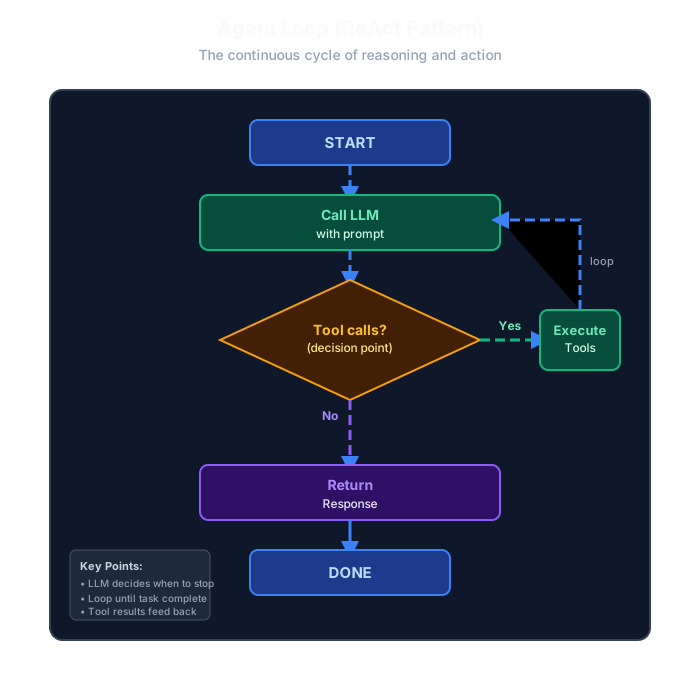
The agent loop implements the ReAct pattern through a simple but powerful cycle. Starting from the initial prompt, the agent calls the LLM with the current context. The LLM analyzes the situation and makes a critical decision: does it need more information via tools, or can it provide the final response?
If the LLM requests tool calls, the agent executes those tools (web search, fetch webpage, etc.) and feeds the results back into the conversation context. This creates a feedback loop where the LLM receives the tool outputs and can decide whether to call more tools or proceed with responding. The loop continues, with the LLM orchestrating which tools to use and when.
When the LLM determines it has sufficient information to complete the task, it returns a text response without any tool calls. This signals the loop to terminate. The key insight is that the LLM itself controls the iteration—there’s no complex state machine or predefined sequence. The loop simply continues until the LLM is satisfied, making the agent self-directed and adaptive to the complexity of each task.
Phase Handlers
Each workflow phase gets its own handler. Let’s build a few:
Phase 1: Planning
def phase_planning(self):
    """Phase 1: Create research plan."""
    self.checkpoint.show_progress("Planning", "Creating research plan...")
    self.state.phase = AgentPhase.PLANNING

    prompt = f"""Create a research plan for the following topic:

Topic: {self.state.topic}
Requirements: {self.state.requirements}

Respond with:
1. A list of 3-5 research questions to answer
2. A list of 5-7 specific search queries to find information

Format your response as JSON:
{{
    "research_questions": ["question1", "question2", ...],
    "search_queries": ["query1", "query2", ...]
}}
"""

    result = self._agent_loop(prompt, max_iterations=3)

    # Parse the plan
    try:
        import re
        json_match = re.search(r'\{[\s\S]*\}', result)
        if json_match:
            plan = json.loads(json_match.group())
            self.state.research_questions = plan.get("research_questions", [])
            self.state.search_queries = plan.get("search_queries", [])
    except json.JSONDecodeError:
        self.checkpoint.show_error("Failed to parse plan. Using defaults.")
        self.state.research_questions = [f"What is {self.state.topic}?"]
        self.state.search_queries = [self.state.topic]

    # === HUMAN CHECKPOINT ===
    questions, queries, approved = self.checkpoint.approve_plan(
        self.state.research_questions,
        self.state.search_queries
    )

    if not approved:
        self.checkpoint.show_error("Plan rejected. Please restart.")
        return False

    self.state.research_questions = questions
    self.state.search_queries = queries

    # Log to long-term memory
    self.state.feedback_history.append({
        "phase": "planning",
        "action": "approved",
        "modifications": questions != self.state.research_questions
    })

    return True
Notice the pattern:
- Set the phase
- Run the agent loop with a specific prompt
- Parse the result
- Human checkpoint for approval
- Update state and return
Phase 2: Searching
def phase_searching(self):
    """Phase 2: Execute search queries."""
    self.checkpoint.show_progress("Searching", "Executing search queries...")
    self.state.phase = AgentPhase.SEARCHING

    all_results = []
    for query in self.state.search_queries:
        self.checkpoint.show_progress("Search", f"Searching: {query}")

        result = self.tools["web_search"].execute(query=query, num_results=5)
        result_data = json.loads(result)

        if "results" in result_data:
            all_results.extend(result_data["results"])

    # Deduplicate by URL
    seen_urls = set()
    unique_results = []
    for r in all_results:
        if r["url"] not in seen_urls:
            seen_urls.add(r["url"])
            unique_results.append(r)

    self.state.search_results = unique_results

    # === HUMAN CHECKPOINT ===
    selected = self.checkpoint.select_sources(unique_results)
    self.state.search_results = selected

    self.checkpoint.show_success(f"Selected {len(selected)} sources to analyze")
    return True
Phase 4: Synthesizing (Fact Extraction)
def phase_synthesizing(self):
    """Phase 4: Extract facts from fetched content."""
    self.checkpoint.show_progress("Synthesizing", "Extracting key facts...")
    self.state.phase = AgentPhase.SYNTHESIZING

    # Prepare content for LLM (limit context size)
    content_summary = ""
    for page in self.state.fetched_pages[:5]:
        content_summary += f"\n\n=== Source: {page['url']} ===\n{page['content'][:2000]}"

    prompt = f"""Based on these sources, extract key facts relevant to:

Topic: {self.state.topic}
Questions to answer:
{chr(10).join(f"- {q}" for q in self.state.research_questions)}

Sources:
{content_summary}

Extract 10-15 specific, factual statements. For each fact, note the source URL.

Format as JSON array:
[
    {{"fact": "specific factual statement", "source_url": "url"}},
    ...
]
"""

    result = self._agent_loop(prompt, max_iterations=3)

    # Parse facts
    try:
        import re
        json_match = re.search(r'\[[\s\S]*\]', result)
        if json_match:
            self.state.extracted_facts = json.loads(json_match.group())
    except json.JSONDecodeError:
        self.checkpoint.show_error("Failed to parse facts")
        self.state.extracted_facts = []

    # === HUMAN CHECKPOINT ===
    if self.state.extracted_facts:
        self.state.extracted_facts = self.checkpoint.review_facts(self.state.extracted_facts)

    self.checkpoint.show_success(f"Verified {len(self.state.extracted_facts)} facts")
    return True
The Main Run Method
Finally, the entry point that orchestrates everything:
def run(self, topic: str, requirements: str = ""):
    """Main entry point. Runs the full research workflow."""
    console.print(Panel.fit(
        "[bold green]🔬 RESEARCH REPORT GENERATOR[/bold green]\n\n"
        "This agent will help you create a well-researched report.\n"
        "You'll be asked to review and approve each step.",
        title="Welcome"
    ))

    self.state.topic = topic
    self.state.requirements = requirements

    try:
        # Phase 1: Planning
        if not self.phase_planning():
            return

        # Phase 2: Searching
        if not self.phase_searching():
            return

        # Phase 3: Reading
        if not self.phase_reading():
            return

        # Phase 4: Synthesizing
        if not self.phase_synthesizing():
            return

        # Phase 5: Writing
        if not self.phase_writing():
            return

        # Phase 6: Reviewing
        if not self.phase_reviewing():
            return

        # Phase 7: Complete
        self.phase_complete()

        console.print(Panel.fit(
            "[bold green]✓ Research complete![/bold green]\n\n"
            f"Topic: {self.state.topic}\n"
            f"Facts used: {len(self.state.extracted_facts)}\n"
            f"Sources cited: {len(self.state.fetched_pages)}",
            title="Done"
        ))

    except KeyboardInterrupt:
        console.print("\n[yellow]Interrupted. Saving state...[/yellow]")
        self.state.save()
        console.print("State saved. Run again to resume.")
Each phase returns True (continue) or False (abort). If the user rejects at any checkpoint, we stop gracefully.
What’s Coming Next
We have a working agent! In the final part, we’ll:
- Show the complete file structure
- Run a full example session
- Cover best practices and common pitfalls
- Discuss how to extend the agent with new tools and phases
- Explore advanced memory strategies
The finish line is in sight.
Key Takeaways
- The agent loop is simple — Call LLM → Execute tools → Repeat until done
- The LLM decides when to stop — No complex state machine needed
- Phase handlers orchestrate — Each phase has its prompt and checkpoint
- Parse gracefully — Always have fallbacks for parsing failures
- Log to long-term memory — Track feedback for debugging and improvement
Ready for the finale? Continue to Part 6: Complete Agent & Best Practices →
Continue reading
Next article
The Grafana Observability Stack: A Pragmatic Deep Dive
Related Content
AI Agents from Scratch Part 2: Building the Tool System (Research Report Generator)
Give your AI agent superpowers! Build a clean tool system with web search, content extraction, and file operations—the foundation that lets agents interact with the real world.
AI Agents from Scratch Part 1: Understanding the ReAct Pattern (Research Report Generator)
Start your journey building AI agents without frameworks. Learn the foundational ReAct pattern that powers modern agents—with a hands-on Research Report Generator example.
AI Agents from Scratch Part 3: State Management & Memory (Research Report Generator)
Give your AI agent a memory! Learn short-term vs long-term memory, prevent context overflow, and enable agents to resume interrupted work.