Optimizing Data Transfer at Scale
Optimizing Data Transfer at Scale
Chapter 10 reduced protocol overhead by choosing better serialization and connection models. This chapter addresses the three remaining levers for data transfer optimization: batching (send fewer, larger payloads), compression (make each payload smaller), and backpressure (slow down when the receiver cannot keep up).
Batching: The Latency-Throughput Tradeoff
The logistics platform’s package event producer sends one Kafka message per package scan. At 2,000 scans per minute, that is 2,000 individual sends. Each send involves a network round trip to the Kafka broker, waiting for acknowledgment, and protocol framing overhead per message.
Kafka Producer Batching
The Kafka producer batches messages automatically. Two settings control the behavior:
// Concept: Kafka producer batching configuration
Properties props = new Properties();
props.put("batch.size", 65536);           // 64KB: max batch size in bytes
props.put("linger.ms", 10);               // Wait up to 10ms to fill the batch
props.put("compression.type", "lz4");     // Compress each batch
props.put("buffer.memory", 33554432);     // 32MB producer buffer

// Without batching (linger.ms=0, default):
// Each send() immediately sends a batch of 1 message.
// 2000 messages/min = 2000 network round trips/min.
// Each round trip: ~0.5ms within datacenter.
// Total network time: 1000ms/min.

// With batching (linger.ms=10):
// Producer waits up to 10ms to accumulate messages.
// At 2000 messages/min = 33 messages/sec, in 10ms: ~0.33 messages.
// Batching effect is minimal at this rate.

// At 50,000 messages/sec (burst during warehouse batch scan):
// In 10ms: ~500 messages per batch.
// 500 messages in 1 batch vs 500 individual sends.
// Network round trips: 1 instead of 500.
// Total network time: 0.5ms instead of 250ms.
The tradeoff: linger.ms adds latency to every message. A message produced at T=0 is not sent until T=10ms (worst case). For the logistics dashboard that displays real-time status, 10ms of additional latency is invisible. For a trading system, it may be unacceptable.
JDBC Batch Inserts
The same principle applies to database writes. The logistics platform’s event ingestion service receives a batch of scans and inserts them individually:
// BLACK BOX: individual inserts (slow)
for (PackageEvent event : events) {
    jdbcTemplate.update(
        "INSERT INTO package_events (package_id, status, timestamp) VALUES (?, ?, ?)",
        event.packageId(), event.status(), event.timestamp());
}
// 1000 events: 1000 round trips to PostgreSQL.
// Each round trip: ~0.3ms (local network).
// Total: 300ms + processing time.

// MECHANISM: batch insert (fast)
jdbcTemplate.batchUpdate(
    "INSERT INTO package_events (package_id, status, timestamp) VALUES (?, ?, ?)",
    new BatchPreparedStatementSetter() {
        public void setValues(PreparedStatement ps, int i) throws SQLException {
            ps.setString(1, events.get(i).packageId());
            ps.setString(2, events.get(i).status());
            ps.setTimestamp(3, Timestamp.from(events.get(i).timestamp()));
        }
        public int getBatchSize() { return events.size(); }
    });
// 1000 events: 1 round trip to PostgreSQL.
// Total: 0.3ms + processing time.
// Speedup: ~1000x reduction in network round trips.
Compression: Algorithm Choice by Data Type
Not all compression algorithms are equal. The choice depends on what matters: compression ratio (smaller output) or compression speed (less CPU per byte).
| Algorithm | Ratio (text) | Compress speed | Decompress speed | Use case |
|---|---|---|---|---|
| LZ4 | 2.1:1 | 780 MB/s | 4200 MB/s | Kafka messages, real-time streams |
| Zstd | 2.9:1 | 510 MB/s | 1400 MB/s | Kafka long-term storage, Protobuf payloads |
| Gzip | 2.7:1 | 120 MB/s | 450 MB/s | HTTP APIs, legacy compatibility |
| Snappy | 1.7:1 | 580 MB/s | 1800 MB/s | RocksDB SSTables, low-CPU environments |
For Kafka topics with 50 million messages/day:
# Concept: Kafka topic compression comparison
# Same 1 million package events, different compression

# No compression:   280 MB
# LZ4:              133 MB  (ratio 2.1:1, compress: 360ms, decompress: 67ms)
# Zstd:              97 MB  (ratio 2.9:1, compress: 549ms, decompress: 200ms)
# Gzip:             104 MB  (ratio 2.7:1, compress: 2330ms, decompress: 622ms)
# Snappy:           165 MB  (ratio 1.7:1, compress: 483ms, decompress: 156ms)
LZ4 is the correct default for Kafka. It compresses and decompresses faster than any alternative while achieving a reasonable ratio. The CPU savings from LZ4 over Gzip are dramatic: 6.5x faster compression. On a Kafka broker handling 100 MB/s of inbound data, Gzip compression consumes 833ms of CPU per second. LZ4 consumes 128ms.
Zstd is the correct choice when storage cost matters more than CPU: long-retention topics, archival data, and cold storage.
Backpressure: When to Slow Down
Backpressure is the mechanism by which a slow consumer signals a fast producer to reduce its rate. Without backpressure, the fast producer overwhelms the slow consumer, and one of three things happens: the consumer’s buffer overflows and data is lost, the consumer runs out of memory and crashes, or an intermediate buffer (Kafka, a queue) grows without bound.
Kafka Consumer Backpressure
Kafka consumers control their own pace via the poll() loop. If the consumer processes slowly, it polls less frequently, and messages accumulate in the partition log. The log is the buffer. Backpressure is implicit: the consumer is naturally rate-limited by its processing speed.
// Concept: Kafka consumer with processing-rate-aware polling
// max.poll.records controls how many messages the consumer gets per poll.
// If processing takes too long, reduce max.poll.records.

Properties props = new Properties();
props.put("max.poll.records", 100);            // Process 100 messages per poll
props.put("max.poll.interval.ms", 300000);     // 5 minutes max between polls

// If processing 100 messages takes longer than max.poll.interval.ms,
// the consumer is considered dead and triggers a rebalance.
// Fix: reduce max.poll.records until processing fits within the interval.
TCP Flow Control
At the transport level, TCP’s flow control prevents a sender from overwhelming a receiver. The receiver advertises a window size: the number of bytes it can accept. When the window fills (receiver has not acknowledged received data), the sender pauses.
This is relevant for gRPC: if the route optimizer’s gRPC stream sends package responses faster than the client can process them, TCP flow control kicks in, and the server’s write blocks. The gRPC framework translates this into backpressure on the server’s response stream.
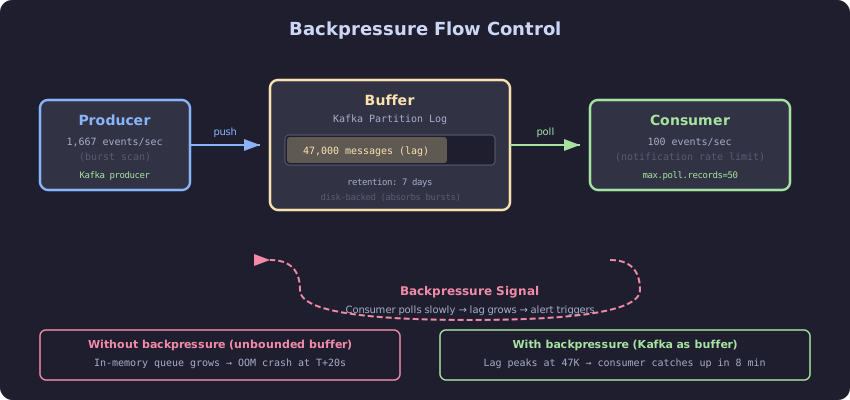
The diagram shows the backpressure chain. The producer sends data to an intermediate buffer (Kafka partition, TCP buffer, or in-memory queue). The consumer reads from the buffer at its own pace. When the buffer reaches a threshold, a flow control signal propagates backward to the producer, reducing its send rate. Without this signal, the buffer grows until it overflows. In Kafka, the buffer is durable (disk-backed partition log), so overflow means disk exhaustion rather than data loss. In TCP, the buffer is a kernel memory buffer, and overflow means the sender pauses until the receiver catches up.
The Decision Rule
Batch writes when the per-message overhead (network round trip, protocol framing) exceeds the per-message processing time. For Kafka producers, set linger.ms to 5-20ms unless sub-millisecond latency is required. For database inserts, always use batch statements when inserting more than 10 rows.
Compress with LZ4 for real-time streams. Compress with Zstd for storage-optimized topics. Do not use Gzip unless a downstream consumer (legacy HTTP client, browser) requires it.
Implement backpressure before you need it. Set max.poll.records conservatively and monitor consumer lag. If lag grows steadily, the consumer is slower than the producer. The fix is either faster processing (optimize the consumer), more consumers (scale out the consumer group), or slower production (rate-limit the producer, if the source allows it).