HTTP/2, HTTP/3, and Brotli
HTTP/2, HTTP/3, and Brotli
Protocol Wins That Cost Almost Nothing
HTTP/2, HTTP/3, and Brotli compression are infrastructure-level optimizations. They require no code changes, no architectural redesign, and no framework migration. They are server and CDN configuration changes that produce measurable improvements in transfer speed and page load time.
The e-commerce platform ran on HTTP/1.1 with gzip compression for its first three years. Enabling HTTP/2 required a Nginx configuration change. Enabling Brotli required installing a module. Enabling HTTP/3 required a CDN that supports QUIC. Total engineering effort: half a day. Total LCP improvement: 680ms.
These are the highest-ROI optimizations in this book by effort-to-impact ratio.
HTTP/2 Multiplexing
HTTP/1.1 allows browsers to open 6 parallel TCP connections per domain. Each connection handles one request at a time. A page with 30 resources (CSS, JS chunks, images, fonts) requires 5 rounds of 6-connection batches.
HTTP/2 multiplexes all requests over a single TCP connection. The browser sends all 30 requests simultaneously. The server responds with frames from different resources interleaved on the same connection. No queuing. No round-trip penalty per resource.
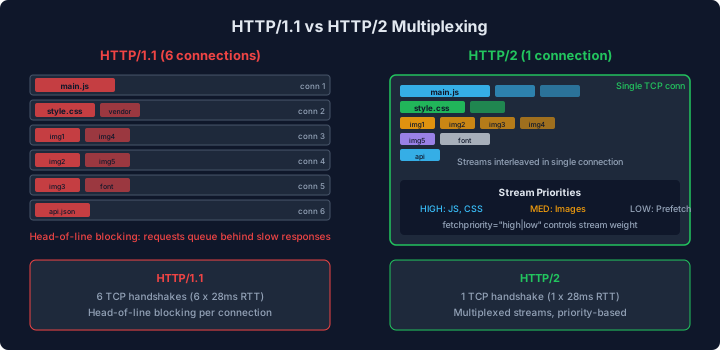
The diagram shows the waterfall difference between HTTP/1.1 and HTTP/2 for loading 18 resources. HTTP/1.1 stacks resources in groups of 6, creating a staircase pattern where each group waits for the previous group to complete. HTTP/2 requests all 18 resources simultaneously, and the responses stream back as soon as each is ready. The total load time is determined by the slowest single resource, not the sum of sequential batches.
The practical impact depends on the number of resources and the latency of the connection. On a connection with 100ms round-trip latency:
| Scenario | HTTP/1.1 | HTTP/2 | Delta |
|---|---|---|---|
| 6 resources | 100ms (1 batch) | 100ms (1 batch) | 0ms |
| 18 resources | 300ms (3 batches) | 100ms (1 batch) | -200ms |
| 30 resources | 500ms (5 batches) | 100ms (1 batch) | -400ms |
The e-commerce product listing page loads 28 resources. The HTTP/1.1 waterfall showed 5 batches of requests. Enabling HTTP/2 collapsed these into a single concurrent burst, saving 400ms of round-trip latency on a 100ms-RTT connection.
The Nginx configuration:
server {
    listen 443 ssl http2;

    ssl_certificate     /etc/ssl/certs/example.com.crt;
    ssl_certificate_key /etc/ssl/private/example.com.key;

    # HTTP/2 specific settings
    http2_max_concurrent_streams 128;
    http2_idle_timeout 5m;

    # ... existing location blocks
}
Verification: open Chrome DevTools Network panel, right-click the column headers, enable “Protocol”. Each request shows h2 for HTTP/2.
HTTP/3 and QUIC
HTTP/3 replaces TCP with QUIC, a UDP-based transport protocol. The performance advantages:
-
Zero round-trip connection establishment: QUIC combines the TLS handshake with the transport handshake, saving one round trip compared to TCP + TLS. On a 100ms RTT connection, this saves 100ms on the first request.
-
No head-of-line blocking: In HTTP/2 over TCP, a single lost packet blocks all multiplexed streams until the packet is retransmitted. In HTTP/3 over QUIC, packet loss on one stream does not affect other streams. On lossy mobile networks with 1-3% packet loss, this prevents the cascading stalls that degrade HTTP/2 performance.
-
Connection migration: QUIC connections survive network changes (Wi-Fi to cellular). A user walking from one room to another does not need to re-establish the connection. This does not affect page load metrics but prevents connection resets during long sessions.
The impact on the e-commerce platform, tested from a Mumbai location with 4G (1.5% packet loss):
| Metric | HTTP/2 (TCP) | HTTP/3 (QUIC) | Delta |
|---|---|---|---|
| Connection establishment | 320ms | 180ms | -140ms |
| LCP (p75) | 4.8s | 4.2s | -600ms |
| Time to Interactive | 5.2s | 4.5s | -700ms |
The 600ms LCP improvement comes primarily from the eliminated round trip during connection establishment (140ms) and the absence of head-of-line blocking stalls during resource loading (460ms on lossy networks).
On low-latency, low-loss connections (developer office Wi-Fi), the improvement is minimal (~50ms). HTTP/3’s advantages are most pronounced on mobile networks with variable latency and packet loss, which is where the majority of real users are.
CDN configuration for HTTP/3 varies by provider. Most CDNs enable it as a toggle. The server advertises HTTP/3 support via the Alt-Svc response header:
Alt-Svc: h3=":443"; ma=86400The browser discovers HTTP/3 support from this header on the first HTTP/2 response and upgrades subsequent connections to QUIC. The first page load uses HTTP/2. The second page load (and all subsequent ones within the 86400-second max-age) uses HTTP/3.
Brotli Compression
Brotli compresses 15-25% better than gzip for text-based resources (HTML, CSS, JavaScript, JSON, SVG). The compression algorithm is more computationally expensive to encode, which means higher CPU cost on the server (or during build). Decompression speed is comparable to gzip, so there is no client-side penalty.
The e-commerce platform’s resource sizes:
| Resource | Uncompressed | Gzip | Brotli | Brotli vs Gzip |
|---|---|---|---|---|
| Main JS bundle | 312 kB | 78 kB | 64 kB | -18% |
| Vendor JS | 448 kB | 112 kB | 92 kB | -18% |
| CSS | 186 kB | 42 kB | 34 kB | -19% |
| HTML (listing) | 58 kB | 12 kB | 9.8 kB | -18% |
| Total | 1,004 kB | 244 kB | 200 kB | -18% |
44KB savings across the critical resources. On a 4G connection with 1.6 Mbps throughput: 220ms faster download time. This translates directly to LCP improvement because the JavaScript and CSS are on the critical rendering path.
Static Brotli Compression at Build Time
Compressing at build time avoids the CPU cost on every request. The server serves pre-compressed files:
// scripts/compress-assets.ts
import * as fs from "fs";
import * as path from "path";
import * as zlib from "zlib";

const COMPRESSIBLE_EXTENSIONS = [
  ".js",
  ".css",
  ".html",
  ".json",
  ".svg",
  ".xml",
  ".txt",
];

function compressFile(filePath: string): void {
  const content = fs.readFileSync(filePath);

  // Brotli compression at quality 11 (maximum, slow but smallest output)
  const brotliBuffer = zlib.brotliCompressSync(content, {
    params: {
      [zlib.constants.BROTLI_PARAM_QUALITY]: 11,
    },
  });
  fs.writeFileSync(`${filePath}.br`, brotliBuffer);

  // Gzip as fallback for clients that do not support Brotli
  const gzipBuffer = zlib.gzipSync(content, { level: 9 });
  fs.writeFileSync(`${filePath}.gz`, gzipBuffer);

  const savings = (
    ((content.length - brotliBuffer.length) / content.length) *
    100
  ).toFixed(1);
  console.log(
    `${path.basename(filePath)}: ${content.length} → ${brotliBuffer.length} (${savings}% reduction)`,
  );
}

function compressDirectory(dir: string): void {
  const entries = fs.readdirSync(dir, { withFileTypes: true });
  for (const entry of entries) {
    const fullPath = path.join(dir, entry.name);
    if (entry.isDirectory()) {
      compressDirectory(fullPath);
    } else if (COMPRESSIBLE_EXTENSIONS.includes(path.extname(entry.name))) {
      compressFile(fullPath);
    }
  }
}

compressDirectory("dist");
Nginx configuration to serve pre-compressed files:
# Enable Brotli static serving
brotli_static on;
gzip_static on;

# Fallback to dynamic compression for non-pre-compressed files
brotli on;
brotli_types text/plain text/css application/javascript
             application/json image/svg+xml;
brotli_comp_level 4;  # Lower level for dynamic compression (CPU vs size tradeoff)
The server checks for a .br file first, falls back to .gz, then serves uncompressed. This happens transparently based on the client’s Accept-Encoding header.
Build time addition: Brotli compression at quality 11 for 200 files takes ~15 seconds on a CI runner. Quality 11 produces the smallest output but is 10x slower than quality 4. Since this runs once at build time and not per-request, maximum quality is justified.
Combined Impact
After enabling HTTP/2, HTTP/3, and Brotli on the e-commerce platform:
| Metric | Before (HTTP/1.1, gzip) | After (HTTP/2+3, Brotli) | Delta |
|---|---|---|---|
| LCP (p75, 4G, Virginia) | 4.1s | 3.4s | -700ms |
| LCP (p75, 4G, Mumbai) | 6.1s | 4.8s | -1,300ms |
| TTFB (p75) | 680ms | 420ms | -260ms |
| Total transfer size | 244 kB | 200 kB | -44 kB |
The improvement is larger for high-latency users (Mumbai: 1,300ms) than low-latency users (Virginia: 700ms) because HTTP/2 multiplexing and HTTP/3 connection establishment savings scale with round-trip latency.
The CI Lighthouse gate from Chapter 2 benefits from these protocol optimizations because the CI environment uses the same server configuration. If someone accidentally disables Brotli or misconfigures the Nginx server block, the Lighthouse resource size assertion catches the regression.