ConfigMap Creation and Consumption
SummaryCovers ConfigMap creation from literals, files, and env-files....
Covers ConfigMap creation from literals, files, and env-files....
Covers ConfigMap creation from literals, files, and env-files. Details three consumption methods — envFrom, env with valueFrom, and volume mounts — with complete YAML examples. Explains the critical difference in update propagation between environment variables (static) and volume mounts (dynamic). Introduces immutable ConfigMaps for performance optimization.
ConfigMap Creation and Consumption
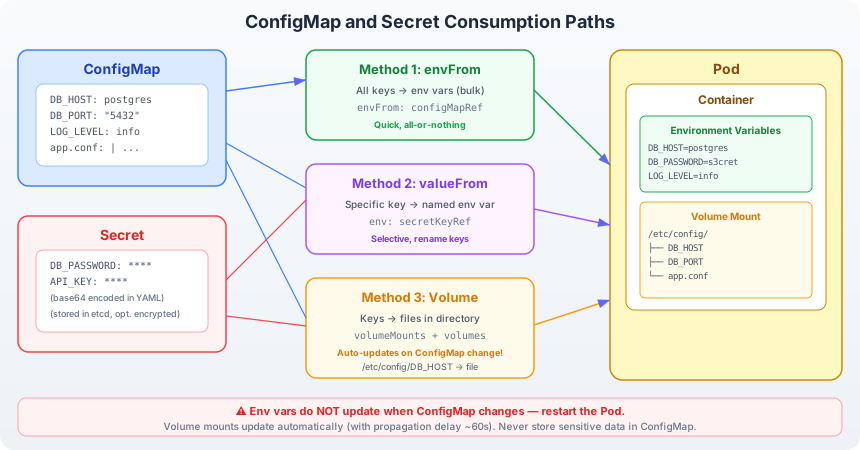
ConfigMap consumption flow: a ConfigMap stores key-value pairs as a first-class Kubernetes object. Pods access these values through three distinct methods. With envFrom, every key in the ConfigMap becomes an environment variable in the container. With env and valueFrom, specific keys are mapped to named environment variables. With a volume mount, each key becomes a file in a directory inside the container, and the file content is the value. Environment variables are injected at container startup and remain static for the lifetime of the container. Volume-mounted files are updated by the kubelet when the ConfigMap changes, typically within 30–60 seconds.
What Is a ConfigMap?
A ConfigMap is a namespaced Kubernetes object that holds configuration data as key-value pairs. Keys are strings. Values are strings — which means a value can be a single word, a multi-line configuration file, or a JSON document. ConfigMaps are not meant for large binary payloads (the total size limit is 1 MiB) and they carry no encryption or access control beyond standard Kubernetes RBAC.
Inspect a ConfigMap’s structure:
apiVersion: v1
kind: ConfigMap
metadata:
  name: app-config
  namespace: default
data:
  DB_HOST: postgres
  LOG_LEVEL: info
  config.properties: |
    server.port=8080
    server.timeout=30
    feature.cache.enabled=true
The data field contains string key-value pairs. Keys follow DNS subdomain naming rules (alphanumeric, -, _, .). The | YAML syntax preserves newlines, allowing entire configuration files to be stored as a single value.
Creating ConfigMaps
From Literals
The fastest method — pass key-value pairs directly on the command line:
kubectl create configmap app-config \
  --from-literal=DB_HOST=postgres \
  --from-literal=LOG_LEVEL=info
Verify the result:
kubectl get configmap app-config -o yamlOutput:
apiVersion: v1
kind: ConfigMap
metadata:
  name: app-config
data:
  DB_HOST: postgres
  LOG_LEVEL: info
Each --from-literal flag adds one key-value pair. This approach works well on the exam for small ConfigMaps with a few keys.
From a File
When configuration is already in a file, load the entire file as a single ConfigMap entry:
# Create a config file
cat <<EOF > config.properties
server.port=8080
server.timeout=30
feature.cache.enabled=true
EOF

kubectl create configmap app-config --from-file=config.properties
The resulting ConfigMap has one key — config.properties — whose value is the entire file content:
data:
  config.properties: |
    server.port=8080
    server.timeout=30
    feature.cache.enabled=true
You can customize the key name:
kubectl create configmap app-config --from-file=app.conf=config.propertiesNow the key is app.conf instead of config.properties.
From an Env-File
An env-file contains lines in KEY=VALUE format, with each line becoming a separate key in the ConfigMap:
# Create an env file
cat <<EOF > app.env
DB_HOST=postgres
DB_PORT=5432
LOG_LEVEL=info
EOF

kubectl create configmap app-config --from-env-file=app.env
Result:
data:
  DB_HOST: postgres
  DB_PORT: "5432"
  LOG_LEVEL: info
Unlike --from-file, which creates one key per file, --from-env-file creates one key per line. Lines starting with # are treated as comments and ignored. This is the method to use when you have a .env file and want each variable as a separate ConfigMap key.
Summary of Creation Methods
| Method | Keys Created | Key Names | Use Case |
|---|---|---|---|
--from-literal | One per flag | Specified in flag | Quick, few values |
--from-file | One per file | Filename (or custom) | Entire config files |
--from-env-file | One per line | KEY from KEY=VALUE | .env files with multiple vars |
Consuming ConfigMaps in Pods
Method 1: envFrom — All Keys as Environment Variables
envFrom imports every key-value pair from a ConfigMap as environment variables:
apiVersion: v1
kind: Pod
metadata:
  name: app-pod
spec:
  containers:
    - name: app
      image: busybox
      command: ["sh", "-c", "env | sort && sleep 3600"]
      envFrom:
        - configMapRef:
            name: app-config
If app-config contains DB_HOST=postgres and LOG_LEVEL=info, the container receives both as environment variables. Every key in the ConfigMap becomes a variable — no filtering.
Verify:
kubectl exec app-pod -- env | grep -E "DB_HOST|LOG_LEVEL"DB_HOST=postgres
LOG_LEVEL=infoCaveat: keys that are not valid shell variable names (e.g., config.properties contains a dot) are silently skipped. The kubelet logs a warning but does not fail the Pod.
Method 2: env with valueFrom — Specific Keys
When you need only certain keys, or you want to rename a key, use valueFrom:
apiVersion: v1
kind: Pod
metadata:
  name: app-pod
spec:
  containers:
    - name: app
      image: busybox
      command: ["sh", "-c", "echo $DATABASE_HOST && sleep 3600"]
      env:
        - name: DATABASE_HOST
          valueFrom:
            configMapKeyRef:
              name: app-config
              key: DB_HOST
The ConfigMap key DB_HOST is injected as the environment variable DATABASE_HOST. This gives you explicit control over which keys enter the container and what they are called.
You can also mark a key as optional, so the Pod starts even if the ConfigMap or key does not exist:
env:
  - name: CACHE_TTL
    valueFrom:
      configMapKeyRef:
        name: app-config
        key: CACHE_TTL
        optional: true
Method 3: Volume Mount — Keys as Files
Volume mounts project ConfigMap keys as files inside the container filesystem:
apiVersion: v1
kind: Pod
metadata:
  name: app-pod
spec:
  volumes:
    - name: config-volume
      configMap:
        name: app-config
  containers:
    - name: app
      image: busybox
      command: ["sh", "-c", "cat /etc/config/DB_HOST && sleep 3600"]
      volumeMounts:
        - name: config-volume
          mountPath: /etc/config
Each key becomes a file in /etc/config/. The file DB_HOST contains the text postgres. The file LOG_LEVEL contains the text info.
To mount only specific keys, use the items field:
volumes:
  - name: config-volume
    configMap:
      name: app-config
      items:
        - key: config.properties
          path: application.conf
This mounts only the config.properties key, renaming it to application.conf inside the container.
Important: mounting a ConfigMap to an existing directory replaces all contents of that directory. To add a single file without clobbering the directory, use subPath:
volumeMounts:
  - name: config-volume
    mountPath: /etc/config/app.conf
    subPath: config.properties
However, subPath mounts do not receive automatic updates when the ConfigMap changes.
Complete Pod YAML: All Three Methods
This Pod demonstrates all three consumption methods simultaneously:
apiVersion: v1
kind: Pod
metadata:
  name: config-demo
spec:
  volumes:
    - name: config-files
      configMap:
        name: app-config
        items:
          - key: config.properties
            path: app.conf
  containers:
    - name: app
      image: busybox
      command: ["sh", "-c", "echo envFrom: DB_HOST=$DB_HOST; echo valueFrom: DATABASE_PORT=$DATABASE_PORT; echo volume:; cat /etc/config/app.conf; sleep 3600"]
      # Method 1: envFrom — all keys as env vars
      envFrom:
        - configMapRef:
            name: app-config
      # Method 2: valueFrom — specific key with custom name
      env:
        - name: DATABASE_PORT
          valueFrom:
            configMapKeyRef:
              name: app-config
              key: DB_PORT
      # Method 3: volume mount — keys as files
      volumeMounts:
        - name: config-files
          mountPath: /etc/config
          readOnly: true
Create the ConfigMap and Pod, then verify:
kubectl create configmap app-config \
  --from-literal=DB_HOST=postgres \
  --from-literal=DB_PORT=5432 \
  --from-literal=LOG_LEVEL=info \
  --from-file=config.properties

kubectl apply -f config-demo.yaml

kubectl exec config-demo -- sh -c "echo DB_HOST=\$DB_HOST; echo DATABASE_PORT=\$DATABASE_PORT; ls /etc/config/"
Update Propagation: The Critical Difference
This is one of the most important distinctions the exam can test:
Environment variables are static. Once a container starts, its environment variables are fixed for the lifetime of that container process. If you update the ConfigMap, existing Pods do not see the change. You must delete and recreate the Pod (or trigger a rollout on the Deployment) for the new values to take effect.
Volume mounts are dynamic. The kubelet periodically syncs mounted ConfigMap volumes with the API server. When a ConfigMap changes, the files in the mounted directory are updated — typically within 30 to 60 seconds, controlled by the kubelet’s sync period and ConfigMap cache TTL. The application must re-read the files to pick up the change; the kubelet does not restart the container.
This behavior has a practical consequence: if your application reads its configuration once at startup (common for Java applications loading a properties file), volume mounts alone do not help. You either need an application that watches the filesystem for changes, or a sidecar container that detects changes and signals the main process.
subPath mounts are an exception. Files mounted with subPath never receive auto-updates, regardless of how the ConfigMap changes. The kubelet skips them during sync cycles.
| Consumption Method | Auto-Updates on ConfigMap Change? |
|---|---|
envFrom | No — requires Pod restart |
env with valueFrom | No — requires Pod restart |
| Volume mount | Yes — within ~60s |
Volume mount with subPath | No — never updates |
Immutable ConfigMaps
Kubernetes supports marking a ConfigMap as immutable:
apiVersion: v1
kind: ConfigMap
metadata:
  name: app-config
data:
  DB_HOST: postgres
  LOG_LEVEL: info
immutable: true
Once set, the immutable flag cannot be reversed — you must delete and recreate the ConfigMap to change its data. This restriction provides two benefits:
- Performance: The kubelet stops polling the API server for changes to immutable ConfigMaps, reducing API load on clusters with thousands of Pods.
- Safety: Prevents accidental modification of configuration that should remain constant across the application lifecycle.
To modify an immutable ConfigMap, delete it and create a new one:
kubectl delete configmap app-config
kubectl create configmap app-config --from-literal=DB_HOST=new-postgres --from-literal=LOG_LEVEL=debug
Pods referencing the old ConfigMap continue running with cached values (for volume mounts) or the original environment variables. New Pods or restarted Pods pick up the recreated ConfigMap.
Exam Strategy
On the CKAD exam, ConfigMap tasks are frequent and typically involve:
- Creating a ConfigMap from literal values or a file (use
kubectl create configmap— it is faster than writing YAML from scratch). - Consuming the ConfigMap in a Pod as environment variables or files. Know the YAML structure for
envFrom,valueFrom, and volume mounts without referring to documentation. - Modifying a ConfigMap and verifying the change propagates (or does not propagate) depending on the consumption method.
Practice the imperative creation commands until they are automatic. On exam day, generating a ConfigMap and wiring it into a Pod should take under two minutes.