Liveness, Readiness, and Startup Probes
SummaryCovers startup probes as a gate that protects...
Covers startup probes as a gate that protects...
Covers startup probes as a gate that protects slow-starting containers, liveness probes as a continuous health check that triggers restarts on failure, and readiness probes as a traffic gate that removes Pods from Service endpoints without restarting. Details all four probe mechanisms (httpGet, exec, tcpSocket, grpc), tuning parameters (initialDelaySeconds, periodSeconds, failureThreshold, successThreshold, timeoutSeconds), common anti-patterns, and a complete multi-probe YAML manifest.
Liveness, Readiness, and Startup Probes
A container can be in one of several states: starting up, running normally, running but deadlocked, running but not ready to accept traffic, or crashed. From the outside — from the kubelet’s perspective — a running container and a deadlocked container look identical. Both have a PID. Both consume resources. The difference only becomes visible when you ask the container a question: “Are you healthy?” Probes are that question.
The Three Probe Types
Kubernetes provides three distinct probe types. Each answers a different question and triggers a different response on failure.
Startup Probe
Question: Has the application finished initializing?
Some applications take tens of seconds — or even minutes — to start. A Java application loading a large classpath. A machine learning model reading weights from disk. A legacy application running database migrations at startup. Without a startup probe, the liveness probe would start checking the container immediately, interpret the slow startup as a failure, and kill the container before it ever finishes initializing. The container restarts, starts initializing again, gets killed again, and enters CrashLoopBackOff.
The startup probe solves this by acting as a gate. While the startup probe is active, the kubelet disables both the liveness and readiness probes. The startup probe checks repeatedly — controlled by periodSeconds and failureThreshold — giving the application a total startup budget of failureThreshold × periodSeconds seconds. Once the startup probe succeeds, the kubelet disables it permanently and enables the liveness and readiness probes. If the startup probe exhausts its budget without a single success, the kubelet kills and restarts the container.
Failure behavior: Container is killed and restarted according to the Pod’s restartPolicy.
Liveness Probe
Question: Is the application still functioning?
A running process is not necessarily a healthy process. Web servers can deadlock. Event loops can freeze. Memory corruption can leave a process spinning without doing useful work. The liveness probe detects these states by periodically checking the container. If the check fails failureThreshold consecutive times, the kubelet concludes the container is broken beyond recovery and restarts it.
This is a blunt instrument by design. The liveness probe does not attempt graceful recovery. It does not send a signal to the application. It kills the container and lets the restart policy create a new one. The assumption is that a fresh start is more likely to fix the problem than leaving a broken process running.
Failure behavior: Container is killed and restarted.
Readiness Probe
Question: Can the application handle incoming traffic right now?
A container might be alive but temporarily unable to serve requests. It might be warming a cache, waiting for a downstream dependency, or processing a large batch job. The readiness probe lets the container signal this state. When the readiness probe fails, the kubelet removes the Pod’s IP from the Endpoints object of every Service that selects it. Traffic stops flowing to that Pod. When the readiness probe passes again, the Pod is re-added to the endpoints.
The critical distinction: a readiness failure does not restart the container. The container keeps running. It keeps processing whatever it was doing. The only change is that it stops receiving new traffic from Services. This makes the readiness probe appropriate for transient conditions — temporary overload, downstream unavailability, cache warming — where killing the container would make things worse.
Failure behavior: Pod removed from Service endpoints. Container continues running.
Probe Decision Flow
The following diagram illustrates how the three probes interact during the Pod lifecycle:
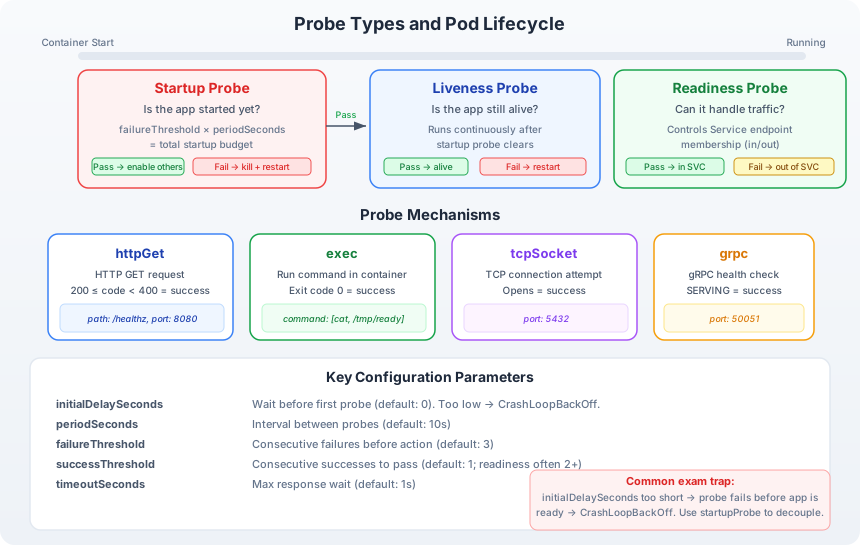
Diagram description: The flow begins at container start. The startup probe runs first, checking repeatedly whether the application has initialized. If the startup probe passes, the kubelet enables both the liveness and readiness probes, which run concurrently for the lifetime of the container. The liveness probe checks whether the application is still alive — failure triggers a container restart. The readiness probe checks whether the application can handle traffic — failure removes the Pod from Service endpoints but does not restart the container. Below the probes, the diagram shows the resulting Pod states: a startup failure leads to kill and restart; a liveness failure leads to restart; a readiness failure leads to endpoint removal with the container still running. The key insight is that the startup probe is a one-time gate, while liveness and readiness are continuous checks.
Probe Mechanisms
Each probe type supports four mechanisms. The mechanism defines how the kubelet checks the container.
httpGet
The kubelet sends an HTTP GET request to a specified path and port on the container. Any response code between 200 and 399 is considered a success. Anything else — 400, 500, connection refused, timeout — is a failure.
livenessProbe:
  httpGet:
    path: /healthz
    port: 8080
    httpHeaders:
      - name: X-Custom-Header
        value: probe-check
This is the most common mechanism for web applications. The /healthz endpoint should return quickly and should not perform expensive operations. It verifies that the HTTP server is running and can respond.
exec
The kubelet executes a command inside the container. An exit code of 0 is a success. Any non-zero exit code is a failure.
livenessProbe:
  exec:
    command:
      - cat
      - /tmp/healthy
The exec mechanism is useful for non-HTTP applications — queue workers, batch processors, daemons. The command runs inside the container’s filesystem and process namespace. Keep the command lightweight; a probe that spawns complex processes adds overhead to every check cycle.
tcpSocket
The kubelet attempts to open a TCP connection to a specified port. If the connection succeeds, the probe passes. If the connection is refused or times out, the probe fails.
readinessProbe:
  tcpSocket:
    port: 3306
This mechanism is appropriate for services that listen on a port but do not speak HTTP — databases, message brokers, custom TCP servers. It confirms the port is open but does not verify application-level health.
grpc
The kubelet calls the gRPC Health Checking Protocol on the specified port. The container must implement the grpc.health.v1.Health service. A SERVING status is a success; anything else is a failure.
readinessProbe:
  grpc:
    port: 50051
    service: my-service
This mechanism was introduced in Kubernetes 1.24 as stable. It is the correct choice for gRPC services, where an HTTP endpoint would require a separate health-check proxy.
Tuning Parameters
Every probe type accepts the same set of timing and threshold parameters. Getting these right is the difference between a self-healing application and a CrashLoopBackOff spiral.
initialDelaySeconds
Default: 0
The number of seconds after container start before the first probe is executed. This gives the application time to initialize before it starts receiving health checks.
If you define a startup probe, initialDelaySeconds on the liveness and readiness probes becomes less important — the startup probe already provides the initialization window. Without a startup probe, initialDelaySeconds on the liveness probe must be long enough to cover the worst-case startup time.
periodSeconds
Default: 10
The interval between consecutive probe checks. A periodSeconds of 5 means the kubelet checks the container every 5 seconds. Lower values provide faster detection but increase load on the container.
failureThreshold
Default: 3
The number of consecutive failures before the probe takes action (restart for liveness/startup, endpoint removal for readiness). With failureThreshold: 3 and periodSeconds: 10, the container has 30 seconds of consecutive failures before the kubelet acts.
successThreshold
Default: 1
The number of consecutive successes required to mark a probe as passing after it has failed. For liveness and startup probes, this must be 1. For readiness probes, setting it higher (e.g., 3) prevents a Pod from rejoining endpoints after a single passing check — useful when a brief passing check during startup doesn’t mean the application is truly ready for sustained traffic.
timeoutSeconds
Default: 1
The maximum time to wait for a single probe response. If the probe does not respond within this time, it counts as a failure. For HTTP probes hitting endpoints that occasionally take longer than 1 second, increase this value. A timeout of 1 second is aggressive for applications under load.
Calculating Startup Budget
When using a startup probe, the total time the container has to start is:
$$\text{startupBudget} = \text{failureThreshold} \times \text{periodSeconds}$$
For example, failureThreshold: 30 with periodSeconds: 10 gives the container 300 seconds (5 minutes) to start. Once the startup probe succeeds within any of those 30 attempts, liveness and readiness probes take over.
Common Mistakes and Anti-Patterns
initialDelaySeconds Too Low Without a Startup Probe
Setting initialDelaySeconds: 5 on a liveness probe for an application that takes 30 seconds to start means the liveness probe will fail 5 times before the application is ready. With the default failureThreshold: 3, the kubelet kills the container after 3 failures — roughly 35 seconds into startup. The container restarts, takes 30 seconds to start, gets killed again, and enters CrashLoopBackOff.
Fix: Use a startup probe with a generous failureThreshold, or increase initialDelaySeconds to exceed the worst-case startup time.
Liveness Probe That Checks External Dependencies
A liveness probe that queries a database, calls an external API, or checks a downstream service introduces a cascading failure mode. If the database goes down, the liveness probe fails on every container that checks it. The kubelet restarts all of them simultaneously. They all reconnect to the database at once, overwhelming it further.
Fix: The liveness probe should check only the container’s own process health. Use the readiness probe for dependency checks — failing the readiness probe removes the Pod from traffic without restarting it, giving the dependency time to recover.
# Anti-pattern: liveness checks database
livenessProbe:
  exec:
    command:
      - pg_isready
      - -h
      - postgres-host
# Correct: liveness checks local process, readiness checks external
livenessProbe:
  httpGet:
    path: /healthz
    port: 8080
readinessProbe:
  httpGet:
    path: /ready  # This endpoint checks database connectivity
    port: 8080
Same Probe Configuration for Liveness and Readiness
Using identical httpGet paths for both probes loses the distinction between “alive” and “ready.” If the /healthz endpoint fails because a downstream service is unavailable, restarting the container (liveness behavior) does nothing to fix the downstream problem. The readiness probe should use a different endpoint that reflects whether the container can handle external traffic.
Readiness Probe on a Batch Job
Batch Jobs do not serve traffic through Services. Adding a readiness probe to a Job’s Pod spec wastes check cycles and can interfere with Job completion tracking. Readiness probes are meaningful only for long-running Pods behind a Service.
Complete Multi-Probe YAML
The following manifest configures all three probes on a web application container:
apiVersion: v1
kind: Pod
metadata:
  name: web-app
  labels:
    app: web
spec:
  containers:
    - name: app
      image: my-web-app:1.4
      ports:
        - containerPort: 8080
      startupProbe:
        httpGet:
          path: /healthz
          port: 8080
        periodSeconds: 5
        failureThreshold: 30        # 30 × 5 = 150s startup budget
        timeoutSeconds: 3
      livenessProbe:
        httpGet:
          path: /healthz
          port: 8080
        periodSeconds: 15           # Check every 15 seconds
        failureThreshold: 3         # 3 × 15 = 45s before restart
        timeoutSeconds: 3
        successThreshold: 1         # Must be 1 for liveness
      readinessProbe:
        httpGet:
          path: /ready              # Different from liveness endpoint
          port: 8080
        periodSeconds: 5            # Check more frequently than liveness
        failureThreshold: 3         # 3 × 5 = 15s before endpoint removal
        successThreshold: 2         # Require 2 consecutive passes to re-add
        timeoutSeconds: 3
      resources:
        requests:
          cpu: 100m
          memory: 128Mi
        limits:
          cpu: 500m
          memory: 256Mi
Key design decisions in this manifest:
-
The startup probe uses a 150-second budget (
30 × 5). This is generous enough for most application startups. The probe checks/healthz, which returns 200 once the HTTP server is listening. -
The liveness probe checks the same
/healthzendpoint but with a longer period (15 seconds). Liveness does not need to detect failures as quickly as readiness — it is a safety net for deadlocks and hangs, not a traffic management tool. ThefailureThreshold: 3means the container gets three consecutive failures (45 seconds) before restart. -
The readiness probe uses a different endpoint (
/ready) that checks downstream dependencies — database connectivity, cache availability, configuration validity. It checks every 5 seconds withsuccessThreshold: 2, requiring two consecutive passes before the Pod is re-added to Service endpoints. This prevents flapping: a single passing check during a transient recovery does not immediately restore traffic.
Verifying Probe Status
Once a Pod is running, you can inspect probe behavior with kubectl describe pod:
kubectl describe pod web-appUnder the Containers section, each probe is listed with its configuration:
    Liveness:       http-get http://:8080/healthz delay=0s timeout=3s period=15s #success=1 #failure=3
    Readiness:      http-get http://:8080/ready delay=0s timeout=3s period=5s #success=2 #failure=3
    Startup:        http-get http://:8080/healthz delay=0s timeout=3s period=5s #success=1 #failure=30
Probe failures appear in the Events section:
Events:
  Type     Reason     Age   From     Message
  ----     ------     ----  ----     -------
  Warning  Unhealthy  10s   kubelet  Liveness probe failed: HTTP probe failed with statuscode: 500
  Warning  Unhealthy  5s    kubelet  Readiness probe failed: HTTP probe failed with statuscode: 503
These events are critical for diagnosing why a Pod keeps restarting or why traffic is not reaching a Pod that appears to be running.
CKAD Exam Tips
The exam frequently tests probe configuration. Typical tasks include:
- Add a liveness probe to an existing Deployment. Know the
kubectl explain pod.spec.containers.livenessProbepath to look up field names during the exam. - Fix a failing probe. A Pod is in CrashLoopBackOff because the liveness probe hits a nonexistent path. Identify the problem from events and correct the probe spec.
- Choose the right probe type. The question may describe a behavior — “remove from traffic but don’t restart” — and expect you to know that this is a readiness probe.
Write probe configurations from memory to save time. The structure is consistent across all three probe types — the only difference is the field name (startupProbe, livenessProbe, readinessProbe).