The Declarative Model and Core Resources
SummaryExplains the Kubernetes control plane architecture, the reconciliation...
Explains the Kubernetes control plane architecture, the reconciliation...
Explains the Kubernetes control plane architecture, the reconciliation loop, the Pod as the atomic scheduling unit, and both imperative and declarative kubectl workflows with practical examples.
The Declarative Model and Core Resources
Every kubectl command you run during the CKAD exam follows the same path: it hits the API server, the API server writes state to etcd, and a controller reacts. Understanding this flow is not academic trivia — it is the mental model that lets you predict what Kubernetes will do before you see the result, debug problems when the result is wrong, and write manifests confidently without second-guessing field names.
Cluster Architecture
A Kubernetes cluster divides into two planes: the control plane that makes decisions, and the worker nodes that execute them. The CKAD does not ask you to install or configure control plane components, but knowing what each one does will save you time when things go wrong during exam tasks.
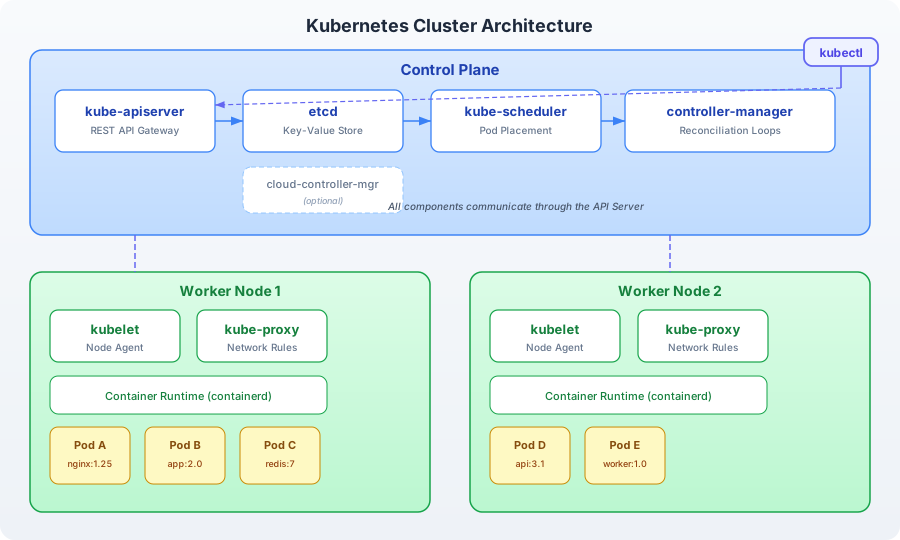
Kubernetes cluster architecture: the control plane runs four components — kube-apiserver (the REST API gateway that every other component talks to), etcd (the distributed key-value store holding all cluster state), kube-scheduler (assigns Pods to nodes based on resource availability, taints, and affinity rules), and controller-manager (runs reconciliation loops that watch desired state in etcd and actuate changes). Worker nodes run kubelet (the node agent that manages Pod lifecycle), kube-proxy (maintains iptables/IPVS rules for Service routing), and the container runtime (containerd). kubectl commands hit the API server, which persists state to etcd, and controllers react to state changes.
Control Plane Components
kube-apiserver is the front door to the cluster. Every interaction — whether from kubectl, a CI/CD pipeline, or an internal controller — goes through the API server as a REST call. It authenticates the request, authorizes it against RBAC policies, validates the resource manifest, and persists the result to etcd. The API server is the only component that talks directly to etcd.
etcd is a distributed key-value store that holds the entire cluster state. Every Pod definition, every Service endpoint, every ConfigMap value lives in etcd. When you run kubectl apply -f pod.yaml, the API server writes the Pod object to etcd. When you run kubectl get pod, the API server reads it back. etcd is the single source of truth — if it is lost, the cluster loses its memory.
kube-scheduler watches for newly created Pods that have no node assignment. When it finds one, it evaluates every node against a scoring function that considers resource requests, taints, tolerations, affinity rules, and topology constraints. The winning node gets the Pod. On the exam, if a Pod is stuck in Pending, the scheduler is the first place to look — usually because no node satisfies the Pod’s resource requests or a taint is blocking scheduling.
kube-controller-manager runs a collection of controllers, each implementing a reconciliation loop for a specific resource type. The ReplicaSet controller watches ReplicaSets and ensures the correct number of Pods exist. The Job controller watches Jobs and creates Pods to completion. The Endpoint controller populates Endpoint objects for Services. Each controller follows the same pattern: watch desired state, compare to actual state, take action to reconcile.
Worker Node Components
kubelet is the agent running on every worker node. It receives Pod specifications from the API server (or, technically, from the scheduler’s node assignment) and ensures the containers described in those specs are running and healthy. It reports Pod status back to the API server. When you see a Pod in CrashLoopBackOff, it is the kubelet that is restarting the container and reporting the failure.
kube-proxy maintains network rules on each node that implement Kubernetes Services. When you create a ClusterIP Service, kube-proxy sets up iptables or IPVS rules so that traffic to the Service’s virtual IP gets forwarded to one of the backing Pods. You rarely interact with kube-proxy directly, but understanding that Services are implemented through network rules — not a running proxy process — explains why Services work even when you cannot see a “proxy” container.
Container runtime (typically containerd in modern clusters) is the software that actually pulls images and starts containers. Kubernetes defines the Container Runtime Interface (CRI), and containerd implements it. Past versions used Docker as the runtime; Kubernetes v1.24+ removed the dockershim and uses containerd directly. Your Kind lab cluster runs containerd.
The Reconciliation Loop
The reconciliation loop is the central mechanism that makes Kubernetes self-healing. Every controller follows the same algorithm:
- Watch — subscribe to changes for a specific resource type via the API server.
- Observe — read the current (actual) state of the cluster.
- Compare — diff the desired state (the spec you declared) against the actual state.
- Act — if they differ, take the minimum action necessary to bring actual state in line with desired state.
This is a continuous loop, not a one-time event. The controller does not run your manifest and stop. It watches the resource forever — or until you delete it. If a Pod crashes, the ReplicaSet controller notices the actual replica count dropped below the desired count and creates a new Pod. If you manually delete a Pod managed by a Deployment, the controller immediately recreates it.
This is why kubectl delete pod on a Deployment-managed Pod does not actually remove it — the controller’s loop fires within seconds and restores the desired count. To remove the Pod permanently, you delete the Deployment, which removes the desired state the controller is reconciling against.
Implications for the Exam
The reconciliation loop explains several behaviors you encounter during exam tasks:
- Editing a Deployment triggers a rollout — the Deployment controller detects the spec changed and creates a new ReplicaSet with the updated template.
- Scaling is declarative —
kubectl scale deployment nginx --replicas=5updates the desired replica count in the Deployment spec. The ReplicaSet controller reconciles. - Self-healing is automatic — kill a container, and the kubelet restarts it. Delete a Pod from a ReplicaSet, and the controller replaces it. This is not “intelligence” — it is a loop comparing two numbers.
The Pod: Atomic Scheduling Unit
A Pod is the smallest deployable unit in Kubernetes. It is not a container — it is a wrapper around one or more containers that share the same network namespace (they can reach each other on localhost), the same storage volumes, and the same lifecycle. In practice, most Pods contain a single application container. Multi-container Pods (sidecar patterns, init containers) are covered in a later chapter.
Here is the minimal Pod manifest — four top-level fields that every Kubernetes resource shares:
apiVersion: v1
kind: Pod
metadata:
  name: nginx
  labels:
    app: nginx
spec:
  containers:
    - name: nginx
      image: nginx:1.25
      ports:
        - containerPort: 80
apiVersion identifies the API group and version. Pods are in the core group (v1). Deployments are in apps/v1. The version matters — using the wrong one produces an error.
kind specifies the resource type. Capitalization matters: Pod, not pod.
metadata holds the resource’s identity — its name, namespace (defaults to default if omitted), labels, and annotations.
spec describes the desired state. For a Pod, this includes the list of containers, each with an image, optional ports, resource requests and limits, environment variables, volume mounts, and health checks.
Imperative vs. Declarative Workflows
Kubernetes supports two workflows, and the exam demands fluency in both.
Imperative: kubectl run
The fastest way to create a Pod:
kubectl run nginx --image=nginx:1.25 --port=80This creates a Pod named nginx with a single container running the nginx:1.25 image. It is fast, but it is a one-shot command — there is no manifest file to version-control or modify later.
Imperative commands are your speed tool on the exam. When a task says “create a Pod running nginx,” do not hand-write YAML from scratch. Run the imperative command to create it directly, or — better yet — generate the YAML and redirect it to a file.
Generating YAML from Imperative Commands
This is the most important exam technique in this entire chapter:
kubectl run nginx --image=nginx:1.25 --dry-run=client -o yaml > pod.yamlThe --dry-run=client flag tells kubectl to validate the command and produce the resource manifest without sending it to the API server. The -o yaml flag outputs the manifest in YAML format. Together, they generate a valid starting point that you can edit and then apply.
This pattern works for most resource types:
# Generate a Deployment manifest
kubectl create deployment nginx --image=nginx:1.25 --dry-run=client -o yaml > deploy.yaml

# Generate a Service manifest
kubectl expose pod nginx --port=80 --target-port=80 --dry-run=client -o yaml > svc.yaml

# Generate a Job manifest
kubectl create job my-job --image=busybox --dry-run=client -o yaml > job.yaml
Exam tip: Memorize the
--dry-run=client -o yamlpattern. Set up shell variables in your exam environment:export do='--dry-run=client -o yaml'so you can typekubectl run nginx --image=nginx $do > pod.yaml. Every second counts.
Declarative: kubectl apply
The declarative workflow uses manifest files:
kubectl apply -f pod.yamlkubectl apply is idempotent — run it once, it creates the resource. Run it again with the same file, nothing changes. Run it again with a modified file, it updates the resource. This is the core of the declarative model: you declare the desired state in a file, and apply makes it so.
Compare this to kubectl create, which is imperative: it creates the resource if it does not exist, but fails if the resource already exists. On the exam, prefer apply for building resources from YAML files — it handles both creation and updates without errors.
# This fails if the Pod already exists:
kubectl create -f pod.yaml

# This always works:
kubectl apply -f pod.yaml
Inspecting and Managing Resources
Three commands form your inspection toolkit:
kubectl get
Lists resources with their status:
# List all Pods in the current namespace
kubectl get pods

# Wide output — shows node assignment and IP
kubectl get pods -o wide

# YAML output — full resource definition including status
kubectl get pod nginx -o yaml
The -o yaml output is invaluable for debugging. It shows the complete resource state, including fields the API server added (like status.phase, status.conditions, and metadata.uid). When a Pod is not behaving as expected, kubectl get pod <name> -o yaml gives you everything.
kubectl describe
Produces a human-readable summary with events:
kubectl describe pod nginxThe output includes the Pod’s labels, annotations, container specs, resource requests, volume mounts, conditions, and — critically — the Events section at the bottom. Events tell you what happened: image pull successes or failures, scheduling decisions, container starts and crashes. When something goes wrong, describe is usually your first diagnostic command.
Exam tip: The Events section is time-ordered. Read from bottom to top for the most recent activity.
kubectl delete
Removes resources:
# Delete a specific Pod
kubectl delete pod nginx

# Delete from a manifest file
kubectl delete -f pod.yaml

# Delete all Pods with a specific label
kubectl delete pods -l app=nginx

# Force delete (skip graceful shutdown) — useful on the exam for speed
kubectl delete pod nginx --grace-period=0 --force
The --grace-period=0 --force flag combination is an exam time-saver. Normally, kubectl delete sends a SIGTERM and waits up to 30 seconds for the container to shut down gracefully. During the exam, you are not running production workloads — force deletion is acceptable and saves valuable seconds.
Resource Manifest Structure
Every Kubernetes resource follows the same four-field structure:
| Field | Purpose | Example |
|---|---|---|
apiVersion | API group and version | v1, apps/v1 |
kind | Resource type | Pod, Deployment |
metadata | Identity (name, namespace, labels) | name: nginx |
spec | Desired state specification | containers: [...] |
The API server also maintains a status field on every resource, but you never write it in a manifest — it is managed by the system. The status field contains the actual state: the Pod’s current phase (Pending, Running, Succeeded, Failed), its IP address, its conditions, and container-level status information.
When you retrieve a resource with kubectl get pod nginx -o yaml, you see both spec (what you asked for) and status (what actually exists). The delta between these two is what the reconciliation loop acts on.
Putting It Together
Here is the complete flow from kubectl apply to a running container:
- You run
kubectl apply -f pod.yaml. kubectlsends the Pod manifest to the API server via an HTTPS POST request.- The API server authenticates your identity, authorizes the request against RBAC, and validates the manifest against the Pod schema.
- The API server persists the Pod object to etcd with
status.phase: Pendingand no node assignment. - The scheduler watches for Pods without node assignments. It picks the best node based on resource availability, taints, and affinity rules, then updates the Pod’s
spec.nodeNamefield via the API server. - The kubelet on the assigned node watches for Pods scheduled to its node. It instructs the container runtime (containerd) to pull the image and start the container.
- The kubelet reports the container’s status back to the API server. The Pod transitions from
PendingtoRunning. - The reconciliation loop continues. If the container crashes, the kubelet restarts it (if
restartPolicy: Always). If you change the manifest and re-apply, the cycle begins again.
Every resource in Kubernetes — Deployments, Services, ConfigMaps, Jobs — follows this same lifecycle. The specifics change (different controllers, different specs), but the pattern is always: declare desired state → API server persists → controller reconciles → actual state converges.