Node Selection and Affinity Rules
SummaryCovers the Kubernetes scheduler's two-phase process (filtering and...
Covers the Kubernetes scheduler's two-phase process (filtering and...
Covers the Kubernetes scheduler's two-phase process (filtering and scoring), direct node assignment with nodeName, label-based selection with nodeSelector, expressive node affinity rules (required and preferred), pod affinity and anti-affinity for co-location and spreading, and topologyKey semantics.
Node Selection and Affinity Rules
How the Scheduler Works
Every Pod that doesn’t have a nodeName set goes through the Kubernetes scheduler. The scheduler’s job is to find the best node for the Pod, and it does this in two distinct phases.
Filtering (also called predicates) eliminates nodes that cannot run the Pod. Reasons a node might be filtered out include: insufficient CPU or memory to satisfy the Pod’s resource requests, the node has a taint the Pod doesn’t tolerate, the Pod’s nodeSelector labels don’t match, a required node affinity rule excludes the node, or the node’s disk pressure or other conditions make it unready. After filtering, the remaining nodes are called feasible.
Scoring (also called priorities) ranks the feasible nodes. Each node receives a score based on factors like resource balance (prefer nodes with more available resources), pod affinity preferences (prefer nodes near related Pods), and anti-affinity preferences (avoid nodes with conflicting Pods). Preferred affinity rules with weights contribute to the score — a preference with weight 100 has more influence than one with weight 10. The node with the highest aggregate score is selected.
Binding assigns the Pod to the winning node by setting the Pod’s .spec.nodeName field.
The following diagram illustrates this three-stage process:
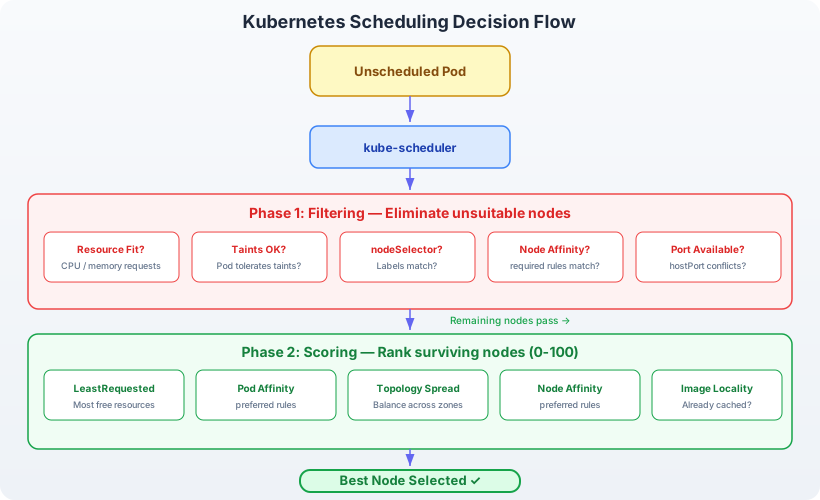
The diagram shows the scheduler receiving an unscheduled Pod, running it through filtering to eliminate ineligible nodes, scoring the remaining feasible nodes, and binding the Pod to the highest-scoring node. Filtering is a hard gate — nodes either pass or are eliminated entirely. Scoring is a soft preference — every feasible node receives a numeric score, and the highest score wins. If no nodes survive filtering, the Pod stays in Pending state until conditions change.
Understanding this two-phase model is critical because every scheduling API in Kubernetes maps to one of these phases. nodeSelector and requiredDuringScheduling rules are filters. preferredDuringScheduling rules are scoring inputs. Knowing which phase a rule affects tells you whether it can cause a Pod to stay Pending (filtering) or whether the scheduler will find an alternative (scoring).
nodeName: Direct Assignment
The most direct way to place a Pod is to set .spec.nodeName explicitly:
apiVersion: v1
kind: Pod
metadata:
  name: pinned-pod
spec:
  nodeName: worker-2
  containers:
    - name: app
      image: nginx:1.25
This bypasses the scheduler entirely. The Pod is assigned to worker-2 without filtering or scoring. If worker-2 doesn’t exist, has insufficient resources, or has taints, the Pod still attempts to run there — and fails.
Because nodeName bypasses all scheduling logic, it’s rarely used in production. It breaks high availability (the Pod is tied to a single node that might go down), ignores resource constraints (the scheduler’s filtering is skipped), and hardcodes infrastructure details into workload definitions. On the CKAD, you should know it exists but prefer nodeSelector or nodeAffinity for placement control.
nodeSelector: Simple Label Matching
nodeSelector is the standard way to constrain a Pod to nodes with specific labels. It’s a map of key-value pairs — the Pod is scheduled only on nodes whose labels include all the specified pairs.
First, label a node:
kubectl label node worker-1 disk=ssdVerify the label:
kubectl get nodes --show-labels | grep diskNow create a Pod that requires SSD storage:
apiVersion: v1
kind: Pod
metadata:
  name: ssd-app
spec:
  nodeSelector:
    disk: ssd
  containers:
    - name: app
      image: nginx:1.25
The scheduler filters out any node that doesn’t have the label disk=ssd. If worker-1 is the only node with that label, ssd-app will always land there. If no node has the label, the Pod stays Pending.
kubectl apply -f ssd-app.yaml
kubectl get pod ssd-app -o wide
NAME READY STATUS RESTARTS AGE IP NODE
ssd-app 1/1 Running 0 5s 10.42.1.5 worker-1Multiple labels work as a logical AND:
nodeSelector:
  disk: ssd
  region: us-east
The Pod is scheduled only on nodes that have both disk=ssd and region=us-east. There is no way to express OR logic, negative matching, or preferences with nodeSelector — for those, you need nodeAffinity.
Built-in Node Labels
Kubernetes automatically applies several labels to every node:
| Label | Example Value | Description |
|---|---|---|
kubernetes.io/hostname | worker-1 | Node hostname |
kubernetes.io/os | linux | Operating system |
kubernetes.io/arch | amd64 | CPU architecture |
topology.kubernetes.io/zone | us-east-1a | Cloud availability zone |
topology.kubernetes.io/region | us-east-1 | Cloud region |
You can use these in nodeSelector without manually labeling nodes:
nodeSelector:
  kubernetes.io/arch: amd64
nodeAffinity: Expressive Rules
nodeAffinity extends nodeSelector with operators, multiple expressions, and the ability to specify both hard requirements and soft preferences.
Required Affinity (Hard Rule)
requiredDuringSchedulingIgnoredDuringExecution is a filtering constraint. If no node matches, the Pod is not scheduled.
apiVersion: v1
kind: Pod
metadata:
  name: zone-restricted
spec:
  affinity:
    nodeAffinity:
      requiredDuringSchedulingIgnoredDuringExecution:
        nodeSelectorTerms:
          - matchExpressions:
              - key: topology.kubernetes.io/zone
                operator: In
                values:
                  - us-east-1a
                  - us-east-1b
  containers:
    - name: app
      image: nginx:1.25
This Pod runs only on nodes in zone us-east-1a or us-east-1b. The In operator checks if the node label’s value is in the provided list.
The name IgnoredDuringExecution means that if a node’s labels change after the Pod is running (removing the matching label), the Pod is not evicted. The rule is enforced only at scheduling time.
Available operators:
| Operator | Behavior |
|---|---|
In | Label value is one of the listed values |
NotIn | Label value is not in the listed values |
Exists | Label key exists (value doesn’t matter) |
DoesNotExist | Label key does not exist |
Gt | Label value is greater than (numeric comparison) |
Lt | Label value is less than (numeric comparison) |
Multiple matchExpressions within a single nodeSelectorTerm are ANDed:
nodeSelectorTerms:
  - matchExpressions:
      - key: disk
        operator: In
        values: ["ssd"]
      - key: region
        operator: In
        values: ["us-east"]
Both conditions must be true for the node to pass. Multiple nodeSelectorTerms at the top level are ORed — the node must match at least one term.
Preferred Affinity (Soft Rule)
preferredDuringSchedulingIgnoredDuringExecution is a scoring preference. It influences node ranking without eliminating nodes:
apiVersion: v1
kind: Pod
metadata:
  name: prefer-ssd
spec:
  affinity:
    nodeAffinity:
      preferredDuringSchedulingIgnoredDuringExecution:
        - weight: 80
          preference:
            matchExpressions:
              - key: disk
                operator: In
                values:
                  - ssd
        - weight: 20
          preference:
            matchExpressions:
              - key: region
                operator: In
                values:
                  - us-east
  containers:
    - name: app
      image: nginx:1.25
Each preference has a weight from 1 to 100. The scheduler adds these weights to the node’s score during the scoring phase. A node with disk=ssd and region=us-east gets a score boost of 100 (80 + 20). A node with only disk=ssd gets 80. A node with neither still qualifies — it’s scored lower, not eliminated.
Combining Required and Preferred
In practice, you often combine both:
affinity:
  nodeAffinity:
    requiredDuringSchedulingIgnoredDuringExecution:
      nodeSelectorTerms:
        - matchExpressions:
            - key: kubernetes.io/os
              operator: In
              values: ["linux"]
    preferredDuringSchedulingIgnoredDuringExecution:
      - weight: 50
        preference:
          matchExpressions:
            - key: disk
              operator: In
              values: ["ssd"]
This says: “must run on Linux nodes (hard requirement), and prefer SSD nodes if available (soft preference).” The Pod will never land on a Windows node, but if no SSD nodes are available, it still schedules on a Linux node with spinning disks.
podAffinity: Schedule Near Other Pods
Node affinity selects nodes based on node labels. Pod affinity selects nodes based on which other Pods are already running there. The question changes from “what kind of node do I want?” to “which Pods do I want to be near?”
apiVersion: v1
kind: Pod
metadata:
  name: frontend
  labels:
    app: frontend
spec:
  affinity:
    podAffinity:
      requiredDuringSchedulingIgnoredDuringExecution:
        - labelSelector:
            matchExpressions:
              - key: app
                operator: In
                values:
                  - api
          topologyKey: kubernetes.io/hostname
  containers:
    - name: web
      image: nginx:1.25
This Pod will only be scheduled on a node where a Pod with label app=api is already running. The topologyKey: kubernetes.io/hostname means “same node” — the topology domain is individual hosts.
If no node is running an app=api Pod, the frontend Pod stays Pending.
topologyKey Explained
The topologyKey field defines the topology domain for affinity calculations. It’s a node label key that groups nodes into domains:
| topologyKey | Domain | Meaning |
|---|---|---|
kubernetes.io/hostname | Individual node | Same node |
topology.kubernetes.io/zone | Availability zone | Same zone (e.g., us-east-1a) |
topology.kubernetes.io/region | Region | Same region (e.g., us-east-1) |
With topologyKey: topology.kubernetes.io/zone, the Pod is scheduled in the same zone as matching Pods — not necessarily the same node, but a node in the same availability zone.
podAntiAffinity: Schedule Away from Other Pods
Pod anti-affinity is the inverse: ensure that Pods are not co-located. The most common use case is spreading replicas of the same application across nodes to improve availability.
apiVersion: apps/v1
kind: Deployment
metadata:
  name: api-server
spec:
  replicas: 3
  selector:
    matchLabels:
      app: api
  template:
    metadata:
      labels:
        app: api
    spec:
      affinity:
        podAntiAffinity:
          requiredDuringSchedulingIgnoredDuringExecution:
            - labelSelector:
                matchExpressions:
                  - key: app
                    operator: In
                    values:
                      - api
              topologyKey: kubernetes.io/hostname
      containers:
        - name: api
          image: api-server:2.0
Each replica of api-server is placed on a different node. If the cluster has only two worker nodes, the third replica stays Pending — there’s no node without an existing app=api Pod.
Using preferredDuringSchedulingIgnoredDuringExecution instead of requiredDuringScheduling relaxes this to a best-effort spread:
affinity:
  podAntiAffinity:
    preferredDuringSchedulingIgnoredDuringExecution:
      - weight: 100
        podAffinityTerm:
          labelSelector:
            matchExpressions:
              - key: app
                operator: In
                values:
                  - api
          topologyKey: kubernetes.io/hostname
Now the scheduler tries to spread replicas across nodes but will place multiple replicas on the same node if necessary. This avoids Pending Pods in small clusters while still achieving distribution when possible.
nodeSelector vs nodeAffinity: When to Use Which
| Capability | nodeSelector | nodeAffinity |
|---|---|---|
| Simple key=value matching | Yes | Yes |
| In / NotIn operators | No | Yes |
| Exists / DoesNotExist | No | Yes |
| Gt / Lt (numeric) | No | Yes |
| Soft preferences (weights) | No | Yes |
| OR logic between terms | No | Yes |
Use nodeSelector when a single label match is sufficient — it’s less YAML and harder to misconfigure. Use nodeAffinity when you need multiple conditions, negation, or soft preferences. On the CKAD, the question usually specifies which to use; if it doesn’t, nodeSelector is faster to type.