Model Packaging and Inference APIs
SummaryThe first two stages of model deployment —...
The first two stages of model deployment —...
The first two stages of model deployment — packaging and API construction — determine whether your model survives contact with production. Pickle is the serialization format most Python developers reach for by default, and it is a security vulnerability that allows arbitrary code execution on deserialization. This section demonstrates the attack, then introduces ONNX as the universal alternative: a single format that works across sklearn, XGBoost, PyTorch, and multiple inference runtimes. For PyTorch-native workflows, TorchScript provides tracing and scripting to capture computation graphs without Python dependency. The second half builds a complete FastAPI inference service with Pydantic validation, model lifecycle management via lifespan context managers, health check endpoints, batch prediction, and request batching with asyncio.Queue for GPU efficiency.
Model Packaging and Inference APIs
10.1 — Packaging Models for Production
Your model exists as a Python object in memory. To deploy it, you need to persist it to disk in a format that another process — possibly on a different machine, possibly in a different language — can load and execute. The choice of serialization format determines your security posture, your portability, and your inference performance.
Most Python developers reach for pickle without a second thought. This is a mistake you should understand deeply before choosing an alternative.
Pickle: The Default That Bites
Python’s pickle module serializes arbitrary Python objects to a byte stream. When you call pickle.load(), the byte stream is deserialized back into a Python object. The critical word here is arbitrary. Pickle does not serialize data. It serializes instructions for reconstructing objects, including instructions to execute arbitrary code.
This means that loading an untrusted pickle file is equivalent to running an untrusted Python script. If someone hands you a model file and you deserialize it with pickle.load(), that file can execute any code on your machine — install a backdoor, exfiltrate data, delete files, join a botnet.
This is not theoretical. Here is the attack:
import pickle
import os


class MaliciousModel:
    """
    This class demonstrates pickle's arbitrary code execution.
    When unpickled, it runs os.system() instead of returning a model.

    DO NOT use this pattern. This exists to show why pickle is dangerous.
    """

    def __reduce__(self) -> tuple:
        # __reduce__ tells pickle how to reconstruct the object.
        # We instruct it to call os.system with a shell command.
        return (os.system, ("echo 'You have been compromised. "
                            "This could have been rm -rf / or a reverse shell.'",))


# Serialize the "model"
payload = pickle.dumps(MaliciousModel())

# Anyone who loads this "model" executes the command
# pickle.loads(payload)  # DANGER: would execute the shell command
print(f"Payload size: {len(payload)} bytes")
print("Loading this payload would execute arbitrary code.")
When pickle.loads(payload) is called, Python does not load a model. It calls os.system() with whatever command the attacker chose. The __reduce__ method is the hook that makes this possible — it tells pickle how to reconstruct the object, and “how to reconstruct” can mean “call any callable with any arguments.”
Every model file you download from the internet, every model a colleague shares via Slack, every model checkpoint from a training run on shared infrastructure — if serialized with pickle, it is a potential attack vector. The scikit-learn team, the PyTorch team, and security researchers have all warned about this repeatedly. The industry continues to use pickle because it is convenient.
Do not be the team that gets compromised because deserialization was convenient.
ONNX: The Universal Format
ONNX (Open Neural Network Exchange) is a format that represents models as computational graphs — sequences of mathematical operations — rather than as Python objects. An ONNX file cannot execute arbitrary code because it does not contain code. It contains a graph of operations (matrix multiply, relu, softmax) with associated weights.
The benefits are substantial:
- Security. No arbitrary code execution. The file is a computation graph, not executable instructions.
- Portability. Run inference in Python, C++, Java, JavaScript, or any language with an ONNX runtime.
- Performance. ONNX Runtime applies graph optimizations (operator fusion, constant folding) that your original framework may not.
- Versioning. ONNX opsets are versioned. Pin the opset and you pin the behavior.
Here is the complete workflow — train an XGBoost model, export to ONNX, run inference with ONNX Runtime:
import numpy as np
from xgboost import XGBClassifier
from skl2onnx import convert_sklearn
from skl2onnx.common.data_types import FloatTensorType
import onnxruntime as ort
from sklearn.datasets import make_classification
from sklearn.model_selection import train_test_split
from sklearn.metrics import accuracy_score
from pathlib import Path

# Train an XGBoost classifier
X, y = make_classification(
    n_samples=5_000, n_features=15, n_informative=10,
    random_state=42,
)
X_train, X_test, y_train, y_test = train_test_split(
    X, y, test_size=0.2, random_state=42,
)

model = XGBClassifier(
    n_estimators=100, max_depth=6, learning_rate=0.1,
    random_state=42, eval_metric="logloss",
)
model.fit(X_train, y_train)

# Native XGBoost predictions (baseline)
native_preds = model.predict(X_test)
native_probs = model.predict_proba(X_test)
print(f"Native accuracy: {accuracy_score(y_test, native_preds):.4f}")

# Export to ONNX
initial_type = [("input", FloatTensorType([None, X_train.shape[1]]))]
onnx_model = convert_sklearn(
    model,
    initial_types=initial_type,
    target_opset=15,  # Pin the opset version for reproducibility
    options={id(model): {"zipmap": False}},  # Return arrays, not dicts
)

model_path = Path("model.onnx")
model_path.write_bytes(onnx_model.SerializeToString())
print(f"ONNX model size: {model_path.stat().st_size / 1024:.1f} KB")

# Load and run with ONNX Runtime
session = ort.InferenceSession(
    str(model_path),
    providers=["CPUExecutionProvider"],
)

# Inspect input/output names and shapes
for inp in session.get_inputs():
    print(f"Input: {inp.name}, shape: {inp.shape}, type: {inp.type}")
for out in session.get_outputs():
    print(f"Output: {out.name}, shape: {out.shape}, type: {out.type}")

# Run inference
onnx_results = session.run(
    None,  # Get all outputs
    {"input": X_test.astype(np.float32)},  # ONNX expects float32
)
onnx_preds = onnx_results[0]
onnx_probs = onnx_results[1]

print(f"ONNX accuracy: {accuracy_score(y_test, onnx_preds):.4f}")
print(f"Max probability difference: {np.max(np.abs(native_probs - onnx_probs)):.8f}")
Note the astype(np.float32) — ONNX Runtime expects 32-bit floats by default, and failing to cast is the most common source of “my ONNX model gives different results” bugs.
TorchScript: Production PyTorch
For PyTorch models, TorchScript captures the computation graph and removes the dependency on the Python interpreter at inference time. There are two approaches:
Tracing runs your model with example inputs and records the operations. It works for models with no data-dependent control flow:
import torch
import torch.nn as nn


class FraudDetector(nn.Module):
    """Simple feedforward network for fraud detection."""

    def __init__(self, n_features: int = 15, hidden: int = 64) -> None:
        super().__init__()
        self.net = nn.Sequential(
            nn.Linear(n_features, hidden),
            nn.ReLU(),
            nn.Dropout(0.3),
            nn.Linear(hidden, hidden // 2),
            nn.ReLU(),
            nn.Dropout(0.2),
            nn.Linear(hidden // 2, 1),
            nn.Sigmoid(),
        )

    def forward(self, x: torch.Tensor) -> torch.Tensor:
        return self.net(x)


# Train your model (abbreviated — see Chapter 6 for full training loops)
model = FraudDetector(n_features=15)
model.eval()  # Critical: set to eval mode before tracing

# Trace with example input
example_input = torch.randn(1, 15)
traced_model = torch.jit.trace(model, example_input)

# Save — this file does not contain Python bytecode
traced_model.save("fraud_detector.pt")
print(f"Saved model size: {Path('fraud_detector.pt').stat().st_size / 1024:.1f} KB")

# Load in a completely separate process — no model class definition needed
loaded_model = torch.jit.load("fraud_detector.pt")
test_input = torch.randn(5, 15)
with torch.no_grad():
    predictions = loaded_model(test_input)
print(f"Predictions shape: {predictions.shape}")
print(f"Predictions: {predictions.squeeze().tolist()}")
Scripting analyzes the Python source code and compiles it. Use scripting when your model has if statements, loops, or other control flow that depends on input data. Tracing would only capture one execution path, silently dropping the others.
The critical detail: you must call model.eval() before tracing or scripting. If you forget, dropout and batch normalization remain in training mode, and your production model will produce randomized, incorrect predictions. This is one of the most common PyTorch deployment bugs.
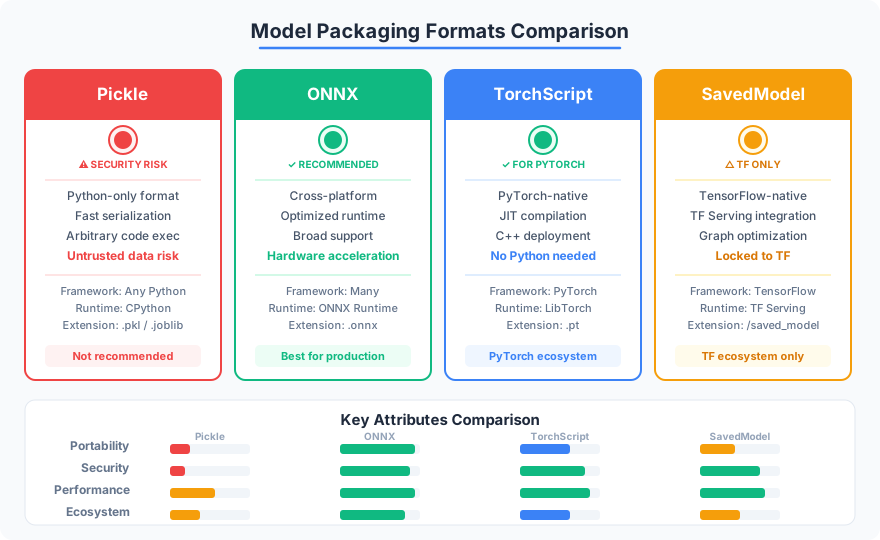
Decision Table: Choosing a Serialization Format
| Format | Security | Portability | Performance | Best For |
|---|---|---|---|---|
| Pickle | Dangerous — arbitrary code execution | Python only | Baseline | Never in production |
| ONNX | Safe — computational graph only | Any ONNX Runtime | Excellent — graph optimizations | sklearn, XGBoost, cross-language |
| TorchScript | Safe — no Python bytecode | PyTorch Runtime (C++) | Good — JIT compilation | PyTorch models |
| SavedModel | Safe — computational graph | TensorFlow Serving, TFLite | Good | TensorFlow/Keras models |
The recommendation is straightforward: if your model is from sklearn or XGBoost, export to ONNX. If your model is PyTorch, use TorchScript (or export to ONNX if you need cross-runtime portability). If your model is TensorFlow, use SavedModel. Never use pickle for model files that cross trust boundaries.
10.2 — Building Inference APIs with FastAPI
You have a serialized model. Now you need to wrap it in an HTTP service that accepts requests, validates inputs, runs inference, and returns structured responses. FastAPI is the right tool for this: it is async-native, generates OpenAPI documentation automatically, and uses Pydantic for request validation — which means malformed inputs are rejected before they reach your model.
The Complete Inference Service
Here is a production-ready inference API. Study the structure before reading the explanations:
from contextlib import asynccontextmanager
from pathlib import Path
from typing import Any

import numpy as np
import onnxruntime as ort
from fastapi import FastAPI, HTTPException, status
from pydantic import BaseModel, Field, field_validator


# --- Request / Response Models ---

class PredictionRequest(BaseModel):
    """Single prediction request with input validation."""
    features: list[float] = Field(
        ..., min_length=15, max_length=15,
        description="Exactly 15 numeric features for the model.",
    )

    @field_validator("features")
    @classmethod
    def validate_no_nans(cls, v: list[float]) -> list[float]:
        if any(np.isnan(x) or np.isinf(x) for x in v):
            raise ValueError("Features must not contain NaN or Inf values")
        return v


class PredictionResponse(BaseModel):
    """Prediction result with confidence."""
    prediction: int
    probability: float = Field(..., ge=0.0, le=1.0)
    model_version: str


class BatchPredictionRequest(BaseModel):
    """Batch of prediction requests."""
    instances: list[PredictionRequest] = Field(
        ..., min_length=1, max_length=1000,
        description="Batch of 1-1000 instances.",
    )


class BatchPredictionResponse(BaseModel):
    """Batch prediction results."""
    predictions: list[PredictionResponse]
    batch_size: int


class HealthResponse(BaseModel):
    """Health check response."""
    status: str
    model_loaded: bool
    model_version: str


# --- Application State ---

class ModelState:
    """Holds the loaded model and metadata."""
    session: ort.InferenceSession | None = None
    model_version: str = "unknown"
    input_name: str = ""

    @property
    def is_loaded(self) -> bool:
        return self.session is not None


model_state = ModelState()
MODEL_PATH = Path("model.onnx")
MODEL_VERSION = "1.0.0"


# --- Lifespan: Load model at startup, release at shutdown ---

@asynccontextmanager
async def lifespan(app: FastAPI):
    """Load model on startup, release on shutdown."""
    if not MODEL_PATH.exists():
        raise FileNotFoundError(
            f"Model file not found: {MODEL_PATH}. "
            "Run the training script first."
        )

    model_state.session = ort.InferenceSession(
        str(MODEL_PATH),
        providers=["CPUExecutionProvider"],
    )
    model_state.input_name = model_state.session.get_inputs()[0].name
    model_state.model_version = MODEL_VERSION
    print(f"Model loaded: {MODEL_PATH} (version {MODEL_VERSION})")

    yield  # Application runs here

    model_state.session = None
    print("Model unloaded.")


# --- FastAPI App ---

app = FastAPI(
    title="ML Inference API",
    version=MODEL_VERSION,
    lifespan=lifespan,
)


@app.get("/health", response_model=HealthResponse)
async def health_check() -> HealthResponse:
    """Readiness probe: returns 503 if model is not loaded."""
    if not model_state.is_loaded:
        raise HTTPException(
            status_code=status.HTTP_503_SERVICE_UNAVAILABLE,
            detail="Model not loaded",
        )
    return HealthResponse(
        status="healthy",
        model_loaded=True,
        model_version=model_state.model_version,
    )


@app.post("/predict", response_model=PredictionResponse)
async def predict(request: PredictionRequest) -> PredictionResponse:
    """Single prediction endpoint."""
    if not model_state.is_loaded:
        raise HTTPException(
            status_code=status.HTTP_503_SERVICE_UNAVAILABLE,
            detail="Model not loaded",
        )

    input_array = np.array([request.features], dtype=np.float32)

    try:
        results = model_state.session.run(
            None, {model_state.input_name: input_array},
        )
    except Exception as e:
        raise HTTPException(
            status_code=status.HTTP_500_INTERNAL_SERVER_ERROR,
            detail=f"Inference failed: {type(e).__name__}",
        )

    prediction = int(results[0][0])
    probability = float(results[1][0][prediction])

    return PredictionResponse(
        prediction=prediction,
        probability=round(probability, 6),
        model_version=model_state.model_version,
    )


@app.post("/predict/batch", response_model=BatchPredictionResponse)
async def predict_batch(
    request: BatchPredictionRequest,
) -> BatchPredictionResponse:
    """
    Batch prediction: more efficient than N single requests
    because the model processes all inputs in one forward pass.
    """
    if not model_state.is_loaded:
        raise HTTPException(
            status_code=status.HTTP_503_SERVICE_UNAVAILABLE,
            detail="Model not loaded",
        )

    input_array = np.array(
        [inst.features for inst in request.instances],
        dtype=np.float32,
    )

    try:
        results = model_state.session.run(
            None, {model_state.input_name: input_array},
        )
    except Exception as e:
        raise HTTPException(
            status_code=status.HTTP_500_INTERNAL_SERVER_ERROR,
            detail=f"Batch inference failed: {type(e).__name__}",
        )

    predictions = []
    for i in range(len(request.instances)):
        pred = int(results[0][i])
        prob = float(results[1][i][pred])
        predictions.append(PredictionResponse(
            prediction=pred,
            probability=round(prob, 6),
            model_version=model_state.model_version,
        ))

    return BatchPredictionResponse(
        predictions=predictions,
        batch_size=len(predictions),
    )
Several design decisions here deserve attention:
Lifespan context manager replaces the deprecated @app.on_event("startup") pattern. The model loads once when the process starts and is shared across all requests. Loading a model per request is a performance disaster — ONNX session creation takes hundreds of milliseconds, and you pay it on every call.
Pydantic validation rejects malformed inputs before they reach the model. The field_validator catches NaN and Inf values that would silently corrupt predictions. Without this, your model returns a “prediction” for garbage input, and your downstream system trusts it.
Health check returns 503 when the model is not loaded. This matters for orchestrators like Kubernetes, which use readiness probes to decide whether to send traffic to a pod. Without a proper health check, the orchestrator routes requests to a pod that is still loading the model, and users see 500 errors.
Error handling catches inference exceptions and returns structured errors without leaking stack traces. In production, a stack trace in the response body is an information disclosure vulnerability.
Async for I/O, Sync for Compute
FastAPI is async-native, but your model inference is CPU-bound. This creates a tension: async def endpoints release the event loop while awaiting I/O, but a synchronous model.predict() call blocks the event loop, preventing other requests from being processed.
For CPU-bound inference on CPU, FastAPI automatically runs def (non-async) endpoints in a thread pool. For I/O-bound preprocessing — fetching features from a database, downloading an image — use async def with await. The rule: if the endpoint does mostly inference, make it a regular def. If it does mostly I/O with a quick prediction at the end, make it async def and run the inference in a thread pool with asyncio.to_thread().
Request Batching for GPU Efficiency
GPUs are throughput machines. A single inference on a GPU wastes most of the hardware — the thousands of cores sit idle while processing one input. Batch inference feeds multiple inputs simultaneously, and the per-item latency drops dramatically.
The challenge: HTTP requests arrive one at a time. You need a mechanism that accumulates individual requests, groups them into a batch, runs one forward pass, and distributes results back to the waiting callers.
import asyncio
from dataclasses import dataclass, field

import numpy as np


@dataclass
class InferenceRequest:
    """A single inference request waiting to be batched."""
    features: np.ndarray
    future: asyncio.Future = field(default_factory=lambda: asyncio.get_event_loop().create_future())


class RequestBatcher:
    """
    Accumulates individual inference requests and processes
    them in batches for GPU efficiency.

    Triggers a batch when either:
    - max_batch_size requests have accumulated, or
    - max_wait_ms milliseconds have passed since the first request in the batch.
    """

    def __init__(
        self,
        model_session: "ort.InferenceSession",
        input_name: str,
        max_batch_size: int = 32,
        max_wait_ms: float = 50.0,
    ) -> None:
        self.model_session = model_session
        self.input_name = input_name
        self.max_batch_size = max_batch_size
        self.max_wait_ms = max_wait_ms
        self._queue: asyncio.Queue[InferenceRequest] = asyncio.Queue()
        self._task: asyncio.Task | None = None

    async def start(self) -> None:
        """Start the background batch processing loop."""
        self._task = asyncio.create_task(self._process_loop())

    async def stop(self) -> None:
        """Stop the batch processing loop."""
        if self._task:
            self._task.cancel()
            try:
                await self._task
            except asyncio.CancelledError:
                pass

    async def predict(self, features: np.ndarray) -> dict:
        """
        Submit a single request and wait for the batched result.
        Returns when the batch containing this request is processed.
        """
        request = InferenceRequest(features=features)
        await self._queue.put(request)
        return await request.future

    async def _process_loop(self) -> None:
        """Continuously collect requests and process in batches."""
        while True:
            batch: list[InferenceRequest] = []

            # Wait for the first request (blocks until one arrives)
            first = await self._queue.get()
            batch.append(first)

            # Collect more requests up to batch size or timeout
            deadline = asyncio.get_event_loop().time() + self.max_wait_ms / 1000
            while len(batch) < self.max_batch_size:
                remaining = deadline - asyncio.get_event_loop().time()
                if remaining <= 0:
                    break
                try:
                    req = await asyncio.wait_for(
                        self._queue.get(), timeout=remaining,
                    )
                    batch.append(req)
                except asyncio.TimeoutError:
                    break

            # Run batched inference
            try:
                input_array = np.stack([r.features for r in batch])
                results = self.model_session.run(
                    None, {self.input_name: input_array.astype(np.float32)},
                )

                # Distribute results to individual callers
                for i, req in enumerate(batch):
                    pred = int(results[0][i])
                    prob = float(results[1][i][pred])
                    req.future.set_result({
                        "prediction": pred,
                        "probability": prob,
                    })
            except Exception as e:
                # If batch inference fails, notify all waiting callers
                for req in batch:
                    if not req.future.done():
                        req.future.set_exception(e)
The batcher waits up to max_wait_ms for a full batch to accumulate. This introduces a latency trade-off: higher max_wait_ms means larger batches (higher throughput) but longer wait times for individual requests. For real-time APIs, 10–50ms is a reasonable range. For batch-oriented workloads, increase to 200–500ms.
Load Testing: Verifying You Can Handle Production
Before deploying, verify your API handles the expected traffic. Use locust for load testing — it lets you define user behavior as Python code:
# locustfile.py — run with: locust -f locustfile.py --host http://localhost:8000
import random
from locust import HttpUser, task, between


class InferenceUser(HttpUser):
    """Simulates users sending prediction requests."""
    wait_time = between(0.1, 0.5)  # Wait 100-500ms between requests

    @task(3)
    def single_predict(self) -> None:
        """Send a single prediction request."""
        features = [random.gauss(0, 1) for _ in range(15)]
        self.client.post("/predict", json={"features": features})

    @task(1)
    def batch_predict(self) -> None:
        """Send a batch prediction request."""
        instances = [
            {"features": [random.gauss(0, 1) for _ in range(15)]}
            for _ in range(20)
        ]
        self.client.post("/predict/batch", json={"instances": instances})

    @task(1)
    def health_check(self) -> None:
        """Check API health."""
        self.client.get("/health")
Run locust -f locustfile.py --host http://localhost:8000, open the web UI, and ramp up users. Watch for three failure modes: (1) error rate increases under load — your model or memory cannot keep up, (2) p99 latency exceeds your SLA — you need batching or more workers, (3) memory grows without bound — you have a leak, likely from accumulating request data.
The numbers you need before deployment: p50, p95, and p99 latency at your expected request rate, the maximum throughput before errors appear, and the memory footprint under sustained load. If you do not have these numbers, you do not know whether your service will survive production.