Rate Limiter
Rate Limiter
A rate limiter controls the rate at which your service sends requests to a dependency. A bulkhead limits concurrent calls. A rate limiter limits calls per time period. The distinction matters.
A bulkhead allows 20 concurrent calls. If each call takes 100ms, the throughput is 200 calls per second. If each call takes 1 second, the throughput is 20 calls per second. The bulkhead adapts to latency. A rate limiter allows 100 calls per second regardless of latency. If each call takes 100ms or 1 second, the rate is still 100 per second.
Use a rate limiter when the downstream dependency has a fixed rate limit (the SMS provider allows 100 messages per second) or when you need to protect a dependency from traffic spikes regardless of its current response time.
The Failure Mode
The notification service sends SMS messages through a third-party provider that enforces a rate limit of 100 messages per second. When the payment platform experiences a traffic spike (flash sale, end-of-month payroll processing), the notification service may attempt to send 500 messages per second. The provider returns HTTP 429 Too Many Requests for the excess. Without rate limiting, the notification service retries the 429 responses, which are counted against the rate limit, which causes more 429s, which triggers more retries. The notification service is now spending most of its resources on retries that cannot succeed.
The Internals: From Scratch
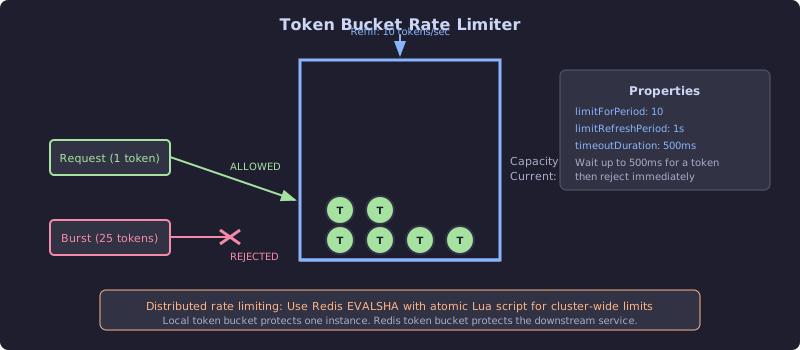
The diagram shows the token bucket mechanism. A bucket holds tokens up to a maximum capacity. Tokens refill at a fixed rate (10 per second in this example). Each request consumes one token. If tokens are available, the request is allowed. If the bucket is empty, the request is rejected. The bucket capacity enables burst handling: a full bucket can absorb a burst of requests up to its capacity before rate limiting kicks in. The bottom note highlights the distributed challenge: a local token bucket protects one instance, but protecting the downstream service across all instances requires a shared bucket in Redis.
// FROM SCRATCH - Token bucket rate limiter
public class TokenBucketRateLimiter {

    private final long capacity;
    private final double refillRate; // tokens per nanosecond
    private final AtomicLong availableTokens;
    private final AtomicLong lastRefillTime;

    /**
     * @param capacity Maximum tokens in the bucket (burst capacity)
     * @param refillPerSecond Tokens added per second (sustained rate)
     */
    public TokenBucketRateLimiter(long capacity, double refillPerSecond) {
        this.capacity = capacity;
        this.refillRate = refillPerSecond / 1_000_000_000.0;
        this.availableTokens = new AtomicLong(capacity);
        this.lastRefillTime = new AtomicLong(System.nanoTime());
    }

    /**
     * Try to acquire one token. Returns true if permitted.
     * Non-blocking: does not wait for tokens to become available.
     */
    public boolean tryAcquire() {
        refill();
        return availableTokens.getAndUpdate(tokens ->
                tokens > 0 ? tokens - 1 : 0) > 0;
    }

    /**
     * Try to acquire one token, waiting up to maxWait.
     * This variant is used when you want to queue requests
     * rather than reject them immediately.
     */
    public boolean tryAcquire(Duration maxWait) {
        long deadline = System.nanoTime() + maxWait.toNanos();

        while (System.nanoTime() < deadline) {
            if (tryAcquire()) {
                return true;
            }
            // Wait for approximately one token refill interval
            long waitNanos = (long) (1.0 / refillRate);
            LockSupport.parkNanos(Math.min(waitNanos, deadline - System.nanoTime()));
        }

        return false;
    }

    private void refill() {
        long now = System.nanoTime();
        long last = lastRefillTime.get();
        long elapsed = now - last;

        if (elapsed <= 0) return;

        long newTokens = (long) (elapsed * refillRate);
        if (newTokens > 0 && lastRefillTime.compareAndSet(last, now)) {
            availableTokens.updateAndGet(tokens ->
                    Math.min(tokens + newTokens, capacity));
        }
    }

    public long getAvailableTokens() {
        refill();
        return availableTokens.get();
    }
}
What the Scratch Implementation Reveals
The refill calculation has precision issues. With a refill rate of 10 tokens per second, the refillRate in tokens per nanosecond is 0.00000001. Multiplying elapsed nanoseconds by this tiny number and casting to long loses precision for small intervals. If the method is called every microsecond, elapsed * refillRate is 0.01, which truncates to 0 tokens. Tokens only appear when enough time has elapsed for at least one whole token. This is correct behavior (you cannot refill a fraction of a token), but it means the effective refill rate depends on how frequently the limiter is accessed. Under high load, the effective rate matches the configured rate. Under low load, tokens accumulate up to the capacity.
The compareAndSet on lastRefillTime is critical. Without it, two threads could read the same last value, both calculate the same newTokens, and both add those tokens. The bucket would refill at 2x the configured rate under concurrent access. The CAS ensures only one thread performs the refill for any given time window.
Local rate limiting does not protect the downstream service across instances. If you have 5 instances of the notification service, each with a 100/second local rate limiter, the aggregate rate to the SMS provider is 500/second. The provider’s 100/second limit is still violated. Distributed rate limiting requires a shared token bucket.
Distributed Rate Limiting with Redis
// PRODUCTION - Redis-based distributed rate limiter
@Component
public class RedisRateLimiter {

    private final StringRedisTemplate redis;
    private static final String SCRIPT = """
        local key = KEYS[1]
        local capacity = tonumber(ARGV[1])
        local refill_rate = tonumber(ARGV[2])
        local now = tonumber(ARGV[3])
        local requested = tonumber(ARGV[4])

        local bucket = redis.call('hmget', key, 'tokens', 'last_refill')
        local tokens = tonumber(bucket[1])
        local last_refill = tonumber(bucket[2])

        if tokens == nil then
            tokens = capacity
            last_refill = now
        end

        local elapsed = now - last_refill
        local new_tokens = elapsed * refill_rate / 1000
        tokens = math.min(capacity, tokens + new_tokens)

        local allowed = 0
        if tokens >= requested then
            tokens = tokens - requested
            allowed = 1
        end

        redis.call('hmset', key, 'tokens', tokens, 'last_refill', now)
        redis.call('pexpire', key, 60000)

        return { allowed, tokens }
        """;

    private final DefaultRedisScript<List> redisScript;

    public RedisRateLimiter(StringRedisTemplate redis) {
        this.redis = redis;
        this.redisScript = new DefaultRedisScript<>(SCRIPT, List.class);
    }

    public boolean tryAcquire(String key, long capacity, double refillPerSecond) {
        long now = System.currentTimeMillis();
        List result = redis.execute(redisScript,
                List.of("rate_limiter:" + key),
                String.valueOf(capacity),
                String.valueOf(refillPerSecond),
                String.valueOf(now),
                "1");
        return result != null && ((Long) result.get(0)) == 1L;
    }
}
The Lua script executes atomically in Redis. All five instances of the notification service share the same bucket. The aggregate rate is enforced at the configured limit regardless of how many instances are running.
The Production Implementation
# PRODUCTION - application.yml
resilience4j:
  ratelimiter:
    instances:
      notificationService:
        limit-for-period: 100
        # Allow 100 calls per refresh period.
        # Matches the SMS provider's rate limit.

        limit-refresh-period: 1s
        # Refresh period: 1 second.
        # Combined: 100 calls per second.

        timeout-duration: 500ms
        # Wait up to 500ms for a permit.
        # During a traffic spike, requests queue for up to 500ms
        # before being rejected. This smooths brief bursts.

        register-health-indicator: true
        # Expose health status in /actuator/health.
        # Reports DOWN when the rate limiter is consistently denying requests.
// PRODUCTION - Rate-limited notification service
@Service
public class NotificationService {
private final NotificationClient notificationClient;
private final NotificationFallback fallback;
@io.github.resilience4j.ratelimiter.annotation.RateLimiter(
name = "notificationService", fallbackMethod = "notificationFallback")
public void sendNotification(String userId, PaymentConfirmation confirmation) {
notificationClient.notify(userId, confirmation);
}
private void notificationFallback(String userId, PaymentConfirmation confirmation,
Throwable cause) {
fallback.fallbackNotify(userId, confirmation, cause);
}
}The Test
@SpringBootTest
class RateLimiterTest {

    @Autowired
    private RateLimiterRegistry rateLimiterRegistry;

    @Autowired
    private NotificationService notificationService;

    @Test
    void rateLimiter_rejectsExcessRequests() throws Exception {
        // Reconfigure for testing: 5 calls per second
        // (already configured via @DynamicPropertySource)

        int successCount = 0;
        int rejectedCount = 0;

        // Send 20 requests as fast as possible
        for (int i = 0; i < 20; i++) {
            try {
                notificationService.sendNotification("user-1", sampleConfirmation());
                successCount++;
            } catch (RequestNotPermitted e) {
                rejectedCount++;
            }
        }

        // 5 should succeed (the limit), 15 should be rejected
        // (with 500ms timeout, some additional may succeed as period refreshes)
        assertThat(successCount).isLessThanOrEqualTo(10);
        assertThat(rejectedCount).isGreaterThan(0);
    }
}
The Observable Signal
resilience4j_ratelimiter_available_permissions{name="notificationService"}
resilience4j_ratelimiter_waiting_threads{name="notificationService"}
The waiting_threads metric is the indicator of pressure. Zero waiting threads means the rate limiter is not constraining traffic. Rising waiting threads means incoming request rate is exceeding the configured limit. Alert when waiting threads exceeds 10 for more than 1 minute: traffic is consistently exceeding the rate limit, and requests are queuing.