Query DSL in Depth: Match, Bool, Function Score, and When to Use Each
Query DSL in Depth
The OpenSearch Query DSL is not one query language. It is a tree of composable query clauses, each with different scoring behavior, caching characteristics, and performance profiles. Using a match query where a term query suffices wastes analysis cycles. Using a must clause where a filter clause suffices wastes scoring computation and prevents cache utilization. Using a multi_match with the wrong type produces rankings that puzzle users and developers alike.
This chapter catalogs the query types that matter for the documentation search platform, explains when each is correct, and builds the query test set that chapters 9 and 10 use for relevance evaluation.
Match Queries
match
The match query analyzes the input text using the field’s analyzer and searches for the resulting tokens. It is the correct default for user-entered search text against analyzed fields.
// Standard match query: analyzes "connection pooling" into tokens,
// matches documents containing either or both tokens

Query matchQuery = Query.of(q -> q
    .match(m -> m
        .field("body")
        .query("connection pooling")
        .operator(Operator.Or)  // default: match either term
    )
);

/*
JSON equivalent:
{
  "match": {
    "body": {
      "query": "connection pooling",
      "operator": "or"
    }
  }
}
*/
The operator parameter changes behavior significantly:
OR(default): documents matching either “connection” OR “pooling” are returned. Higher recall, lower precision.AND: only documents matching both “connection” AND “pooling” are returned. Lower recall, higher precision.
For the documentation platform, OR is the correct default. A search for “connection pooling configuration” should return documents about connection pooling even if they do not mention “configuration.”
match_phrase
Matches the exact sequence of tokens with optional word-distance tolerance (slop):
// match_phrase: requires tokens in exact order
// "connection pooling" matches, "pooling connection" does not

Query phraseQuery = Query.of(q -> q
    .matchPhrase(mp -> mp
        .field("body")
        .query("connection pooling")
        .slop(0)  // exact phrase, no intervening words
    )
);
With slop: 2, “connection pool based pooling” would match because the terms “connection” and “pooling” are within 2 positions of each other. Use phrase queries for method signatures, configuration keys, and error messages where word order carries meaning.
multi_match
Searches the same query across multiple fields. The type parameter determines how per-field scores are combined:
// HARDENED: multi_match with cross_fields for documentation search
// Treats title and body as a single combined field for scoring.
// Prevents accidental title-match bias from best_fields.

Query multiQuery = Query.of(q -> q
    .multiMatch(mm -> mm
        .query(userQuery)
        .fields("title^3", "body", "code_snippets^0.5")
        .type(TextQueryType.CrossFields)
    )
);| multi_match type | Behavior | Use Case |
|---|---|---|
best_fields (default) | Score = max score across fields | Document strongly about the query in one field |
most_fields | Score = sum of scores across fields | Match in multiple fields indicates higher relevance |
cross_fields | Treats fields as single combined field | Search across title + body as unified content |
phrase | Runs match_phrase on each field | Exact phrase search across multiple fields |
For the documentation platform, cross_fields produces the most consistent rankings because documentation titles and bodies are semantically continuous: a term appearing in the title and a different term appearing in the body should contribute to a single combined score.
Bool Queries
The bool query composes other queries with four clause types:
// HARDENED: Complete bool query for documentation search
// Scored clauses in must/should. Non-scored clauses in filter/must_not.

Query searchQuery = Query.of(q -> q
    .bool(b -> b
        // filter: non-scoring, cacheable, applied first
        .filter(f -> f.term(t -> t.field("tenant_id").value(tenantId)))
        .filter(f -> f.term(t -> t.field("version").value("4.0")))

        // must_not: exclude without affecting score
        .mustNot(mn -> mn.term(t -> t.field("content_type").value("changelog")))

        // must: scored, all must match
        .must(mu -> mu.multiMatch(mm -> mm
            .query(userQuery)
            .fields("title^3", "body")
            .type(TextQueryType.CrossFields)
        ))

        // should: scored, optional, boosts matching documents
        .should(sh -> sh.match(m -> m
            .field("api_method")
            .query(userQuery)
            .boost(5.0f)
        ))
        .minimumShouldMatch("0")  // should clauses are optional
    )
);
Scoring rules:
mustclauses contribute to the score and must matchshouldclauses contribute to the score but are optional (unless there are nomustorfilterclauses, in which case at least oneshouldmust match)filterclauses must match but do not contribute to the score and are cachedmust_notclauses must not match, do not contribute to the score, and are cached
Function Score
Function score wraps another query and modifies the score using custom functions. This is the mechanism for boosting documents based on field values, recency, or custom business logic.
// HARDENED: Function score that boosts recently-updated documentation
// and pages with higher user ratings

Query functionScoreQuery = Query.of(q -> q
    .functionScore(fs -> fs
        .query(fq -> fq.multiMatch(mm -> mm
            .query(userQuery)
            .fields("title^3", "body")
            .type(TextQueryType.CrossFields)
        ))
        .functions(
            FunctionScore.of(fn -> fn
                .filter(f -> f.exists(e -> e.field("updated_at")))
                .exp(d -> d
                    .field("updated_at")
                    .placement(p -> p
                        .origin(JsonData.of("now"))
                        .scale(JsonData.of("90d"))
                        .decay(0.5)
                    )
                )
                .weight(1.5)
            ),
            FunctionScore.of(fn -> fn
                .fieldValueFactor(fvf -> fvf
                    .field("view_count")
                    .modifier(FieldValueFactorModifier.Log1p)
                    .missing(1.0)
                )
                .weight(0.5)
            )
        )
        .boostMode(FunctionBoostMode.Multiply)
        .scoreMode(FunctionScoreMode.Sum)
    )
);
The decay function on updated_at reduces the score of stale documentation. A document updated 90 days ago scores at 50% of its BM25 relevance. The field_value_factor on view_count uses log1p to apply diminishing returns: the difference between 0 and 100 views matters; the difference between 10,000 and 10,100 views does not.
The Query Test Set
Every relevance change from this point forward is measured against a test set of representative queries. The test set captures the documentation platform’s search patterns:
public class QueryTestSet {

    public record QueryExpectation(
        String query,
        String description,
        List<String> expectedTopDocIds,
        Map<String, String> filters
    ) {}

    public static List<QueryExpectation> documentationTestSet() {
        return List.of(
            new QueryExpectation(
                "getConnection",
                "Exact method name search",
                List.of("acme:api-ref-jdbc-connection", "acme:guide-connection-pooling"),
                Map.of("tenant_id", "acme")
            ),
            new QueryExpectation(
                "retry policy configuration",
                "Multi-word concept search",
                List.of("acme:guide-retry-policies", "acme:api-ref-http-client"),
                Map.of("tenant_id", "acme")
            ),
            new QueryExpectation(
                "SSL certificate",
                "Security configuration search",
                List.of("acme:guide-ssl-setup", "acme:api-ref-tls-config"),
                Map.of("tenant_id", "acme")
            ),
            // ... 30-50 queries covering method names, concepts,
            // configuration, error messages, and cross-cutting concerns
            new QueryExpectation(
                "NullPointerException getUserProfile",
                "Error message with method name",
                List.of("acme:troubleshooting-npe", "acme:api-ref-user-service"),
                Map.of("tenant_id", "acme")
            )
        );
    }
}
This test set is a fixture in the codebase, not a one-time analysis. Chapter 9 implements the evaluation metrics. Chapter 10 extends the test set to measure semantic search impact. No relevance change is described as an improvement without before-and-after scores against this test set.
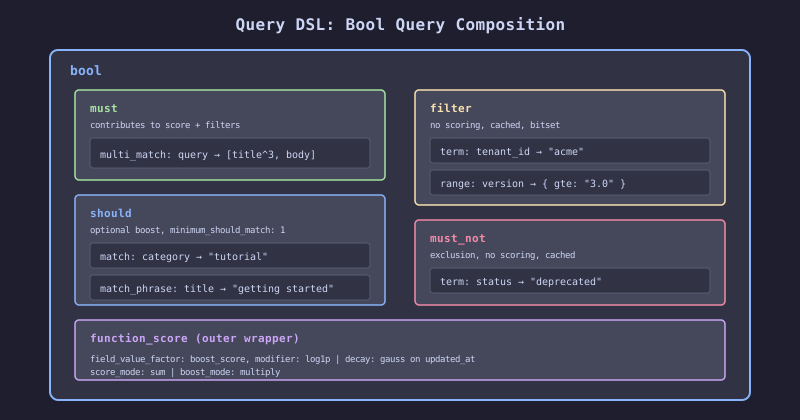
The query DSL composition tree shows how individual query clauses nest inside a bool query, which itself nests inside a function_score query. Scored clauses (must, should) affect the document ranking. Non-scored clauses (filter, must_not) narrow the result set without affecting scores and benefit from the node query cache. Function score modifiers sit at the outermost layer, adjusting the final score based on document metadata like recency or popularity.
The Decision Rule
Use match for user-entered text against analyzed fields. Use term for exact-value lookups against keyword fields. Never use term on a text field (the stored tokens are analyzed; the term query is not, so they will not match unless the user input happens to match the analyzed form).
Place non-scoring predicates in filter clauses, not must clauses. The filter cache eliminates repeated evaluation. The scoring overhead of must is wasted on predicates that do not vary across queries (like tenant ID).
Use cross_fields multi_match for the documentation platform where title and body represent a single logical content unit. Use best_fields when the document is about the query in one specific field (e.g., a title match is categorically more relevant than a body match).