The Measurement Discipline: k6, Latency Percentiles, and Why Average Response Time is a Lie
The Measurement Discipline
Before you add an index, tune a connection pool, or restructure a schema, you need a number. Not a guess. Not a hunch from the last incident. A number that describes exactly how your system behaves under load right now, before you change anything.
This book is about a high-traffic IoT telemetry and social analytics platform. Sensors push readings every second. Users interact with activity feeds. Aggregation pipelines crunch real-time analytics. Behind the API: raw sensor data ingestion at thousands of writes per second, user activity feeds with mixed read-write workloads, real-time aggregation queries running alongside operational traffic, and a growing data set that pushes the WiredTiger cache to its limits. Every chapter uses this system. Every k6 script targets it. Every failure scenario happens inside it.
Four positions run through every chapter. State them now.
Measure before you change anything. Adding an index without checking the explain("executionStats") output is a guess. Every chapter that introduces an optimization requires a JMH benchmark, a k6 load test result, a query execution plan, or an APM trace before and after the change. Opinion without a number is not performance engineering.
Schema design is your highest leverage point. Changing driver configurations is a micro-optimization. Replacing an unbounded array with an outlier pattern or converting individual events into a bucket pattern on a collection taking 10,000 writes per second is architectural. This book treats document data modeling as a strict performance discipline applied to real data shapes.
The bottleneck is almost never the database engine. Senior engineers consistently blame MongoDB when the actual bottleneck is connection pool exhaustion, BSON serialization overhead in the JVM, or the Spring Data MongoDB mapping tax. This book treats the application layer and the driver as the primary suspects in any latency investigation.
WiredTiger is not magic. The storage engine has mechanical limits. Cache eviction pressure, checkpointing stalls, and concurrent write ticket exhaustion are predictable consequences of workload patterns. Treating the storage engine as a black box leads to catastrophic degradation under load.
Why Averages Lie
The telemetry ingestion endpoint averages 85ms. The team reports this in standup. The dashboard is green.
Meanwhile, the operations queue fills with alerts about sensors failing to push data. The average says 85ms. The sensors timing out after 3 seconds say otherwise. Both are telling the truth.
Average latency is an arithmetic mean. It treats a 5ms request and a 12,000ms request as equal contributors to a single number. When the distribution is bimodal, the average lands between the two modes and describes neither.
Consider 10,000 requests to the telemetry ingestion endpoint during a burst:
- 9,500 requests complete in 12ms (document fits in WiredTiger cache, index update is fast)
- 400 requests complete in 450ms (cache miss, page fault to disk)
- 100 requests complete in 3,800ms (cache miss + connection pool wait + WiredTiger checkpoint stall)
The average: $(9500 \times 12 + 400 \times 450 + 100 \times 3800) / 10000 = 67\text{ms}$
The average says 67ms. The 100 requests that stalled for 3.8 seconds caused sensor data gaps. That data gap means a missed anomaly detection window. The average did not capture this.
Percentiles Expose the Truth
Track percentiles, not averages. Every metric in this book uses p50, p95, and p99.
| Percentile | Value | What It Tells You |
|---|---|---|
| p50 (median) | 12ms | Half your requests are faster than this. The happy path. |
| p95 | 420ms | 1 in 20 requests is slower. Cache misses and page faults. |
| p99 | 3,800ms | 1 in 100 requests is this slow. Connection pool exhaustion, checkpoint stalls. |
At 10,000 requests per minute, p99 = 3,800ms means 100 requests per minute experience nearly 4-second latency. For an IoT ingestion pipeline with a 5-second timeout, that is a 1% data loss rate. Over a day, that is 1,440 minutes of partial data gaps.
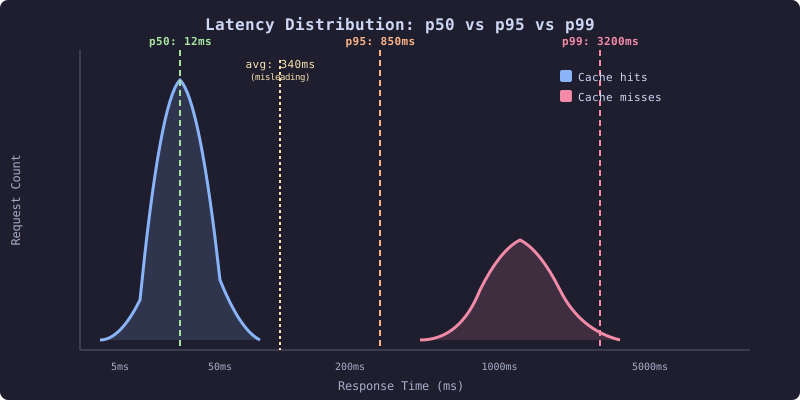
This distribution shows the bimodal latency pattern common in MongoDB workloads. The left peak represents cache hits and indexed reads completing in under 20ms. The right peak represents cache misses, connection pool waits, and WiredTiger checkpoint interference. The average (340ms) sits between the peaks and describes neither the fast requests nor the slow ones. The percentile markers reveal the tail: p99 at 3,200ms is where users and sensors experience timeouts.
The Baseline
Every chapter in this book starts with a measurement and ends with a measurement. The k6 load test suite established here is the instrument.
// k6/baseline-telemetry.js
import http from 'k6/http';
import { check, sleep } from 'k6';
import { Rate, Trend } from 'k6/metrics';

const ingestLatency = new Trend('ingest_latency', true);
const queryLatency = new Trend('query_latency', true);
const failRate = new Rate('fail_rate');

export const options = {
  scenarios: {
    sensor_ingestion: {
      executor: 'constant-arrival-rate',
      rate: 1000,
      timeUnit: '1s',
      duration: '5m',
      preAllocatedVUs: 200,
      maxVUs: 500,
      exec: 'ingestSensorData',
    },
    activity_feed_reads: {
      executor: 'constant-arrival-rate',
      rate: 200,
      timeUnit: '1s',
      duration: '5m',
      preAllocatedVUs: 50,
      maxVUs: 100,
      exec: 'readActivityFeed',
    },
    aggregation_queries: {
      executor: 'constant-arrival-rate',
      rate: 20,
      timeUnit: '1s',
      duration: '5m',
      preAllocatedVUs: 10,
      maxVUs: 30,
      exec: 'runAggregation',
    },
  },
  thresholds: {
    'ingest_latency': ['p(95)<500', 'p(99)<2000'],
    'query_latency': ['p(95)<200', 'p(99)<1000'],
    'fail_rate': ['rate<0.01'],
  },
};

const SENSOR_IDS = Array.from({length: 10000}, (_, i) => `sensor-${i}`);
const BASE_URL = __ENV.BASE_URL || 'http://localhost:8080';

export function ingestSensorData() {
  const sensorId = SENSOR_IDS[Math.floor(Math.random() * SENSOR_IDS.length)];
  const payload = JSON.stringify({
    sensorId: sensorId,
    timestamp: new Date().toISOString(),
    temperature: 20 + Math.random() * 15,
    humidity: 40 + Math.random() * 30,
    pressure: 1010 + Math.random() * 20,
    batteryLevel: Math.random() * 100,
  });

  const res = http.post(`${BASE_URL}/api/telemetry/ingest`, payload, {
    headers: { 'Content-Type': 'application/json' },
  });

  ingestLatency.add(res.timings.duration);
  failRate.add(res.status !== 201);
  check(res, { 'ingest 201': (r) => r.status === 201 });
}

export function readActivityFeed() {
  const userId = `user-${Math.floor(Math.random() * 5000)}`;
  const res = http.get(`${BASE_URL}/api/activity/${userId}?limit=50`);

  queryLatency.add(res.timings.duration);
  failRate.add(res.status !== 200);
  check(res, { 'feed 200': (r) => r.status === 200 });
}

export function runAggregation() {
  const sensorId = SENSOR_IDS[Math.floor(Math.random() * SENSOR_IDS.length)];
  const res = http.get(
    `${BASE_URL}/api/telemetry/stats/${sensorId}?window=1h`
  );

  queryLatency.add(res.timings.duration);
  failRate.add(res.status !== 200);
  check(res, { 'agg 200': (r) => r.status === 200 });
}
Run this baseline before every optimization chapter. The numbers it produces are the “before” in every before-and-after comparison. Without this baseline, you are guessing.
k6 run --out json=results/baseline.json k6/baseline-telemetry.jsThe baseline output from the telemetry platform under load:
scenarios: (100.00%) 3 scenarios, 630 max VUs, 5m30s max duration
         ✓ sensor_ingestion: 1000.00 iters/s for 5m0s
         ✓ activity_feed_reads: 200.00 iters/s for 5m0s
         ✓ aggregation_queries: 20.00 iters/s for 5m0s

     ✓ ingest 201
     ✓ feed 200
     ✓ agg 200

     fail_rate...........: 0.42%
     ingest_latency......: avg=67ms  p(50)=12ms  p(95)=420ms  p(99)=3800ms
     query_latency.......: avg=45ms  p(50)=8ms   p(95)=180ms  p(99)=1200ms
     http_reqs...........: 366000   1220/s
p99 for ingestion is 3,800ms. p99 for queries is 1,200ms. These are the numbers to beat. Every chapter in this book attacks a specific contributor to these tail latencies.