AI Agents from Scratch Part 4: Human-in-the-Loop Validation (Research Report Generator)
Previously in This Series
We’ve built tools and memory. Our agent can search the web, extract content, and remember what it’s done.
But here’s the scary part: it runs autonomously.
What if it searches for the wrong things? What if it extracts incorrect facts? What if the final report misrepresents the sources? Today, we add the guardrails.
The Series:
- Understanding the ReAct Pattern
- Building the Tool System
- State Management & Memory Architecture
- Human-in-the-Loop Validation (You are here)
- The Agent Core & Loop
- Complete Agent & Best Practices
Why Autonomous Agents Are Dangerous
Without oversight, agents can:
- Go down rabbit holes — Wasting time and tokens on irrelevant tangents
- Compound errors — A wrong assumption early ruins everything downstream
- Lose user trust — If users can’t see or influence the process, they won’t rely on it
The solution: Human-in-the-Loop (HITL) checkpoints.
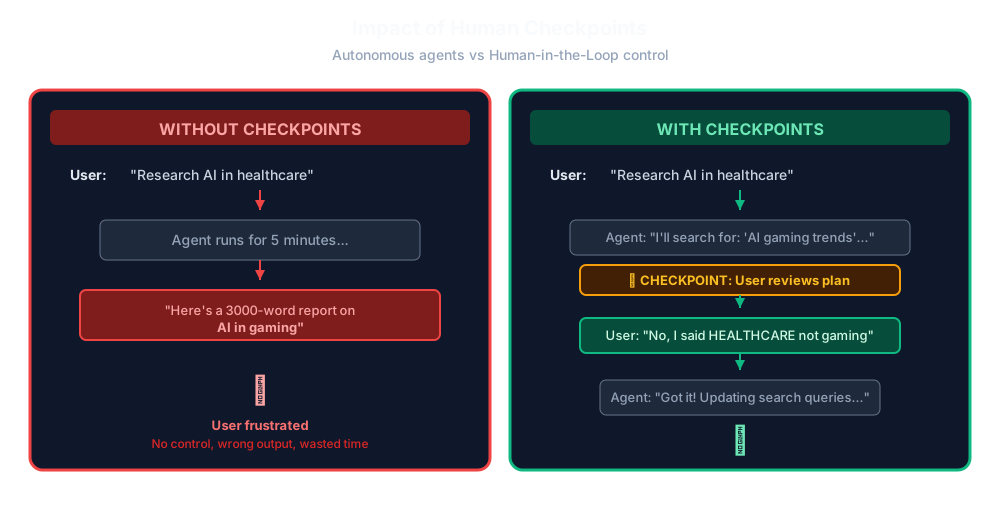
Without human checkpoints, autonomous agents risk going off-track with no opportunity for course correction. When a user requests research on AI in healthcare, an unchecked agent might misinterpret the request and spend valuable time researching the wrong topic, delivering a lengthy report on an unrelated subject like AI in gaming. This wastes computational resources and frustrates users who have no visibility or control over the process.
With checkpoints strategically placed throughout the workflow, users maintain oversight at critical decision points. When the agent proposes its research plan, the user can immediately catch misunderstandings and provide corrections. This human-in-the-loop validation ensures the agent stays aligned with user intent, prevents costly mistakes from compounding, and builds trust through transparency and control.
Where to Insert Checkpoints
Too few checkpoints = loss of control.
Too many checkpoints = tedious interruptions.
The sweet spots:
| Checkpoint | Why It Matters |
|---|---|
| After planning | Before expensive operations, validate the approach |
| Source selection | Which articles are worth reading in full? |
| Fact verification | Remove incorrect or biased information |
| Outline approval | Ensure the structure matches expectations |
| Draft review | Final chance to request changes |
Building the Checkpoint System
We’ll use the rich library for beautiful terminal output:
# human_loop.py
from rich.console import Console
from rich.panel import Panel
from rich.prompt import Prompt, Confirm
from rich.table import Table
from rich.markdown import Markdown
from typing import Optional

console = Console()

class HumanCheckpoint:
    """
    Handles human-in-the-loop interactions.
    Every major decision goes through here.
    """
Checkpoint 1: Plan Approval
After the agent creates a research plan, users review it:
@staticmethod
def approve_plan(questions: list[str], queries: list[str]) -> tuple[list[str], list[str], bool]:
    """
    Show research plan and get user approval/modification.
    Returns (modified_questions, modified_queries, approved).
    """
    console.print(Panel.fit(
        "[bold cyan]🔬 RESEARCH PLAN[/bold cyan]\n\n"
        "The agent has created a research plan. Please review:",
        title="Checkpoint 1: Planning"
    ))

    # Display questions
    console.print("\n[bold]Research Questions:[/bold]")
    for i, q in enumerate(questions, 1):
        console.print(f"  {i}. {q}")

    # Display queries
    console.print("\n[bold]Search Queries:[/bold]")
    for i, q in enumerate(queries, 1):
        console.print(f"  {i}. {q}")

    console.print()

    # User decision
    choice = Prompt.ask(
        "What would you like to do?",
        choices=["approve", "modify", "add", "reject"],
        default="approve"
    )

    if choice == "approve":
        return questions, queries, True

    elif choice == "modify":
        console.print("\n[dim]Enter new questions (one per line, empty line to finish):[/dim]")
        new_questions = []
        while True:
            q = Prompt.ask("Question", default="")
            if not q:
                break
            new_questions.append(q)

        console.print("\n[dim]Enter new search queries (one per line, empty line to finish):[/dim]")
        new_queries = []
        while True:
            q = Prompt.ask("Query", default="")
            if not q:
                break
            new_queries.append(q)

        return (
            new_questions if new_questions else questions,
            new_queries if new_queries else queries,
            True
        )

    elif choice == "add":
        # Add to existing lists
        console.print("\n[dim]Add additional questions:[/dim]")
        while True:
            q = Prompt.ask("Question (empty to stop)", default="")
            if not q:
                break
            questions.append(q)

        console.print("\n[dim]Add additional queries:[/dim]")
        while True:
            q = Prompt.ask("Query (empty to stop)", default="")
            if not q:
                break
            queries.append(q)

        return questions, queries, True

    else:  # reject
        return [], [], False
Users can:
- ✅ Approve — Proceed with the plan
- ✏️ Modify — Replace questions/queries entirely
- ➕ Add — Append to existing lists
- ❌ Reject — Abort and restart
Checkpoint 2: Source Selection
Not all search results are worth reading. Let users choose:
@staticmethod
def select_sources(sources: list[dict]) -> list[dict]:
    """Show search results and let user select which to fetch."""
    console.print(Panel.fit(
        "[bold cyan]📚 SOURCE SELECTION[/bold cyan]\n\n"
        "These sources were found. Select which ones to read in detail:",
        title="Checkpoint 2: Source Selection"
    ))

    # Build a nice table
    table = Table(show_header=True, header_style="bold")
    table.add_column("#", width=4)
    table.add_column("Title", width=40)
    table.add_column("URL", width=30)
    table.add_column("Snippet", width=50)

    for i, source in enumerate(sources, 1):
        table.add_row(
            str(i),
            source.get("title", "")[:40],
            source.get("url", "")[:30],
            source.get("snippet", "")[:50]
        )

    console.print(table)

    selection = Prompt.ask(
        "\nEnter source numbers to fetch (comma-separated, or 'all')",
        default="all"
    )

    if selection.lower() == "all":
        return sources

    try:
        indices = [int(x.strip()) - 1 for x in selection.split(",")]
        return [sources[i] for i in indices if 0 <= i < len(sources)]
    except (ValueError, IndexError):
        console.print("[yellow]Invalid selection, using all sources[/yellow]")
        return sources
This is huge for efficiency. Instead of fetching 20 pages, users might select 5 that look most relevant.
Checkpoint 3: Fact Verification
The agent extracts facts from sources. But LLMs hallucinate. Users verify:
@staticmethod
def review_facts(facts: list[dict]) -> list[dict]:
    """Show extracted facts for review. User can remove incorrect ones."""
    console.print(Panel.fit(
        "[bold cyan]✓ FACT REVIEW[/bold cyan]\n\n"
        "Review the extracted facts. Remove any that are incorrect:",
        title="Checkpoint 3: Fact Verification"
    ))

    for i, fact in enumerate(facts, 1):
        console.print(f"\n[bold]Fact {i}:[/bold]")
        console.print(f"  {fact['fact']}")
        console.print(f"  [dim]Source: {fact['source_url']}[/dim]")

    console.print()
    remove = Prompt.ask(
        "Enter fact numbers to REMOVE (comma-separated, or 'none')",
        default="none"
    )

    if remove.lower() == "none":
        return facts

    try:
        remove_indices = set(int(x.strip()) - 1 for x in remove.split(","))
        return [f for i, f in enumerate(facts) if i not in remove_indices]
    except ValueError:
        return facts
This is critical for trust. Users see exactly what goes into the report and can remove anything suspicious.
Checkpoint 4: Outline Approval
Before writing, confirm the structure:
@staticmethod
def approve_outline(outline: list[str]) -> tuple[list[str], bool]:
    """Show report outline for approval."""
    console.print(Panel.fit(
        "[bold cyan]📝 REPORT OUTLINE[/bold cyan]\n\n"
        "Review the proposed structure:",
        title="Checkpoint 4: Outline Review"
    ))

    for i, section in enumerate(outline, 1):
        console.print(f"  {i}. {section}")

    choice = Prompt.ask(
        "\nApprove this outline?",
        choices=["yes", "modify", "no"],
        default="yes"
    )

    if choice == "yes":
        return outline, True
    elif choice == "modify":
        console.print("\n[dim]Enter new outline (one section per line, empty to finish):[/dim]")
        new_outline = []
        while True:
            section = Prompt.ask("Section", default="")
            if not section:
                break
            new_outline.append(section)
        return new_outline if new_outline else outline, True
    else:
        return outline, False
Checkpoint 5: Draft Review
The most interactive checkpoint—users can revise multiple times:
@staticmethod
def review_draft(draft: str) -> tuple[str, str]:
    """Show draft and get feedback. Returns (feedback, action)."""
    console.print(Panel.fit(
        "[bold cyan]📄 DRAFT REVIEW[/bold cyan]",
        title="Checkpoint 5: Draft Review"
    ))

    # Render markdown
    console.print(Markdown(draft))

    console.print()
    action = Prompt.ask(
        "What would you like to do?",
        choices=["approve", "revise", "expand", "shorten", "restart"],
        default="approve"
    )

    feedback = ""
    if action in ["revise", "expand", "shorten"]:
        feedback = Prompt.ask("Provide specific feedback")

    return feedback, action
Actions available:
- ✅ Approve — Done, finalize
- ✏️ Revise — Make specific changes
- ➕ Expand — Add more detail to sections
- ➖ Shorten — Condense the content
- 🔄 Restart — Scrap and redo
Utility Methods
Some helper methods for consistent UI:
@staticmethod
def get_user_input(prompt: str, default: str = "") -> str:
    """Generic user input with nice formatting."""
    return Prompt.ask(f"[bold]{prompt}[/bold]", default=default)

@staticmethod
def confirm(message: str) -> bool:
    """Yes/no confirmation."""
    return Confirm.ask(message)

@staticmethod
def show_progress(phase: str, message: str):
    """Show progress indicator."""
    console.print(f"[bold blue]⚙ {phase}:[/bold blue] {message}")

@staticmethod
def show_error(message: str):
    """Show error message."""
    console.print(f"[bold red]✗ Error:[/bold red] {message}")

@staticmethod
def show_success(message: str):
    """Show success message."""
    console.print(f"[bold green]✓[/bold green] {message}")
The Flow with Checkpoints
Here’s how the research agent now flows:
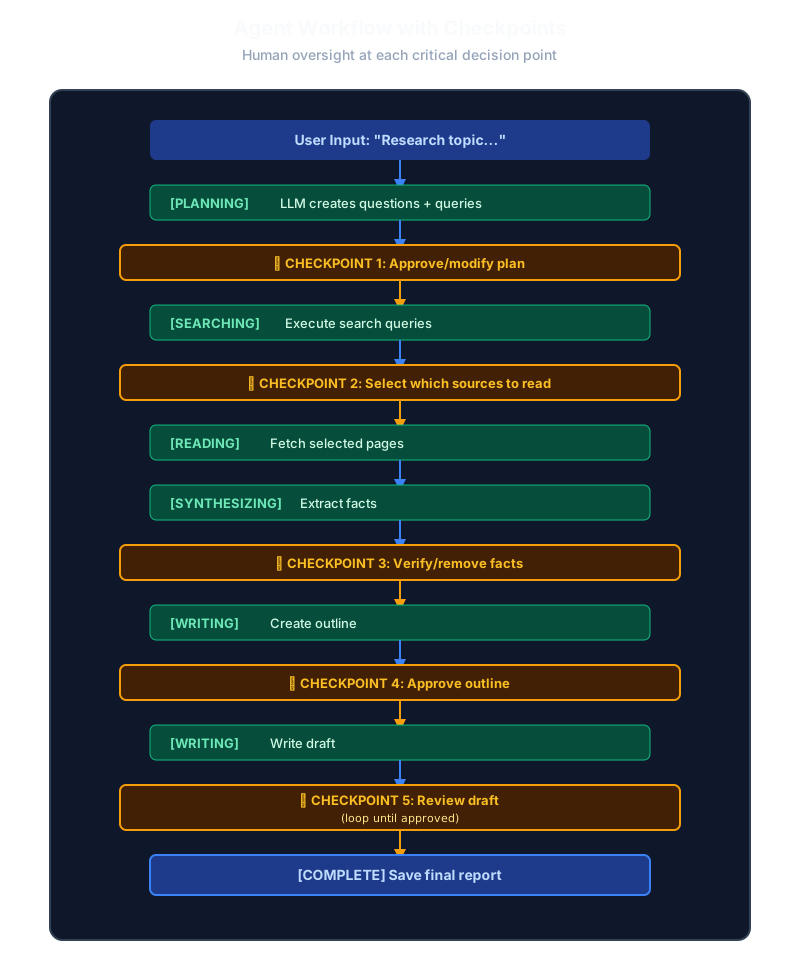
The complete research workflow integrates five strategic checkpoints that keep humans in control throughout the entire process. Starting with user input defining the research topic, the agent enters the planning phase where the LLM generates research questions and search queries. Checkpoint 1 allows users to approve or modify this plan before any expensive operations begin.
Once approved, the searching phase executes the queries, followed by Checkpoint 2 where users select which sources are worth reading in detail. This prevents wasting resources on irrelevant pages. The agent then fetches the selected pages and moves to the synthesizing phase, extracting key facts from the content.
Checkpoint 3 provides fact verification, letting users remove incorrect or biased information before it enters the report. The writing phase begins with outline creation, validated at Checkpoint 4 to ensure proper structure. After drafting the report, Checkpoint 5 enables iterative review where users can request revisions, expansions, or condensing until satisfied. Finally, the agent saves the approved final report, completing a workflow where human oversight prevents errors at every critical decision point.
What’s Coming Next
We have all the pieces:
- ✅ Tools (Part 2)
- ✅ State & Memory (Part 3)
- ✅ Human Checkpoints (Part 4)
In Part 5, we build the Agent Core—the actual loop that ties everything together:
- The system prompt that guides the LLM
- Tool execution and result handling
- The ReAct loop in code
- Phase handlers that orchestrate the workflow
This is where it all comes together into a working agent.
Key Takeaways
- Autonomous agents are risky — They can go off-track with no way to correct
- Strategic checkpoints — After planning, before expensive operations, when finalizing
- Give users options — Approve, modify, add, reject
- Show your work — Display exactly what the agent found/extracted
- Enable iteration — Draft review should loop until satisfied
Ready to build the brain? Continue to Part 5: The Agent Core →
Continue reading
Next article
Beyond the Window: Engineering Cognitive Architectures
Related Content
AI Agents from Scratch Part 1: Understanding the ReAct Pattern (Research Report Generator)
Start your journey building AI agents without frameworks. Learn the foundational ReAct pattern that powers modern agents—with a hands-on Research Report Generator example.
AI Agents from Scratch Part 2: Building the Tool System (Research Report Generator)
Give your AI agent superpowers! Build a clean tool system with web search, content extraction, and file operations—the foundation that lets agents interact with the real world.
AI Agents from Scratch Part 5: The Agent Core & Loop (Research Report Generator)
Build the brain of your AI agent! Implement the ReAct loop, system prompts, tool execution, and phase handlers that orchestrate the entire research workflow.