Lambda Internals and Execution Engineering
Lambda Internals and Execution Engineering
Lambda appears magical — upload code, it runs. The reality is a sophisticated multi-tenant execution system built on Firecracker microVMs, with an init phase you don’t directly control, a memory setting that indirectly controls CPU allocation, and a concurrency model that can either scale to thousands of instances or throttle your entire application if misconfigured.
The Execution Environment Lifecycle
Every Lambda function invocation runs inside an execution environment — an isolated sandbox with its own filesystem, memory, and process space. The lifecycle has three phases:
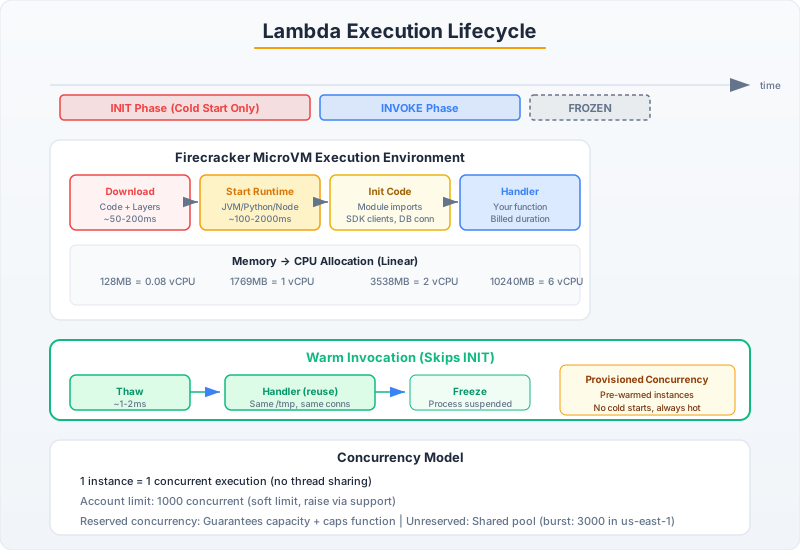
Phase 1: INIT (Cold Start)
When no warm execution environment is available, Lambda provisions a new one:
- Download code: Lambda fetches your deployment package from S3 (or ECR for container images)
- Create microVM: A Firecracker microVM boots with your configured memory allocation
- Initialize runtime: The language runtime starts (JVM, Python interpreter, Node.js V8 engine)
- Execute init code: Code outside your handler function runs — imports, connections, SDK clients
- Freeze: The environment is frozen, ready for the first invocation
The INIT phase gets 10 seconds of execution time with full configured CPU — this is free time not billed to you. Use it:
import boto3
import os
import json
from functools import lru_cache

# ALL of this runs during INIT — free cold start time
# Initialize SDK clients ONCE, reuse across invocations
dynamodb = boto3.resource('dynamodb')
table = dynamodb.Table(os.environ['TABLE_NAME'])
s3_client = boto3.client('s3')
secrets_client = boto3.client('secretsmanager')

# Pre-fetch configuration during init
@lru_cache(maxsize=1)
def get_config():
    """Cached during init, reused across warm invocations."""
    response = secrets_client.get_secret_value(
        SecretId=os.environ['CONFIG_SECRET_ARN']
    )
    return json.loads(response['SecretString'])

# Force initialization
CONFIG = get_config()

# Connection pools are established during INIT
import urllib3
http_pool = urllib3.PoolManager(maxsize=10, retries=urllib3.Retry(3))


def handler(event, context):
    """
    This runs during INVOKE phase — billed time starts here.
    SDK clients, config, and connection pools are already warm.
    """
    # Using pre-initialized resources (no connection overhead)
    item = table.get_item(Key={'pk': event['id'], 'sk': 'DATA'})
    return {'statusCode': 200, 'body': json.dumps(item.get('Item', {}))}
import software.amazon.awssdk.services.dynamodb.DynamoDbClient;
import software.amazon.awssdk.services.secretsmanager.SecretsManagerClient;
import software.amazon.awssdk.services.secretsmanager.model.GetSecretValueRequest;
import com.amazonaws.services.lambda.runtime.Context;
import com.amazonaws.services.lambda.runtime.RequestHandler;
import java.util.Map;
public class OptimizedHandler implements RequestHandler<Map<String, String>, Map<String, Object>> {
// Static initialization = INIT phase (free CPU time)
private static final DynamoDbClient DYNAMO = DynamoDbClient.create();
private static final Map<String, String> CONFIG;
static {
// Heavy initialization during cold start (not billed)
SecretsManagerClient secrets = SecretsManagerClient.create();
String secretJson = secrets.getSecretValue(GetSecretValueRequest.builder()
.secretId(System.getenv("CONFIG_SECRET_ARN"))
.build()).secretString();
CONFIG = parseJson(secretJson);
// Force class loading and JIT compilation paths
// The JVM will JIT-compile hot paths after enough invocations
System.out.println("Init complete. Config loaded: " + CONFIG.size() + " keys");
}
@Override
public Map<String, Object> handleRequest(Map<String, String> event, Context context) {
// INVOKE phase — SDK client already connected, config cached
// First invocation after cold start is still slower (JVM warmup)
// Subsequent invocations benefit from JIT optimization
return Map.of("statusCode", 200, "config_keys", CONFIG.size());
}
}Phase 2: INVOKE (Billed)
The handler function executes. Billed per millisecond. After the handler returns, the environment freezes — all background threads stop, no CPU cycles are available, timers don’t tick.
Phase 3: SHUTDOWN
After a period of inactivity (typically 5-15 minutes, varies and is not guaranteed), Lambda tears down the environment. A shutdown hook gets up to 2 seconds to clean up:
import signal
import atexit

def shutdown_handler(signum, frame):
    """Called when Lambda is about to destroy this execution environment."""
    # Flush metrics, close database connections, send remaining batch
    print("Shutting down — flushing buffers")
    flush_metrics_buffer()

signal.signal(signal.SIGTERM, shutdown_handler)
# Note: atexit handlers also work, called during SHUTDOWN phase
Memory, CPU, and Network: The Hidden Relationship
Lambda doesn’t let you configure CPU directly. Instead, CPU and network bandwidth scale linearly with memory:
| Memory | vCPU Equivalent | Network Bandwidth |
|---|---|---|
| 128 MB | 0.083 vCPU | ~70 Mbps |
| 512 MB | 0.33 vCPU | ~280 Mbps |
| 1,024 MB | 0.58 vCPU | ~580 Mbps |
| 1,769 MB | 1 full vCPU | ~1 Gbps |
| 3,538 MB | 2 vCPUs | ~2 Gbps |
| 10,240 MB | 6 vCPUs | ~10 Gbps |
Critical insight: At 1,769 MB you get a full vCPU. At 1,770 MB you get access to a second vCPU — but your code must use threads or async to benefit from it. Single-threaded code sees zero improvement above 1,769 MB.
# Benchmark: Same function at different memory configurations
# Processing a 5MB JSON file

# 128 MB: 12,400ms duration → Cost: $0.0000026/ms × 12400 = $0.032
# 256 MB: 6,200ms  → Cost: $0.0000042/ms × 6200 = $0.026
# 512 MB: 3,100ms  → Cost: $0.0000083/ms × 3100 = $0.026
# 1024 MB: 1,550ms → Cost: $0.0000167/ms × 1550 = $0.026
# 2048 MB: 1,500ms → Cost: $0.0000333/ms × 1500 = $0.050  ← No speedup, 2x cost!

# For CPU-bound work: Find the inflection point where more memory
# stops reducing duration. That's your optimal cost/performance setting.
# For I/O-bound work (API calls, DB queries): 256-512 MB is usually optimal
# because more CPU doesn't help when you're waiting on network.
Cold Start Engineering
Cold start durations by runtime (p50 / p99):
| Runtime | Cold Start p50 | Cold Start p99 | Notes |
|---|---|---|---|
| Python 3.12 | 200-400ms | 600-800ms | Fastest interpreted runtime |
| Node.js 20 | 150-350ms | 500-700ms | V8 is fast to start |
| Java 21 | 3,000-5,000ms | 8,000-12,000ms | JVM class loading dominates |
| Java 21 + SnapStart | 200-400ms | 500-800ms | Snapshot restores instantly |
| .NET 8 | 400-800ms | 1,000-2,000ms | AOT compilation helps |
| Rust/Go | 10-30ms | 50-100ms | Compiled, no runtime overhead |
Strategies to Eliminate Cold Starts
# Strategy 1: Provisioned Concurrency (guaranteed warm instances)
import boto3

lambda_client = boto3.client('lambda')

# Keep 10 instances permanently warm
lambda_client.put_provisioned_concurrency_config(
    FunctionName='payment-processor',
    Qualifier='prod',  # Must target a version or alias, not $LATEST
    ProvisionedConcurrentExecutions=10
)
# Cost: You pay for idle time (same as if they were running)
# Use for: Latency-critical paths (payment processing, real-time APIs)
# Don't use for: Batch processing, async event consumers

# Strategy 2: Keep-warm with scheduled invocations (poor man's provisioned concurrency)
# EventBridge rule: rate(5 minutes) → invoke Lambda with warmup event
def handler(event, context):
    if event.get('source') == 'aws.scheduler.warmup':
        return {'statusCode': 200, 'body': 'warm'}
    # Actual processing...
// Strategy 3: SnapStart (Java only) — Snapshot and Restore
// Configure in Lambda function settings: SnapStart = PublishedVersions
// SnapStart takes a Firecracker snapshot AFTER init completes
// Cold starts restore from snapshot instead of re-running INIT
// Result: Java cold starts drop from 5000ms to 200-400ms
// IMPORTANT: SnapStart gotchas
// 1. Randomness: Random values generated during INIT are SHARED across all restored instances
// → Use runtime randomness, not init-time randomness
import java.security.SecureRandom;
import java.util.UUID;
public class SnapStartSafeHandler {
// BAD: This random value is the same in every restored snapshot
// private static final String INSTANCE_ID = UUID.randomUUID().toString();
// GOOD: Generate at invocation time
private String getInstanceId() {
return UUID.randomUUID().toString();
}
// BAD: Connection established during INIT might be stale after restore
// private static final Connection DB_CONN = createConnection();
// GOOD: Validate/recreate connections on first invoke after restore
private Connection getConnection() {
if (connection == null || !connection.isValid(1)) {
connection = createConnection();
}
return connection;
}
}
// 2. Uniqueness: If you generate unique IDs during INIT, they'll be shared
// 3. Network connections: TCP connections from INIT are dead after restore
// 4. Caches: Time-based caches from INIT have wrong timestamps after restore
// Implement CRaC hooks for proper restore behavior:
import org.crac.*;
public class CracAwareHandler implements Resource {
static {
Core.getGlobalContext().register(new CracAwareHandler());
}
@Override
public void beforeCheckpoint(Context<? extends Resource> context) {
// Called before snapshot — close connections, flush state
closeAllConnections();
}
@Override
public void afterRestore(Context<? extends Resource> context) {
// Called after restore — re-establish connections, reset state
reinitializeConnections();
resetTimestamps();
}
}Concurrency Model
Lambda’s concurrency model is one function instance per concurrent invocation. No shared memory between invocations on different instances. The account-level default concurrent execution limit is 1,000 (soft limit, requestable increase to tens of thousands).
# Reserved Concurrency: Guarantee capacity AND cap maximum
lambda_client.put_function_concurrency(
    FunctionName='payment-processor',
    ReservedConcurrentExecutions=100
    # This function is GUARANTEED 100 concurrent instances
    # But it can NEVER exceed 100 concurrent instances
    # The remaining 900 are available to other functions
)

# Warning: Setting reserved concurrency to 0 = function is DISABLED
# This is actually used as a kill switch in incident response

# Unreserved concurrency = Account limit - sum(all reserved concurrency)
# If unreserved drops to 0, any function without reserved concurrency gets throttled
Throttling behavior: When a function hits its concurrency limit, new invocations are throttled. The behavior depends on the invocation source:
- Synchronous (API Gateway): Returns 429 to the caller
- Async (S3 events, SNS): Retries with backoff for up to 6 hours, then goes to DLQ
- Stream (DynamoDB, Kinesis): Retries at the shard level, blocking the shard
- SQS: Returns messages to queue (visibility timeout expires), retries automatically