IAM: The Real Security Model
IAM: The Real Security Model
Every AWS API call passes through the same gate: IAM’s policy evaluation engine. You’ve written Effect: Allow and Effect: Deny hundreds of times, but do you actually know what happens when an identity policy says Allow, a permission boundary says nothing, an SCP says Allow with a condition, and a resource policy on the target says Deny? The answer isn’t “Deny wins” — it’s more nuanced than that, and getting it wrong means either a security hole or a broken deployment.
IAM is not a firewall. It’s not an ACL. It’s a logic engine that evaluates up to seven different policy types in a specific order, and the evaluation differs depending on whether the request is same-account or cross-account. This chapter disassembles that engine.
The Policy Evaluation Algorithm
When a principal makes an API call, AWS evaluates policies in this order:
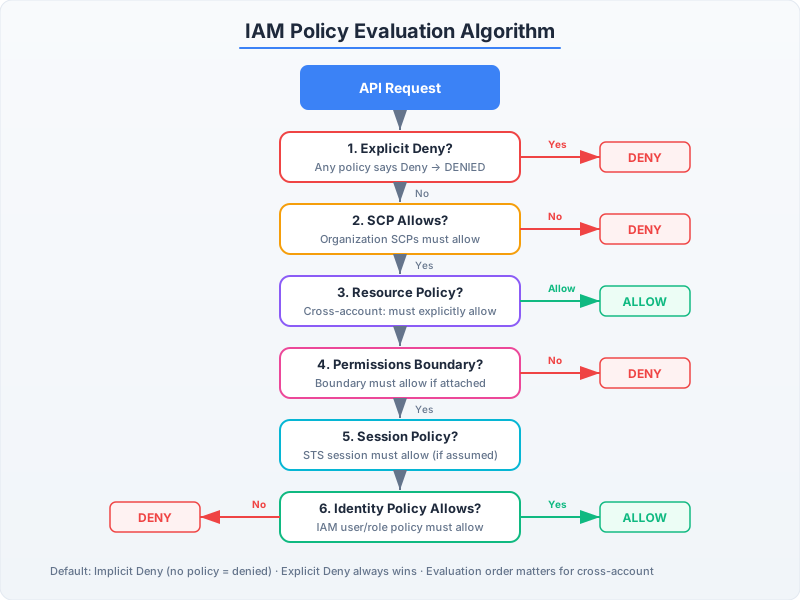
The evaluation is not a simple union of all policies. It follows a specific decision tree:
-
Explicit Deny check: If ANY applicable policy (identity, resource, SCP, permission boundary, session) contains a matching Deny statement with satisfied conditions → DENY. Full stop. No override possible.
-
Service Control Policies (SCPs): If the account is in an AWS Organization and the SCP doesn’t explicitly Allow the action → implicit DENY. SCPs are a ceiling, not a floor.
-
Resource-based policies: If the resource policy grants access to the calling principal directly (not via
*) → ALLOW — even without an identity policy granting it. This is the critical exception most people miss. -
Permission boundaries: If set, the action must be allowed by BOTH the identity policy AND the permission boundary. The boundary is an intersection filter, not an additive grant.
-
Session policies: For federated/assumed-role sessions, the effective permissions are the intersection of the role’s policies and the session policy passed during
AssumeRole. -
Identity policies: The principal’s attached managed/inline policies. If none allow the action → implicit DENY.
The key insight: Allow requires agreement from all applicable policy types. Deny from any single source vetoes everything.
Policy Evaluation in Code
Let’s trace through a real evaluation. Assume a developer role with a permission boundary:
import boto3
import json

# The identity policy attached to the developer role
identity_policy = {
    "Version": "2012-10-17",
    "Statement": [
        {
            "Effect": "Allow",
            "Action": [
                "s3:GetObject",
                "s3:PutObject",
                "s3:DeleteObject"
            ],
            "Resource": "arn:aws:s3:::project-data/*"
        },
        {
            "Effect": "Allow",
            "Action": "dynamodb:*",
            "Resource": "arn:aws:dynamodb:us-east-1:123456789012:table/app-*"
        }
    ]
}

# The permission boundary — acts as a ceiling
permission_boundary = {
    "Version": "2012-10-17",
    "Statement": [
        {
            "Effect": "Allow",
            "Action": [
                "s3:GetObject",
                "s3:PutObject",
                "dynamodb:GetItem",
                "dynamodb:PutItem",
                "dynamodb:Query"
            ],
            "Resource": "*"
        }
    ]
}

# Result: s3:DeleteObject is in identity policy but NOT in permission boundary
# → DENIED (boundary intersection removes it)
# dynamodb:DeleteItem is in identity policy (dynamodb:*) but NOT in boundary
# → DENIED
# s3:GetObject on project-data/* → ALLOWED (both agree)
# dynamodb:Query on app-* table → ALLOWED (both agree)
// Java: Demonstrating the same concept with AWS SDK v2 policy simulation
import software.amazon.awssdk.services.iam.IamClient;
import software.amazon.awssdk.services.iam.model.*;
public class PolicyEvaluationDemo {
public static void simulatePolicyEvaluation(IamClient iam) {
// Use IAM's built-in policy simulator to verify effective permissions
SimulatePrincipalPolicyRequest request = SimulatePrincipalPolicyRequest.builder()
.policySourceArn("arn:aws:iam::123456789012:role/DeveloperRole")
.actionNames(
"s3:GetObject",
"s3:DeleteObject", // Should be denied by boundary
"dynamodb:Query",
"dynamodb:DeleteItem" // Should be denied by boundary
)
.resourceArns("arn:aws:s3:::project-data/file.txt",
"arn:aws:dynamodb:us-east-1:123456789012:table/app-users")
.build();
SimulatePrincipalPolicyResponse response = iam.simulatePrincipalPolicy(request);
for (EvaluationResult result : response.evaluationResults()) {
System.out.printf("Action: %-25s Decision: %-10s Reason: %s%n",
result.evalActionName(),
result.evalDecision(),
result.matchedStatements().isEmpty() ? "implicitDeny" : "matched");
}
}
}Condition Keys: The Hidden Power
Most IAM policies use conditions as an afterthought. In production, conditions are where real security lives:
# Restrict operations to specific VPC endpoints only
vpc_restricted_policy = {
    "Version": "2012-10-17",
    "Statement": [
        {
            "Effect": "Deny",
            "Action": "s3:*",
            "Resource": [
                "arn:aws:s3:::sensitive-data",
                "arn:aws:s3:::sensitive-data/*"
            ],
            "Condition": {
                "StringNotEquals": {
                    "aws:sourceVpce": "vpce-0123456789abcdef0"
                }
            }
        }
    ]
}

# Tag-based access control (ABAC) — scales without policy updates
abac_policy = {
    "Version": "2012-10-17",
    "Statement": [
        {
            "Effect": "Allow",
            "Action": [
                "ec2:StartInstances",
                "ec2:StopInstances",
                "ec2:RebootInstances"
            ],
            "Resource": "*",
            "Condition": {
                "StringEquals": {
                    "aws:ResourceTag/team": "${aws:PrincipalTag/team}"
                }
            }
        }
    ]
}
# A principal tagged team=payments can only manage instances tagged team=payments
# Add a new team? Tag their resources and principals. Zero policy changes.
// Java: Building condition-based policies programmatically
import software.amazon.awssdk.services.iam.model.*;
import java.util.Map;
public class ConditionalPolicyBuilder {
public static String buildAbacPolicy(String tagKey) {
// Using raw JSON because the SDK doesn't have a policy builder
// (a notable gap that CDK fills — see Chapter 7)
return """
{
"Version": "2012-10-17",
"Statement": [{
"Effect": "Allow",
"Action": [
"ec2:StartInstances",
"ec2:StopInstances"
],
"Resource": "*",
"Condition": {
"StringEquals": {
"aws:ResourceTag/%s": "${aws:PrincipalTag/%s}"
}
}
}]
}
""".formatted(tagKey, tagKey);
}
}The STS AssumeRole Dance
Cross-account access in AWS always flows through sts:AssumeRole. Understanding the mechanics prevents a class of “access denied” debugging nightmares:
- Caller (Account A) calls
sts:AssumeRolewith the target role ARN in Account B - STS checks: Does the caller’s identity policy allow
sts:AssumeRoleon that ARN? - STS checks: Does the target role’s trust policy allow the caller’s principal?
- If both agree → STS issues temporary credentials (access key, secret key, session token)
- Those credentials carry the target role’s permissions, intersected with any session policy passed
The trust policy is a resource policy on the role itself:
import boto3
from datetime import datetime

# Account B: The trust policy on the role being assumed
trust_policy = {
    "Version": "2012-10-17",
    "Statement": [
        {
            "Effect": "Allow",
            "Principal": {
                "AWS": "arn:aws:iam::111111111111:role/ServiceRole"
            },
            "Action": "sts:AssumeRole",
            "Condition": {
                "StringEquals": {
                    "sts:ExternalId": "unique-external-id-12345"
                }
            }
        }
    ]
}

# Account A: Actually assuming the role
sts_client = boto3.client('sts')

response = sts_client.assume_role(
    RoleArn='arn:aws:iam::222222222222:role/CrossAccountDataAccess',
    RoleSessionName=f'data-sync-{datetime.now().strftime("%Y%m%d-%H%M%S")}',
    ExternalId='unique-external-id-12345',
    DurationSeconds=3600  # Max 1 hour for cross-account
)

# Use the temporary credentials
credentials = response['Credentials']
s3_cross_account = boto3.client(
    's3',
    aws_access_key_id=credentials['AccessKeyId'],
    aws_secret_access_key=credentials['SecretAccessKey'],
    aws_session_token=credentials['SessionToken']
)

# Now operating with Account B's role permissions
objects = s3_cross_account.list_objects_v2(Bucket='account-b-bucket')
import software.amazon.awssdk.services.sts.StsClient;
import software.amazon.awssdk.services.sts.model.*;
import software.amazon.awssdk.services.s3.S3Client;
import software.amazon.awssdk.auth.credentials.AwsSessionCredentials;
import software.amazon.awssdk.auth.credentials.StaticCredentialsProvider;
public class CrossAccountAccess {
public static S3Client assumeRoleAndGetS3Client(String roleArn, String externalId) {
StsClient sts = StsClient.create();
AssumeRoleResponse response = sts.assumeRole(AssumeRoleRequest.builder()
.roleArn(roleArn)
.roleSessionName("data-sync-" + System.currentTimeMillis())
.externalId(externalId)
.durationSeconds(3600)
.build());
Credentials creds = response.credentials();
AwsSessionCredentials sessionCreds = AwsSessionCredentials.create(
creds.accessKeyId(),
creds.secretAccessKey(),
creds.sessionToken()
);
// Build S3 client with the assumed role's credentials
return S3Client.builder()
.credentialsProvider(StaticCredentialsProvider.create(sessionCreds))
.build();
}
}The ExternalId pattern: When you allow a third party to assume a role in your account, ExternalId prevents the “confused deputy” attack. Without it, any customer of that third party could trick them into accessing YOUR resources by supplying your role ARN. The ExternalId acts as a shared secret that the third party must provide, unique per customer relationship.