Ingress Rules and TLS Termination
SummaryCovers Ingress as a Layer 7 HTTP routing...
Covers Ingress as a Layer 7 HTTP routing...
Covers Ingress as a Layer 7 HTTP routing mechanism, the NGINX Ingress Controller setup on Kind, path-based and host-based routing rules, Exact vs Prefix path types, TLS termination with Kubernetes Secrets, complete Ingress YAML examples, and debugging with kubectl get ingress and describe.
Ingress Rules and TLS Termination
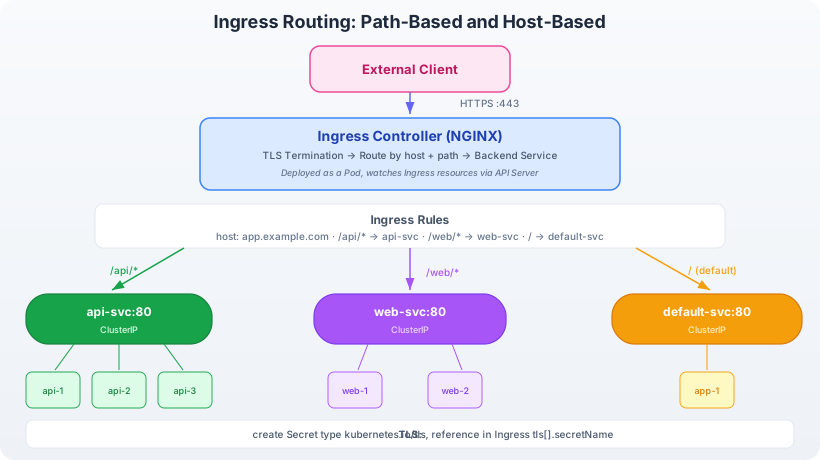
Ingress routing flow: HTTP requests arrive at the Ingress Controller (typically an NGINX or Traefik Pod running inside the cluster). The controller evaluates the request’s hostname and URL path against Ingress rules defined in Ingress resources. Based on matching rules, it proxies the request to the appropriate backend Service. For example, requests to /api route to the api-service while requests to /web route to the web-service. TLS termination happens at the Ingress Controller — it decrypts HTTPS traffic using certificates stored in Kubernetes Secrets, then forwards plain HTTP to backend Services.
What Is an Ingress?
An Ingress is a Kubernetes API resource (kind: Ingress) that defines HTTP and HTTPS routing rules. Unlike a Service, which operates at Layer 4 (TCP/UDP), an Ingress operates at Layer 7 — it inspects HTTP headers, URL paths, and hostnames to decide where to route each request.
Critically, an Ingress resource does nothing on its own. It is a declaration of routing intent. To make it functional, the cluster needs an Ingress Controller — a running process that watches Ingress resources and configures a reverse proxy (NGINX, Traefik, HAProxy, etc.) accordingly.
Think of it this way: the Ingress resource is the configuration file; the Ingress Controller is the web server that reads it.
Setting Up NGINX Ingress Controller on Kind
Kind clusters do not ship with an Ingress Controller. Install the NGINX Ingress Controller with a single command:
kubectl apply -f https://raw.githubusercontent.com/kubernetes/ingress-nginx/main/deploy/static/provider/kind/deploy.yamlWait for the controller Pod to become ready:
kubectl wait --namespace ingress-nginx \
  --for=condition=ready pod \
  --selector=app.kubernetes.io/component=controller \
  --timeout=90s
Verify the controller is running:
kubectl get pods -n ingress-nginxExpected output:
NAME                                        READY   STATUS    RESTARTS   AGE
ingress-nginx-controller-7d4d8b5c6-xyz12    1/1     Running   0          45s
The Kind cluster configuration from Chapter 2 maps host ports 80 and 443 to the control-plane node. The NGINX Ingress Controller’s Service uses hostPort on these ports, so HTTP traffic to localhost:80 reaches the Ingress Controller.
Path-Based Routing
The most common Ingress pattern routes different URL paths to different backend Services.
Setting Up Backend Services
Create two Deployments and Services:
kubectl create deployment api --image=hashicorp/http-echo -- -text="API response"
kubectl expose deployment api --port=80 --target-port=5678

kubectl create deployment web --image=hashicorp/http-echo -- -text="Web response"
kubectl expose deployment web --port=80 --target-port=5678
Creating the Ingress Resource
apiVersion: networking.k8s.io/v1
kind: Ingress
metadata:
  name: app-ingress
  annotations:
    nginx.ingress.kubernetes.io/rewrite-target: /
spec:
  ingressClassName: nginx
  rules:
    - http:
        paths:
          - path: /api
            pathType: Prefix
            backend:
              service:
                name: api
                port:
                  number: 80
          - path: /web
            pathType: Prefix
            backend:
              service:
                name: web
                port:
                  number: 80
Key fields:
ingressClassName: nginx: Links this Ingress to the NGINX Ingress Controller. Multiple controllers can coexist in a cluster, each watching for Ingress resources with their class name.rules: A list of routing rules. Each rule can specify ahost(hostname) and a list ofpaths.path: /api: Matches requests whose URL path starts with/api.pathType: Prefix: Determines how the path is matched (see below).backend.service: The Service and port to forward matched requests to.
Apply it:
kubectl apply -f app-ingress.yamlTest the routes:
curl http://localhost/api
# Output: API response

curl http://localhost/web
# Output: Web response
Path Types
Kubernetes supports three path matching strategies:
Prefix
Matches any URL path that starts with the specified value, split on / boundaries:
path: /apimatches/api,/api/,/api/v1,/api/v1/userspath: /apidoes not match/apisor/apikey(no/boundary match)
Prefix is the most commonly used path type and the one you will reach for most often on the exam.
Exact
Matches the URL path exactly — no prefix matching, no trailing slash tolerance:
path: /apimatches only/api- Does not match
/api/or/api/v1
Use Exact when you need to distinguish between /api and /api/v1 as separate routes.
ImplementationSpecific
Matching behavior depends on the Ingress Controller. NGINX treats this similarly to Prefix, but other controllers may differ. Avoid this type on the exam unless specifically asked — Prefix and Exact cover almost all scenarios.
Host-Based Routing
Host-based routing inspects the HTTP Host header to route requests to different backends:
apiVersion: networking.k8s.io/v1
kind: Ingress
metadata:
  name: multi-host-ingress
spec:
  ingressClassName: nginx
  rules:
    - host: api.example.com
      http:
        paths:
          - path: /
            pathType: Prefix
            backend:
              service:
                name: api
                port:
                  number: 80
    - host: web.example.com
      http:
        paths:
          - path: /
            pathType: Prefix
            backend:
              service:
                name: web
                port:
                  number: 80
Requests to api.example.com route to the api Service. Requests to web.example.com route to the web Service. Both share the same Ingress Controller and external IP.
Test with curl using the Host header:
curl -H "Host: api.example.com" http://localhost/
# Output: API response

curl -H "Host: web.example.com" http://localhost/
# Output: Web response
You can combine host-based and path-based routing within a single Ingress resource. For example, api.example.com/v1 and api.example.com/v2 can route to different backends.
TLS Termination
Ingress Controllers can terminate TLS (HTTPS) using certificates stored in Kubernetes Secrets. The controller decrypts incoming HTTPS traffic and forwards plain HTTP to backend Services.
Step 1: Create a TLS Secret
Generate a self-signed certificate (for lab purposes):
openssl req -x509 -nodes -days 365 -newkey rsa:2048 \
  -keyout tls.key -out tls.crt \
  -subj "/CN=app.example.com"
Create a Kubernetes Secret of type kubernetes.io/tls:
kubectl create secret tls app-tls --cert=tls.crt --key=tls.keyStep 2: Reference the Secret in the Ingress
apiVersion: networking.k8s.io/v1
kind: Ingress
metadata:
  name: tls-ingress
spec:
  ingressClassName: nginx
  tls:
    - hosts:
        - app.example.com
      secretName: app-tls
  rules:
    - host: app.example.com
      http:
        paths:
          - path: /
            pathType: Prefix
            backend:
              service:
                name: web
                port:
                  number: 80
The tls section tells the Ingress Controller to:
- Listen for HTTPS connections on
app.example.com - Load the certificate and key from the
app-tlsSecret - Terminate TLS at the controller and forward decrypted traffic to the
webService on port 80
Test with curl (allowing self-signed certs):
curl -k -H "Host: app.example.com" https://localhost/The -k flag skips certificate verification (acceptable for self-signed certs in lab environments).
Exam Tip: TLS Secret Format
The Secret must be type kubernetes.io/tls and contain two keys: tls.crt (certificate) and tls.key (private key). Any other format causes the Ingress Controller to reject it silently — the Ingress will not serve HTTPS, and kubectl describe ingress may show a warning in the Events section.
Inspecting and Debugging Ingress
View Ingress Resources
kubectl get ingressExpected output:
NAME          CLASS   HOSTS             ADDRESS     PORTS     AGE
app-ingress   nginx   *                 localhost   80        5m
tls-ingress   nginx   app.example.com   localhost   80, 443   2m
The PORTS column shows 80, 443 when TLS is configured.
Describe for Details
kubectl describe ingress app-ingressThis shows:
- The rules and their backend Services
- Whether the backends have endpoints (connected to Pods)
- Events — look here for configuration errors
Common Issues
| Symptom | Cause | Fix |
|---|---|---|
| 404 for all paths | No Ingress Controller running | Install the NGINX Ingress Controller |
| 503 Service Temporarily Unavailable | Backend Service has no endpoints | Check Service selector matches Pod labels |
| TLS not working | Secret not found or wrong type | Verify Secret exists and is type kubernetes.io/tls |
| Wrong backend receiving traffic | Path matching order | More specific paths should appear first; use Exact for precise matches |
ADDRESS column empty | Ingress Controller hasn’t processed the resource | Check ingressClassName matches the controller |
Logs from the Ingress Controller
When routing does not work as expected, check the controller’s logs:
kubectl logs -n ingress-nginx -l app.kubernetes.io/component=controller --tail=50The NGINX controller logs every request with the status code, upstream service, and response time. A 502 or 503 in the log paired with the upstream address helps pinpoint whether the issue is the backend Pod or the routing configuration.
Default Backend
When no Ingress rule matches an incoming request (wrong hostname, wrong path), the Ingress Controller returns a 404. You can configure a default backend that handles unmatched requests:
apiVersion: networking.k8s.io/v1
kind: Ingress
metadata:
  name: fallback-ingress
spec:
  ingressClassName: nginx
  defaultBackend:
    service:
      name: fallback-svc
      port:
        number: 80
  rules:
    - host: app.example.com
      http:
        paths:
          - path: /api
            pathType: Prefix
            backend:
              service:
                name: api
                port:
                  number: 80
Requests to app.example.com/api route to the api Service. Requests to any other path on app.example.com, or requests with no matching host, route to fallback-svc. This is useful for serving custom 404 pages or redirecting unknown paths.
Ingress Annotations
Ingress Controllers extend Ingress behavior through annotations. The NGINX Ingress Controller supports dozens of annotations for customizing routing, timeouts, rate limiting, and more. Key annotations for CKAD:
annotations:
  # Rewrite the URL path before forwarding
  nginx.ingress.kubernetes.io/rewrite-target: /

  # Enable SSL redirect (HTTP → HTTPS)
  nginx.ingress.kubernetes.io/ssl-redirect: "true"

  # Set proxy timeout
  nginx.ingress.kubernetes.io/proxy-read-timeout: "60"

  # Limit request body size
  nginx.ingress.kubernetes.io/proxy-body-size: "10m"
The rewrite-target annotation is the most commonly needed. Without it, a request to /api/users is forwarded as /api/users to the backend. With rewrite-target: /, the path is rewritten to /users before forwarding. If the backend expects paths without the Ingress prefix, this annotation is required.
Exam Tips for Ingress
- Always verify the Ingress Controller is running before creating Ingress resources. On the exam, the controller may already be deployed.
- Use
ingressClassNamerather than the deprecatedkubernetes.io/ingress.classannotation. The field-based approach is the current standard. - TLS Secrets must be in the same namespace as the Ingress resource. Cross-namespace Secret references are not supported.
- Test with curl and Host header:
curl -H "Host: my.domain.com" http://<ingress-ip>/lets you test host-based routing without DNS configuration. - Check Events section of
kubectl describe ingressfor configuration errors — this is where the controller reports issues with missing backends or invalid TLS Secrets.