Network Policies and Connectivity Debugging
SummaryCovers the default all-open Pod networking model, NetworkPolicy...
Covers the default all-open Pod networking model, NetworkPolicy...
Covers the default all-open Pod networking model, NetworkPolicy structure with podSelector and policyTypes, default deny patterns for ingress and egress, allow rules using podSelector/namespaceSelector/ipBlock, complete YAML examples, and connectivity debugging with kubectl exec and network tools. Includes four exercises covering Service DNS, Ingress routing, NetworkPolicy isolation, and Service debugging.
Network Policies and Connectivity Debugging
NetworkPolicy traffic control: a NetworkPolicy selects a group of Pods using podSelector (shown as the target Pods in the center). Ingress rules define which sources are allowed to send traffic to those Pods — sources can be other Pods (podSelector), entire namespaces (namespaceSelector), or IP ranges (ipBlock). Egress rules define which destinations the selected Pods are allowed to send traffic to. Traffic not explicitly allowed by a rule is denied. Pods not selected by any NetworkPolicy remain fully open — they accept all ingress and egress traffic.
Default Behavior: No Isolation
Out of the box, Kubernetes does not restrict Pod communication. Every Pod can reach every other Pod, regardless of namespace. Every Pod can make outbound connections to any IP address. There are no firewalls, no ACLs, no isolation boundaries.
This all-open model is intentional — it makes bootstrapping easy. But it means that the moment you deploy a sensitive workload (a database, a payment service, an auth server), any compromised Pod in the cluster can reach it. NetworkPolicies close this gap.
Important: NetworkPolicies are enforced by the CNI plugin, not by Kubernetes itself. If your cluster uses a CNI that does not support NetworkPolicies (like Flannel in its default configuration or Kind’s default kindnet), you can create NetworkPolicy resources without errors, but they will have no effect. CNI plugins that enforce NetworkPolicies include Calico, Cilium, and Weave Net.
NetworkPolicy Structure
A NetworkPolicy has four key sections:
apiVersion: networking.k8s.io/v1
kind: NetworkPolicy
metadata:
  name: example-policy
  namespace: default
spec:
  podSelector:
    matchLabels:
      app: backend
  policyTypes:
    - Ingress
    - Egress
  ingress:
    - from:
        - podSelector:
            matchLabels:
              app: frontend
      ports:
        - protocol: TCP
          port: 8080
  egress:
    - to:
        - podSelector:
            matchLabels:
              app: database
      ports:
        - protocol: TCP
          port: 5432
podSelector
Selects which Pods this policy applies to. In the example above, the policy targets all Pods with label app: backend in the default namespace. An empty podSelector: {} selects all Pods in the namespace.
policyTypes
Declares whether the policy controls ingress, egress, or both. This field matters even if you only define ingress rules — if you list Egress in policyTypes but provide no egress rules, all egress traffic is denied for the selected Pods.
ingress
Defines what incoming traffic is allowed. Each entry in the ingress list is a rule composed of from (source selectors) and ports (allowed destination ports). Multiple entries in from within the same rule are OR’d together.
egress
Defines what outgoing traffic is allowed. Structure mirrors ingress: to (destination selectors) and ports.
Default Deny All Ingress
The most common starting point for NetworkPolicy enforcement is denying all ingress traffic to a namespace, then selectively allowing specific flows.
apiVersion: networking.k8s.io/v1
kind: NetworkPolicy
metadata:
  name: deny-all-ingress
  namespace: default
spec:
  podSelector: {}
  policyTypes:
    - Ingress
This policy:
- Selects all Pods in
default(emptypodSelector) - Declares
Ingressas a policy type - Has no
ingressrules — meaning no ingress traffic is allowed
After applying this policy, no Pod in default can receive traffic from any source (including Pods in the same namespace). Egress is unaffected because Egress is not listed in policyTypes.
Default Deny All Egress
apiVersion: networking.k8s.io/v1
kind: NetworkPolicy
metadata:
  name: deny-all-egress
  namespace: default
spec:
  podSelector: {}
  policyTypes:
    - Egress
This blocks all outbound traffic from Pods in default. Be cautious — this also blocks DNS resolution (UDP port 53), which prevents Pods from resolving Service names. You typically pair this with an egress rule that allows DNS.
Default Deny All (Ingress + Egress)
apiVersion: networking.k8s.io/v1
kind: NetworkPolicy
metadata:
  name: deny-all
  namespace: default
spec:
  podSelector: {}
  policyTypes:
    - Ingress
    - Egress
This is the most restrictive starting point. After applying it, Pods in default cannot send or receive any traffic. Layer additional policies on top to open specific paths.
Allow Rules: podSelector, namespaceSelector, ipBlock
After establishing deny-all, you create additional NetworkPolicies that allow specific traffic patterns.
Allow from Specific Pods (Same Namespace)
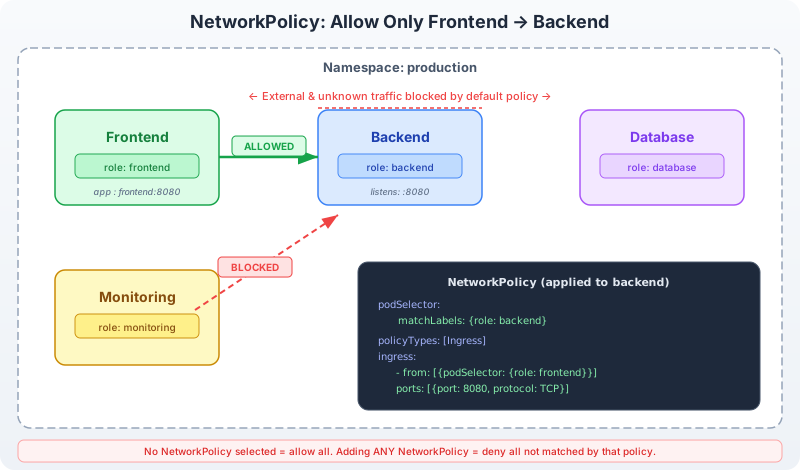
Allow frontend Pods to reach backend Pods on port 8080:
apiVersion: networking.k8s.io/v1
kind: NetworkPolicy
metadata:
  name: allow-frontend-to-backend
  namespace: default
spec:
  podSelector:
    matchLabels:
      app: backend
  policyTypes:
    - Ingress
  ingress:
    - from:
        - podSelector:
            matchLabels:
              app: frontend
      ports:
        - protocol: TCP
          port: 8080
Only Pods with app: frontend in the same namespace can reach Pods with app: backend on TCP 8080. All other ingress to backend Pods remains denied.
Allow from Specific Namespace
Allow all Pods in the monitoring namespace to reach backend Pods:
apiVersion: networking.k8s.io/v1
kind: NetworkPolicy
metadata:
  name: allow-monitoring
  namespace: default
spec:
  podSelector:
    matchLabels:
      app: backend
  policyTypes:
    - Ingress
  ingress:
    - from:
        - namespaceSelector:
            matchLabels:
              name: monitoring
      ports:
        - protocol: TCP
          port: 8080
The namespaceSelector matches namespaces by label. You must label the namespace first:
kubectl label namespace monitoring name=monitoringCombined podSelector and namespaceSelector
There is a subtle but critical distinction in how from entries are structured:
OR logic (two separate entries in from):
ingress:
  - from:
      - podSelector:
          matchLabels:
            app: frontend
      - namespaceSelector:
          matchLabels:
            name: monitoring
This allows traffic from frontend Pods in the same namespace OR from any Pod in the monitoring namespace.
AND logic (single entry with both selectors):
ingress:
  - from:
      - podSelector:
          matchLabels:
            app: frontend
        namespaceSelector:
          matchLabels:
            name: production
This allows traffic only from Pods with app: frontend that are also in a namespace labeled name: production. Both conditions must be true.
The difference is one YAML list entry vs. two. This is a frequent exam trap — read the indentation carefully.
Allow from IP Blocks
Allow traffic from an external network range:
ingress:
  - from:
      - ipBlock:
          cidr: 10.0.0.0/8
          except:
            - 10.0.1.0/24
    ports:
      - protocol: TCP
        port: 443
This allows ingress from the 10.0.0.0/8 range except the 10.0.1.0/24 subnet. ipBlock is useful for allowing traffic from external load balancers or specific corporate networks.
Egress Rules
Egress rules follow the same structure as ingress, using to instead of from:
apiVersion: networking.k8s.io/v1
kind: NetworkPolicy
metadata:
  name: backend-egress
  namespace: default
spec:
  podSelector:
    matchLabels:
      app: backend
  policyTypes:
    - Egress
  egress:
    - to:
        - podSelector:
            matchLabels:
              app: database
      ports:
        - protocol: TCP
          port: 5432
    - to: []
      ports:
        - protocol: UDP
          port: 53
This policy allows backend Pods to:
- Connect to database Pods on TCP 5432
- Send DNS queries (UDP 53) to any destination
The DNS rule is critical. Without it, backend Pods cannot resolve Service names, and any connection attempt using DNS names will fail — even if another rule allows the destination IP.
Complete Example: Three-Tier Application
A realistic scenario: frontend, backend, and database tiers with strict isolation:
# Deny all traffic in the namespace
apiVersion: networking.k8s.io/v1
kind: NetworkPolicy
metadata:
  name: deny-all
  namespace: app
spec:
  podSelector: {}
  policyTypes:
    - Ingress
    - Egress
---
# Allow frontend to receive external traffic and reach backend
apiVersion: networking.k8s.io/v1
kind: NetworkPolicy
metadata:
  name: frontend-policy
  namespace: app
spec:
  podSelector:
    matchLabels:
      tier: frontend
  policyTypes:
    - Ingress
    - Egress
  ingress:
    - from: []
      ports:
        - protocol: TCP
          port: 80
  egress:
    - to:
        - podSelector:
            matchLabels:
              tier: backend
      ports:
        - protocol: TCP
          port: 8080
    - to: []
      ports:
        - protocol: UDP
          port: 53
---
# Allow backend to receive from frontend and reach database
apiVersion: networking.k8s.io/v1
kind: NetworkPolicy
metadata:
  name: backend-policy
  namespace: app
spec:
  podSelector:
    matchLabels:
      tier: backend
  policyTypes:
    - Ingress
    - Egress
  ingress:
    - from:
        - podSelector:
            matchLabels:
              tier: frontend
      ports:
        - protocol: TCP
          port: 8080
  egress:
    - to:
        - podSelector:
            matchLabels:
              tier: database
      ports:
        - protocol: TCP
          port: 5432
    - to: []
      ports:
        - protocol: UDP
          port: 53
---
# Allow database to receive from backend only
apiVersion: networking.k8s.io/v1
kind: NetworkPolicy
metadata:
  name: database-policy
  namespace: app
spec:
  podSelector:
    matchLabels:
      tier: database
  policyTypes:
    - Ingress
  ingress:
    - from:
        - podSelector:
            matchLabels:
              tier: backend
      ports:
        - protocol: TCP
          port: 5432
This configuration ensures:
- Frontend Pods accept external traffic on port 80 and can reach backend on port 8080
- Backend Pods only accept traffic from frontend and can reach database on port 5432
- Database Pods only accept traffic from backend
- No other communication is permitted
Debugging Connectivity
When traffic between Pods is blocked (or unexpectedly allowed), use these techniques:
Test with kubectl exec
# Test TCP connectivity
kubectl exec -it frontend-pod -- wget -qO- --timeout=3 http://backend-svc:8080

# Test with curl (if available in the image)
kubectl exec -it frontend-pod -- curl -s --max-time 3 http://backend-svc:8080

# Test with netcat for port connectivity
kubectl exec -it frontend-pod -- nc -zv backend-svc 8080 -w 3
Deploy a Debug Pod
If existing Pods lack network tools:
kubectl run nettest --image=nicolaka/netshoot --rm -it --restart=Never -- bashInside the debug Pod:
# DNS resolution
nslookup backend-svc

# TCP connectivity
curl -s --max-time 3 http://backend-svc:8080

# Trace the route
traceroute backend-svc
Check NetworkPolicy Configuration
# List all policies in the namespace
kubectl get networkpolicies -n default

# Inspect a specific policy
kubectl describe networkpolicy allow-frontend-to-backend

# Verify Pod labels match the policy's podSelector
kubectl get pods --show-labels
Common Issues
| Symptom | Cause | Fix |
|---|---|---|
| All traffic blocked after applying deny-all | Expected behavior | Add allow policies for specific traffic |
| DNS resolution fails | Egress deny blocks UDP 53 | Add egress rule allowing UDP port 53 |
| Policy has no effect | CNI does not support NetworkPolicies | Switch to Calico or Cilium |
| Allow rule not working | Label mismatch between policy and Pods | Compare podSelector labels with kubectl get pods --show-labels |
| Cross-namespace traffic blocked | Missing namespaceSelector | Add namespaceSelector to the from block and label the source namespace |
Exercises
Work through these exercises on your Kind cluster. Complete YAML manifests and step-by-step solutions are provided in Chapter 13.
Exercise 1: ClusterIP Service with DNS Resolution
Create a Deployment named echo-server with 2 replicas running hashicorp/http-echo with the argument -text="hello from echo". Create a ClusterIP Service named echo-svc that routes to the Deployment on port 80 (targetPort 5678). Launch a temporary busybox Pod and verify that nslookup echo-svc resolves to the Service’s ClusterIP, then wget -qO- echo-svc returns the echo response.
Exercise 2: Ingress Routing on Kind
Deploy two applications: api-app (http-echo with text “API”) and web-app (http-echo with text “WEB”). Create Services for both (port 80, targetPort 5678). Create an Ingress resource with NGINX class that routes /api to api-app and /web to web-app. Verify both routes work with curl http://localhost/api and curl http://localhost/web.
Exercise 3: NetworkPolicy — Frontend to Backend Isolation
Create a namespace called netpol-lab. Deploy a backend Pod (nginx, label tier=backend) and a frontend Pod (busybox, label tier=frontend, running sleep 3600). Create a NetworkPolicy that:
- Applies to Pods with
tier=backend - Allows ingress only from Pods with
tier=frontendon TCP port 80 - Denies all other ingress
Verify that frontend can reach backend on port 80, then create a third Pod intruder (without the tier=frontend label) and verify it cannot reach backend.
Exercise 4: Debug a Broken Service
Create a Deployment named debug-app with 2 replicas running nginx:1.25 with labels app=debug-app. Create a Service named debug-svc with selector app=debug-wrong (intentionally wrong). Diagnose why debug-svc returns no endpoints. Fix the Service selector and verify connectivity.