Dependency Management and Type-Safe Validation
SummaryThis section tackles the two most common sources...
This section tackles the two most common sources...
This section tackles the two most common sources of silent production failures in data science: dependency drift and unvalidated data. We start with a realistic disaster caused by unpinned transitive dependencies, then build a locked environment with uv that resolves and installs packages 10–100x faster than pip. We then address the second failure mode — data that lies about its types — by introducing Pydantic models for feature validation, showing how to catch malformed rows at ingestion rather than discovering them as NaN-poisoned model outputs weeks later.
The Dependency Disaster: A Post-Mortem
Here is a requirements.txt that has shipped to production at hundreds of companies:
pandas>=2.0
scikit-learn
numpy
fastapi
This file is a time bomb. Let’s trace exactly how it detonates.
On January 15th, you run pip install -r requirements.txt. Pip resolves pandas==2.1.4, numpy==1.26.3, scikit-learn==1.4.0. Your model trains. Your tests pass. You deploy.
On March 3rd, a new team member clones the repo and runs the same command. Pip now resolves pandas==2.2.1, numpy==2.0.0, scikit-learn==1.4.2. NumPy 2.0 is a breaking release — it removes deprecated aliases that scikit-learn 1.4.0 uses internally. The import fails:
AttributeError: module 'numpy' has no attribute 'float_'Your colleague spends four hours debugging. The fix? Pin numpy<2.0. But now pandas==2.2.1 requires numpy>=2.0. You’re in dependency hell, and pip has no mechanism to tell you this upfront because requirements.txt doesn’t capture the full resolution graph.
This is not a tooling problem you can discipline your way out of. It’s a structural deficiency in pip freeze workflows. You need a lockfile.
uv: Dependency Management That Respects Your Time
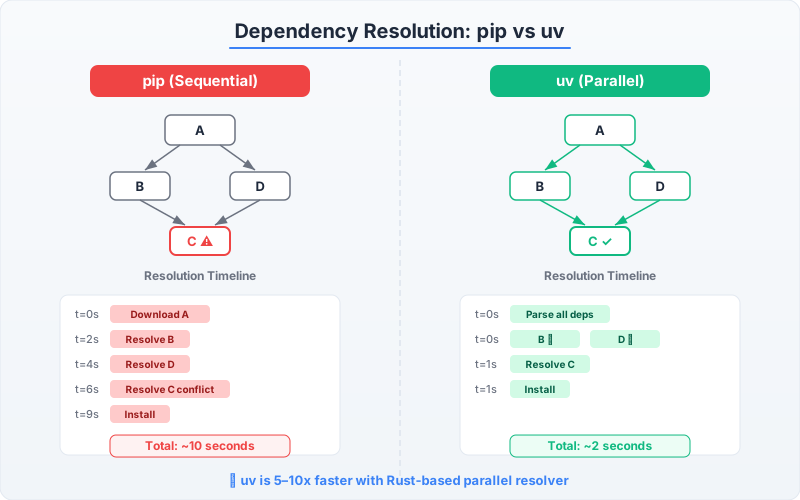
uv is a Python package manager written in Rust by the Astral team (the same people behind ruff). It replaces pip, pip-tools, virtualenv, and pyenv with a single binary. The speed difference is not incremental — it is categorical.
| Operation | pip | uv | Speedup |
|---|---|---|---|
| Create virtualenv | 2.1s | 0.01s | ~200x |
| Install 50 packages (cold) | 38s | 1.2s | ~30x |
| Install 50 packages (cached) | 12s | 0.15s | ~80x |
| Resolve dependency tree | 8s | 0.3s | ~25x |
Speed matters because slow installs discourage people from creating fresh environments. When pip install takes 45 seconds, developers reuse stale environments. When uv sync takes 1 second, there’s no reason not to start clean.
Setting Up uv
Install uv as a standalone binary — it doesn’t need Python to install itself:
# Install uv (Linux/macOS)
curl -LsSf https://astral.sh/uv/install.sh | sh

# Verify installation
uv --version
Initialize a new project with a pyproject.toml:
# Create project structure
uv init ml-forecasting
cd ml-forecasting

# Pin Python version
uv python pin 3.12

# Add dependencies
uv add polars scikit-learn pydantic fastapi
uv add --dev pytest ruff mypy ipykernel
This generates a pyproject.toml that serves as the single source of truth:
[project]
name = "ml-forecasting"
version = "0.1.0"
requires-python = ">=3.12"
dependencies = [
    "polars>=1.20.0",
    "scikit-learn>=1.6.0",
    "pydantic>=2.10.0",
    "fastapi>=0.115.0",
]

[dependency-groups]
dev = [
    "pytest>=8.3.0",
    "ruff>=0.9.0",
    "mypy>=1.14.0",
    "ipykernel>=6.29.0",
]

[build-system]
requires = ["hatchling"]
build-backend = "hatchling.backends"
Now generate and inspect the lockfile:
# Generate deterministic lockfile
uv lock

# Inspect what was resolved
head -30 uv.lock
The uv.lock file captures the exact version of every transitive dependency, their hashes, and their platform-specific markers. When your colleague runs uv sync three months from now, they get byte-identical packages. The January-vs-March problem is eliminated.
The Daily Workflow
# Sync environment to match lockfile (idempotent, fast)
uv sync

# Run a script inside the managed environment
uv run python src/forecasting/models/train.py

# Run tests
uv run pytest tests/

# Add a new dependency (updates pyproject.toml + uv.lock)
uv add xgboost

# Remove a dependency
uv remove xgboost

# Update a specific package
uv lock --upgrade-package scikit-learn
The critical command is uv sync. It reads the lockfile, diffs it against the current environment, and installs or removes packages to match — in under a second. Run it every time you pull from version control.
When to Use Poetry Instead
Poetry predates uv and remains a solid choice for teams already invested in it. Here’s an honest comparison:
| Criteria | uv | Poetry |
|---|---|---|
| Speed | 10–100x faster | Adequate |
| Lockfile format | Cross-platform by default | Cross-platform |
| Build backend | Flexible (hatchling, setuptools) | Poetry-specific |
| Plugin ecosystem | Growing | Mature |
| Python version management | Built-in (uv python) | Requires external tool |
| Adoption in ML ecosystem | Accelerating | Established |
Use Poetry if your team already uses it and has no pain points. Use uv for new projects — the speed advantage compounds across CI builds, Docker layer caching, and developer experience. This book standardizes on uv.
Type Safety: Because DataFrames Lie
You’ve solved the dependency problem. Your environment is locked and reproducible. Now let’s address the second silent killer: data that doesn’t match your assumptions.
Consider this CSV that arrives from a partner’s API every morning:
customer_id,age,annual_income,credit_score
1001,34,72000.00,750
1002,28,54000.00,680
1003,forty-one,91000.00,720
1004,55,,800
1005,42,63000.00,excellent
Row 3 has a string in the age column. Row 4 has a missing annual_income. Row 5 has a string in credit_score. If you load this with Pandas:
import pandas as pd

df = pd.read_csv("customers.csv")
print(df.dtypes)
customer_id int64
age object # ← silently became object (mixed types)
annual_income float64 # ← NaN for missing, but dtype looks fine
credit_score object # ← also silently became objectPandas will not raise an error. It will silently coerce the age column to object dtype — a Python object array that stores a mix of integers and strings. Your feature engineering code will run. Your model will train on garbage. You might not notice for weeks, until someone audits why predictions for 41-year-olds have mysteriously disappeared from the output.
Pydantic: Validation at the Boundary
Pydantic models define the schema your data must conform to and raise precise errors when it doesn’t. Place validation at the boundary — the moment data enters your system — so corrupted rows never reach your feature pipeline.
from pydantic import BaseModel, Field, ValidationError


class CustomerRow(BaseModel):
    """Schema for a single row of customer data.

    Validation happens at construction time. If any field
    fails its type constraint, Pydantic raises a ValidationError
    with the field name, expected type, and received value.
    """
    customer_id: int
    age: int = Field(ge=18, le=120)
    annual_income: float = Field(gt=0)
    credit_score: int = Field(ge=300, le=850)
Now write a loader that validates every row and separates clean data from errors:
import csv
from pathlib import Path
from dataclasses import dataclass, field

import polars as pl
from pydantic import ValidationError


@dataclass
class LoadResult:
    """Container for validated data and any validation errors."""
    valid_rows: list[dict] = field(default_factory=list)
    errors: list[dict] = field(default_factory=list)

    @property
    def error_rate(self) -> float:
        total = len(self.valid_rows) + len(self.errors)
        return len(self.errors) / total if total > 0 else 0.0


def load_customers(path: Path, max_error_rate: float = 0.05) -> pl.DataFrame:
    """Load and validate customer data.

    Raises ValueError if more than max_error_rate fraction
    of rows fail validation — a sign of upstream data corruption.
    """
    result = LoadResult()

    with open(path) as f:
        reader = csv.DictReader(f)
        for line_num, row in enumerate(reader, start=2):
            try:
                validated = CustomerRow(**row)
                result.valid_rows.append(validated.model_dump())
            except ValidationError as e:
                result.errors.append({
                    "line": line_num,
                    "raw": row,
                    "errors": e.errors(),
                })

    if result.error_rate > max_error_rate:
        raise ValueError(
            f"Data quality check failed: {result.error_rate:.1%} of rows "
            f"invalid (threshold: {max_error_rate:.1%}). "
            f"First error: line {result.errors[0]['line']}, "
            f"{result.errors[0]['errors']}"
        )

    if result.errors:
        print(
            f"Warning: {len(result.errors)} rows skipped "
            f"({result.error_rate:.1%} error rate)"
        )

    return pl.DataFrame(result.valid_rows)
Run this against the corrupted CSV:
from pathlib import Path

df = load_customers(Path("customers.csv"))
ValueError: Data quality check failed: 60.0% of rows invalid (threshold: 5.0%).
First error: line 4, [{'type': 'int_parsing', 'loc': ('age',),
'msg': 'Input should be a valid integer, unable to parse string as an integer',
'input': 'forty-one'}]Three rows out of five failed validation: the string age, the missing income, and the string credit score. The error message tells you exactly which line, which field, and what went wrong. Compare this to Pandas silently converting columns to object dtype and letting corrupted data flow downstream for weeks.
Composing Pydantic with Polars
Once data passes validation, you’re working with a Polars DataFrame that has guaranteed types. This enables a pattern where Pydantic guards the boundary and Polars handles computation:
def build_features(df: pl.DataFrame) -> pl.DataFrame:
    """Build features from validated customer data.

    Because the input is Pydantic-validated, we know:
    - age is an integer between 18 and 120
    - annual_income is a positive float
    - credit_score is an integer between 300 and 850
    No defensive type checks needed here.
    """
    return df.with_columns(
        (pl.col("annual_income") / pl.col("age")).alias("income_per_year_of_age"),
        (pl.col("credit_score") / 850.0).alias("credit_score_normalized"),
        pl.when(pl.col("annual_income") > 100_000)
        .then(pl.lit("high"))
        .when(pl.col("annual_income") > 50_000)
        .then(pl.lit("medium"))
        .otherwise(pl.lit("low"))
        .alias("income_bracket"),
    )
Notice what’s absent from this function: no try/except, no isinstance checks, no pd.to_numeric(errors='coerce') calls. The validation boundary upstream guarantees that this code receives clean data. This separation — validate at ingestion, compute with confidence — is the pattern you should adopt across every pipeline.
Type Hints Beyond Pydantic
Pydantic validates data at runtime. Type hints validated by mypy catch logic errors at development time. Use both.
from typing import Literal

import polars as pl


def split_dataset(
    df: pl.DataFrame,
    target_col: str,
    test_fraction: float = 0.2,
    strategy: Literal["random", "temporal"] = "random",
    temporal_col: str | None = None,
) -> tuple[pl.DataFrame, pl.DataFrame]:
    """Split a dataset into train and test sets.

    When strategy is 'temporal', temporal_col must be provided.
    mypy catches the case where you pass strategy='temporal'
    but forget temporal_col — at type-check time, not runtime.
    """
    if strategy == "temporal":
        if temporal_col is None:
            raise ValueError(
                "temporal_col is required when strategy='temporal'"
            )
        sorted_df = df.sort(temporal_col)
        split_idx = int(len(sorted_df) * (1 - test_fraction))
        return sorted_df[:split_idx], sorted_df[split_idx:]

    shuffled = df.sample(fraction=1.0, shuffle=True, seed=42)
    split_idx = int(len(shuffled) * (1 - test_fraction))
    return shuffled[:split_idx], shuffled[split_idx:]
Configure mypy in your pyproject.toml:
[tool.mypy]
python_version = "3.12"
strict = true
warn_return_any = true
warn_unused_configs = true
disallow_untyped_defs = true

[[tool.mypy.overrides]]
module = ["sklearn.*", "xgboost.*"]
ignore_missing_imports = true
Run the type checker as part of your development loop:
uv run mypy src/The combination of Pydantic (runtime data validation) and mypy (static logic validation) creates two safety nets that catch different classes of errors. Neither alone is sufficient. Together, they eliminate the two most common ways data science code fails silently: bad data and bad logic.
You now have a locked environment that installs identically everywhere and a validation layer that rejects corrupt data before it reaches your models. The next section addresses where this code lives — the repository structure that makes it testable, reviewable, and maintainable.