Repository Structure and Version Control for Data
SummaryThis section dismantles the monolithic notebook anti-pattern and...
This section dismantles the monolithic notebook anti-pattern and...
This section dismantles the monolithic notebook anti-pattern and replaces it with a modular repository structure that separates data loading, feature engineering, training, and serving into testable Python modules. We then introduce DVC (Data Version Control) to solve the problem git cannot: tracking large datasets and model artifacts with the same rigor as source code. By the end, the reader has a complete, reproducible ML project where every model can be traced to the exact data, code, and hyperparameters that produced it.
The Notebook Monolith
Open any data science team’s shared drive and you will find a file named something like model_v2_final_actually_final_johns_fixes.ipynb. This notebook contains 147 cells. Cells 1–30 load and clean data. Cells 31–80 engineer features. Cells 81–120 train three different models. Cells 121–140 evaluate them. Cells 141–147 serialize the winner and make predictions.
This notebook has four fatal properties:
It is unreviewable. GitHub diffs on .ipynb files show JSON noise — cell metadata changes, output blobs, execution counters. A reviewer cannot tell what code changed without reconstructing the entire notebook in their head.
It is untestable. You cannot import cell [47] into a test file. You cannot mock the database connection in cell [12] without executing all preceding cells. The only way to test the notebook is to run it end-to-end, which takes 45 minutes and requires access to production data.
It is stateful. Cell execution order matters. Run cell 50 before cell 30 and you get a NameError. Run cell 80 twice and you double your feature matrix. The notebook’s correctness depends on the sequence of human clicks, which is not reproducible.
It is undeployable. No production system executes Jupyter notebooks. Eventually, someone must extract the “important” cells into a .py file. This extraction is manual, error-prone, and invalidates all previous testing (which was already inadequate).
The solution is to never put production logic in notebooks in the first place. Notebooks are for exploration — visualizing distributions, testing hypotheses, prototyping transformations. Once an approach proves viable, the code moves to a Python module with type hints, tests, and a clear interface.
A Production ML Repository Structure
Here is the layout this book uses for every ML project. Each directory has a single responsibility.
ml-forecasting/
├── pyproject.toml          # Dependencies and tool configuration
├── uv.lock                 # Deterministic lockfile
├── dvc.yaml                # Pipeline stages
├── dvc.lock                # Data/model version hashes
├── params.yaml             # Hyperparameters (single source of truth)
├── .gitignore
├── .dvcignore
│
├── src/
│   └── forecasting/
│       ├── __init__.py
│       ├── data/
│       │   ├── __init__.py
│       │   ├── loader.py       # Raw data ingestion + Pydantic validation
│       │   ├── transforms.py   # Feature engineering (pure functions)
│       │   └── splitter.py     # Train/val/test splitting logic
│       ├── models/
│       │   ├── __init__.py
│       │   ├── train.py        # Training entrypoint
│       │   ├── evaluate.py     # Metric computation + reporting
│       │   └── registry.py     # Model serialization/loading
│       └── serving/
│           ├── __init__.py
│           ├── predict.py      # Inference logic
│           └── schemas.py      # API request/response models
│
├── configs/
│   ├── train.yaml          # Model hyperparameters
│   └── features.yaml       # Feature definitions and encodings
│
├── data/
│   ├── raw/                # Immutable source data (DVC-tracked)
│   └── processed/          # Transformed features (DVC-tracked)
│
├── models/                 # Serialized model artifacts (DVC-tracked)
│
├── notebooks/              # Exploration ONLY
│   └── eda/
│       └── 01_distributions.ipynb
│
├── tests/
│   ├── conftest.py         # Shared fixtures
│   ├── test_loader.py
│   ├── test_transforms.py
│   ├── test_train.py
│   └── fixtures/
│       └── sample_data.csv # Small, deterministic test data
│
└── scripts/
    └── run_pipeline.py     # CLI entry point for full pipeline
Why This Layout Works
src/ layout with namespace package. Placing code under src/forecasting/ prevents accidental imports from the project root. When you run uv run python -m forecasting.models.train, Python resolves the import from the installed package, not from a loose file in the working directory. This eliminates an entire class of “it works locally but not in Docker” bugs.
Pure functions in transforms.py. Feature engineering functions take a DataFrame and return a DataFrame. No side effects, no database calls, no file I/O. This makes them trivially testable:
# src/forecasting/data/transforms.py
import polars as pl


def add_rolling_features(
    df: pl.DataFrame,
    value_col: str,
    windows: list[int],
) -> pl.DataFrame:
    """Add rolling mean and std features for specified windows.

    Pure function: no side effects, deterministic output
    for the same input.
    """
    expressions = []
    for w in windows:
        expressions.extend([
            pl.col(value_col)
            .rolling_mean(window_size=w)
            .alias(f"{value_col}_rolling_mean_{w}"),
            pl.col(value_col)
            .rolling_std(window_size=w)
            .alias(f"{value_col}_rolling_std_{w}"),
        ])
    return df.with_columns(expressions)
# tests/test_transforms.py
import polars as pl
from forecasting.data.transforms import add_rolling_features
def test_rolling_features_column_names() -> None:
df = pl.DataFrame({
"date": ["2024-01-01", "2024-01-02", "2024-01-03",
"2024-01-04", "2024-01-05"],
"price": [100.0, 102.0, 99.0, 105.0, 103.0],
})
result = add_rolling_features(df, "price", windows=[3])
assert "price_rolling_mean_3" in result.columns
assert "price_rolling_std_3" in result.columns
assert result.shape[0] == 5
def test_rolling_features_values() -> None:
df = pl.DataFrame({"value": [1.0, 2.0, 3.0, 4.0, 5.0]})
result = add_rolling_features(df, "value", windows=[3])
# First two rows should be null (insufficient window)
assert result["value_rolling_mean_3"][0] is None
assert result["value_rolling_mean_3"][1] is None
# Third row: mean of [1, 2, 3] = 2.0
assert result["value_rolling_mean_3"][2] == 2.0This test runs in milliseconds. No GPU, no database, no 10 GB dataset. The function is pure, so it’s fast to test and impossible to break with execution order.
Configs separated from code. Hyperparameters live in params.yaml, not hardcoded in training scripts. This enables two things: DVC can track parameter changes as part of the pipeline, and you can swap configurations without modifying Python files.
# params.yaml
train:
  n_estimators: 500
  max_depth: 8
  learning_rate: 0.05
  early_stopping_rounds: 20

features:
  rolling_windows: [7, 14, 30]
  target_col: "price"
  categorical_cols: ["sector", "region"]
# src/forecasting/models/train.py
from pathlib import Path
import yaml
import polars as pl
from sklearn.ensemble import GradientBoostingRegressor
import joblib
def load_params(path: Path = Path("params.yaml")) -> dict:
"""Load hyperparameters from YAML config."""
with open(path) as f:
return yaml.safe_load(f)
def train_model(
train_df: pl.DataFrame,
target_col: str,
params: dict,
) -> GradientBoostingRegressor:
"""Train a gradient boosting model with specified parameters."""
feature_cols = [c for c in train_df.columns if c != target_col]
X = train_df.select(feature_cols).to_numpy()
y = train_df[target_col].to_numpy()
model = GradientBoostingRegressor(
n_estimators=params["n_estimators"],
max_depth=params["max_depth"],
learning_rate=params["learning_rate"],
)
model.fit(X, y)
return model
if __name__ == "__main__":
params = load_params()
train_data = pl.read_parquet("data/processed/train.parquet")
model = train_model(
train_data,
target_col=params["features"]["target_col"],
params=params["train"],
)
output_path = Path("models/model.joblib")
output_path.parent.mkdir(parents=True, exist_ok=True)
joblib.dump(model, output_path)
print(f"Model saved to {output_path}")Cookie-Cutter Templates
Starting from scratch every time is wasteful. The cookiecutter-data-science template provides a reasonable starting point:
uv tool install cookiecutter
cookiecutter https://github.com/drivendataorg/cookiecutter-data-science
Use it as a starting point, then deviate deliberately. Common deviations for production ML:
- Remove
Makefilein favor of DVC pipelines oruv runscripts. Makefiles can’t express data dependencies. - Add
src/layout — the default template puts code at the project root, which causes import ambiguity. - Add
serving/directory — most templates assume offline batch processing, not real-time inference. - Replace
setup.pywithpyproject.toml— the Python packaging ecosystem has moved on.
DVC: Git for Data and Models
Git tracks code. It cannot track data. A 2 GB training dataset stored in git will bloat the repository permanently — even after deletion, the blob lives in git history. git clone becomes a 20-minute ordeal. Large model files (500 MB+) make it worse.
DVC (Data Version Control) solves this by storing pointer files in git and the actual data in remote storage (S3, GCS, Azure Blob, or even a local directory).
The DVC Mental Model
Think of DVC as a layer on top of git that extends version control to large files.
| What | Tracked by | Stored in |
|---|---|---|
| Python source code | git | GitHub/GitLab |
pyproject.toml, params.yaml | git | GitHub/GitLab |
| Raw data (2 GB CSV) | DVC (pointer in git) | S3/GCS/local remote |
| Processed features (500 MB parquet) | DVC (pointer in git) | S3/GCS/local remote |
| Trained model (200 MB joblib) | DVC (pointer in git) | S3/GCS/local remote |
Pipeline definition (dvc.yaml) | git | GitHub/GitLab |
Pipeline state (dvc.lock) | git | GitHub/GitLab |
When you run git log, you see when code and parameters changed. When you inspect dvc.lock, you see the exact hash of the data and model for that commit. Together, they answer: “What code, data, and parameters produced this model?”
Setting Up DVC
# Install DVC (with S3 support)
uv add dvc dvc-s3

# Initialize DVC in an existing git repo
uv run dvc init

# Configure remote storage
uv run dvc remote add -d myremote s3://my-ml-bucket/dvc-store

# Or use a local directory for learning
uv run dvc remote add -d localremote /tmp/dvc-store
DVC creates a .dvc/ directory (analogous to .git/) and a .dvcignore file. Both should be committed to git.
Tracking Data Files
# Add a large dataset to DVC tracking
uv run dvc add data/raw/transactions.csv
This command does three things:
- Computes the MD5 hash of
transactions.csv - Creates
data/raw/transactions.csv.dvc— a small pointer file containing the hash - Adds
data/raw/transactions.csvto.gitignoreso git never touches the actual data
The pointer file looks like this:
# data/raw/transactions.csv.dvc
outs:
- md5: a1b2c3d4e5f6789012345678abcdef01
  size: 2147483648
  hash: md5
  path: transactions.csv
Now commit the pointer to git and push the data to remote storage:
git add data/raw/transactions.csv.dvc data/raw/.gitignore
git commit -m "Track transactions dataset v1"

# Push actual data to remote storage
uv run dvc push
When a colleague clones the repo, they get the pointer file from git and pull the actual data from remote storage:
git clone https://github.com/team/ml-forecasting.git
cd ml-forecasting
uv sync          # Install Python dependencies
uv run dvc pull  # Download data from remote storage
DVC Pipelines: Reproducible End-to-End
Individual file tracking is useful, but the real power of DVC is pipelines. A dvc.yaml file defines the stages of your ML workflow — their commands, dependencies, and outputs. DVC tracks the entire graph and only re-executes stages whose inputs have changed.
# dvc.yaml
stages:
  prepare:
    cmd: uv run python src/forecasting/data/loader.py
    deps:
      - src/forecasting/data/loader.py
      - data/raw/transactions.csv
    params:
      - features.target_col
      - features.categorical_cols
    outs:
      - data/processed/train.parquet
      - data/processed/test.parquet

  train:
    cmd: uv run python src/forecasting/models/train.py
    deps:
      - src/forecasting/models/train.py
      - data/processed/train.parquet
    params:
      - train.n_estimators
      - train.max_depth
      - train.learning_rate
    outs:
      - models/model.joblib

  evaluate:
    cmd: uv run python src/forecasting/models/evaluate.py
    deps:
      - src/forecasting/models/evaluate.py
      - models/model.joblib
      - data/processed/test.parquet
    metrics:
      - metrics.json:
          cache: false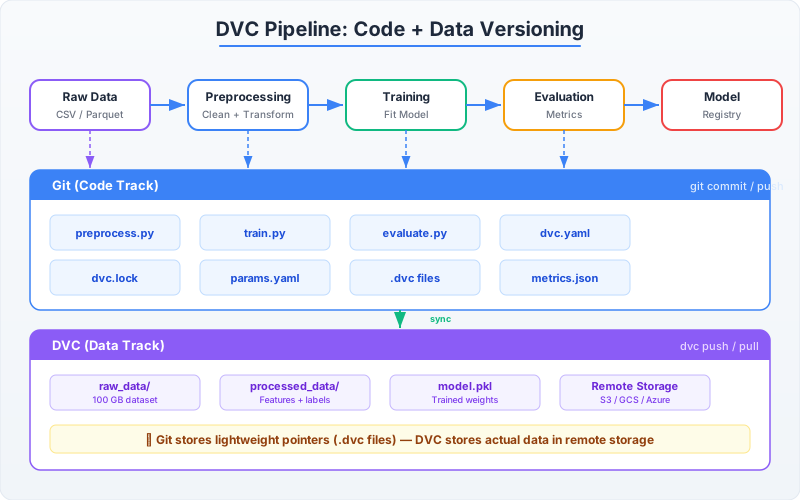
Run the entire pipeline:
uv run dvc reproDVC computes the dependency graph (prepare → train → evaluate), checks which stages have stale inputs, and re-executes only what’s necessary. If you change a hyperparameter in params.yaml, DVC skips prepare (data hasn’t changed) and re-runs train and evaluate.
After a successful run, DVC updates dvc.lock with the hashes of all inputs and outputs. Commit this file to git:
git add dvc.lock metrics.json
git commit -m "Train model: RMSE=0.043, n_estimators=500"

# Push updated data/model artifacts to remote
uv run dvc push
Reproducing Any Historical Model
This is where the investment pays off. Suppose you need to reproduce the model from three months ago — the one that performed better on a specific customer segment. With DVC + git:
# Check out the code and DVC pointers from that date
git checkout abc123f

# Pull the exact data that existed at that commit
uv sync
uv run dvc checkout

# Reproduce the pipeline (should be a no-op if nothing changed)
uv run dvc repro
You now have the identical model, trained on the identical data, with the identical hyperparameters. No guessing which CSV was on whose laptop. No “I think we used the March version of the dataset.” The answer is in dvc.lock.
The Complete Workflow in Practice
Here’s what a typical development day looks like with this setup:
# Morning: pull latest code and data
git pull
uv sync
uv run dvc pull

# Develop: modify feature engineering
# Edit src/forecasting/data/transforms.py

# Test your changes
uv run pytest tests/test_transforms.py -v

# Run the pipeline (only changed stages re-execute)
uv run dvc repro

# Check metrics
cat metrics.json

# Commit everything
git add -A
git commit -m "Add 30-day rolling volatility feature, RMSE improved 0.043→0.038"
uv run dvc push
git push
Every commit in your git history now tells a complete story: what code changed, what data was used, what parameters were set, and what metrics resulted. You’ve built an audit trail that would take weeks to reconstruct manually — and it cost you two extra commands (dvc repro and dvc push) added to your existing workflow.
Bringing It All Together
The four pillars from Chapter 1 are now in place:
uvlocks your dependencies so environments are identical across machines and time.- Pydantic validates data at ingestion so corrupted rows never reach your models.
- The
src/layout separates concerns so code is testable, reviewable, and importable. - DVC versions data and models alongside code so any result can be reproduced exactly.
None of these tools are complex. Each adds minutes to your setup and seconds to your daily workflow. What they eliminate — the 2 AM debugging sessions, the irreproducible results, the “it works on my machine” conversations — saves weeks per quarter.
In Chapter 2, we turn to the data itself: loading, cleaning, and transforming real-world datasets with Polars — and understanding why it’s replacing Pandas in performance-critical pipelines.