Polars: The DataFrame That Respects Your Hardware
SummaryThis section dissects why Pandas consumes excessive memory...
This section dissects why Pandas consumes excessive memory...
This section dissects why Pandas consumes excessive memory and CPU, then introduces Polars as a production-grade alternative. You will learn the Polars expression API, the difference between eager and lazy evaluation, how to read and interpret query plans, and how to migrate existing Pandas code. Every concept is anchored to benchmarks and runnable code.
Polars: The DataFrame That Respects Your Hardware
2.1 — When Pandas Fails (and Why)
Before reaching for a new tool, you need to understand exactly what is broken. Pandas performance problems are not bugs — they are consequences of design decisions made when datasets fit in a few megabytes.
The Memory Model Problem
When Pandas reads a CSV, here is what happens in memory:
import pandas as pd
import sys

df = pd.read_csv("users.csv")  # 1 million rows, 5 columns

# Check actual memory usage
print(df.memory_usage(deep=True).sum() / 1e6, "MB")
A CSV file with 1 million rows and 5 columns (id, name, email, age, signup_date) might be 80MB on disk. In a Pandas DataFrame, it consumes 250–350MB. Here is why:
String columns use Python objects. Each string value is a full Python str object with 50+ bytes of overhead (reference count, type pointer, hash, length, and the actual characters). A column of 1 million email addresses at 25 characters each costs ~75MB as raw bytes — but ~150MB as Python objects.
The dtype object is a lie. When you see dtype: object, Pandas stores an array of 8-byte pointers, each pointing to a heap-allocated Python object. This prevents vectorized operations and forces row-by-row Python interpreter overhead.
Operations copy by default. Most Pandas operations return a new DataFrame. Chaining five transformations creates five intermediate copies. Even with copy-on-write (introduced in Pandas 2.0), many operations still materialize full copies because the optimization cannot apply universally.
# Each line creates a new DataFrame in memory
df = df[df["age"] > 18]                    # Copy 1
df = df.assign(domain=df["email"].str.split("@").str[1])  # Copy 2
df = df.drop(columns=["email"])            # Copy 3
df = df.sort_values("signup_date")         # Copy 4
df = df.reset_index(drop=True)             # Copy 5
# Peak memory: ~5x the size of the original DataFrame
The Single-Thread Problem
Measure it yourself:
import pandas as pd
import numpy as np
import time

# Generate a realistic dataset
n = 20_000_000
rng = np.random.default_rng(42)
df = pd.DataFrame({
    "customer_id": rng.integers(0, 500_000, n),
    "product_id": rng.integers(0, 10_000, n),
    "amount": rng.uniform(1.0, 500.0, n).round(2),
    "category": rng.choice(["electronics", "clothing", "food", "books", "home"], n),
})

start = time.perf_counter()
result = df.groupby("category").agg(
    total=("amount", "sum"),
    mean_amount=("amount", "mean"),
    unique_customers=("customer_id", "nunique"),
)
elapsed = time.perf_counter() - start
print(f"Pandas groupby: {elapsed:.2f}s")
# Typical result on 8-core machine: 4.2 seconds (1 core used)
While this runs, open a system monitor. You will see one core at 100% and seven cores idle. You paid for an 8-core machine and Pandas uses 12.5% of it.
2.2 — Polars Fundamentals
Polars is a DataFrame library written in Rust, exposed to Python via PyO2. It was designed from scratch with three principles that directly address the Pandas failures above:
- Apache Arrow memory format — columnar, zero-copy, no Python object overhead
- Multi-threaded execution engine — automatic parallelism across all available cores
- Lazy evaluation with query optimization — predicate pushdown, projection pushdown, and join reordering
Install it:
uv add polarsEager vs. Lazy: Two Modes, One Library
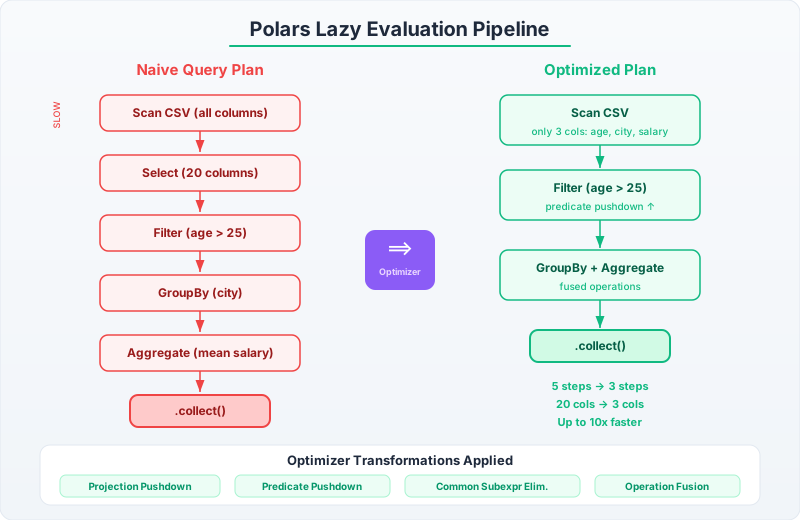
Polars offers both eager (DataFrame) and lazy (LazyFrame) execution. Eager mode behaves like Pandas — each operation executes immediately. Lazy mode builds a computation graph and optimizes it before execution.
Always default to lazy mode. Eager mode exists for interactive exploration. Production code should use scan_csv, scan_parquet, and .lazy() to enter lazy mode, and .collect() to trigger execution.
import polars as pl

# Eager: executes immediately (like Pandas)
df = pl.read_csv("orders.csv")
result = df.filter(pl.col("amount") > 100).group_by("category").agg(pl.col("amount").sum())

# Lazy: builds a plan, optimizes, then executes
lf = pl.scan_csv("orders.csv")
result = (
    lf.filter(pl.col("amount") > 100)
    .group_by("category")
    .agg(pl.col("amount").sum())
    .collect()  # Execution happens here
)
The lazy version can be dramatically faster because Polars applies optimizations before executing:
- Predicate pushdown: the
amount > 100filter is applied during the CSV scan, not after loading the entire file into memory - Projection pushdown: only the
amountandcategorycolumns are read from disk — all other columns are skipped entirely - Common subexpression elimination: duplicate computations are detected and executed once
Reading the Query Plan
You should always inspect the query plan before calling .collect() on a complex pipeline. This is how you verify that optimizations are applied:
lf = (
    pl.scan_csv("orders.csv")
    .filter(pl.col("order_date") >= pl.lit("2025-01-01"))
    .filter(pl.col("amount") > 50)
    .select("customer_id", "category", "amount")
    .group_by("category")
    .agg(
        pl.col("amount").sum().alias("total_revenue"),
        pl.col("customer_id").n_unique().alias("unique_customers"),
    )
)

# Show the optimized plan
print(lf.explain())
The output will show you that both filters are pushed down to the scan node, and only three columns are projected. If you see a FILTER node sitting above a full CSV SCAN, something went wrong — likely a data type mismatch or an expression that prevents pushdown.
The Expression API
Polars expressions are the core unit of computation. Unlike Pandas, where you mix attribute access, bracket indexing, and method chains inconsistently, Polars has a single, composable expression system:
import polars as pl

# Polars expressions are composable and type-safe
result = (
    pl.scan_csv("sales.csv")
    .with_columns(
        # Parse date string to Date type
        pl.col("sale_date").str.to_date("%Y-%m-%d"),
        # Compute revenue
        (pl.col("price") * pl.col("quantity")).alias("revenue"),
        # Normalize category names
        pl.col("category").str.to_lowercase().str.strip_chars(),
    )
    .filter(
        pl.col("sale_date").is_between(
            pl.lit("2025-01-01").str.to_date("%Y-%m-%d"),
            pl.lit("2025-12-31").str.to_date("%Y-%m-%d"),
        )
    )
    .group_by("category")
    .agg(
        pl.col("revenue").sum().alias("total_revenue"),
        pl.col("revenue").mean().alias("avg_revenue"),
        pl.col("revenue").quantile(0.95).alias("p95_revenue"),
        pl.len().alias("transaction_count"),
    )
    .sort("total_revenue", descending=True)
    .collect()
)
Every operation returns an expression that can be combined, aliased, and passed around. There is no guessing about whether a method returns a Series, a DataFrame, or a scalar.
Benchmark: Pandas vs. Polars
Here is a head-to-head comparison on the three most common DataFrame operations. Run this yourself — the numbers will vary by machine, but the ratios are consistent:
import polars as pl
import pandas as pd
import numpy as np
import time
from typing import Callable

def benchmark(name: str, fn: Callable[[], object], runs: int = 3) -> float:
    """Run a function multiple times, return median elapsed time."""
    times: list[float] = []
    for _ in range(runs):
        start = time.perf_counter()
        fn()
        times.append(time.perf_counter() - start)
    median = sorted(times)[len(times) // 2]
    print(f"  {name}: {median:.3f}s")
    return median

# Generate identical data for both libraries
n = 10_000_000
rng = np.random.default_rng(42)
data = {
    "customer_id": rng.integers(0, 200_000, n),
    "product_id": rng.integers(0, 5_000, n),
    "amount": rng.uniform(5.0, 500.0, n).round(2),
    "category": rng.choice(
        ["electronics", "clothing", "food", "books", "home", "sports"], n
    ),
    "region": rng.choice(["US", "EU", "APAC", "LATAM"], n),
}

pdf = pd.DataFrame(data)
plf = pl.DataFrame(data)

print("=== GroupBy-Aggregate ===")
benchmark("Pandas", lambda: pdf.groupby("category").agg(
    total=("amount", "sum"), avg=("amount", "mean"),
    nunique=("customer_id", "nunique"),
))
benchmark("Polars", lambda: plf.group_by("category").agg(
    pl.col("amount").sum().alias("total"),
    pl.col("amount").mean().alias("avg"),
    pl.col("customer_id").n_unique().alias("nunique"),
))

print("\n=== Filter ===")
benchmark("Pandas", lambda: pdf[pdf["amount"] > 200.0])
benchmark("Polars", lambda: plf.filter(pl.col("amount") > 200.0))

print("\n=== Join ===")
dim_pdf = pdf[["customer_id", "region"]].drop_duplicates()
dim_plf = plf.select("customer_id", "region").unique()
benchmark("Pandas", lambda: pdf.merge(dim_pdf, on="customer_id"))
benchmark("Polars", lambda: plf.join(dim_plf, on="customer_id"))

# Typical results (8-core, 32GB RAM):
# GroupBy-Aggregate:  Pandas 3.8s → Polars 0.3s  (12x faster)
# Filter:            Pandas 0.3s → Polars 0.05s  (6x faster)
# Join:              Pandas 5.1s → Polars 0.7s   (7x faster)
The speedup comes from three sources working together: Rust-native execution avoids Python interpreter overhead, Arrow columnar format enables SIMD operations, and the work is split across all available CPU cores.
Complete ETL Pipeline in Polars
Here is a realistic pipeline that reads raw transaction data, cleans it, enriches it, and writes results to Parquet. This is the pattern you will use in production:
import polars as pl
from pathlib import Path

def run_sales_etl(
    transactions_path: Path,
    products_path: Path,
    output_path: Path,
) -> pl.DataFrame:
    """
    ETL pipeline: raw transactions → cleaned, enriched, aggregated results.
    Uses lazy evaluation throughout for automatic optimization.
    """
    # Step 1: Scan inputs lazily — nothing is read from disk yet
    transactions = pl.scan_csv(
        transactions_path,
        schema_overrides={
            "transaction_id": pl.Utf8,
            "amount": pl.Float64,
        },
    )
    products = pl.scan_csv(products_path)

    # Step 2: Build the transformation pipeline
    pipeline = (
        transactions
        # Clean: remove invalid rows
        .filter(
            pl.col("amount").is_not_null()
            & (pl.col("amount") > 0)
            & pl.col("customer_id").is_not_null()
        )
        # Parse dates
        .with_columns(
            pl.col("transaction_date").str.to_date("%Y-%m-%d"),
        )
        # Filter to the time window we care about
        .filter(pl.col("transaction_date") >= pl.lit("2025-01-01").str.to_date("%Y-%m-%d"))
        # Enrich: join with product catalog
        .join(products, on="product_id", how="left")
        # Compute derived columns
        .with_columns(
            (pl.col("amount") * pl.col("tax_rate")).alias("tax_amount"),
            pl.col("transaction_date").dt.month().alias("month"),
            pl.col("transaction_date").dt.weekday().alias("day_of_week"),
        )
        # Aggregate: monthly category-level summary
        .group_by("month", "category")
        .agg(
            pl.col("amount").sum().alias("gross_revenue"),
            pl.col("tax_amount").sum().alias("total_tax"),
            pl.col("transaction_id").n_unique().alias("transaction_count"),
            pl.col("customer_id").n_unique().alias("unique_customers"),
            pl.col("amount").mean().alias("avg_transaction_value"),
            pl.col("amount").quantile(0.5).alias("median_transaction_value"),
        )
        # Compute net revenue
        .with_columns(
            (pl.col("gross_revenue") - pl.col("total_tax")).alias("net_revenue"),
        )
        .sort("month", "category")
    )

    # Step 3: Inspect the optimized plan BEFORE executing
    print("Query plan:")
    print(pipeline.explain())
    print()

    # Step 4: Execute and write results
    result = pipeline.collect()
    result.write_parquet(output_path)
    print(f"Wrote {len(result)} rows to {output_path}")


    return result
Notice the discipline: no data is read until .collect() is called. The explain() call lets you verify that filters are pushed down and only necessary columns are projected. In a production setting, you would log the query plan for debugging failed runs.
Pandas-to-Polars Migration Patterns
If you have existing Pandas code, here is a translation table for the most common operations. The left column is what you are replacing; the right column is the idiomatic Polars equivalent.
| Operation | Pandas | Polars |
|---|---|---|
| Read CSV | pd.read_csv("f.csv") | pl.scan_csv("f.csv") (lazy) |
| Filter rows | df[df["col"] > 5] | lf.filter(pl.col("col") > 5) |
| Select columns | df[["a", "b"]] | lf.select("a", "b") |
| New column | df["c"] = df["a"] + df["b"] | lf.with_columns((pl.col("a") + pl.col("b")).alias("c")) |
| Group + agg | df.groupby("g").agg({"v": "sum"}) | lf.group_by("g").agg(pl.col("v").sum()) |
| Sort | df.sort_values("col") | lf.sort("col") |
| Join | df1.merge(df2, on="k") | lf1.join(lf2, on="k") |
| Drop nulls | df.dropna(subset=["col"]) | lf.filter(pl.col("col").is_not_null()) |
| Apply function | df["col"].apply(fn) | lf.with_columns(pl.col("col").map_elements(fn)) |
| Value counts | df["col"].value_counts() | lf.select(pl.col("col").value_counts()) |
| Pivot table | pd.pivot_table(df, ...) | df.pivot(on=..., values=...) |
One critical difference: Polars has no index. There is no set_index(), no reset_index(), no MultiIndex. This is deliberate — indexes add complexity and prevent certain optimizations. If you relied on index-based alignment in Pandas, you will need to use explicit joins in Polars.
Another difference: The apply() / map_elements() escape hatch exists in Polars but defeats the purpose. Every call to map_elements drops you back into single-threaded Python. If you find yourself using it frequently, you are not using the expression API correctly. Almost every row-level Python function can be rewritten as a combination of Polars expressions.
# BAD: drops to Python, single-threaded, 100x slower
df.with_columns(
    pl.col("name").map_elements(lambda s: s.split()[0], return_dtype=pl.Utf8).alias("first_name")
)

# GOOD: native Polars expression, multi-threaded, vectorized
df.with_columns(
    pl.col("name").str.split(" ").list.get(0).alias("first_name")
)
The pattern is consistent: if you are writing a lambda, there is almost certainly a Polars expression that does the same thing faster. Check the expression reference before reaching for map_elements.