DuckDB and Out-of-Core Processing
SummaryThis section introduces DuckDB as an in-process analytical...
This section introduces DuckDB as an in-process analytical...
This section introduces DuckDB as an in-process analytical SQL engine that queries Parquet, CSV, and JSON files directly without loading them into memory. We demonstrate DuckDB's query execution on multi-GB datasets, its interoperability with Polars and Pandas via Apache Arrow, and the specific workloads where SQL-native processing outperforms DataFrame APIs. We then cover out-of-core processing techniques — chunked reads, Polars streaming, and memory-mapped files — for handling datasets that exceed available RAM. The section closes with vectorized operations, explaining why Python loops are 100x slower and how Arrow serves as the universal exchange format connecting all these tools.
DuckDB and Out-of-Core Processing
2.3 — DuckDB: Your In-Process Analytical Database
Here is the scenario that motivated DuckDB’s creation: you have 20 Parquet files totaling 8GB on disk, and you need to run a complex analytical query — joins across three tables, window functions for ranking, a CTE for intermediate aggregation. You could load everything into Pandas (if it fits), wrangle it with method chains, and hope it finishes before your meeting. Or you could write SQL.
DuckDB runs an optimized analytical query engine inside your Python process. No server to install. No ports to configure. No network roundtrips. You pip install duckdb, and you have an OLAP database that can query files directly on disk.
import duckdb

# Query a Parquet file without loading it into memory.
# DuckDB reads only the row groups and columns needed.
result = duckdb.sql("""
    SELECT
        region,
        date_trunc('month', date) AS month,
        SUM(amount * quantity) AS total_revenue,
        COUNT(DISTINCT user_id) AS unique_users,
        AVG(amount) AS avg_order_value
    FROM read_parquet('/tmp/daily_revenue.parquet')
    GROUP BY region, month
    ORDER BY month, total_revenue DESC
""")

print(result.show())
That query scans the Parquet file directly. DuckDB uses Parquet’s internal metadata — row group statistics, column chunk offsets — to skip irrelevant data. If your WHERE clause filters on a column and an entire row group’s min/max range falls outside the predicate, DuckDB never reads those bytes from disk.
Creating and Querying Larger Datasets
Let’s generate a realistic multi-file dataset and demonstrate DuckDB’s ability to query across files:
import duckdb
import polars as pl
import numpy as np
from pathlib import Path

def generate_partitioned_data(base_dir: str, n_files: int = 12, rows_per_file: int = 1_000_000) -> None:
    """Simulate a year of monthly transaction files."""
    base = Path(base_dir)
    base.mkdir(parents=True, exist_ok=True)
    rng = np.random.default_rng(42)

    for month in range(1, n_files + 1):
        df = pl.DataFrame({
            "transaction_id": range((month - 1) * rows_per_file, month * rows_per_file),
            "user_id": rng.integers(1, 200_001, size=rows_per_file),
            "product_id": rng.integers(1, 10_001, size=rows_per_file),
            "amount": rng.uniform(1.0, 500.0, size=rows_per_file).round(2),
            "quantity": rng.integers(1, 15, size=rows_per_file),
            "region": rng.choice(["US", "EU", "APAC", "LATAM", "MEA"], size=rows_per_file),
            "month": [f"2025-{month:02d}"] * rows_per_file,
        })
        path = base / f"transactions_2025_{month:02d}.parquet"
        df.write_parquet(str(path))
        print(f"  Wrote {path.name} ({rows_per_file:,} rows)")

# Generate 12 million rows across 12 files
generate_partitioned_data("/tmp/transactions_partitioned")

# Query ALL files with a glob pattern — DuckDB handles the fan-out
result = duckdb.sql("""
    SELECT
        month,
        region,
        SUM(amount * quantity) AS revenue,
        COUNT(*) AS n_transactions,
        COUNT(DISTINCT user_id) AS unique_customers,
        PERCENTILE_CONT(0.95) WITHIN GROUP (ORDER BY amount) AS p95_amount
    FROM read_parquet('/tmp/transactions_partitioned/*.parquet')
    WHERE region IN ('US', 'EU')
    GROUP BY month, region
    ORDER BY month, region
""")

print(result.show())
Note PERCENTILE_CONT — a window function that would require multiple lines of Pandas code. In DuckDB, it’s a single expression in your SELECT clause.
When DuckDB Beats Polars
Both tools are fast. The choice between them is about expressiveness and maintenance, not raw speed:
Complex joins. Writing a three-table join with qualifying conditions in Polars requires chaining .join() calls with renamed columns to avoid collisions. In SQL, it’s a single statement with explicit ON clauses.
import duckdb

# Three-table join with conditions — clean and readable as SQL
result = duckdb.sql("""
    WITH monthly_revenue AS (
        SELECT
            user_id,
            month,
            SUM(amount * quantity) AS revenue
        FROM read_parquet('/tmp/transactions_partitioned/*.parquet')
        GROUP BY user_id, month
    ),
    user_segments AS (
        SELECT
            user_id,
            AVG(revenue) AS avg_monthly_revenue,
            COUNT(DISTINCT month) AS active_months,
            CASE
                WHEN AVG(revenue) > 5000 AND COUNT(DISTINCT month) >= 10 THEN 'whale'
                WHEN AVG(revenue) > 1000 THEN 'regular'
                ELSE 'casual'
            END AS segment
        FROM monthly_revenue
        GROUP BY user_id
    )
    SELECT
        segment,
        COUNT(*) AS n_users,
        ROUND(AVG(avg_monthly_revenue), 2) AS avg_revenue,
        ROUND(AVG(active_months), 1) AS avg_active_months
    FROM user_segments
    GROUP BY segment
    ORDER BY avg_revenue DESC
""")

print(result.show())
CTEs (WITH clauses) make complex analytical logic readable and self-documenting. The equivalent Polars code would be three separate method chains assigned to intermediate variables — functional, but less scannable for someone reviewing the logic.
Window functions. Ranking, running totals, lag/lead — these are first-class citizens in SQL and awkward in DataFrame APIs:
import duckdb

# Rank products by revenue within each region, compute running totals
result = duckdb.sql("""
    SELECT
        region,
        product_id,
        SUM(amount * quantity) AS product_revenue,
        RANK() OVER (PARTITION BY region ORDER BY SUM(amount * quantity) DESC) AS revenue_rank,
        SUM(SUM(amount * quantity)) OVER (
            PARTITION BY region
            ORDER BY SUM(amount * quantity) DESC
            ROWS UNBOUNDED PRECEDING
        ) AS cumulative_revenue
    FROM read_parquet('/tmp/transactions_partitioned/*.parquet')
    GROUP BY region, product_id
    QUALIFY revenue_rank <= 10
""")

print(result.show())
QUALIFY filters on window function results — you cannot do this in a single Pandas operation.
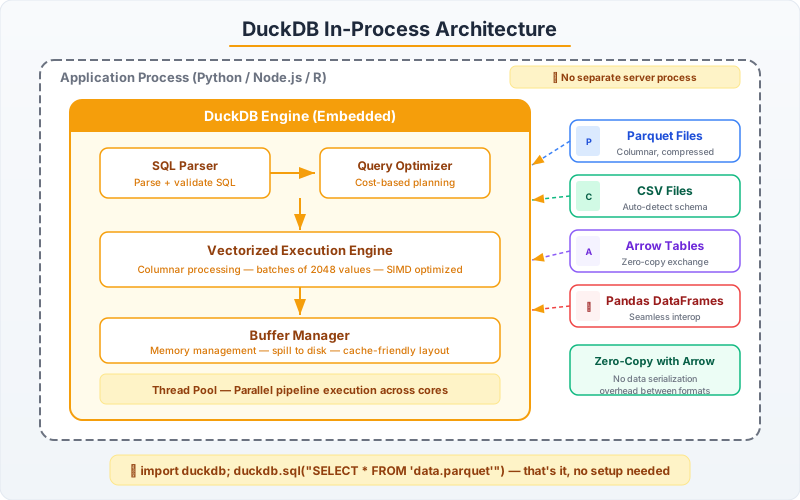
DuckDB + Polars + Pandas Interoperability
These tools are not competitors — they are collaborators. Apache Arrow provides zero-copy data exchange between them, meaning you can pass data from DuckDB to Polars to Pandas without serialization or memory duplication.
import duckdb
import polars as pl
import pandas as pd

# Start with DuckDB for heavy SQL transformation
con = duckdb.connect()

# DuckDB can query Polars DataFrames directly
sales_pl = pl.DataFrame({
    "product_id": [1, 2, 3, 4, 5],
    "product_name": ["Widget A", "Widget B", "Gadget X", "Gadget Y", "Doohickey"],
    "category": ["widgets", "widgets", "gadgets", "gadgets", "misc"],
    "unit_cost": [10.0, 15.0, 25.0, 30.0, 5.0],
})

# DuckDB detects the Polars DataFrame by variable name
result_arrow = con.sql("""
    SELECT
        category,
        COUNT(*) AS n_products,
        AVG(unit_cost) AS avg_cost,
        MAX(unit_cost) - MIN(unit_cost) AS cost_spread
    FROM sales_pl
    GROUP BY category
    ORDER BY avg_cost DESC
""").arrow()

# Arrow table → Polars (zero-copy)
result_polars = pl.from_arrow(result_arrow)
print("As Polars DataFrame:")
print(result_polars)

# Arrow table → Pandas (near zero-copy for numeric data)
result_pandas = result_arrow.to_pandas()
print("\nAs Pandas DataFrame:")
print(result_pandas)

# Polars DataFrame → DuckDB query (automatic, by variable name)
further_analysis = con.sql("""
    SELECT *, avg_cost * n_products AS total_category_cost
    FROM result_polars
""").pl()  # .pl() returns a Polars DataFrame directly

print("\nDuckDB → Polars round-trip:")
print(further_analysis)
The .arrow() method returns an Arrow table — the universal format. .pl() and .df() are shortcuts for Polars and Pandas DataFrames respectively. Data flows between these tools through shared Arrow memory without copying bytes.
The practical pattern: Use DuckDB for SQL-heavy transformations (joins, CTEs, window functions), convert to Polars for pipeline operations and ML feature engineering, and convert to Pandas only at the boundary where a downstream library (scikit-learn, matplotlib) requires it.
2.4 — Out-of-Core Processing
Everything above assumes your data fits in RAM — maybe not as Pandas, but as Polars or via DuckDB’s buffer manager. What happens when it truly doesn’t? When you have 50GB of data and 16GB of RAM?
Polars Streaming
Polars’ streaming engine processes data in batches, keeping only one batch in memory at a time. You activate it by passing streaming=True to .collect():
import polars as pl
import numpy as np
from pathlib import Path

def create_large_dataset(base_dir: str, n_files: int = 20, rows_per_file: int = 2_000_000) -> None:
    """Create a dataset too large to fit in memory all at once."""
    base = Path(base_dir)
    base.mkdir(parents=True, exist_ok=True)
    rng = np.random.default_rng(42)

    for i in range(n_files):
        df = pl.DataFrame({
            "id": range(i * rows_per_file, (i + 1) * rows_per_file),
            "value_a": rng.normal(100, 25, size=rows_per_file).round(4),
            "value_b": rng.normal(50, 10, size=rows_per_file).round(4),
            "category": rng.choice([f"cat_{c}" for c in range(100)], size=rows_per_file),
            "timestamp": rng.integers(1704067200, 1735689600, size=rows_per_file),
        })
        df.write_parquet(str(base / f"chunk_{i:03d}.parquet"))

    total_rows = n_files * rows_per_file
    print(f"Created {n_files} files, {total_rows:,} total rows")

# Generate data (adjust n_files to simulate memory pressure)
create_large_dataset("/tmp/large_dataset", n_files=10)

# Streaming query — processes in batches, constant memory usage
result = (
    pl.scan_parquet("/tmp/large_dataset/*.parquet")
    .filter(pl.col("value_a") > 80)
    .with_columns(
        ratio=(pl.col("value_a") / pl.col("value_b")),
    )
    .group_by("category")
    .agg(
        pl.col("ratio").mean().alias("avg_ratio"),
        pl.col("ratio").std().alias("std_ratio"),
        pl.col("value_a").quantile(0.99).alias("p99_value_a"),
        pl.len().alias("n_rows"),
    )
    .sort("avg_ratio", descending=True)
    .collect(streaming=True)  # <-- streaming execution
)

print(f"Result: {result.shape[0]} categories")
print(result.head(10))
With streaming=True, Polars does not load all Parquet files into memory simultaneously. It processes them in chunks, merging partial aggregation results as it goes. Memory usage stays roughly constant regardless of total dataset size.
When streaming works: Aggregations, filters, projections, and certain joins. When it doesn’t: Operations that require seeing all data at once — full sorts on non-partitioned data, certain window functions, and cross joins. If Polars cannot stream an operation, it falls back to the standard engine and will tell you.
Chunked Reading for Custom Processing
When you need row-level control over how data is processed — for example, applying a custom model to each batch — use Polars’ scan_parquet with slice or DuckDB’s LIMIT/OFFSET:
import polars as pl
from pathlib import Path
from typing import Iterator

def stream_parquet_batches(
    pattern: str,
    batch_size: int = 500_000,
) -> Iterator[pl.DataFrame]:
    """
    Yield DataFrames in fixed-size batches from a set of Parquet files.
    Memory usage stays bounded by batch_size × row_width.
    """
    lazy = pl.scan_parquet(pattern)

    # Get total row count without loading data
    total_rows = lazy.select(pl.len()).collect().item()
    print(f"Total rows: {total_rows:,}, batch size: {batch_size:,}")

    offset = 0
    while offset < total_rows:
        batch = lazy.slice(offset, batch_size).collect()
        yield batch
        offset += batch_size

def process_batch(batch: pl.DataFrame, batch_num: int) -> dict[str, float]:
    """Simulate per-batch processing — could be model inference, validation, etc."""
    return {
        "batch": batch_num,
        "rows": batch.shape[0],
        "mean_value_a": batch["value_a"].mean(),
        "max_value_b": batch["value_b"].max(),
    }

# Process the large dataset in bounded-memory batches
results = []
for i, batch in enumerate(stream_parquet_batches("/tmp/large_dataset/*.parquet")):
    stats = process_batch(batch, i)
    results.append(stats)
    if i < 3 or i % 10 == 0:
        print(f"  Batch {i}: {stats['rows']:,} rows, mean_a={stats['mean_value_a']:.2f}")

summary = pl.DataFrame(results)
print(f"\nProcessed {summary['rows'].sum():,} rows in {summary.shape[0]} batches")
This pattern is essential for model scoring, data validation, and any workflow where you need to apply arbitrary Python logic to each chunk. The iterator keeps memory bounded — only one batch exists in RAM at any moment.
Vectorized Operations: Why Python Loops Are 100x Slower
Before closing this chapter, we need to address the single most common performance mistake in Python data science: using Python for loops to process data.
import polars as pl
import numpy as np
import time

n = 2_000_000
df = pl.DataFrame({
    "a": np.random.default_rng(42).normal(0, 1, n).round(6),
    "b": np.random.default_rng(43).normal(0, 1, n).round(6),
})

# WRONG: Python loop — processes one row at a time, GIL-bound
t0 = time.perf_counter()
results_loop = []
a_series = df["a"].to_list()
b_series = df["b"].to_list()
for a_val, b_val in zip(a_series, b_series):
    results_loop.append(a_val ** 2 + b_val ** 2 + 2 * a_val * b_val)
loop_time = time.perf_counter() - t0

# RIGHT: Vectorized expression — processes entire columns at once
t0 = time.perf_counter()
result_vec = df.with_columns(
    result=(pl.col("a") ** 2 + pl.col("b") ** 2 + 2 * pl.col("a") * pl.col("b"))
)
vec_time = time.perf_counter() - t0

print(f"Python loop: {loop_time:.3f}s")
print(f"Vectorized:  {vec_time:.4f}s")
print(f"Speedup:     {loop_time / vec_time:.0f}x")
On 2 million rows, the Python loop takes ~1.5 seconds. The vectorized expression takes ~0.01 seconds. That is a 150x difference. The reason is fundamental: each iteration of the Python loop crosses the Python-C boundary, evaluates the expression through the bytecode interpreter, and boxes/unboxes floating point values into Python float objects. The vectorized expression compiles to a tight SIMD loop over contiguous memory — no Python objects, no interpreter overhead, no GIL.
The rule: If you find yourself writing for row in df.iter_rows(): or converting to a list and looping, stop. Express the computation as column operations. If you genuinely need per-row logic that cannot be expressed as column math, use map_elements with return_dtype specified — it’s still slow, but at least Polars handles the iteration:
import polars as pl
import math

# When you truly need custom per-row logic (avoid if possible)
df = pl.DataFrame({"angle_deg": [0, 30, 45, 60, 90, 180, 270, 360]})

result = df.with_columns(
    pl.col("angle_deg")
    .map_elements(
        lambda x: round(math.sin(math.radians(x)), 6),
        return_dtype=pl.Float64,
    )
    .alias("sin_value")
)
print(result)

# Better: use Polars native expressions when available
result_native = df.with_columns(
    (pl.col("angle_deg") * (math.pi / 180)).sin().round(6).alias("sin_value")
)
print(result_native)
The native expression version avoids map_elements entirely — no Python function calls per row, no GIL involvement. Always check if Polars has a built-in expression before reaching for map_elements.
Apache Arrow: The Universal Exchange Format
Arrow is the reason DuckDB, Polars, and Pandas can share data without serialization overhead. It defines a language-independent columnar memory format: contiguous buffers of typed data with null bitmaps, offset arrays for variable-length types, and a standardized metadata schema.
When you call .arrow() on a DuckDB result, or pl.from_arrow() on an Arrow table, no data is copied. Both libraries understand Arrow’s memory layout natively and can operate directly on the buffers.
import pyarrow as pa
import pyarrow.parquet as pq
import polars as pl
import duckdb

# Create data in Arrow
table = pa.table({
    "id": pa.array(range(1000)),
    "value": pa.array([float(x) * 0.1 for x in range(1000)]),
    "label": pa.array([f"item_{x % 10}" for x in range(1000)]),
})

# Arrow → Polars: zero-copy
pl_df = pl.from_arrow(table)
print(f"Polars shape: {pl_df.shape}")

# Arrow → DuckDB: zero-copy query
result = duckdb.sql("SELECT label, AVG(value) AS avg_val FROM table GROUP BY label ORDER BY label")
print(result.show())

# Polars → Arrow → Parquet (efficient columnar write)
arrow_back = pl_df.to_arrow()
pq.write_table(arrow_back, "/tmp/arrow_example.parquet", compression="zstd")

# DuckDB reads the Parquet file we just wrote
verification = duckdb.sql("""
    SELECT COUNT(*) AS n_rows,
           MIN(value) AS min_val,
           MAX(value) AS max_val
    FROM read_parquet('/tmp/arrow_example.parquet')
""")
print(verification.show())
Parquet + Arrow is the production data format stack. Parquet gives you compressed columnar storage on disk with predicate pushdown support. Arrow gives you columnar memory with zero-copy interoperability. Together, they eliminate the serialization tax that CSV and pickle impose on every read/write cycle.
Use Parquet with zstd compression as your default file format. It’s 3-5x smaller than CSV, 10-50x faster to read, and every tool in this chapter reads it natively. If you are still using df.to_csv() for intermediate pipeline outputs, switching to df.write_parquet() is the single highest-impact change you can make today.
Summary: Choosing Your Stack
| Scenario | Recommended Tool | Why |
|---|---|---|
| Exploratory notebook, < 1GB | Pandas | Maximum ecosystem compatibility, best debuggability |
| ETL pipeline, 1-100GB | Polars (lazy) | Automatic optimization, multi-threading, predictable memory |
| Complex SQL analytics | DuckDB | CTEs, window functions, readable query logic |
| Query files without loading | DuckDB | Parquet predicate pushdown, zero memory footprint |
| Dataset exceeds RAM | Polars streaming or chunked iteration | Bounded memory, production-safe |
| ML feature engineering | Polars → Pandas at boundary | Speed for transforms, compatibility for sklearn |
| Data interchange | Apache Arrow + Parquet | Zero-copy exchange, compressed columnar storage |
The tools work together. The skill is knowing which one to reach for first — and that decision should be driven by your data size, your query complexity, and whether you need SQL or a DataFrame API. Not by habit.