Building the Locust Baseline for the Ride-Hailing Platform
Building the Locust Baseline for the Ride-Hailing Platform
The Symptom
The team knows the system is slow under load. “Slow” is not actionable. Slow where? Slow for whom? Slow compared to what? Without a repeatable load test that models real user behavior, performance conversations devolve into anecdotes.
The Cause
No load test exists. Performance is measured by the absence of complaints. When complaints arrive, the team profiles one request in dev with 50 rows in the database, finds nothing wrong, and closes the ticket. The production database has 12 million rows. The dev environment has never simulated more than 3 concurrent users.
The Baseline
This section builds the complete Locust test suite that the rest of the book references. Every file lives in load-tests/ at the repository root.
Project Structure
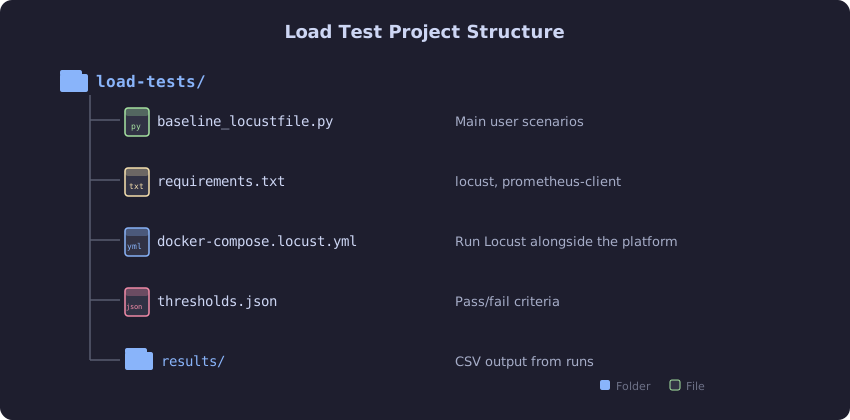
The load test suite lives in a dedicated load-tests/ directory at the repository root. The baseline_locustfile.py defines all user scenarios (rider, driver, admin), while thresholds.json codifies the pass/fail criteria that CI checks after each run. The docker-compose.locust.yml file lets you run Locust alongside the platform in a single docker compose up, and the results/ directory collects CSV output for trend analysis across runs.
The User Behavior Model
Real traffic is not uniform. During peak hours, the ride-hailing platform sees:
- 60% rider traffic (searching, estimating fares, viewing history)
- 30% driver traffic (location updates, checking ride requests)
- 10% admin/analytics traffic (zone stats, dashboards)
Riders are impatient. They search for drivers, request a fare estimate, and if it takes too long, they leave. Drivers send location updates every 3-5 seconds. Admin queries are infrequent but expensive.
# load-tests/baseline_locustfile.py
import random
import time
from locust import HttpUser, task, between, tag, events
from locust.runners import MasterRunner, WorkerRunner

# Realistic coordinates for the ride-hailing service area
NYC_LOCATIONS = [
    (40.7128, -74.0060),   # Lower Manhattan
    (40.7580, -73.9855),   # Midtown
    (40.7831, -73.9712),   # Upper West Side
    (40.7484, -73.9857),   # Empire State area
    (40.6892, -74.0445),   # Statue of Liberty area
    (40.7061, -74.0087),   # Tribeca
    (40.7282, -73.7949),   # Queens
    (40.6501, -73.9496),   # Brooklyn
]

RIDER_IDS = [f"rider-{i}" for i in range(1, 10001)]
DRIVER_IDS = [f"driver-{i}" for i in range(1, 5001)]


class RiderUser(HttpUser):
    weight = 6
    wait_time = between(1, 3)

    def on_start(self):
        self.rider_id = random.choice(RIDER_IDS)
        self.pickup = random.choice(NYC_LOCATIONS)
        self.dropoff = random.choice(NYC_LOCATIONS)
        while self.dropoff == self.pickup:
            self.dropoff = random.choice(NYC_LOCATIONS)

    @tag("rider", "read")
    @task(3)
    def search_drivers(self):
        self.client.get(
            "/api/drivers/nearby",
            params={
                "lat": self.pickup[0],
                "lng": self.pickup[1],
                "radius_km": 5
            },
            name="/api/drivers/nearby"
        )

    @tag("rider", "read")
    @task(2)
    def request_fare_estimate(self):
        self.client.post(
            "/api/fares/estimate",
            json={
                "pickup_lat": self.pickup[0],
                "pickup_lng": self.pickup[1],
                "dropoff_lat": self.dropoff[0],
                "dropoff_lng": self.dropoff[1]
            },
            name="/api/fares/estimate"
        )

    @tag("rider", "write")
    @task(1)
    def request_ride(self):
        self.client.post(
            "/api/rides/request",
            json={
                "rider_id": self.rider_id,
                "pickup_lat": self.pickup[0],
                "pickup_lng": self.pickup[1],
                "dropoff_lat": self.dropoff[0],
                "dropoff_lng": self.dropoff[1]
            },
            name="/api/rides/request"
        )

    @tag("rider", "read")
    @task(1)
    def view_trip_history(self):
        self.client.get(
            "/api/trips/history",
            headers={"X-User-Id": self.rider_id},
            name="/api/trips/history"
        )


class DriverUser(HttpUser):
    weight = 3
    wait_time = between(2, 5)

    def on_start(self):
        self.driver_id = random.choice(DRIVER_IDS)
        base = random.choice(NYC_LOCATIONS)
        self.lat = base[0]
        self.lng = base[1]

    @tag("driver", "write")
    @task(5)
    def update_location(self):
        # Simulate movement
        self.lat += random.uniform(-0.001, 0.001)
        self.lng += random.uniform(-0.001, 0.001)
        self.client.post(
            "/api/drivers/location",
            json={
                "driver_id": self.driver_id,
                "lat": self.lat,
                "lng": self.lng,
                "heading": random.randint(0, 359),
                "speed_kmh": random.randint(0, 60)
            },
            name="/api/drivers/location"
        )

    @tag("driver", "read")
    @task(1)
    def check_ride_requests(self):
        self.client.get(
            "/api/drivers/requests",
            headers={"X-Driver-Id": self.driver_id},
            name="/api/drivers/requests"
        )


class AdminUser(HttpUser):
    weight = 1
    wait_time = between(5, 15)

    @tag("admin", "read")
    @task(1)
    def view_zone_stats(self):
        self.client.get(
            "/api/admin/zones/stats",
            name="/api/admin/zones/stats"
        )

    @tag("admin", "read")
    @task(1)
    def view_surge_map(self):
        self.client.get(
            "/api/admin/surge/current",
            name="/api/admin/surge/current"
        )
Running the Baseline
# Start the ride-hailing platform
docker compose -f docker-compose.yml up -d

# Wait for health
until curl -s http://localhost:8080/actuator/health | grep -q '"status":"UP"'; do
    sleep 2
done

# Run Locust baseline: 200 users, 5 minutes
locust -f load-tests/baseline_locustfile.py \
    --host=http://localhost:8080 \
    --users 200 \
    --spawn-rate 10 \
    --run-time 5m \
    --headless \
    --csv=load-tests/results/baseline \
    --html=load-tests/results/baseline.html
Baseline Results
The unoptimized platform produces these numbers:
Name                       # reqs  Avg   Med   Min    Max    p95    p99    RPS   Fail%
/api/drivers/nearby         1842   145    98    12   4210    420   2100   6.14   0.0%
/api/fares/estimate         1228   210   130    18   8400    890   4200   4.09   0.2%
/api/rides/request           614   320   180    25  12000   1800   6500   2.05   0.8%
/api/trips/history           614   680   450    45  12000   2800   8400   2.05   1.1%
/api/drivers/location       1535    45    32     8    980    180    650   5.12   0.0%
/api/drivers/requests        307    62    40    10   1200    250    800   1.02   0.0%
/api/admin/zones/stats       102   890   600    80  15000   4200  12000   0.34   2.9%
/api/admin/surge/current     102   420   280    40   8000   2100   6000   0.34   1.0%
Aggregated                  6344   224   110     8  15000   1200   4800  21.15   0.4%
This table is the starting line. Save it. Print it. Pin it to the team’s wall. Every chapter that follows will change one or more of these numbers and show the new table for comparison.
What to Watch in the Output
Four things matter in every Locust result:
-
p99 latency per endpoint. This is the user experience for your unluckiest 1%. If p99 is above your SLO (500ms for rider-facing endpoints), the chapter has work to do.
-
Failure rate. A non-zero failure rate under moderate load means the system is not handling load gracefully. It is dropping requests, timing out, or returning errors. The trip history endpoint’s 1.1% failure rate at only 200 users is a problem.
-
RPS (requests per second). This is raw throughput. Compare it against your capacity target. If Friday evening peak is 5,000 RPS and the baseline handles 21 RPS with 200 users, you need to understand the scaling behavior before production proves it for you.
-
The gap between median and p99. A large gap (median 110ms, p99 4,800ms) indicates a bimodal distribution. Some requests take a fundamentally different code path. Find that path.
The Fix
The baseline itself is the fix for this section. The team now has repeatable, quantified evidence of how the system behaves under load. The next step is not optimization. The next step is Chapter 2: tracing a single request through every layer to understand where the milliseconds go.
The Proof
The proof is the table above. Run it yourself against your system. The numbers will be different, but the shape will be familiar: a few endpoints that are fast, a few that are unacceptable, and an average that hides the problem.
Run it three times. If the numbers vary by more than 15%, you have a reproducibility problem: noisy neighbor VMs, GC variance, or insufficient warm-up time. Fix the test environment before trusting the results. For this book, all results are the median of three consecutive runs with a 60-second warm-up period excluded from the statistics.
Prometheus Exporter for Locust
To feed Locust results into Grafana alongside application metrics:
# load-tests/locust_prometheus.py
from prometheus_client import start_http_server, Histogram, Counter
from locust import events

REQUEST_LATENCY = Histogram(
    "locust_request_duration_seconds",
    "Locust request latency",
    ["method", "name", "status"],
    buckets=[0.01, 0.025, 0.05, 0.1, 0.2, 0.5, 1.0, 2.5, 5.0, 10.0]
)

REQUEST_COUNT = Counter(
    "locust_requests_total",
    "Total Locust requests",
    ["method", "name", "status"]
)


@events.request.add_listener
def on_request(request_type, name, response_time, response_length,
               response, exception, context, **kwargs):
    status = "failure" if exception else "success"
    REQUEST_LATENCY.labels(
        method=request_type, name=name, status=status
    ).observe(response_time / 1000.0)
    REQUEST_COUNT.labels(
        method=request_type, name=name, status=status
    ).inc()


@events.init.add_listener
def on_init(environment, **kwargs):
    start_http_server(9646)
Add this to the Locust invocation:
locust -f load-tests/baseline_locustfile.py,load-tests/locust_prometheus.py \
    --host=http://localhost:8080 \
    --users 200 \
    --spawn-rate 10 \
    --run-time 5m \
    --headless
Now Grafana can show Locust’s external measurements alongside the application’s internal Prometheus metrics on the same time axis. When the Locust p99 spikes, the corresponding application metric (connection pool wait time, Redis command latency, PostgreSQL query duration) spikes at the same moment, pointing directly at the bottleneck.