Distributed Tracing with OpenTelemetry: Finding the Slow Thing
Distributed Tracing with OpenTelemetry: Finding the Slow Thing
The Symptom
Friday night. 11:47 PM. A rider reports that requesting a ride took 8 seconds. The rider API metrics show p50 at 180ms, p95 at 320ms, p99 at 480ms. All within SLO. But the Prometheus scrape interval is 15 seconds, and the anomaly happened to a single request that falls outside the p99 window. The request succeeded. The rider got their car. No error was logged.
The metrics tell you the system is healthy. The logs tell you the request completed. Neither tells you why one request took 8 seconds when 99% complete in under 500ms.
You need to see inside the request. Every service it touched, every database query it made, every queue it waited in, and the exact millisecond where 7.5 of those 8 seconds were spent. You need a trace.
The Cause
The ride-hailing platform has six services in the request path for a ride request:
Rider App → API Gateway → Rider API → Fare Service → Driver Matching → Trip Service
                                    → Kafka → Trip Analytics (async)
Metrics give you aggregate behavior per service. Logs give you events per service. Neither connects the dots across services for a single request. When a request is slow, you are left correlating timestamps across six services, hoping the clocks are synchronized and the log formats are consistent. They never are.
Distributed tracing solves this by assigning a unique trace ID to each incoming request and propagating it through every service, every database call, every message queue. Each unit of work within a trace is a span. Spans have a parent-child relationship that forms a tree. The tree shows you exactly where time was spent.
OpenTelemetry is the CNCF standard for instrumentation. It provides:
- Traces: A directed acyclic graph of spans representing a single request’s journey
- Spans: Individual operations with start time, duration, status, and attributes
- Context propagation: Passing trace context (trace ID + span ID) across process boundaries via HTTP headers or Kafka headers
- Sampling: Deciding which traces to record (you cannot record all of them at 10,000 RPS)
The Java agent handles auto-instrumentation. Attach it to the JVM, and every Spring WebFlux handler, every Redis command, every SQL query, every Kafka produce/consume gets a span. Zero code changes.
Custom spans fill the gaps. The auto-instrumenter does not know that calculateSurgePricing() is a business-critical operation worth tracing separately. You add those manually.
For the ride-hailing platform, the instrumentation plan is:
Layer          Auto-Instrumented          Custom Instrumented
HTTP           WebFlux handlers           -
Database       R2DBC queries, JDBC        Connection pool wait time
Cache          Lettuce Redis commands     Cache miss vs hit logic
Messaging      Kafka produce/consume      -
Business       -                          Surge pricing, driver matching, fare calc
The auto-instrumented layer tells you “the database query took 7.5 seconds.” The custom layer tells you “the fare calculation took 7.6 seconds because the database query inside it waited for a connection.”
The Baseline
Current observability for the ride request path:
Signal        Coverage                  Finds the 8s request?
Metrics       p50/p95/p99 per service   No (aggregated away)
Logs          Per-service text logs     Maybe (if you grep 6 services)
Traces        None                      N/A
Target:
Signal        Coverage                  Finds the 8s request?
Metrics       p50/p95/p99 per service   No (still aggregated)
Logs          Structured, trace-correlated  Yes (filter by trace ID)
Traces        Full request path          Yes (waterfall shows 7.5s pool wait)
Without tracing, diagnosing the 8-second request requires:
- Searching rider API logs for slow requests (hope you log request duration)
- Finding a correlation ID (hope you have one)
- Searching 5 downstream services for that correlation ID
- Manually summing up time spent in each service
- Guessing which gap between services is network vs processing
Time to diagnose: 2-4 hours. With tracing: 90 seconds.
The Fix
Adding the OpenTelemetry Java Agent
# SCALED: Dockerfile with OTel Java agent
FROM eclipse-temurin:21-jre-alpine

COPY --from=build /app/target/*.jar /app/app.jar

# Download the OpenTelemetry Java agent
ADD https://github.com/open-telemetry/opentelemetry-java-instrumentation/releases/latest/download/opentelemetry-javaagent.jar /app/opentelemetry-javaagent.jar

ENV JAVA_TOOL_OPTIONS="-javaagent:/app/opentelemetry-javaagent.jar"
ENV OTEL_SERVICE_NAME="rider-api"
ENV OTEL_EXPORTER_OTLP_ENDPOINT="http://otel-collector:4317"
ENV OTEL_TRACES_SAMPLER="parentbased_traceidratio"
ENV OTEL_TRACES_SAMPLER_ARG="0.1"

ENTRYPOINT ["java", "-jar", "/app/app.jar"]
One environment variable. No code changes. The agent hooks into Spring WebFlux, Lettuce, R2DBC, and Spring Kafka automatically.
Custom Spans for Business Logic
Auto-instrumentation covers framework code. Business logic needs manual spans:
// SCALED: Custom spans for fare calculation
@Service
public class FareService {

    private final Tracer tracer = GlobalOpenTelemetry.getTracer("ride-hailing");

    public Mono<FareEstimate> calculateFare(RideRequest request) {
        return Mono.defer(() -> {
            Span span = tracer.spanBuilder("fare.calculate")
                .setAttribute("rider.id", request.getRiderId())
                .setAttribute("zone.id", request.getPickupZoneId())
                .startSpan();

            return calculateBaseFare(request)
                .flatMap(base -> applySurgePricing(base, request))
                .flatMap(surged -> applyPromotions(surged, request))
                .doOnSuccess(estimate ->
                    span.setAttribute("fare.amount", estimate.getAmount().doubleValue())
                        .setStatus(StatusCode.OK)
                        .end())
                .doOnError(err ->
                    span.setStatus(StatusCode.ERROR, err.getMessage())
                        .recordException(err)
                        .end())
                .contextWrite(Context.current().with(span).asContextElement());
        });
    }

    @WithSpan("fare.surge_pricing")
    private Mono<FareComponents> applySurgePricing(
            FareComponents base,
            @SpanAttribute("zone.id") String zoneId) {
        return surgeService.getMultiplier(zoneId)
            .map(multiplier -> base.withSurge(multiplier));
    }
}
The fare.calculate span wraps the entire fare computation. The fare.surge_pricing span captures surge pricing specifically. When the trace waterfall shows 7.5 seconds inside fare.calculate, you drill into its child spans and find exactly which sub-operation stalled.
Context Propagation Across Kafka
HTTP context propagation happens automatically via the W3C traceparent header. Kafka needs the OTel agent attached to both producer and consumer:
// SCALED: Kafka producer with trace context propagation
@Service
public class RideEventPublisher {

    private final KafkaTemplate<String, RideEvent> kafkaTemplate;

    public Mono<Void> publishRideRequested(RideRequest request, FareEstimate fare) {
        RideEvent event = new RideEvent(
            request.getRideId(),
            "RIDE_REQUESTED",
            request.getRiderId(),
            fare.getAmount()
        );

        // The OTel agent injects W3C traceparent into Kafka headers automatically
        return Mono.fromFuture(
            kafkaTemplate.send("ride-events", request.getRideId(), event)
        ).then();
    }
}
The OpenTelemetry Java agent instruments KafkaTemplate and @KafkaListener automatically. It injects the traceparent header into produced messages and extracts it on the consumer side. The consumer’s spans become children of the producer’s trace. A ride request trace that publishes to Kafka and gets consumed by Trip Analytics appears as a single trace spanning both services.
OTLP Export and the Collector
# SCALED: OpenTelemetry Collector configuration
receivers:
  otlp:
    protocols:
      grpc:
        endpoint: "0.0.0.0:4317"
      http:
        endpoint: "0.0.0.0:4318"

processors:
  batch:
    timeout: 5s
    send_batch_size: 8192
  memory_limiter:
    check_interval: 1s
    limit_mib: 512
    spike_limit_mib: 128

exporters:
  otlp/tempo:
    endpoint: "tempo:4317"
    tls:
      insecure: true

service:
  pipelines:
    traces:
      receivers: [otlp]
      processors: [memory_limiter, batch]
      exporters: [otlp/tempo]
Services send spans to the Collector via OTLP gRPC. The Collector batches them and forwards to Grafana Tempo. The Collector sits as a sidecar or daemonset, absorbing the export overhead so the application does not block on network calls to the tracing backend.
Sampling Strategy
At 10,000 RPS across 6 services, recording every span generates roughly 60,000 spans/second. At 1KB per span, that is 60MB/s or 5TB/day. Sampling is not optional.
# Development: record everything
otel.traces.sampler=always_on

# Production: record 10% of traces, follow parent decision for downstream
otel.traces.sampler=parentbased_traceidratio
otel.traces.sampler.arg=0.1
parentbased_traceidratio means: if this service is the root (no incoming trace context), sample at 10%. If this service received a trace context from upstream, follow the upstream’s sampling decision. This ensures a sampled trace is complete across all services, not fragmented.
The Proof
Locust: Generating Traced Traffic
# SCALED: Locust generating traced ride requests
from locust import HttpUser, task, between
import uuid

class TracedRideUser(HttpUser):
    wait_time = between(0.5, 2.0)

    @task
    def request_ride(self):
        trace_id = uuid.uuid4().hex
        self.client.post("/api/rides/request",
            json={
                "rider_id": f"rider-{self.environment.runner.user_count}",
                "pickup": {"lat": 40.7128, "lng": -74.0060},
                "dropoff": {"lat": 40.7589, "lng": -73.9851}
            },
            headers={
                "traceparent": f"00-{trace_id}-{uuid.uuid4().hex[:16]}-01"
            },
            name="/api/rides/request"
        )
Run with 100 concurrent users for 5 minutes. Then query Tempo:
{duration > 2s && resource.service.name = "rider-api"}The 8-second trace appears in the results. The waterfall shows:
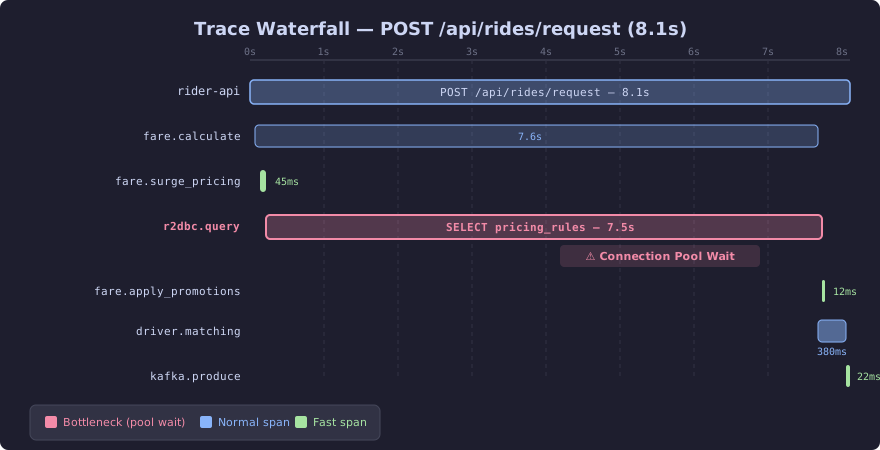
The waterfall visualization makes the bottleneck immediately obvious. The R2DBC query span dominates the trace at 7.5 seconds, shown in red, while every other span completes in milliseconds. The query itself executes in 15ms — the remaining 7,485ms is pure connection pool wait time. Without tracing, this would look like a slow database; with tracing, the span attributes pinpoint pool exhaustion as the root cause.
The R2DBC query span shows 7.5 seconds. The query itself takes 15ms when a connection is available. The remaining 7,485ms is connection pool wait time. The pool has 10 connections, all in use by concurrent requests. This request waited for a connection to become available.
The fix: increase spring.r2dbc.pool.max-size from 10 to 50, and add spring.r2dbc.pool.max-idle-time=30s to prevent connections from going stale.
Before tracing, this would have been a 4-hour investigation. The trace showed the answer in 90 seconds.
Before and After
Metric                      Before Tracing       After Tracing
Time to diagnose outlier    2-4 hours            90 seconds
Confidence in root cause    Low (guessing)       High (exact span)
Ability to find p99.9       None                 Full (tail sampling)
Cross-service visibility    Manual log grep      Automatic waterfall
Connection pool issue       Invisible            Span attribute: pool.wait=7485ms
The investment: one Dockerfile change, one Collector config, four @WithSpan annotations. The return: every slow request in the platform is now diagnosable in under 2 minutes.