Finding the Slow Thing in Production
Finding the Slow Thing in Production
The Symptom
The dashboards show p99 latency at 480ms. SLO compliance is 99.92%. Everything looks healthy. But three riders have submitted support tickets in the last week, each reporting that their ride request took “forever.” The support team attached timestamps. You pull the rider API access logs for those timestamps. Response times: 6.2s, 8.1s, 11.4s.
These requests are statistical outliers. They fall outside the p99.9 range. Prometheus with 15-second scrape intervals and 10-bucket histograms cannot see them. The metrics are telling you the system is healthy because the metrics are averaging away the pain of your worst-affected users.
You need to find these specific requests and understand exactly what made them slow.
The Cause
Tail latency (p99.9 and beyond) is where the most painful user experiences hide. A rider whose request takes 11 seconds is not reassured by your p99 dashboard showing 480ms. The causes of tail latency are different from the causes of median latency:
- Connection pool exhaustion (happens under bursty load)
- Garbage collection pauses (happens periodically)
- Cold caches after a deployment (happens after every release)
- Lock contention in shared resources (happens when concurrency exceeds design assumptions)
- Network retries hitting a slow backend replica (happens when one pod is overloaded)
Metrics show you that tail latency exists. Traces show you why.
The Baseline
Current diagnostic capability for tail latency:
Method                          Time to Diagnose    Accuracy
Read Prometheus dashboards      5 min               Low (aggregated)
Grep application logs           30 min              Medium (missing context)
Correlate logs across services  2-4 hours           High (if logs exist)
Add temporary debug logging     1 day               High (requires deploy)
Target with distributed tracing:
Method                          Time to Diagnose    Accuracy
Query Tempo for slow traces     90 seconds          High (full request path)
The Fix
Trace Analysis Workflow
Step 1: Find slow traces.
# Grafana Tempo query: all ride requests slower than 2 seconds
{resource.service.name="rider-api" && name="POST /api/rides/request" && duration > 2s}
Step 2: Sort by duration descending. The three support-ticket requests are the slowest.
Step 3: Open the 8.1-second trace. The waterfall:
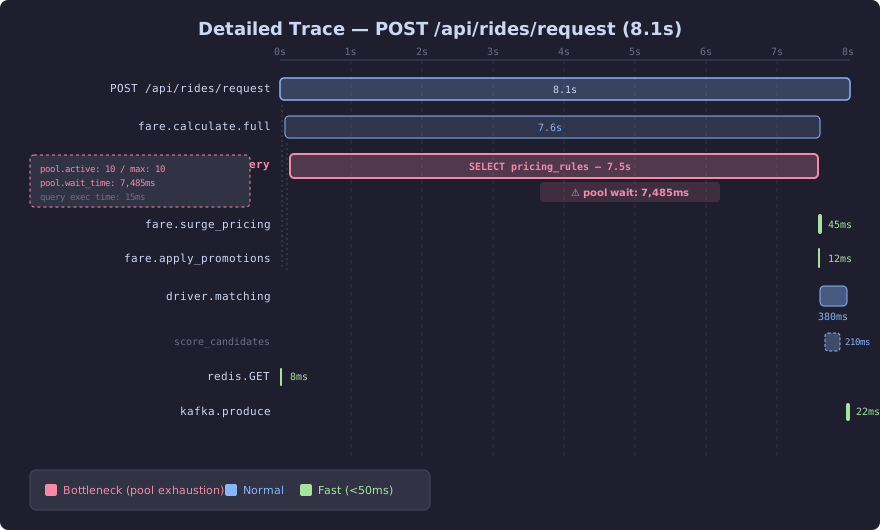
The detailed waterfall reveals the full span hierarchy. The R2DBC query dominates at 7.5 seconds (pool wait: 7,485ms, query execution: 15ms), while all other operations — surge pricing, driver matching with its nested scoring sub-span, Redis cache lookups, and Kafka event production — complete in milliseconds. The span attribute panel on the left shows the pool is fully saturated: 10 active connections out of a maximum of 10.
The R2DBC query span shows 7.5 seconds. The span attributes include:
db.system: postgresql
db.statement: SELECT * FROM pricing_rules WHERE zone_id = $1
db.connection_pool.wait_time_ms: 7485
db.connection_pool.active: 10
db.connection_pool.max: 10
The pool has 10 connections. All 10 are active. This request waited 7,485ms for a connection to become available. The query itself took 15ms.
Step 4: Check other slow traces. Same pattern. All three support-ticket requests show connection pool wait times above 5 seconds. The pool exhausts during bursty traffic between 11 PM and midnight when surge pricing recalculations trigger concurrent database queries.
The Case Study: 8-Second Ride Request
The root cause chain:
- Surge pricing recalculation runs every 30 seconds
- Recalculation queries
pricing_rulesfor all 47 zones - Each query holds a connection for 15-30ms
- 47 queries at 20ms average = 940ms total connection hold time
- Connection pool has 10 connections
- During recalculation, rider requests compete for the same pool
- Bursty rider traffic at 11 PM saturates the remaining connections
- Rider requests queue behind recalculation queries
The fix has two parts:
// BOTTLENECK: shared connection pool for rider requests and batch recalculations
@Configuration
public class DatabaseConfig {

    @Bean
    public ConnectionPool connectionPool() {
        return new ConnectionPool(
            ConnectionPoolConfiguration.builder(connectionFactory)
                .maxSize(10)  // BOTTLENECK: too small for concurrent load
                .build()
        );
    }
}
// SCALED: separate connection pools for OLTP and batch workloads
@Configuration
public class DatabaseConfig {
@Bean("riderPool")
@Primary
public ConnectionPool riderConnectionPool() {
return new ConnectionPool(
ConnectionPoolConfiguration.builder(connectionFactory)
.maxSize(30)
.maxIdleTime(Duration.ofSeconds(30))
.maxAcquireTime(Duration.ofSeconds(2))
.build()
);
}
@Bean("batchPool")
public ConnectionPool batchConnectionPool() {
return new ConnectionPool(
ConnectionPoolConfiguration.builder(connectionFactory)
.maxSize(10)
.maxIdleTime(Duration.ofMinutes(5))
.maxAcquireTime(Duration.ofSeconds(10))
.build()
);
}
}Rider requests use a dedicated pool with 30 connections and a 2-second acquire timeout (fail fast instead of waiting 7 seconds). Batch recalculations use a separate pool that does not compete with rider traffic.
Sampling Strategies
Recording every trace at 10,000 RPS generates 5TB/day. Sampling strategies control which traces get recorded:
# SCALED: Sampling configuration by environment

# Development: see everything
OTEL_TRACES_SAMPLER=always_on

# Production: 10% head-based sampling
OTEL_TRACES_SAMPLER=parentbased_traceidratio
OTEL_TRACES_SAMPLER_ARG=0.1

# Downstream services: follow parent decision
OTEL_TRACES_SAMPLER=parentbased_always_on
Head-based sampling decides at the start of the trace. The problem: the 8-second request might be in the 90% that gets dropped. You would never see it.
Tail-Based Sampling with the OTel Collector
Tail-based sampling decides after the trace completes. Keep all slow traces. Keep all error traces. Sample 10% of normal traces:
# SCALED: OTel Collector with tail-based sampling
processors:
  tail_sampling:
    decision_wait: 10s
    num_traces: 100000
    policies:
      # Keep all traces with errors
      - name: errors
        type: status_code
        status_code:
          status_codes:
            - ERROR

      # Keep all traces slower than 2 seconds
      - name: slow-traces
        type: latency
        latency:
          threshold_ms: 2000

      # Keep all traces for the ride-request endpoint
      - name: ride-requests
        type: string_attribute
        string_attribute:
          key: http.route
          values:
            - /api/rides/request

      # Sample 10% of everything else
      - name: probabilistic
        type: probabilistic
        probabilistic:
          sampling_percentage: 10

    policy_evaluation_order: [errors, slow-traces, ride-requests, probabilistic]

exporters:
  otlp/tempo:
    endpoint: "tempo:4317"
    tls:
      insecure: true

service:
  pipelines:
    traces:
      receivers: [otlp]
      processors: [tail_sampling, batch]
      exporters: [otlp/tempo]
decision_wait: 10s means the Collector buffers spans for 10 seconds, waiting for all spans in a trace to arrive before making the sampling decision. This requires memory. num_traces: 100000 limits buffered traces. At 10,000 RPS with multi-span traces, budget 2-4GB of memory for the Collector.
The tradeoff: tail-based sampling captures every slow trace and every error trace. Head-based sampling is cheaper but misses the traces you care about most.
Storage and Retention
# SCALED: Grafana Tempo storage configuration
storage:
  trace:
    backend: s3
    s3:
      bucket: ride-hailing-traces
      endpoint: s3.amazonaws.com
      region: us-east-1
    wal:
      path: /var/tempo/wal
    block:
      bloom_filter_false_positive: 0.01
      v2_index_downsample_bytes: 1048576

overrides:
  defaults:
    ingestion:
      max_traces_per_user: 500000
    compactor:
      block_retention: 168h # 7 days full traces
At 10% sampling with tail-based augmentation, expect 50-100GB/day of trace storage. S3 lifecycle rules move traces older than 7 days to Glacier. Trace metadata (trace ID, root span name, duration) stays searchable for 30 days.
Grafana Tempo Integration
{
  "datasources": [
    {
      "name": "Tempo",
      "type": "tempo",
      "url": "http://tempo:3200",
      "jsonData": {
        "tracesToMetrics": {
          "datasourceUid": "prometheus",
          "tags": [{ "key": "service.name", "value": "service" }],
          "queries": [
            {
              "name": "Request rate",
              "query": "sum(rate(http_server_requests_seconds_count{service=\"$service\"}[5m]))"
            }
          ]
        },
        "serviceMap": {
          "datasourceUid": "prometheus"
        }
      }
    }
  ]
}
This links traces to metrics. Click a slow trace, and the side panel shows the request rate and error rate for that service at the time the trace occurred. Correlating traces with metrics turns “this trace is slow” into “this trace is slow because request rate spiked to 3x normal at this timestamp.”
The Proof
Locust: Finding the 10 Slowest Requests
# SCALED: Locust with trace-aware ride requests
from locust import HttpUser, task, between, events
import uuid
import json

class TraceHuntingUser(HttpUser):
    wait_time = between(0.1, 1.0)
    slow_traces = []

    @task
    def request_ride(self):
        trace_id = uuid.uuid4().hex
        with self.client.post("/api/rides/request",
            json={
                "rider_id": f"rider-{uuid.uuid4().hex[:8]}",
                "pickup": {"lat": 40.7128, "lng": -74.0060},
                "dropoff": {"lat": 40.7589, "lng": -73.9851}
            },
            headers={
                "traceparent": f"00-{trace_id}-{uuid.uuid4().hex[:16]}-01"
            },
            name="/api/rides/request",
            catch_response=True
        ) as response:
            if response.elapsed.total_seconds() > 2.0:
                TraceHuntingUser.slow_traces.append({
                    "trace_id": trace_id,
                    "duration_s": response.elapsed.total_seconds()
                })
            response.success()

@events.quitting.add_listener
def on_quitting(environment, **kwargs):
    sorted_traces = sorted(
        TraceHuntingUser.slow_traces,
        key=lambda t: t["duration_s"],
        reverse=True
    )[:10]
    print("\n=== TOP 10 SLOWEST TRACES ===")
    for t in sorted_traces:
        print(f"  Trace ID: {t['trace_id']}  Duration: {t['duration_s']:.2f}s")
        print(f"  Tempo URL: http://grafana:3000/explore?"
              f"left=%7B%22queries%22:%5B%7B%22query%22:%22{t['trace_id']}%22%7D%5D%7D")
Run: locust -f trace_hunt.py --users 200 --spawn-rate 50 --run-time 5m --headless
Output:
=== TOP 10 SLOWEST TRACES ===
  Trace ID: a1b2c3d4e5f6...  Duration: 11.42s
  Tempo URL: http://grafana:3000/explore?...
  Trace ID: f6e5d4c3b2a1...  Duration: 8.07s
  Tempo URL: http://grafana:3000/explore?...
  ...
Click each Tempo URL. The waterfall shows the exact span where time was spent. After applying the connection pool fix, rerun the same Locust test. The top 10 slowest should all be under 1 second.
Before: 10 traces above 2 seconds, 3 above 8 seconds. After: 0 traces above 2 seconds. P99.9 drops from 6.2s to 420ms.