Service Control Policies and Multi-Account Strategy
Service Control Policies and Multi-Account Strategy
Service Control Policies are the highest authority in IAM evaluation (after explicit denies). They define the maximum permissions for every principal in every account within their scope. An SCP doesn’t grant permissions — it constrains what can be granted. Think of it as a governor on an engine: the engine can produce 500 horsepower, but the governor limits output to 300 regardless of throttle input.
How SCPs Actually Propagate
SCPs attach to Organization roots, Organizational Units (OUs), or individual accounts. The effective SCP for any account is the intersection of all SCPs in its path from root to the account:
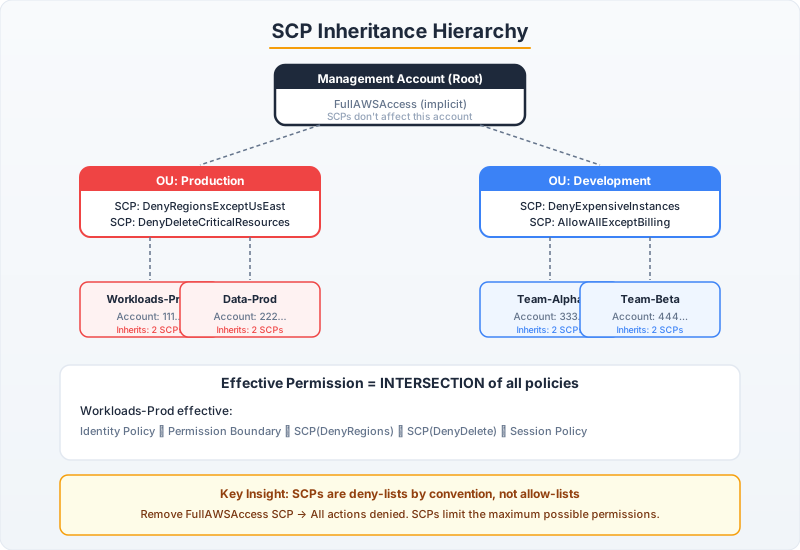
Root (SCP: AllowAll)
├── Security OU (SCP: DenyRegionsExceptUS + DenyRootAccess)
│   └── Audit Account → Effective: AllowAll ∩ DenyRegionsExceptUS ∩ DenyRootAccess
├── Production OU (SCP: DenyRegionsExceptUS + DenyServiceList)
│   ├── Account: prod-api → Effective: AllowAll ∩ DenyRegionsExceptUS ∩ DenyServiceList
│   └── Account: prod-data → (same intersection)
└── Sandbox OU (SCP: DenyIAMChanges + DenyExpensiveServices)
    └── Dev Account → Effective: AllowAll ∩ DenyIAMChanges ∩ DenyExpensiveServices
Critical rules:
- The management account is never affected by SCPs (this is by design, not a bug)
- An account must have at least one SCP with an Allow; removing all SCPs locks out the account entirely
- SCPs don’t affect service-linked roles (AWS-managed roles like
AWSServiceRoleForElasticLoadBalancing)
The Two SCP Strategies
Strategy 1: Deny-List (Recommended for Most Organizations)
Start with the default FullAWSAccess SCP, then add explicit Deny SCPs for what you want to block:
# SCP: Prevent usage of non-approved regions
region_lockdown_scp = {
    "Version": "2012-10-17",
    "Statement": [
        {
            "Sid": "DenyNonApprovedRegions",
            "Effect": "Deny",
            "Action": "*",
            "Resource": "*",
            "Condition": {
                "StringNotEquals": {
                    "aws:RequestedRegion": [
                        "us-east-1",
                        "us-west-2",
                        "eu-west-1"
                    ]
                },
                # Exclude global services that only operate in us-east-1
                "ArnNotLike": {
                    "aws:PrincipalARN": [
                        "arn:aws:iam::*:role/OrganizationAccountAccessRole"
                    ]
                }
            }
        },
        {
            "Sid": "ExcludeGlobalServices",
            "Effect": "Deny",
            "NotAction": [
                "iam:*",
                "organizations:*",
                "route53:*",
                "budgets:*",
                "waf:*",
                "cloudfront:*",
                "globalaccelerator:*",
                "sts:*",
                "support:*"
            ],
            "Resource": "*",
            "Condition": {
                "StringNotEquals": {
                    "aws:RequestedRegion": ["us-east-1", "us-west-2", "eu-west-1"]
                }
            }
        }
    ]
}
// Java: Applying an SCP to an Organizational Unit
import software.amazon.awssdk.services.organizations.OrganizationsClient;
import software.amazon.awssdk.services.organizations.model.*;
public class ScpManagement {
public static String createAndAttachScp(
OrganizationsClient org,
String ouId,
String scpName,
String scpContent) {
// Create the SCP
CreatePolicyResponse createResponse = org.createPolicy(CreatePolicyRequest.builder()
.name(scpName)
.description("Region lockdown - deny all actions outside approved regions")
.type(PolicyType.SERVICE_CONTROL_POLICY)
.content(scpContent)
.build());
String policyId = createResponse.policy().policySummary().id();
// Attach to OU
org.attachPolicy(AttachPolicyRequest.builder()
.policyId(policyId)
.targetId(ouId) // OU ID like "ou-ab12-cdef5678"
.build());
System.out.printf("SCP %s attached to OU %s%n", policyId, ouId);
return policyId;
}
// WARNING: Always test SCPs in a sandbox OU first!
// A misconfigured SCP can lock out an entire account with no self-service recovery.
// Recovery requires the management account to detach the SCP.
}Strategy 2: Allow-List (High Security Environments)
Remove the default FullAWSAccess and only allow explicitly approved services:
# Allow-list SCP: Only approved services can be used
allowlist_scp = {
    "Version": "2012-10-17",
    "Statement": [
        {
            "Effect": "Allow",
            "Action": [
                "ec2:*",
                "s3:*",
                "dynamodb:*",
                "lambda:*",
                "sqs:*",
                "sns:*",
                "cloudwatch:*",
                "logs:*",
                "xray:*",
                "kms:*",
                "secretsmanager:*",
                "sts:*",
                "iam:Get*",
                "iam:List*",
                "iam:PassRole"
            ],
            "Resource": "*"
        }
    ]
}
# Tradeoff: New services require SCP updates (breaks self-service)
# But: Prevents shadow IT and unapproved service usage completely
Production SCP Patterns
Protect CloudTrail and GuardDuty
security_guardrails_scp = {
    "Version": "2012-10-17",
    "Statement": [
        {
            "Sid": "ProtectCloudTrail",
            "Effect": "Deny",
            "Action": [
                "cloudtrail:StopLogging",
                "cloudtrail:DeleteTrail",
                "cloudtrail:UpdateTrail"
            ],
            "Resource": "*",
            "Condition": {
                "ArnNotLike": {
                    "aws:PrincipalARN": "arn:aws:iam::*:role/SecurityAutomation"
                }
            }
        },
        {
            "Sid": "ProtectGuardDuty",
            "Effect": "Deny",
            "Action": [
                "guardduty:DeleteDetector",
                "guardduty:DisassociateFromMasterAccount",
                "guardduty:UpdateDetector"
            ],
            "Resource": "*"
        },
        {
            "Sid": "DenyRootUserActions",
            "Effect": "Deny",
            "Action": "*",
            "Resource": "*",
            "Condition": {
                "StringLike": {
                    "aws:PrincipalArn": "arn:aws:iam::*:root"
                }
            }
        }
    ]
}
Prevent Credential Exfiltration
credential_exfiltration_scp = {
    "Version": "2012-10-17",
    "Statement": [
        {
            "Sid": "DenyLeaveOrganization",
            "Effect": "Deny",
            "Action": "organizations:LeaveOrganization",
            "Resource": "*"
        },
        {
            "Sid": "DenyExternalSharing",
            "Effect": "Deny",
            "Action": [
                "ram:CreateResourceShare",
                "ram:UpdateResourceShare"
            ],
            "Resource": "*",
            "Condition": {
                "Bool": {
                    "ram:RequestedAllowsExternalPrincipals": "true"
                }
            }
        },
        {
            "Sid": "DenyPublicS3",
            "Effect": "Deny",
            "Action": [
                "s3:PutBucketPublicAccessBlock"
            ],
            "Resource": "*",
            "Condition": {
                "StringNotEquals": {
                    "s3:PublicAccessBlockConfiguration/BlockPublicAcls": "true"
                }
            }
        }
    ]
}
Debugging Access Denied in Multi-Account
When you get AccessDenied and can’t figure out why, follow this systematic approach:
import boto3
import json

def diagnose_access_denied(role_arn: str, action: str, resource_arn: str):
    """
    Systematic approach to debugging cross-account access denied.
    Must be run from a role with iam:SimulateCustomPolicy permissions.
    """
    iam = boto3.client('iam')

    # Step 1: Simulate with just the identity policies
    response = iam.simulate_principal_policy(
        PolicySourceArn=role_arn,
        ActionNames=[action],
        ResourceArns=[resource_arn]
    )

    for result in response['EvaluationResults']:
        decision = result['EvalDecision']
        print(f"Identity policy evaluation: {decision}")

        if decision == 'implicitDeny':
            print("  → No identity policy grants this action")
            print("  → Fix: Add an Allow statement to the role's policy")
        elif decision == 'explicitDeny':
            print("  → An explicit Deny blocks this action")
            for stmt in result.get('MatchedStatements', []):
                print(f"  → Denying statement: {stmt.get('SourcePolicyId')}")

    # Step 2: Check if permission boundary is the issue
    role_name = role_arn.split('/')[-1]
    role_info = iam.get_role(RoleName=role_name)
    boundary = role_info['Role'].get('PermissionsBoundary')

    if boundary:
        print(f"\nPermission boundary attached: {boundary['PermissionsBoundaryArn']}")
        print("  → Action must be allowed by BOTH identity policy AND boundary")

    # Step 3: Check SCPs (requires Organizations API access from mgmt account)
    # This is the most common hidden cause of cross-account denials
    print("\n⚠️  If above checks pass, the issue is likely:")
    print("  1. SCP blocking the action in the target account")
    print("  2. Resource policy on the target not granting cross-account access")
    print("  3. Missing sts:AssumeRole permission on the source side")
    print("  4. VPC endpoint policy blocking the API call")

# Usage
diagnose_access_denied(
    role_arn="arn:aws:iam::111111111111:role/DataPipeline",
    action="s3:GetObject",
    resource_arn="arn:aws:s3:::cross-account-bucket/data.parquet"
)
import software.amazon.awssdk.services.iam.IamClient;
import software.amazon.awssdk.services.iam.model.*;
import software.amazon.awssdk.services.accessanalyzer.AccessAnalyzerClient;
import software.amazon.awssdk.services.accessanalyzer.model.*;
public class AccessDeniedDiagnostics {
public static void diagnose(String roleArn, String action, String resourceArn) {
IamClient iam = IamClient.create();
// Simulate the policy
SimulatePrincipalPolicyResponse simResponse = iam.simulatePrincipalPolicy(
SimulatePrincipalPolicyRequest.builder()
.policySourceArn(roleArn)
.actionNames(action)
.resourceArns(resourceArn)
.build());
for (EvaluationResult result : simResponse.evaluationResults()) {
System.out.printf("Action: %s → Decision: %s%n",
result.evalActionName(), result.evalDecision());
if (result.evalDecision() == PolicyEvaluationDecisionType.IMPLICIT_DENY) {
System.out.println(" Fix: Add Allow statement to role policy");
}
// Check which policy type caused the denial
for (Statement stmt : result.matchedStatements()) {
System.out.printf(" Matched in: %s (Effect: %s)%n",
stmt.sourcePolicyId(), stmt.sourcePolicyType());
}
}
// Check permission boundary
String roleName = roleArn.substring(roleArn.lastIndexOf('/') + 1);
GetRoleResponse roleResponse = iam.getRole(
GetRoleRequest.builder().roleName(roleName).build());
if (roleResponse.role().permissionsBoundary() != null) {
System.out.printf("Boundary: %s%n",
roleResponse.role().permissionsBoundary().permissionsBoundaryArn());
}
}
}Pro tip: AWS CloudTrail logs include a errorCode: AccessDenied event with a errorMessage that sometimes (not always) hints at which policy type caused the denial. Enable CloudTrail data events for S3 and DynamoDB to capture these — they’re invisible in management events.