Transit Gateway, PrivateLink, and Multi-VPC Architectures
Transit Gateway, PrivateLink, and Multi-VPC Architectures
A single VPC works until you need environment isolation (dev/staging/prod), team isolation (platform/payments/logistics), or compliance boundaries (PCI scope limitation). Then you face the interconnect problem: how do 15 VPCs communicate without O(n²) peering connections?
The Interconnect Decision Framework
| Method | Max Connections | Bandwidth | Cost | Use Case |
|---|---|---|---|---|
| VPC Peering | 125 per VPC | 10+ Gbps | $0.01/GB (cross-AZ) | Direct 1:1 connection, low latency |
| Transit Gateway | 5,000 attachments | 50 Gbps | $0.05/hour + $0.02/GB | Hub-and-spoke, centralized routing |
| PrivateLink | Unlimited | Scales with NLB | $0.01/hour + $0.01/GB | Service-to-service, no route exposure |
| VPN over TGW | Per attachment | 1.25 Gbps per tunnel | $0.05/hour | On-premises connectivity |
Transit Gateway: The Network Hub
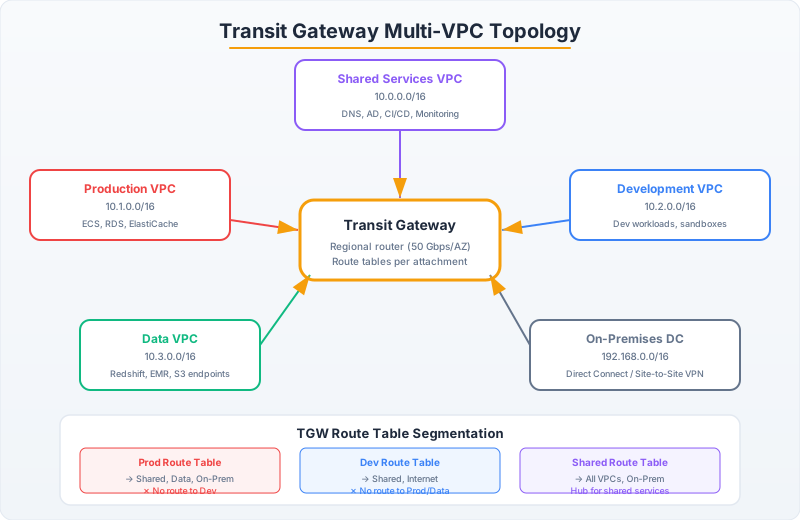
Transit Gateway acts as a regional network hub. VPCs, VPNs, and Direct Connect gateways attach to it, and route tables control traffic flow between attachments:
import boto3

ec2 = boto3.client('ec2')

# Create Transit Gateway
tgw_response = ec2.create_transit_gateway(
    Description='Central network hub',
    Options={
        'AmazonSideAsn': 64512,
        'AutoAcceptSharedAttachments': 'disable',  # Require explicit acceptance
        'DefaultRouteTableAssociation': 'disable',  # We'll manage route tables manually
        'DefaultRouteTablePropagation': 'disable',
        'DnsSupport': 'enable',
        'VpnEcmpSupport': 'enable',
        'MulticastSupport': 'disable'
    }
)
tgw_id = tgw_response['TransitGateway']['TransitGatewayId']

# Create separate route tables for network segmentation
# Prod VPCs can reach each other and shared services, but NOT dev VPCs
prod_rt = ec2.create_transit_gateway_route_table(TransitGatewayId=tgw_id)
dev_rt = ec2.create_transit_gateway_route_table(TransitGatewayId=tgw_id)
shared_rt = ec2.create_transit_gateway_route_table(TransitGatewayId=tgw_id)

# Attach VPCs
prod_vpc_attachment = ec2.create_transit_gateway_vpc_attachment(
    TransitGatewayId=tgw_id,
    VpcId='vpc-prod-api',
    SubnetIds=['subnet-prod-a', 'subnet-prod-b', 'subnet-prod-c'],
    Options={
        'DnsSupport': 'enable',
        'Ipv6Support': 'disable',
        'ApplianceModeSupport': 'disable'
    }
)

# Associate attachment with route table (determines which routes it sees)
ec2.associate_transit_gateway_route_table(
    TransitGatewayRouteTableId=prod_rt['TransitGatewayRouteTable']['TransitGatewayRouteTableId'],
    TransitGatewayAttachmentId=prod_vpc_attachment['TransitGatewayVpcAttachment']['TransitGatewayAttachmentId']
)

# Propagate routes: shared services VPC routes appear in prod route table
ec2.enable_transit_gateway_route_table_propagation(
    TransitGatewayRouteTableId=prod_rt['TransitGatewayRouteTable']['TransitGatewayRouteTableId'],
    TransitGatewayAttachmentId='tgw-attach-shared-services'  # Shared VPC's attachment
)

# Static route: Send 0.0.0.0/0 to inspection VPC (for IDS/firewall)
ec2.create_transit_gateway_route(
    TransitGatewayRouteTableId=prod_rt['TransitGatewayRouteTable']['TransitGatewayRouteTableId'],
    DestinationCidrBlock='0.0.0.0/0',
    TransitGatewayAttachmentId='tgw-attach-inspection-vpc'
)
import software.amazon.awssdk.services.ec2.Ec2Client;
import software.amazon.awssdk.services.ec2.model.*;
import java.util.List;
public class TransitGatewaySetup {
private final Ec2Client ec2 = Ec2Client.create();
public record TgwInfra(String tgwId, String prodRtId, String devRtId, String sharedRtId) {}
public TgwInfra createHubAndSpoke() {
// Create TGW
CreateTransitGatewayResponse tgwResponse = ec2.createTransitGateway(
CreateTransitGatewayRequest.builder()
.description("Central network hub")
.options(TransitGatewayRequestOptions.builder()
.amazonSideAsn(64512L)
.autoAcceptSharedAttachments(AutoAcceptSharedAttachmentsValue.DISABLE)
.defaultRouteTableAssociation(DefaultRouteTableAssociationValue.DISABLE)
.defaultRouteTablePropagation(DefaultRouteTablePropagationValue.DISABLE)
.dnsSupport(DnsSupportValue.ENABLE)
.build())
.build());
String tgwId = tgwResponse.transitGateway().transitGatewayId();
// Create segmented route tables
String prodRtId = createRouteTable(tgwId, "prod-routes");
String devRtId = createRouteTable(tgwId, "dev-routes");
String sharedRtId = createRouteTable(tgwId, "shared-routes");
return new TgwInfra(tgwId, prodRtId, devRtId, sharedRtId);
}
private String createRouteTable(String tgwId, String name) {
CreateTransitGatewayRouteTableResponse response = ec2.createTransitGatewayRouteTable(
CreateTransitGatewayRouteTableRequest.builder()
.transitGatewayId(tgwId)
.tagSpecifications(TagSpecification.builder()
.resourceType(ResourceType.TRANSIT_GATEWAY_ROUTE_TABLE)
.tags(Tag.builder().key("Name").value(name).build())
.build())
.build());
return response.transitGatewayRouteTable().transitGatewayRouteTableId();
}
}PrivateLink: Service Exposure Without Network Coupling
PrivateLink creates a one-way channel: a service provider exposes an endpoint, consumers access it through an ENI in their VPC. No route table changes, no CIDR coordination, no transitive routing risk.
# Provider side: Expose a service behind an NLB via PrivateLink

# Step 1: Service is behind a Network Load Balancer
# (Must be NLB, not ALB — PrivateLink only works with NLB or GWLB)

# Step 2: Create VPC Endpoint Service
endpoint_service = ec2.create_vpc_endpoint_service_configuration(
    NetworkLoadBalancerArns=['arn:aws:elasticloadbalancing:us-east-1:111111111111:loadbalancer/net/my-service-nlb/abc123'],
    AcceptanceRequired=True,  # Manually approve connection requests
    TagSpecifications=[{
        'ResourceType': 'vpc-endpoint-service',
        'Tags': [{'Key': 'Name', 'Value': 'payment-service-endpoint'}]
    }]
)
service_id = endpoint_service['ServiceConfiguration']['ServiceId']
service_name = endpoint_service['ServiceConfiguration']['ServiceName']
# Service name looks like: com.amazonaws.vpce.us-east-1.vpce-svc-0123456789abcdef0

# Step 3: Allow specific accounts to create endpoints to this service
ec2.modify_vpc_endpoint_service_permissions(
    ServiceId=service_id,
    AddAllowedPrincipals=[
        'arn:aws:iam::222222222222:root',  # Consumer account
        'arn:aws:iam::333333333333:root'
    ]
)

# Consumer side: Create endpoint to the service
consumer_endpoint = ec2.create_vpc_endpoint(
    VpcId='vpc-consumer',
    ServiceName=service_name,
    VpcEndpointType='Interface',
    SubnetIds=['subnet-consumer-a', 'subnet-consumer-b'],
    SecurityGroupIds=['sg-endpoint-access'],
    PrivateDnsEnabled=False  # Usually False for custom services
)
# Consumer now accesses the service via the endpoint DNS:
# vpce-0123456789abcdef0-abc123.vpce-svc-xyz.us-east-1.vpce.amazonaws.com
// Consumer side: Calling a service through PrivateLink
// The DNS endpoint resolves to a private IP in the consumer's VPC
import java.net.http.HttpClient;
import java.net.http.HttpRequest;
import java.net.http.HttpResponse;
import java.net.URI;
public class PrivateLinkConsumer {
private static final String ENDPOINT_DNS =
"vpce-0123456789abcdef0-abc123.vpce-svc-xyz.us-east-1.vpce.amazonaws.com";
private final HttpClient httpClient = HttpClient.newBuilder()
.connectTimeout(java.time.Duration.ofSeconds(5))
.build();
public String callPaymentService(String orderId, String amount) throws Exception {
HttpRequest request = HttpRequest.newBuilder()
.uri(URI.create("https://" + ENDPOINT_DNS + "/api/v1/charge"))
.header("Content-Type", "application/json")
.POST(HttpRequest.BodyPublishers.ofString("""
{"order_id": "%s", "amount": "%s"}
""".formatted(orderId, amount)))
.build();
HttpResponse<String> response = httpClient.send(request,
HttpResponse.BodyHandlers.ofString());
if (response.statusCode() != 200) {
throw new PaymentException("Payment failed: " + response.body());
}
return response.body();
}
}When to Use Which
VPC Peering: Two VPCs that need direct, low-latency, high-bandwidth connectivity. Both sides see each other’s CIDR. No transitive routing (A peers with B, B peers with C, but A cannot reach C through B).
Transit Gateway: You have 5+ VPCs that need some-to-some connectivity with centralized routing control. You want network segmentation (prod can’t reach dev). You need inspection (route all traffic through a firewall VPC).
PrivateLink: You want to expose a specific service (not the whole VPC) to consumers. Consumer doesn’t need to know your CIDR. Works across accounts without any VPC peering or routing changes.
Anti-pattern: Using Transit Gateway when you only have 2 VPCs that need to talk. The $0.05/hour per attachment plus $0.02/GB data processing cost is overkill compared to free VPC peering with $0.01/GB cross-AZ only.