Distributed Tracing with X-Ray
Distributed Tracing with X-Ray
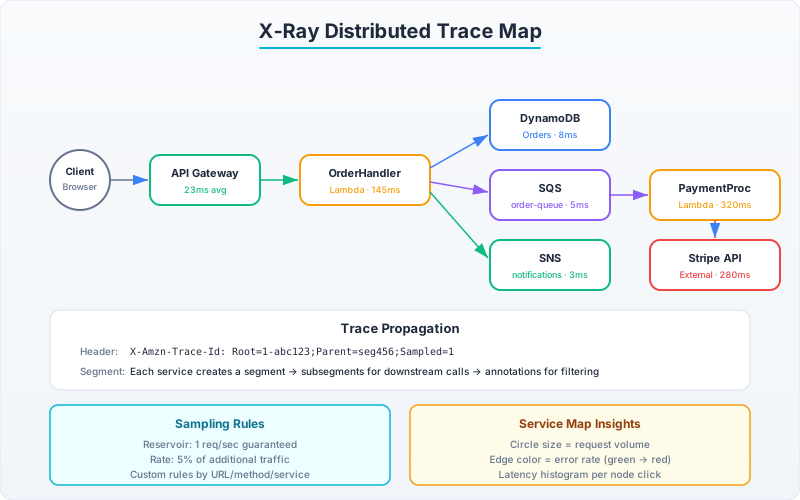
A single user request in a microservice architecture might touch API Gateway → Lambda → DynamoDB → SQS → Lambda → SNS → Lambda. When that request takes 8 seconds instead of 200ms, which hop is the bottleneck? X-Ray answers this by creating a trace — a tree of segments representing each service hop, with timing data at each node.
How X-Ray Trace Propagation Works
X-Ray traces flow through the X-Amzn-Trace-Id header. Each service creates a segment (its own contribution to the trace), and when calling downstream services, includes the trace ID so the downstream can link its segment to the same trace.
# For Lambda: X-Ray is enabled at the function level (Active Tracing)
# The SDK auto-creates segments for AWS SDK calls

# Install: pip install aws-xray-sdk
from aws_xray_sdk.core import xray_recorder, patch_all

# Patch ALL supported libraries (boto3, requests, httplib, sqlite3, psycopg2)
patch_all()
# After this, EVERY boto3 call automatically creates an X-Ray subsegment
# with timing, request/response metadata, and error details

import boto3

dynamodb = boto3.resource('dynamodb')
table = dynamodb.Table('orders')

@xray_recorder.capture('process_order')  # Custom subsegment
def process_order(order_id: str):
    # This DynamoDB call is auto-traced (patch_all handled it)
    order = table.get_item(Key={'pk': f'ORDER#{order_id}', 'sk': 'METADATA'})

    # Create custom subsegment for business logic timing
    with xray_recorder.in_subsegment('validate_inventory') as subsegment:
        subsegment.put_annotation('order_id', order_id)  # Indexed, searchable
        subsegment.put_metadata('order_details', order)  # Not indexed, for debugging

        result = validate_inventory(order['Item'])

    return result

def handler(event, context):
    # Lambda automatically creates the parent segment
    # All subsegments are children of this segment

    # Add annotation for filtering traces later
    segment = xray_recorder.current_segment()
    segment.put_annotation('customer_tier', event.get('customer_tier', 'standard'))

    return process_order(event['order_id'])
// Java: X-Ray with AWS SDK v2
// Add dependency: software.amazon.awssdk:aws-xray-recorder-sdk-aws-sdk-v2-instrumentor
import com.amazonaws.xray.AWSXRay;
import com.amazonaws.xray.entities.Subsegment;
import com.amazonaws.xray.interceptors.TracingInterceptor;
import software.amazon.awssdk.core.client.config.ClientOverrideConfiguration;
import software.amazon.awssdk.services.dynamodb.DynamoDbClient;
import software.amazon.awssdk.services.dynamodb.model.*;
import java.util.Map;
public class TracedOrderService {
// Instrument the SDK client with X-Ray tracing interceptor
private static final DynamoDbClient DYNAMO = DynamoDbClient.builder()
.overrideConfiguration(ClientOverrideConfiguration.builder()
.addExecutionInterceptor(new TracingInterceptor())
.build())
.build();
public Map<String, AttributeValue> processOrder(String orderId) {
// Create custom subsegment for business logic
Subsegment subsegment = AWSXRay.beginSubsegment("validate_order");
try {
subsegment.putAnnotation("order_id", orderId);
// This DynamoDB call is automatically traced via the interceptor
GetItemResponse response = DYNAMO.getItem(GetItemRequest.builder()
.tableName("orders")
.key(Map.of(
"pk", AttributeValue.builder().s("ORDER#" + orderId).build(),
"sk", AttributeValue.builder().s("METADATA").build()
))
.build());
subsegment.putMetadata("item_count", response.item().size());
return response.item();
} catch (Exception e) {
subsegment.addException(e);
throw e;
} finally {
AWSXRay.endSubsegment();
}
}
}Tracing Across Async Boundaries (SQS)
X-Ray trace context is automatically propagated through synchronous calls. For async boundaries (SQS, SNS, EventBridge), you must propagate manually:
import json
from aws_xray_sdk.core import xray_recorder

def send_to_queue_with_trace(queue_url: str, message: dict):
    """Propagate X-Ray trace context through SQS message attributes."""

    # Get current trace header
    header = xray_recorder.current_segment().trace_id
    parent_id = xray_recorder.current_subsegment().id if xray_recorder.current_subsegment() else None

    sqs = boto3.client('sqs')
    sqs.send_message(
        QueueUrl=queue_url,
        MessageBody=json.dumps(message),
        MessageSystemAttributes={
            'AWSTraceHeader': {
                'DataType': 'String',
                'StringValue': f'Root={header};Parent={parent_id};Sampled=1'
            }
        }
    )

# Consumer side: link back to the original trace
def sqs_consumer_handler(event, context):
    for record in event['Records']:
        # SQS automatically extracts AWSTraceHeader and sets it as the parent
        # The consumer Lambda segment is automatically linked to the producer's trace

        # Your business logic here — all subsegments are part of the original trace
        body = json.loads(record['body'])
        process_async_message(body)
Sampling Rules: Cost Control at Scale
At 1 million requests/day, tracing everything costs real money ($5 per million traces ingested). Sampling rules control which requests get traced:
import boto3

xray = boto3.client('xray')

# Custom sampling rule: Trace 100% of errors, 5% of successful requests
xray.create_sampling_rule(
    SamplingRule={
        'RuleName': 'order-service-adaptive',
        'Priority': 100,
        'FixedRate': 0.05,      # Sample 5% of requests
        'ReservoirSize': 10,     # Always sample at least 10/sec (burst)
        'ServiceName': 'order-service',
        'ServiceType': '*',
        'Host': '*',
        'HTTPMethod': '*',
        'URLPath': '*',
        'ResourceARN': '*',
        'Version': 1
    }
)

# High-priority rule for errors (evaluated first due to lower priority number)
xray.create_sampling_rule(
    SamplingRule={
        'RuleName': 'always-trace-errors',
        'Priority': 1,          # Evaluated before other rules
        'FixedRate': 1.0,       # 100% of matching requests
        'ReservoirSize': 100,
        'ServiceName': '*',
        'ServiceType': '*',
        'Host': '*',
        'HTTPMethod': '*',
        'URLPath': '*',
        'ResourceARN': '*',
        'Version': 1,
        'Attributes': {
            'http.status': '5*'  # Match 5xx responses
        }
    }
)
Service Map: Automated Architecture Discovery
X-Ray’s service map is built automatically from trace data. It shows:
- All services and their dependencies
- Average latency between services
- Error rates per edge
- Throughput (traces/second)
# Query the service graph programmatically
import boto3
from datetime import datetime, timedelta

xray = boto3.client('xray')

# Get the service graph for the last hour
response = xray.get_service_graph(
    StartTime=datetime.utcnow() - timedelta(hours=1),
    EndTime=datetime.utcnow()
)

for service in response['Services']:
    name = service['Name']
    state = service['State']

    # Aggregate latency stats
    summary = service.get('SummaryStatistics', {})
    ok_count = summary.get('OkCount', 0)
    error_count = summary.get('ErrorStatistics', {}).get('TotalCount', 0)
    fault_count = summary.get('FaultStatistics', {}).get('TotalCount', 0)

    total = ok_count + error_count + fault_count
    error_rate = (error_count + fault_count) / total * 100 if total > 0 else 0

    # Latency histogram
    latency = service.get('ResponseTimeHistogram', [])
    p99 = next((h['Value'] for h in latency if h.get('Count', 0) > 0), 0) * 1000

    print(f"{name:30s} | Requests: {total:>8} | Error rate: {error_rate:>5.1f}% | State: {state}")

    # Edges show dependencies
    for edge in service.get('Edges', []):
        ref = edge['ReferenceId']
        edge_latency = edge.get('SummaryStatistics', {})
        print(f"  → {edge.get('Aliases', [{}])[0].get('Name', ref)}")
Trace Analysis: Finding the Bottleneck
# Query traces matching specific criteria
def find_slow_traces(service: str, min_duration_seconds: float = 2.0):
    """Find traces where a specific service took longer than threshold."""
    xray = boto3.client('xray')

    response = xray.get_trace_summaries(
        StartTime=datetime.utcnow() - timedelta(hours=1),
        EndTime=datetime.utcnow(),
        FilterExpression=f'service("{service}") AND duration > {min_duration_seconds}',
        Sampling=False  # Get all matching (not sampled subset)
    )

    slow_traces = response['TraceSummaries']
    print(f"Found {len(slow_traces)} slow traces (>{min_duration_seconds}s)")

    for trace in slow_traces[:5]:
        print(f"\n  Trace: {trace['Id']}")
        print(f"  Duration: {trace['Duration']:.2f}s")
        print(f"  Response time: {trace.get('ResponseTime', 0):.2f}s")

        # Get full trace details
        full_trace = xray.batch_get_traces(TraceIds=[trace['Id']])
        for segment_doc in full_trace['Traces'][0]['Segments']:
            seg = json.loads(segment_doc['Document'])
            seg_duration = seg.get('end_time', 0) - seg.get('start_time', 0)
            print(f"    {seg.get('name', 'unknown'):30s} {seg_duration*1000:>8.1f}ms")

# Filter expressions are powerful:
# service("order-service") AND responseTime > 5
# annotation.customer_tier = "enterprise" AND fault = true
# http.url CONTAINS "/api/v1/payments"
# service("dynamodb") AND edge("order-service", "dynamodb") { responsetime > 0.5 }
The observability maturity model:
- Level 1: Alarms on service-level metrics (error rate, latency). You know something is wrong.
- Level 2: Structured logs with correlation IDs. You can find the failing request.
- Level 3: Distributed traces linked to logs. You can see the full call chain.
- Level 4: Anomaly detection + automated remediation. The system self-heals.
Most teams are stuck at Level 1. Getting to Level 3 requires upfront investment in instrumentation that pays for itself on the first production incident.