ArgoCD vs Flux: An Honest Comparison
ArgoCD vs Flux
This book uses ArgoCD. This chapter explains why and acknowledges where Flux is the better choice.
Both tools implement GitOps. Both watch Git repositories and reconcile cluster state. The differences are in architecture, user experience, and operational model.
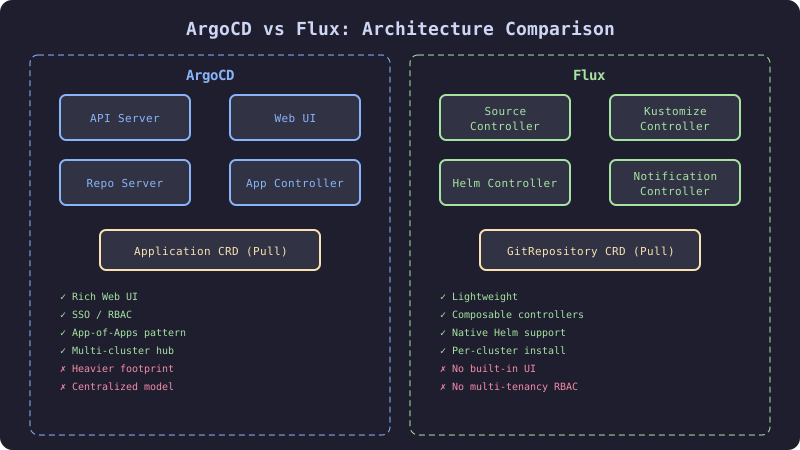
The Comparison
Architecture
ArgoCD is a centralized application. It runs as a set of deployments in the argocd namespace: API server, repo server, application controller, Redis, and Dex (authentication). It has a web UI and a CLI. It stores application state in Kubernetes CRDs.
Flux is a set of controllers that run independently. Each controller handles a specific concern: source-controller (watches Git), kustomize-controller (applies manifests), helm-controller (manages Helm releases), notification-controller (sends alerts). There is no built-in UI.
| Aspect | ArgoCD | Flux |
|---|---|---|
| Architecture | Monolithic (single set of components) | Modular (independent controllers) |
| UI | Built-in web UI with visualization | No built-in UI (Weave GitOps, Capacitor) |
| CLI | argocd CLI with full functionality | flux CLI for bootstrapping and debugging |
| State storage | Kubernetes CRDs | Kubernetes CRDs |
| Git polling | Configurable (default 3 min) | Configurable (default 1 min) |
| Webhook support | Yes | Yes |
| Multi-cluster | Yes (hub-spoke model) | Yes (per-cluster controllers) |
Feature Matrix
| Feature | ArgoCD | Flux |
|---|---|---|
| Web UI | ✅ Full dashboard with diff view | ❌ Requires third-party (Weave GitOps) |
| SSO/RBAC | ✅ Dex integration, project roles | ✅ Kubernetes RBAC, multi-tenancy |
| Rollback | ✅ UI button, revision history | ⚠️ Git revert (no UI rollback) |
| Sync waves | ✅ Ordered resource application | ✅ Kustomize dependsOn |
| Progressive delivery | ✅ Argo Rollouts integration | ✅ Flagger integration |
| Helm support | ✅ Helm template rendering | ✅ Native HelmRelease CRD |
| Kustomize support | ✅ Native | ✅ Native |
| Notifications | ✅ Built-in notification engine | ✅ notification-controller |
| Image update | ⚠️ Argo CD Image Updater (separate) | ✅ image-reflector + image-automation |
| OCI support | ✅ OCI Helm charts | ✅ OCI artifacts for all sources |
| Multi-tenancy | ⚠️ Projects + RBAC | ✅ Namespace-scoped, native multi-tenancy |
When to Choose ArgoCD
- The team values a visual dashboard for deployment status
- The organization has a platform team that manages deployments centrally
- The team needs Argo Rollouts for progressive delivery (tighter integration)
- Rollback via UI is a requirement for on-call engineers
- The team prefers a centralized model with project-level access control
When to Choose Flux
- Multi-tenancy is a primary requirement (teams manage their own GitOps in their namespace)
- The team prefers a lightweight, composable architecture
- Automated image updates are a core workflow (Flux’s image automation is more mature)
- The team is comfortable with CLI-first operations (no UI dependency)
- The organization prefers Kubernetes-native RBAC over application-level RBAC
The Mechanism
Operational Complexity
ArgoCD requires more initial setup (API server, Dex, Redis, Ingress) but provides more out of the box. Flux requires less initial setup but needs additional components for full functionality (UI, image automation).
Maintenance load:
- ArgoCD: Upgrade is a single manifest update. Breaking changes are rare but possible (Dex configuration, API deprecations). The UI requires Ingress and TLS.
- Flux: Upgrade is
flux installor updating the Flux CRDs. Each controller upgrades independently. Fewer moving parts but more components to track.
Resource Consumption
| Component | ArgoCD Memory | Flux Equivalent | Flux Memory |
|---|---|---|---|
| API Server | 256-512 Mi | (no equivalent) | - |
| Repo Server | 256-512 Mi | source-controller | 128-256 Mi |
| App Controller | 256-512 Mi | kustomize-controller | 128-256 Mi |
| Redis | 128-256 Mi | (no equivalent) | - |
| Dex | 64-128 Mi | (no equivalent) | - |
| Notifications | 64-128 Mi | notification-controller | 64-128 Mi |
| Total | ~1-2 Gi | ~320-640 Mi |
Flux uses approximately half the memory of ArgoCD because it has no UI, no authentication layer, and no Redis cache.
The Implementation
This book does not include a full Flux implementation. Here is the equivalent Flux configuration for the checkout service to illustrate the difference:
# Flux equivalent of ArgoCD Application
apiVersion: source.toolkit.fluxcd.io/v1
kind: GitRepository
metadata:
  name: ecommerce-infra
  namespace: flux-system
spec:
  interval: 1m
  url: https://github.com/acme/ecommerce-infra.git
  ref:
    branch: main
---
apiVersion: kustomize.toolkit.fluxcd.io/v1
kind: Kustomization
metadata:
  name: checkout-service
  namespace: flux-system
spec:
  interval: 5m
  sourceRef:
    kind: GitRepository
    name: ecommerce-infra
  path: ./apps/checkout-service/overlays/production
  prune: true
  targetNamespace: production
  healthChecks:
    - apiVersion: apps/v1
      kind: Deployment
      name: checkout-service
      namespace: production
  timeout: 3m
The structure is different (two resources instead of one) but the behavior is equivalent: watch Git, render Kustomize, apply to cluster, monitor health, prune deleted resources.
The Gate
The choice between ArgoCD and Flux is a team decision, not a technical one. Both tools are production-ready. Both are CNCF graduated projects. The gate is: does the team need a UI? If yes, ArgoCD. If the team prioritizes lightweight multi-tenancy and is CLI-comfortable, Flux.
The Recovery
Migrating from ArgoCD to Flux (or vice versa): Run both tools in parallel during the migration. Point ArgoCD Applications and Flux Kustomizations at the same Git paths. Verify that both produce identical cluster state. Then disable one. Do not attempt a big-bang migration.
Chose ArgoCD but now need Flux’s image automation: Use ArgoCD Image Updater, which provides similar functionality. Or run Flux’s image-reflector alongside ArgoCD for just the image update workflow.