Incident Recovery: GitOps Rollback and Hotfix Pipelines
Incident Recovery: GitOps Rollback and Hotfix Pipelines
The deployment caused an outage. The dashboard is red. PagerDuty is screaming. The question is not “what went wrong” — it is “how fast can we get back to working.”
GitOps rollback is a git revert. The infrastructure repo records every deployment. Reverting the commit that changed the image tag restores the previous version. ArgoCD syncs. The service rolls back.
The Failure
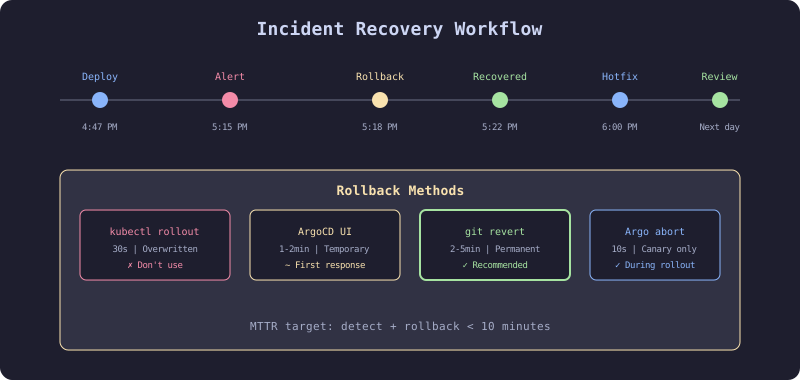
The team deployed a new version of the payments service at 4:47 PM on a Friday. At 5:15 PM, the on-call engineer received a PagerDuty alert: payment processing was failing. The engineer tried to rollback by editing the Kubernetes deployment directly: kubectl set image deployment/payments-service.... It worked for 3 minutes. Then ArgoCD synced and re-deployed the broken version because the infra repo still pointed to the bad image tag.
GitOps rollback must go through Git, not kubectl. Any change made outside Git will be reverted by the GitOps controller.
The Mechanism
Rollback Options
| Method | Speed | Risk | Audit Trail |
|---|---|---|---|
git revert on infra repo | 2-5 min | Low | Full |
| ArgoCD UI rollback | 1-2 min | Medium (drift) | Partial |
kubectl rollout undo | 30s | High (ArgoCD overwrites) | None |
| Argo Rollouts abort | 10s | Low (canary only) | Full |
Recommended Flow
- Immediate: ArgoCD UI rollback (fastest, gets service back)
- Within 5 min:
git revertthe infra repo commit (prevents ArgoCD re-sync) - Within 1 hour: Root cause analysis, hotfix if needed
- Next business day: Post-incident review, pipeline improvements
The Implementation
Git Revert Rollback
# HARDENED: GitOps rollback via git revert
cd ecommerce-infra

# Find the deployment commit
git log --oneline --grep="deploy: payments-service" -5
# abc1234 deploy: payments-service def5678 to production
# 9876543 deploy: payments-service aaa1111 to production

# Revert the bad deployment
git revert abc1234 --no-edit
git push

# ArgoCD detects the revert, syncs to previous image tag
# Rollback complete in 2-5 minutes
Emergency Rollback Script
#!/bin/bash
# scripts/emergency-rollback.sh
# HARDENED: One-command rollback for on-call engineers
set -euo pipefail

SERVICE=$1
ENVIRONMENT=${2:-production}

if [[ -z "$SERVICE" ]]; then
  echo "Usage: $0 <service-name> [environment]"
  exit 1
fi

echo "Rolling back $SERVICE in $ENVIRONMENT"

# Find the last deployment commit for this service
LAST_DEPLOY=$(git log --oneline --grep="deploy: $SERVICE" -1 --format="%H")

if [[ -z "$LAST_DEPLOY" ]]; then
  echo "No deployment commit found for $SERVICE"
  exit 1
fi

echo "Reverting commit: $(git log --oneline -1 $LAST_DEPLOY)"
git revert "$LAST_DEPLOY" --no-edit
git push

echo "Revert pushed. ArgoCD will sync within 3 minutes."
echo "Monitor: argocd app get ${SERVICE}-${ENVIRONMENT}"
Hotfix Pipeline
# checkout-service/.github/workflows/hotfix.yml
# HARDENED: Fast-path pipeline for emergency fixes
name: Hotfix
on:
  push:
    branches: ["hotfix/**"]

jobs:
  hotfix-build:
    runs-on: ubuntu-latest
    steps:
      - uses: actions/checkout@v4

      # Reduced test suite: unit tests only
      - name: Fast tests
        run: go test -short ./...

      # Security scan still runs (non-negotiable)
      - name: Trivy scan
        uses: aquasecurity/trivy-action@master
        with:
          scan-type: "fs"
          severity: "CRITICAL"
          exit-code: "1"

      - name: Build and push
        uses: docker/build-push-action@v5
        with:
          push: true
          tags: ghcr.io/acme/checkout-service:hotfix-${{ github.sha }}

      # Deploy directly to production (skip staging)
      - name: Trigger production deploy
        uses: peter-evans/repository-dispatch@v3
        with:
          token: ${{ secrets.INFRA_REPO_TOKEN }}
          repository: acme/ecommerce-infra
          event-type: deploy-service
          client-payload: |
            {
              "service": "checkout-service",
              "image": "ghcr.io/acme/checkout-service",
              "tag": "hotfix-${{ github.sha }}",
              "environment": "production",
              "hotfix": true
            }
Post-Incident Pipeline Review
## Post-Incident Review Template

### Timeline

- **Detection**: How long between deploy and alert?
- **Response**: How long between alert and rollback?
- **Resolution**: How long between rollback and full fix?

### Pipeline Questions

1. Did the pipeline catch any warnings before deploy?
2. Were there analysis/canary results before full rollout?
3. Could automated rollback have caught this faster?
4. What gate would have prevented this from reaching production?

### Action Items

- [ ] Add test for the specific failure mode
- [ ] Tighten canary analysis thresholds
- [ ] Add monitoring for the affected metric
- [ ] Update runbook with rollback procedure
The Gate
The hotfix pipeline has a reduced gate: unit tests and critical-severity security scans only. It skips integration tests, performance tests, and staging deployment. This is an explicit trade-off: speed of recovery versus thoroughness of validation. The hotfix must be followed by a proper release through the normal pipeline within 24 hours.
The Recovery
ArgoCD re-deploys the broken version after kubectl rollback: Always revert in Git. ArgoCD’s self-heal will undo any kubectl changes within 3 minutes.
Hotfix branch has merge conflicts: The hotfix branch diverges from main. After the hotfix is deployed, merge the hotfix back to main immediately. Do not let hotfix branches live for more than 24 hours.
Git revert creates a new commit that blocks the fix: The reverted change cannot be re-merged as-is. Create the fix as a new commit, not a revert of the revert. Or use git revert --no-commit to stage the revert and include the fix in the same commit.