Container Builds: Dockerfile Hygiene, Layer Caching, and Multi-Stage Builds
Container Builds
The catalog service Docker image is 1.2 GB. It includes the Node.js development toolchain, test fixtures, a .git directory, and the entire node_modules tree including dev dependencies. Building it takes 4 minutes because every change to any file invalidates the COPY . . layer, which triggers a full npm install rebuild.
The production runtime needs Node.js, the compiled application, and production dependencies. Nothing else. A properly structured Dockerfile produces an image under 200 MB. Build time drops to 45 seconds on cache hit because dependency installation only re-runs when package-lock.json changes.
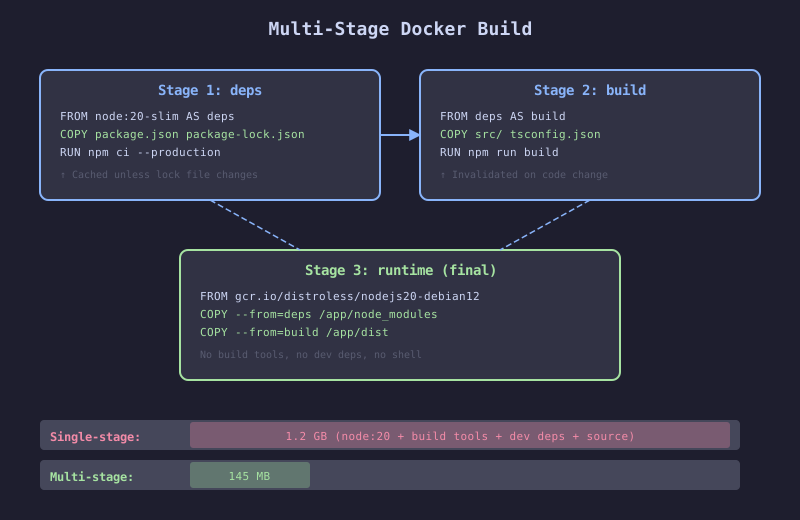
The diagram shows a two-stage Docker build. Stage 1 (build) starts with a full Node.js image, copies package.json and package-lock.json, runs npm ci, copies source code, and runs the build. Stage 2 (production) starts with a slim base image, copies only the compiled output and production node_modules from stage 1. The resulting image excludes build tools, dev dependencies, and source code. Layer sizes are annotated: the build stage is 890 MB, the production stage is 180 MB.
The Failure
A developer adds a new API endpoint to the catalog service. They change one file: src/routes/recommendations.js. The CI pipeline rebuilds the Docker image. The Dockerfile:
# FRAGILE: Every source change triggers full dependency install
FROM node:20
WORKDIR /app
COPY . .
RUN npm install
RUN npm run build
CMD ["node", "dist/server.js"]
The COPY . . instruction copies every file in the build context, including the changed source file. This invalidates the layer cache. The RUN npm install step runs from scratch: 3 minutes to download and install 400 packages that did not change. Total build time: 4 minutes for a one-line code change.
The image is 1.2 GB because it contains the full node_modules (including dev dependencies), the src/ directory (not needed at runtime), the .git/ directory (accidentally included), and the Node.js build toolchain.
The Mechanism
Docker builds images in layers. Each instruction (FROM, COPY, RUN) creates a layer. Docker caches layers and reuses them when the input has not changed. The cache invalidation rule: if any input to a layer changes, that layer and all subsequent layers are rebuilt.
Layer ordering determines cache efficiency. Instructions with inputs that change rarely (dependency installation) should come before instructions with inputs that change frequently (source code copy). This way, a source code change only invalidates the source copy and build layers, not the dependency layer.
Multi-stage builds use multiple FROM instructions. Each FROM starts a new build stage. The final stage copies only what it needs from previous stages. Build tools, compilers, test frameworks, and dev dependencies stay in the build stage and are not included in the final image.
The Implementation
# HARDENED: Optimized Dockerfile for the catalog service
# Stage 1: Install dependencies (cached unless package-lock.json changes)
FROM node:20-slim@sha256:4f57b0edb3... AS deps
WORKDIR /app
COPY package.json package-lock.json ./
RUN npm ci --ignore-scripts --production=false

# Stage 2: Build application
FROM deps AS build
COPY tsconfig.json ./
COPY src/ ./src/
RUN npm run build

# Stage 3: Production image
FROM node:20-slim@sha256:4f57b0edb3... AS production
WORKDIR /app

# Install production dependencies only
COPY package.json package-lock.json ./
RUN npm ci --ignore-scripts --omit=dev && npm cache clean --force

# Copy compiled output from build stage
COPY --from=build /app/dist ./dist

# Security: run as non-root user
USER node

# Health check
HEALTHCHECK --interval=30s --timeout=3s --start-period=5s --retries=3 \
  CMD node -e "require('http').get('http://localhost:8080/healthz', (r) => { process.exit(r.statusCode === 200 ? 0 : 1) })"

EXPOSE 8080
CMD ["node", "dist/server.js"]
# .dockerignore
.git
.github
node_modules
dist
*.md
load-tests
.env*
docker-compose*
coverageThe .dockerignore prevents large, unnecessary files from being included in the build context. The .git directory alone can be hundreds of megabytes. node_modules is excluded because the Dockerfile installs dependencies from the lock file.
Pipeline Integration with Size Tracking
# HARDENED: Build with vulnerability scan and size tracking
jobs:
  build:
    runs-on: ubuntu-latest
    outputs:
      image-digest: ${{ steps.build.outputs.digest }}
      image-size: ${{ steps.size.outputs.bytes }}
    steps:
      - uses: actions/checkout@v4

      - uses: docker/login-action@v3
        with:
          registry: ghcr.io
          username: ${{ github.actor }}
          password: ${{ secrets.GITHUB_TOKEN }}

      - name: Build and push
        id: build
        uses: docker/build-push-action@v6
        with:
          context: .
          push: true
          tags: ghcr.io/acme/catalog-service:${{ github.sha }}
          cache-from: type=gha
          cache-to: type=gha,mode=max

      - name: Track image size
        id: size
        run: |
          size=$(docker inspect ghcr.io/acme/catalog-service:${{ github.sha }} --format='{{.Size}}')
          size_mb=$((size / 1024 / 1024))
          echo "bytes=$size" >> $GITHUB_OUTPUT
          echo "## Image Size" >> $GITHUB_STEP_SUMMARY
          echo "**${size_mb} MB**" >> $GITHUB_STEP_SUMMARY

  scan:
    runs-on: ubuntu-latest
    needs: [build]
    steps:
      - name: Trivy vulnerability scan
        uses: aquasecurity/trivy-action@master
        with:
          image-ref: ghcr.io/acme/catalog-service@${{ needs.build.outputs.image-digest }}
          exit-code: 1
          severity: CRITICAL,HIGH
          format: table
The Gate
Two gates:
-
Trivy scan blocks the pipeline on CRITICAL or HIGH vulnerabilities in the image. This catches vulnerable OS packages in the base image and vulnerable language dependencies.
-
Image size tracking is observability, not a gate. But it can become a gate: if the image size exceeds a threshold (e.g., 300 MB for the catalog service), the pipeline fails. This prevents accidental inclusion of dev dependencies or build tools in the production image.
- name: Check image size limit
  run: |
    max_size=$((300 * 1024 * 1024))  # 300 MB
    if [ "${{ steps.size.outputs.bytes }}" -gt "$max_size" ]; then
      echo "::error::Image size ${{ steps.size.outputs.bytes }} exceeds limit of $max_size"
      exit 1
    fi
The Recovery
When a vulnerability scan blocks the build:
-
Base image CVE: Update the
FROMdigest to a patched version. Rundocker pull node:20-slimto get the latest, then extract the new digest for pinning. -
Application dependency CVE: Update the dependency, regenerate the lock file, rebuild. The multi-stage build ensures only production dependencies appear in the final image.
-
Stuck on a CVE with no fix: Add to Trivy’s ignore list with justification. Set a calendar reminder to check again when the upstream fix is released. Never leave an ignored CVE without a review date.