The Wire: What Actually Happens When You Make an HTTP Request
SummaryA complete dissection of what happens between typing...
A complete dissection of what happens between typing...
A complete dissection of what happens between typing requests.get() and receiving a response — from DNS resolution through TCP handshakes, TLS negotiation, HTTP/2 framing, and back. Every layer exposed with real tooling output.
The Wire: What Actually Happens When You Make an HTTP Request
Here’s a line of code you’ve written hundreds of times:
import requests
response = requests.get("https://example.com/api/users")
One line. One function call. And somewhere between that call and the JSON appearing in response.json(), approximately fourteen distinct operations happened — across five layers of protocol, touching at least four separate machines, involving cryptographic key exchanges, binary frame encoding, and the physical modulation of electrical signals or light pulses on a wire.
You probably think of this as “making an HTTP request.” That’s like calling brain surgery “fixing a headache.” Technically accurate. Practically useless when something goes wrong.
And things go wrong constantly. Connection timeouts that only happen in production. Requests that work from your laptop but fail from the server. Latency spikes that appear at 3 AM and vanish by the time anyone looks. The engineers who debug these issues in minutes instead of days are the ones who understand what actually happens on the wire.
Let’s trace every step.
Step 0: The Library Unpacks Your Intent
When you call requests.get("https://example.com/api/users"), the requests library doesn’t immediately reach for the network. First, it parses the URL into components: scheme (https), host (example.com), port (implicit 443), path (/api/users). It constructs a PreparedRequest object, attaches default headers (User-Agent, Accept-Encoding, Connection: keep-alive), checks its connection pool for an existing connection to example.com:443, and only then drops into urllib3, which manages the actual socket lifecycle.
This is already more than most engineers realize. That connection pool matters — it’s why your second request to the same host is measurably faster than the first.
Step 1: DNS Resolution — Translating Names to Numbers
Before any bytes can travel anywhere, the operating system needs an IP address. example.com means nothing to a network card. The resolution chain goes like this:
- The application calls
getaddrinfo("example.com", 443)— a POSIX function that the OS provides. - The OS checks
/etc/hosts— a flat file that predates DNS entirely. If there’s an entry forexample.com, resolution stops here. - The OS checks
/etc/nsswitch.conf— this file determines the order of resolution sources. A typical line readshosts: files dns myhostname, meaning: check local files first, then DNS, then the machine’s own hostname. - The stub resolver reads
/etc/resolv.confto find the configured nameserver (say,8.8.8.8). - A UDP packet is sent to the recursive resolver on port 53, asking for the A record (IPv4) or AAAA record (IPv6) of
example.com. - The recursive resolver walks the DNS hierarchy: root servers →
.comTLD servers →example.comauthoritative nameserver. - The answer comes back with an IP address and a TTL (Time To Live) — say,
93.184.216.34with a TTL of 3600 seconds.
The OS caches the result for the TTL duration. Some language runtimes cache it independently — and dangerously. Java’s JVM, for instance, caches DNS results indefinitely by default when a security manager is installed, a behavior that has caused countless production incidents when backend hosts change IP addresses.
You can watch this happen in real time:
$ dig example.com

; <<>> DiG 9.18.28 <<>> example.com
;; global options: +cmd
;; Got answer:
;; ->>HEADER<<- opcode: QUERY, status: NOERROR, id: 41983
;; flags: qr rd ra; QUERY: 1, ANSWER: 1, AUTHORITY: 0, ADDITIONAL: 1

;; ANSWER SECTION:
example.com.        3600    IN    A    93.184.216.34

;; Query time: 12 msec
;; SERVER: 8.8.8.8#53(8.8.8.8) (UDP)
That 3600 is the TTL in seconds. For the next hour, your resolver won’t ask again. Subsection CH4-S1 tears DNS apart completely.
Step 2: TCP Three-Way Handshake — Establishing the Channel
With an IP address in hand, the OS creates a TCP socket and initiates a connection. TCP is a reliable, ordered, byte-stream protocol — it guarantees that bytes arrive in order and without loss. But that guarantee requires setup.
The three-way handshake:
Client → Server:  SYN         seq=1000
Server → Client:  SYN-ACK     seq=4000, ack=1001
Client → Server: ACK seq=1001, ack=4001SYN: The client picks a random initial sequence number (ISN) — say, 1000 — and sends a SYN (synchronize) packet. This packet contains no payload data. It’s a request to establish a connection.
SYN-ACK: The server picks its own ISN (4000), acknowledges the client’s sequence number by setting ack=1001 (client’s ISN + 1), and sends both values back.
ACK: The client acknowledges the server’s ISN by setting ack=4001 and the connection enters the ESTABLISHED state on both sides.
This costs one full round trip before any data flows. On a connection from New York to London (~70ms round trip), that’s 70ms before you’ve sent a single byte of your HTTP request. On a connection from São Paulo to Tokyo, it’s closer to 280ms.
This is why connection pooling exists. This is why HTTP Keep-Alive exists. This is why HTTP/2 multiplexes multiple requests over a single connection. Every new TCP connection costs you a handshake.
Subsection CH4-S2 goes deep on TCP — including why TIME_WAIT connections might be eating your ephemeral port range.
Step 3: TLS 1.3 — The Cryptographic Negotiation
You specified https://, which means this connection is encrypted with TLS. Before any HTTP data flows, the client and server need to agree on cryptographic parameters and verify each other’s identity. TLS 1.3 improved this significantly over TLS 1.2 by reducing the handshake to a single round trip.
The TLS 1.3 handshake:
ClientHello (Client → Server): The client sends supported cipher suites, supported key exchange groups (e.g., X25519, P-256), and — critically — key shares for those groups. TLS 1.3 sends the key material speculatively in the first message, betting that the server will accept one of the offered groups.
Cipher Suites:
  TLS_AES_256_GCM_SHA384
  TLS_CHACHA20_POLY1305_SHA256
  TLS_AES_128_GCM_SHA256
Key Share: x25519 (32 bytes of public key)
ServerHello (Server → Client): The server picks a cipher suite, sends its own key share for the agreed-upon group, and follows immediately with:
- EncryptedExtensions: Additional parameters, now encrypted.
- Certificate: The server’s X.509 certificate chain.
- CertificateVerify: A signature proving the server holds the private key for the certificate.
- Finished: A MAC over the entire handshake transcript.
Client Finished (Client → Server): The client verifies the certificate chain against its trust store (is the certificate signed by a trusted CA? Is it expired? Does the domain match?), computes the shared secret from both key shares using Elliptic Curve Diffie-Hellman, derives session keys, and sends its own Finished message.
From this point forward, all data is encrypted with AES-256-GCM (or whichever cipher was negotiated). The symmetric key was derived from the ECDH exchange — it was never transmitted on the wire. Even someone who captured every packet cannot decrypt the traffic without one of the private keys.
You can see this with curl -v:
$ curl -v https://example.com/api/users 2>&1 | head -30
* Trying 93.184.216.34:443...
* Connected to example.com (93.184.216.34) port 443
* ALPN: offers h2,http/1.1
* TLSv1.3 (OUT), TLS handshake, Client hello (1):
* TLSv1.3 (IN), TLS handshake, Server hello (2):
* TLSv1.3 (IN), TLS handshake, Encrypted Extensions (8):
* TLSv1.3 (IN), TLS handshake, Certificate (11):
* TLSv1.3 (IN), TLS handshake, CERT verify (15):
* TLSv1.3 (IN), TLS handshake, Finished (20):
* TLSv1.3 (OUT), TLS handshake, Finished (20):
* SSL connection using TLSv1.3 / TLS_AES_256_GCM_SHA384
* ALPN: server accepted h2
* Server certificate:
*  subject: CN=example.com
*  start date: Jan 15 00:00:00 2025 GMT
*  expire date: Feb 15 23:59:59 2026 GMT
*  issuer: C=US; O=DigiCert Inc; CN=DigiCert TLS RSA SHA256 2020 CA1
> GET /api/users HTTP/2
> Host: example.com
> User-Agent: curl/8.5.0
> Accept: */*
Notice the ALPN: server accepted h2 line. During the TLS handshake, the Application-Layer Protocol Negotiation extension allows the client and server to agree on HTTP/2 without an additional round trip. Elegant.
Total time spent before sending any application data: DNS lookup + TCP handshake + TLS handshake = easily 150-400ms on a typical internet connection. On the first request. Now you understand why your cold-start API calls are slow.
Step 4: HTTP/2 Framing — The Request Itself
With an encrypted channel established, the client finally sends the HTTP request. But if HTTP/2 was negotiated (and it almost always is with modern servers), the request isn’t sent as plain text. It’s encoded into binary frames.
HTTP/2 introduces several concepts that HTTP/1.1 didn’t have:
Streams: Each request/response pair occupies a numbered stream. Multiple streams can be active simultaneously over the same TCP connection — this is multiplexing. No more head-of-line blocking at the HTTP layer.
Frames: All communication is broken into frames. The key frame types:
HEADERSframe: Contains the request headers, compressed using HPACK.DATAframe: Contains the request/response body.SETTINGSframe: Configuration parameters exchanged at connection setup.
HPACK Header Compression: HTTP headers are notoriously repetitive. Every request sends Host, User-Agent, Accept, etc. HPACK maintains a dynamic table of previously sent headers and encodes repeated headers as table indices. The Host: example.com header that was 20 bytes in HTTP/1.1 becomes a 1-byte index on subsequent requests.
Your GET /api/users request, encoded as HTTP/2 frames, looks roughly like this on the wire:
Frame: HEADERS (type=0x01)
  Stream ID: 1
  Flags: END_HEADERS, END_STREAM
  Header Block:
    :method = GET
    :path = /api/users
    :scheme = https
    :authority = example.com
    user-agent = python-requests/2.31.0
    accept = */*
    accept-encoding = gzip, deflate
The pseudo-headers (prefixed with :) are HTTP/2 specific — they replace the request line from HTTP/1.1.
Step 5: The Response Comes Back
The server processes the request and sends back:
Frame: HEADERS (type=0x01)
  Stream ID: 1
  Flags: END_HEADERS
  Header Block:
    :status = 200
    content-type = application/json
    content-encoding = gzip

Frame: DATA (type=0x00)
  Stream ID: 1
  Flags: END_STREAM
  Payload: [gzip-compressed JSON body]
The requests library receives these frames, decompresses the gzip body (because it sent Accept-Encoding: gzip), parses the headers, and wraps everything in a Response object. Your response.json() call then deserializes the JSON payload.
The Full Stack on the Wire
Here’s what a single packet carrying your HTTP request looks like after all the encapsulation, from outermost to innermost:
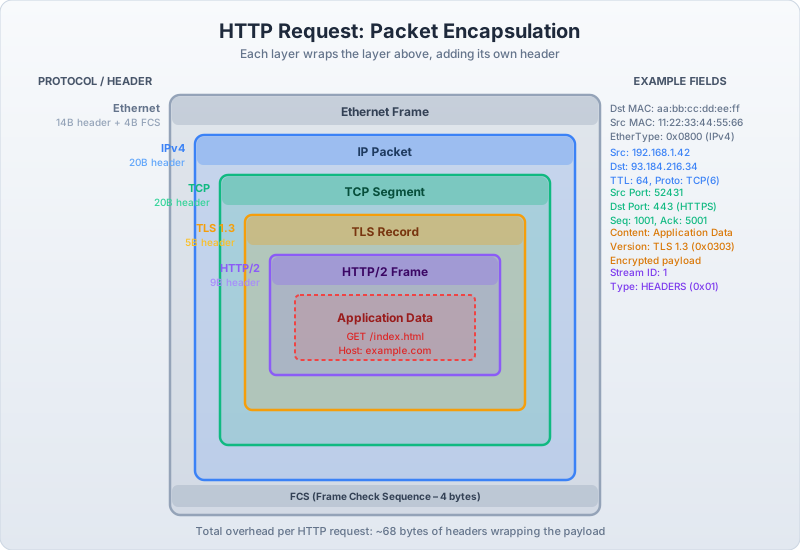
HTTP packet encapsulation: every HTTP request travels through four protocol layers. The Ethernet frame (14 bytes) handles MAC addressing for the local network, IP (20 bytes) handles routing between networks, TCP (20+ bytes) provides reliable ordered delivery, and TLS adds a 5-byte record header plus 16-byte authentication tag — totalling at least 175 bytes of overhead around your application payload. Understanding this layering explains why “just use HTTPS” has measurable latency cost, and why connection reuse (HTTP keep-alive) matters more than most application-layer optimizations.
Each layer adds its own header, wrapping the data from the layer above. The Ethernet frame adds 14 bytes. The IP header adds 20 bytes. TCP adds 20 bytes (minimum). TLS adds 5 bytes for the record header plus 16 bytes for the authentication tag. Your tiny HTTP request of maybe 100 bytes is traveling inside at least 175 bytes of overhead — and that’s before any padding or options.
Watching It Happen: tcpdump
You can capture the raw packets with tcpdump:
$ sudo tcpdump -i eth0 -nn host 93.184.216.34 -c 10

15:42:01.001 IP 192.168.1.100.52431 > 93.184.216.34.443: Flags [S], seq 1000, win 65535, options [mss 1460,sackOK,TS val 123456 ecr 0,nop,wscale 7], length 0
15:42:01.072 IP 93.184.216.34.443 > 192.168.1.100.52431: Flags [S.], seq 4000, ack 1001, win 65535, options [mss 1460,sackOK,TS val 789012 ecr 123456,nop,wscale 7], length 0
15:42:01.072 IP 192.168.1.100.52431 > 93.184.216.34.443: Flags [.], ack 4001, win 512, length 0
15:42:01.073 IP 192.168.1.100.52431 > 93.184.216.34.443: Flags [P.], seq 1001:1318, ack 4001, win 512, length 317
15:42:01.145 IP 93.184.216.34.443 > 192.168.1.100.52431: Flags [.], ack 1318, win 501, length 0
15:42:01.146 IP 93.184.216.34.443 > 192.168.1.100.52431: Flags [P.], seq 4001:7254, ack 1318, win 501, length 3253
Read it top to bottom: SYN → SYN-ACK → ACK (handshake complete, 72ms round trip). Then the client pushes data (the TLS ClientHello + HTTP request). The server acknowledges and pushes its response (TLS ServerHello + certificates + HTTP response). The Flags column tells the story: [S] is SYN, [S.] is SYN-ACK, [.] is ACK, [P.] is push+ack (real data).
That 72ms gap between the first SYN and the SYN-ACK? That’s physics. The speed of light through fiber optic cable, multiplied by the distance, plus router processing time at every hop. No amount of code optimization will make it faster. The only engineering response is to make fewer round trips — which is exactly what HTTP/2, TLS 1.3, and connection pooling do.
Why This Matters
Here’s the practical payoff. When you understand these layers, production mysteries become tractable:
- “Requests intermittently time out” → Check DNS TTL. Is your resolver caching a dead IP?
- “First request is slow, subsequent ones are fast” → TCP + TLS handshake cost. Connection pooling misconfigured?
- “We’re leaking connections” → Check
TIME_WAITsocket states. Ephemeral port exhaustion? - “TLS handshake failed” → Certificate expired? CA not in trust store? Cipher suite mismatch?
- “Requests work from my laptop but not from the server” → Different DNS resolvers. Different CA trust stores. Different MTU causing fragmentation.
Every one of these is a real bug that real engineers spend hours on — because they treat the network as a black box that either works or doesn’t. The wire doesn’t care about your abstraction layer. It has rules, and when you break them, it breaks you.
The next two subsections go deep on the two most treacherous layers: DNS, where names become numbers and stale caches become outages; and TCP, where reliable delivery hides an astonishing amount of state machine complexity that surfaces exactly when you can least afford it.