The OS: The Landlord Nobody Talks To
SummaryExposes the operating system as the invisible runtime...
Exposes the operating system as the invisible runtime...
Exposes the operating system as the invisible runtime beneath every application, walking through processes, threads, system calls, file descriptors, and fork() with real Linux internals, strace output, and concrete code to show what actually happens when your program runs.
The OS: The Landlord Nobody Talks To
The operating system is the most consequential layer most software engineers never interact with. Not “rarely interact with.” Never. You talk to frameworks. You talk to runtimes. You talk to package managers. But the thing that actually runs your code — the thing that decides when your process gets CPU time, how your network packets leave the machine, whether your file write actually hits disk — you’ve probably never had a direct conversation with it.
This is like renting an apartment for a decade and never once speaking to the landlord. The heat works. The water runs. You never think about it — until the pipes burst at 3 AM and you realize you don’t even know their phone number.
Every “serverless” function runs on an OS. Every Docker container runs on an OS. Every Kubernetes pod runs on an OS. The cloud isn’t magic. It’s Linux. And if you can’t reason about processes, threads, system calls, and file descriptors, you’re not engineering software — you’re assembling LEGO bricks and hoping the table doesn’t move.
What a Process Actually Is
Ask a junior engineer what a process is and you’ll hear something about “a running program.” That’s like describing a car as “a moving thing.” Technically not wrong. Catastrophically incomplete.
On Linux, a process is a task_struct — a data structure in the kernel that’s roughly 6 kilobytes of bookkeeping. It contains:
- A PID (process ID)
- A pointer to the process’s virtual address space (its own private view of memory)
- A file descriptor table (every open file, socket, pipe)
- Scheduling information (priority, time slice remaining, CPU affinity)
- Signal handlers (what happens on SIGTERM, SIGKILL, SIGSEGV)
- Credentials (UID, GID — who this process is running as)
- A pointer to the parent process (
ppid) - Resource usage counters (CPU time consumed, page faults, I/O operations)
You can see much of this yourself:
# Pick any process — let's say your shell
ls /proc/$$

# You'll see:
# cmdline  cwd  environ  exe  fd  maps  mem  ns  stat  status  ...
Every running process has a directory in /proc. This isn’t a real filesystem — it’s the kernel exposing its internal data structures as files. Read /proc/$$/status and you’ll see the kernel’s view of your shell process: its state, memory usage, thread count, capabilities.
cat /proc/$$/status
# Name:   bash
# State:  S (sleeping)
# Tgid:   1234
# Pid:    1234
# PPid:   1233
# Threads: 1
# VmRSS:  5432 kB
# ...
That VmRSS number? That’s how much physical memory this process is actually using right now. Not what it’s allocated. What it’s using. The difference matters enormously, and most engineers never check.
Threads: Not What You Think
A thread, on Linux, is almost the same thing as a process. Both are task_struct entries. Both get scheduled by the same scheduler. The only difference: threads within the same process share a virtual address space and file descriptor table.
That’s it. That’s the entire difference.
When you call pthread_create(), the kernel creates a new task_struct that points to the same memory mapping and fd table as the parent. When you call fork(), the kernel creates a new task_struct with its own copy of the memory mapping and fd table. Under the hood, both use the same system call on Linux: clone(). The flags you pass to clone() determine what gets shared:
// fork() is roughly equivalent to:
clone(SIGCHLD, 0);

// pthread_create() is roughly equivalent to:
clone(CLONE_VM | CLONE_FS | CLONE_FILES | CLONE_SIGHAND | CLONE_THREAD, stack_ptr);
CLONE_VM means “share the virtual memory.” CLONE_FILES means “share the file descriptor table.” That’s the mechanical difference between a process and a thread. Everything else is convention.
The Linux scheduler — CFS, the Completely Fair Scheduler — doesn’t distinguish between them. It schedules task_struct entries. A single-threaded process gets one time slice. A process with 8 threads gets 8 time slices. This is why a multi-threaded program can consume more CPU than a single-threaded one: the scheduler treats each thread as an independent schedulable entity.
System Calls: Crossing the Boundary
Your code runs in user space. It cannot directly touch hardware, manage memory pages, or open network sockets. To do any of these things, it must ask the kernel. That ask is a system call.
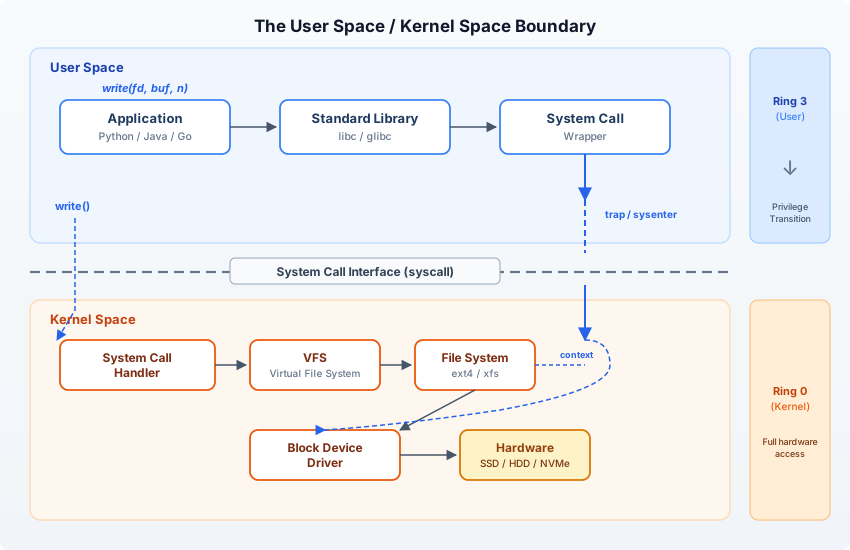
User space to kernel space transition: application code runs in Ring 3 (user space) with no direct hardware access. When it needs the OS — to open a file, allocate memory, send a packet — it executes a trap instruction (syscall on x86-64) that atomically switches to Ring 0 (kernel space). The kernel validates the request, performs the privileged operation, and returns. Each crossing costs roughly 100–300 ns for the privilege switch alone, before the actual I/O. This is why 1,000 individual write() calls is far more expensive than one writev() call writing the same data — and why buffered I/O (stdio, Python’s file objects) exists: to batch syscalls. The diagram also shows why mmap() bypasses this boundary for reads after the initial mapping: page faults bring data in without full syscall overhead.
When you call open() in C — or open() in Python, which eventually calls it — here’s what actually happens:
- Your code calls the C library wrapper function
open() - The wrapper loads the syscall number (for
openat, it’s 257 on x86-64) into theraxregister - Arguments go into registers:
rdi,rsi,rdx,r10,r8,r9 - The
syscallinstruction fires — this is a CPU instruction that triggers a transition to kernel mode - The CPU switches privilege levels (ring 3 → ring 0), saves user-space registers, and jumps to the kernel’s syscall entry point
- The kernel looks up syscall number 257 in its syscall table, calls
do_sys_openat2() - The kernel does the actual work: walks the filesystem, checks permissions, allocates a file descriptor
- The return value goes into
rax, the CPU switches back to ring 3, and your code resumes
This transition — user space to kernel space and back — takes roughly 100-200 nanoseconds on modern hardware. That sounds trivial until you realize a busy web server might make millions of syscalls per second.
macOS note: macOS uses a similar mechanism but with Mach traps alongside BSD syscalls. The
syscallinstruction works the same way on x86-64. On Apple Silicon, thesvcinstruction handles the transition.
strace: Watching the Conversation
You can eavesdrop on every system call your program makes with strace. This is the single most underused debugging tool in software engineering.
Let’s trace a trivially simple Python program:
# hello.py
print("hello")
strace -c python3 hello.py% time seconds usecs/call calls errors syscall
------ ----------- ----------- --------- --------- ----------------
28.57 0.001200 10 116 read
17.14 0.000720 5 143 mmap
11.43 0.000480 7 67 close
9.52 0.000400 5 70 7 openat
7.14 0.000300 4 69 fstat
5.71 0.000240 6 36 mprotect
4.29 0.000180 10 18 brk
3.81 0.000160 9 17 3 stat
2.38 0.000100 33 3 munmap
1.90 0.000080 7 12 rt_sigaction
1.43 0.000060 10 6 ioctl
...
------ ----------- ----------- --------- --------- ----------------
100.00 0.004200 612 12 total612 system calls to print “hello.” Six hundred and twelve.
Most of those are Python starting up: loading shared libraries (openat/read/mmap), setting up its runtime, importing built-in modules. The actual write(1, "hello\n", 6) that prints to stdout is a single syscall near the end. But you paid for 611 others just to get there.
Run strace -e trace=write python3 hello.py to see only write calls:
write(1, "hello\n", 6) = 6There’s your program. One system call. Everything else was the runtime booting itself.
This is why startup time matters. This is why cold starts in serverless are slow. This is why JVM applications take seconds to handle their first request. The runtime tax is real, and it’s measured in syscalls.
File Descriptors: Everything Is a File
When the kernel opens a file on your behalf, it doesn’t hand you the file. It hands you a file descriptor — a small integer that’s an index into your process’s fd table.
# See your shell's file descriptors
ls -la /proc/$$/fd

# lrwx------ 1 user user 64 ... 0 -> /dev/pts/0
# lrwx------ 1 user user 64 ... 1 -> /dev/pts/0
# lrwx------ 1 user user 64 ... 2 -> /dev/pts/0
# lr-x------ 1 user user 64 ... 255 -> /dev/pts/0
File descriptors 0, 1, and 2 are always stdin, stdout, and stderr. They’re pointing at your terminal (/dev/pts/0). When you print() in Python, it writes to fd 1. When you input(), it reads from fd 0.
But file descriptors aren’t just for files. They represent:
- Regular files on disk
- Sockets (TCP connections, UDP, Unix domain sockets)
- Pipes (the
|in shell commands) - Terminals (your TTY)
- Event file descriptors (
eventfd,timerfd,signalfd) - epoll instances (used by event loops — more on this in CH6-S2)
This is the Unix philosophy of “everything is a file.” A TCP connection to a remote server is a file descriptor. You read() from it and write() to it using the same system calls you’d use on a text file.
import socket, os

sock = socket.socket(socket.AF_INET, socket.SOCK_STREAM)
sock.connect(("example.com", 80))
print(f"Socket fd: {sock.fileno()}")  # e.g., 3

# It's just a number — an index into the process fd table
# The kernel tracks what that number actually refers to
Every process has a limit on how many file descriptors it can hold open. Check yours:
ulimit -n
# 1024 (typical default)
A busy web server handling 10,000 concurrent connections needs 10,000+ file descriptors. This is why production servers set ulimit -n 65536 or higher. Run out of file descriptors and you can’t accept new connections, open log files, or do much of anything useful. The error message — “Too many open files” — is one of the most common production failures, and most engineers who encounter it don’t understand what a file descriptor is.
fork(): How Processes Are Born
Every process on the system (except PID 1, init) was created by fork(). This is the Unix process model, and it’s beautifully simple: a process creates a copy of itself.
#include <stdio.h>
#include <unistd.h>

int main() {
    printf("Before fork: PID %d\n", getpid());

    pid_t pid = fork();

    if (pid == 0) {
        // Child process
        printf("Child: PID %d, Parent PID %d\n", getpid(), getppid());
    } else {
        // Parent process
        printf("Parent: PID %d, Child PID %d\n", getpid(), pid);
    }
    return 0;
}
Before fork: PID 1000
Parent: PID 1000, Child PID 1001
Child: PID 1001, Parent PID 1000After fork(), there are two processes running the same code. The only difference is the return value: the parent gets the child’s PID, the child gets 0. Everything else — memory contents, open file descriptors, environment variables — is identical.
But the kernel doesn’t actually copy all the memory. That would be absurdly expensive. Instead, it uses copy-on-write (COW): both processes share the same physical memory pages, marked as read-only. Only when one process tries to write to a page does the kernel copy that specific page. Most pages are never written, so most pages are never copied.
# Watch COW in action
python3 -c "
import os
data = bytearray(100_000_000)  # 100 MB
pid = os.fork()
if pid == 0:
    # Child: reading data uses shared pages (no copy)
    total = sum(data[:1000])
    os._exit(0)
else:
    os.waitpid(pid, 0)
" &

# Check memory: both processes show 100MB virtual,
# but physical memory is shared until writes happen
This is why fork() is fast even for processes using gigabytes of memory. And it’s why Python’s multiprocessing module works: it calls fork() to create worker processes that share the parent’s memory (until they modify it).
The typical pattern after fork() is exec() — the child replaces its code with a new program:
pid_t pid = fork();
if (pid == 0) {
    // Child replaces itself with /bin/ls
    execl("/bin/ls", "ls", "-la", NULL);
    // If exec returns, it failed
    perror("exec failed");
    _exit(1);
}
Every time you type a command in your shell, this is what happens: the shell calls fork(), the child calls exec() to become that command, and the parent calls wait() for the child to finish. Every single command. ls, grep, python3 — all of them.
Why This Matters
Here’s a production scenario. Your Python web application is slow. Response times are spiking. You’re allocated 512MB of memory in your container. What do you do?
If you understand this chapter, you:
- Check file descriptors:
ls /proc/<pid>/fd | wc -l— are you leaking connections? - Run
strace -p <pid> -cfor 10 seconds — where is the process spending its time? Waiting onread()? Blocked onfutex()(a lock)? - Check
/proc/<pid>/status— isVmRSSclose to your memory limit? Are you getting OOM-killed? - Look at
/proc/<pid>/stat— how many context switches? Voluntary (waiting for I/O) vs. involuntary (preempted by scheduler)?
If you don’t understand this chapter, you restart the container and hope it gets better.
The OS isn’t an implementation detail you can safely ignore. It’s the environment your code lives in. Ignoring it is like a fish ignoring water — possible right up until the moment the water changes and you don’t know why you’re dying.
The landlord is always there. The pipes are always carrying your data. The scheduler is always deciding when you run. You can keep pretending none of this exists, or you can learn to read the lease.