Spring WebFlux Internals: Netty, the Event Loop, and What Blocking Inside a Reactive Pipeline Actually Costs
The Abstraction
@RestController
public class NotificationController {

    @GetMapping("/api/tenants/{tenantId}/notifications")
    public Flux<Notification> getNotifications(@PathVariable String tenantId) {
        return notificationService.findByTenant(tenantId);
    }
}
This looks like Spring MVC. Same annotations. Same return type convention. But the return type is Flux<Notification>, not List<Notification>. That single difference changes the entire execution model. No thread waits for the database. No thread holds a connection. No thread blocks.
Spring MVC processes one request per thread. Spring WebFlux processes many requests per thread. The difference is not annotation-level. It is architectural. Understanding it requires understanding Netty, event loops, and why blocking inside a reactive pipeline is the single most destructive mistake you can make in a WebFlux application.
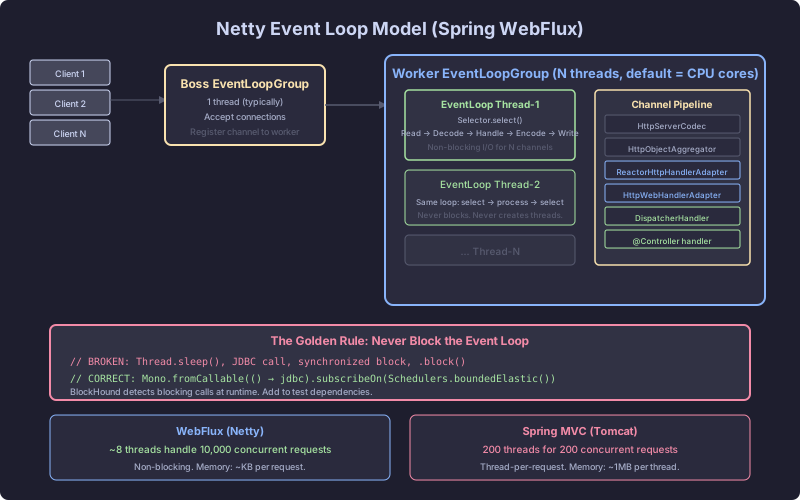
The Mechanism: Netty’s Event Loop Model
Boss Group and Worker Group
When a Spring WebFlux application starts on the default Netty runtime, Netty creates two thread groups:
Boss group: One thread (sometimes two). Its only job is accepting incoming TCP connections. When a connection arrives, the boss thread registers it with a worker thread and moves on. The boss thread never processes request data.
Worker group: N threads, where N defaults to the number of CPU cores (or Runtime.getRuntime().availableProcessors() multiplied by 2 on some configurations). Each worker thread runs an event loop: a tight while(true) loop that polls for I/O events on its assigned connections.
Boss Thread
  └── accept() → register connection with Worker Thread 3

Worker Thread 0: [conn-1, conn-7, conn-15, conn-22, ...]  ← event loop
Worker Thread 1: [conn-2, conn-8, conn-16, conn-23, ...]  ← event loop
Worker Thread 2: [conn-3, conn-9, conn-17, conn-24, ...]  ← event loop
...
Worker Thread 7: [conn-6, conn-14, conn-21, conn-28, ...] ← event loop
Each worker thread handles hundreds or thousands of connections. It never blocks waiting for data. It checks: is there data available on connection 1? No. Connection 7? Yes. Read the bytes, process them, write the response bytes, move to connection 15. This is the event loop.
The Thread Count Difference
Spring MVC on Tomcat: 200 threads by default (server.tomcat.threads.max=200). Each request occupies one thread for the full duration of the request. If a request takes 100ms, that thread is unavailable for 100ms.
Spring WebFlux on Netty: 8 threads on an 8-core machine. Each thread handles thousands of concurrent connections through non-blocking I/O multiplexing.
This is not about WebFlux being “faster.” A single request does not complete faster. The difference is concurrency. With 200 Tomcat threads, request 201 waits in a queue. With 8 Netty event loop threads, request 10,001 gets processed because no thread is blocked waiting for I/O.
HttpHandler: The Entry Point
Every request entering a WebFlux application passes through HttpHandler, the lowest-level reactive HTTP contract:
public interface HttpHandler {
    Mono<Void> handle(ServerHttpRequest request, ServerHttpResponse response);
}
The return type is Mono<Void>. The framework does not expect a blocking return. It expects a publisher that signals completion when the response is fully written. Netty’s event loop subscribes to this publisher, and when bytes need to be written, they are written on the event loop thread without blocking.
The implementation chain:
Netty Channel → ReactorHttpHandlerAdapter → HttpWebHandlerAdapter → DispatcherHandlerReactorHttpHandlerAdapter bridges Netty’s channel pipeline to Spring’s HttpHandler. HttpWebHandlerAdapter wraps the raw request/response into ServerWebExchange, the reactive equivalent of HttpServletRequest/HttpServletResponse. It also applies WebFilter instances (the reactive filter chain).
DispatcherHandler: The Reactive DispatcherServlet
DispatcherHandler is the WebFlux equivalent of DispatcherServlet. It implements WebHandler and coordinates the request processing:
public class DispatcherHandler implements WebHandler {

    @Override
    public Mono<Void> handle(ServerWebExchange exchange) {
        return Flux.fromIterable(this.handlerMappings)
            .concatMap(mapping -> mapping.getHandler(exchange))
            .next()
            .switchIfEmpty(createNotFoundError())
            .flatMap(handler -> invokeHandler(exchange, handler))
            .flatMap(result -> handleResult(exchange, result));
    }
}
Study that method. Every operation returns a reactive type. concatMap, next, flatMap. No operation blocks. The handler mappings are iterated reactively. The handler is invoked reactively. The result is handled reactively.
The processing chain:
- HandlerMapping: Resolves the handler (e.g.,
RequestMappingHandlerMappingfinds your@GetMappingmethod) - HandlerAdapter: Invokes the handler (e.g.,
RequestMappingHandlerAdaptercalls your controller method) - HandlerResultHandler: Writes the result (e.g.,
ResponseBodyResultHandlerserializes theFlux<Notification>to JSON)
Each step returns a Mono or Flux. The event loop thread assembles this pipeline, subscribes, and moves on. When data arrives (from the database, from an external service), the callback fires on the event loop thread, and the next operator in the chain executes.
Mono and Flux in HTTP Context
For HTTP request/response, the reactive types map directly:
Mono<T>: A single response body. Most REST endpoints return this.Mono<Notification>serializes to a single JSON object.Flux<T>: A stream of response items.Flux<Notification>serializes to a JSON array by default, or to Server-Sent Events if the media type istext/event-stream.Mono<Void>: No response body. Used for DELETE or fire-and-forget operations.
The serialization itself is non-blocking. Jackson’s Encoder writes to Netty’s ByteBuf on the event loop thread. For Flux, each element is serialized and flushed as it arrives, enabling backpressure-aware streaming.
The Debuggable Demonstration
The SaaS backend’s notification endpoint under load. Two implementations, same logic, different execution models:
// Spring MVC version
@GetMapping("/api/tenants/{tenantId}/notifications")
public List<Notification> getNotifications(@PathVariable String tenantId) {
    // Thread blocks here for ~50ms waiting for DB
    return jdbcTemplate.query(
        "SELECT * FROM notifications WHERE tenant_id = ? ORDER BY created_at DESC LIMIT 50",
        notificationRowMapper,
        tenantId
    );
}

// Spring WebFlux version
@GetMapping("/api/tenants/{tenantId}/notifications")
public Flux<Notification> getNotifications(@PathVariable String tenantId) {
    // No thread blocks. R2DBC returns Flux immediately.
    return r2dbcTemplate.getDatabaseClient()
        .sql("SELECT * FROM notifications WHERE tenant_id = ? ORDER BY created_at DESC LIMIT 50")
        .bind(0, tenantId)
        .map(notificationMapper)
        .all();
}
Under 5,000 concurrent requests:
| Metric | Spring MVC (Tomcat, 200 threads) | WebFlux (Netty, 8 threads) |
|---|---|---|
| Threads used | 200 (all saturated) | 8 (event loop) + ~16 (Netty internals) |
| Memory per thread | ~1MB stack each = 200MB | ~1MB stack each = 8MB |
| Request 201 | Queued (waiting for thread) | Processed immediately |
| Throughput ceiling | ~4,000 req/s | ~15,000+ req/s |
| Latency at p99 | Spikes when thread pool exhausts | Stable until CPU saturates |
The difference is not theoretical. It is measurable with a simple wrk or hey benchmark.
The Critical Failure: Blocking Inside a Reactive Pipeline
This is where WebFlux applications die. One developer writes a blocking call inside a reactive pipeline, and the entire application’s throughput collapses.
// BROKEN: Blocking the event loop thread
@GetMapping("/api/tenants/{tenantId}/notifications")
public Mono<List<Notification>> getNotifications(@PathVariable String tenantId) {
    return Mono.fromCallable(() -> {
        // This blocks the Netty event loop thread for 50ms
        return jdbcTemplate.query(
            "SELECT * FROM notifications WHERE tenant_id = ?",
            notificationRowMapper,
            tenantId
        );
    });
}
Mono.fromCallable() executes the lambda on the subscribing thread. In WebFlux, the subscribing thread is the Netty event loop thread. That thread now blocks on JDBC for 50ms. During those 50ms, every other connection assigned to that thread is stalled. No reads, no writes, no new connections processed.
With 8 event loop threads, one blocked thread reduces capacity by 12.5%. If all 8 threads block on JDBC calls simultaneously, the server processes zero requests until the queries return.
BlockHound: Detecting the Damage
BlockHound is a Java agent that detects blocking calls on threads that should never block:
<dependency>
    <groupId>io.projectreactor.tools</groupId>
    <artifactId>blockhound</artifactId>
    <version>1.0.9.RELEASE</version>
    <scope>test</scope>
</dependency>@SpringBootTest
class NotificationControllerTest {
@BeforeAll
static void installBlockHound() {
BlockHound.install();
}
@Test
void getNotifications_shouldNotBlock() {
// This test will throw if any blocking call happens
// on a non-blocking thread
webTestClient.get()
.uri("/api/tenants/acme/notifications")
.exchange()
.expectStatus().isOk();
}
}When a blocking call occurs on a Netty event loop thread, BlockHound throws:
reactor.blockhound.BlockingOperationError: Blocking call!
    java.io.FileInputStream.readBytes
    at java.base/java.io.FileInputStream.read(FileInputStream.java:276)
    at com.zaxxer.hikari.pool.HikariProxyConnection...
That stack trace tells you exactly which blocking call and where. Install BlockHound in every WebFlux project. Run it in tests. Consider running it in development.
The Correct Pattern
// CORRECT: Non-blocking data access with R2DBC
@GetMapping("/api/tenants/{tenantId}/notifications")
public Flux<Notification> getNotifications(@PathVariable String tenantId) {
    return notificationRepository.findByTenantId(tenantId);
    // R2DBC repository: returns Flux, never blocks
}

// CORRECT: Offloading unavoidable blocking to a bounded elastic pool
@GetMapping("/api/tenants/{tenantId}/report")
public Mono<Report> generateReport(@PathVariable String tenantId) {
    return Mono.fromCallable(() -> {
            // Legacy JDBC call that cannot be migrated yet
            return jdbcTemplate.queryForObject(
                "SELECT * FROM reports WHERE tenant_id = ?",
                reportRowMapper,
                tenantId
            );
        })
        .subscribeOn(Schedulers.boundedElastic());  // Runs on elastic thread, not event loop
}
Schedulers.boundedElastic() creates a thread pool designed for blocking I/O. It caps at 10 * cores threads by default and queues excess tasks. The blocking call runs on an elastic thread. The event loop thread remains free.
This is a bridge pattern. It works, but it reintroduces thread-per-request semantics for that specific call. The correct long-term fix is replacing JDBC with R2DBC, replacing RestTemplate with WebClient, and replacing File I/O with AsynchronousFileChannel.
The rule is absolute: no blocking call may execute on a Netty event loop thread. Every violation degrades throughput for every tenant in the SaaS backend. BlockHound enforces this rule. Schedulers.boundedElastic() provides the escape hatch. R2DBC provides the real solution.