The Auto-Configuration Mechanism: @EnableAutoConfiguration, ImportCandidates, and the Condition Evaluation Chain
What @SpringBootApplication Actually Does
@SpringBootApplication is a composed annotation. Strip it apart and you find three annotations doing the real work:
@SpringBootConfiguration   // marks this as a @Configuration class
@EnableAutoConfiguration    // triggers auto-configuration discovery
@ComponentScan              // scans the package tree
public @interface SpringBootApplication { }
The one that matters for this chapter is @EnableAutoConfiguration. It carries an @Import(AutoConfigurationImportSelector.class) annotation. That import is the entire entry point into the auto-configuration mechanism. Every auto-configured DataSource, every auto-configured ObjectMapper, every auto-configured WebMvcConfigurer traces back to this single import.
The Discovery Pipeline
When ConfigurationClassPostProcessor processes the @Import on @EnableAutoConfiguration, it delegates to AutoConfigurationImportSelector. This class implements DeferredImportSelector, which means it runs after all user-defined @Configuration classes have been parsed. That ordering is deliberate: auto-configuration must yield to your explicit configuration.
AutoConfigurationImportSelector.selectImports() triggers a pipeline:
-
Load candidates.
ImportCandidates.load(AutoConfiguration.class, classLoader)reads every file atMETA-INF/spring/org.springframework.boot.autoconfigure.AutoConfiguration.importson the classpath. Each file contains fully qualified class names, one per line. -
Remove duplicates. Multiple JARs can declare the same auto-configuration class. Duplicates are collapsed.
-
Apply exclusions. Any class listed in
@SpringBootApplication(exclude = ...)or in thespring.autoconfigure.excludeproperty is removed from the candidate set. -
Filter by conditions. The remaining candidates pass through
AutoConfigurationImportFilterinstances. The primary filter isOnBeanCondition,OnClassCondition, andOnWebApplicationCondition. These filters discard candidates early, before their class bytes are loaded. -
Sort. The surviving candidates are ordered according to
@AutoConfigureBefore,@AutoConfigureAfter, and@AutoConfigureOrder.
The result is an ordered list of configuration classes that Spring will process as if you had declared @Import on each one.
The Imports File
Before Spring Boot 3.0, auto-configuration classes were registered in META-INF/spring.factories under the EnableAutoConfiguration key. That file was shared with other Spring extension points, which created confusion and startup cost. Spring Boot 3.0 moved to a dedicated file:
META-INF/spring/org.springframework.boot.autoconfigure.AutoConfiguration.importsThe format is plain text. One class per line. Comments start with #:
# DataSource auto-configuration
org.springframework.boot.autoconfigure.jdbc.DataSourceAutoConfiguration
org.springframework.boot.autoconfigure.jdbc.JdbcTemplateAutoConfiguration
org.springframework.boot.autoconfigure.orm.jpa.HibernateJpaAutoConfiguration
ImportCandidates reads these files using ClassLoader.getResources(), which means every JAR on the classpath contributes its own candidates. A typical Spring Boot web application starts with 150+ candidate classes.
AutoConfigurationImportSelector Internals
The selector does not implement ImportSelector.selectImports() directly. It implements DeferredImportSelector.Group, which batches imports for efficiency. The key class is AutoConfigurationImportSelector.AutoConfigurationGroup:
// Inside AutoConfigurationImportSelector
private static class AutoConfigurationGroup implements DeferredImportSelector.Group {

    @Override
    public void process(AnnotationMetadata metadata, DeferredImportSelector selector) {
        // 1. Load all candidates from imports files
        // 2. Apply exclusions
        // 3. Filter by conditions
        // 4. Sort
        this.autoConfigurationEntries.add(entry);
    }

    @Override
    public Iterable<Entry> selectImports() {
        // Return the sorted, filtered entries
        return sortedEntries;
    }
}
The process() method runs once per @EnableAutoConfiguration annotation (normally just one). The selectImports() method returns the final ordered set. Because this is a DeferredImportSelector, it executes after all regular @Import processing. Your explicit @Bean definitions exist before auto-configuration runs.
The Condition Evaluation Chain
The filtering step is where most auto-configuration classes get discarded. A typical Spring Boot application loads 20-30 auto-configuration classes out of 150+ candidates. The rest fail their conditions.
Spring Boot defines several @Conditional annotations. Each delegates to a Condition implementation:
| Annotation | Condition Class | Checks |
|---|---|---|
@ConditionalOnClass | OnClassCondition | Class present on classpath (ASM check, no loading) |
@ConditionalOnMissingClass | OnClassCondition | Class absent from classpath |
@ConditionalOnBean | OnBeanCondition | Bean of type/name exists in context |
@ConditionalOnMissingBean | OnBeanCondition | No bean of type/name in context |
@ConditionalOnProperty | OnPropertyCondition | Property has specific value |
@ConditionalOnWebApplication | OnWebApplicationCondition | Servlet or reactive web context |
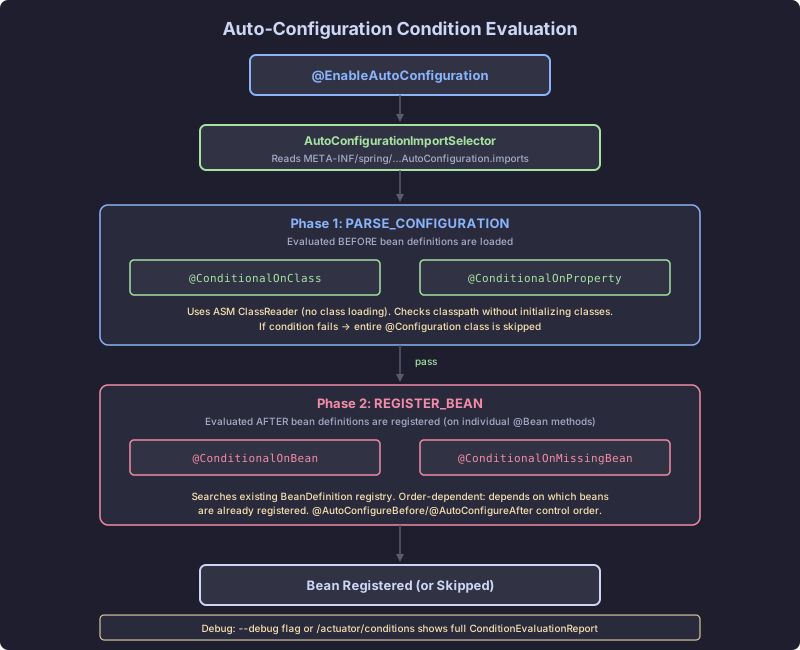
These conditions evaluate in two phases:
Phase 1 (PARSE_CONFIGURATION): @ConditionalOnClass and @ConditionalOnWebApplication run before any bean definitions from the configuration class are registered. They act as a gate. If the required class is not on the classpath, the entire configuration class is skipped.
Phase 2 (REGISTER_BEAN): @ConditionalOnBean and @ConditionalOnMissingBean run when individual @Bean methods are being registered. At this point, bean definitions from previously processed configuration classes exist in the registry.
This two-phase model is why @ConditionalOnClass can appear at the class level but @ConditionalOnBean should appear at the method level. Phase 1 conditions gate entire classes. Phase 2 conditions gate individual beans.
Ordering: @AutoConfigureBefore, @AutoConfigureAfter
Auto-configuration ordering matters because @ConditionalOnBean depends on which bean definitions have already been registered. If JpaAutoConfiguration runs before DataSourceAutoConfiguration, it will not find the DataSource bean and will skip itself.
Spring Boot provides three ordering mechanisms:
@AutoConfiguration(after = DataSourceAutoConfiguration.class)
public class JpaAutoConfiguration {
    // DataSource bean definition is guaranteed to exist when this is evaluated
}@AutoConfigureBefore(JpaAutoConfiguration.class)
@AutoConfigureAfter(DataSourceAutoConfiguration.class)
public class CustomDataSourceAutoConfiguration { }@AutoConfigureOrder(Ordered.HIGHEST_PRECEDENCE)
public class EarlyAutoConfiguration { }AutoConfigurationSorter processes these annotations and produces a topological sort of the candidate list. Cycles cause an IllegalStateException at startup.
The ConditionEvaluationReport
Every condition evaluation is recorded. The ConditionEvaluationReport stores the result of every @Conditional check for every auto-configuration class. You can access it two ways:
1. The —debug flag:
java -jar app.jar --debugThis activates ConditionEvaluationReportLogger, which prints the full report at startup:
============================
CONDITIONS EVALUATION REPORT
============================

Positive matches:
-----------------
   DataSourceAutoConfiguration matched:
      - @ConditionalOnClass found required class 'javax.sql.DataSource' (OnClassCondition)
      - @ConditionalOnMissingBean (types: javax.sql.DataSource; SearchStrategy: all) did not find any beans (OnBeanCondition)

Negative matches:
-----------------
   MongoAutoConfiguration:
      Did not match:
         - @ConditionalOnClass did not find required class 'com.mongodb.client.MongoClient' (OnClassCondition)
2. The /actuator/conditions endpoint:
GET /actuator/conditions

{
  "contexts": {
    "application": {
      "positiveMatches": {
        "DataSourceAutoConfiguration": [{
          "condition": "OnClassCondition",
          "message": "@ConditionalOnClass found required class 'javax.sql.DataSource'"
        }]
      },
      "negativeMatches": {
        "MongoAutoConfiguration": {
          "notMatched": [{
            "condition": "OnClassCondition",
            "message": "did not find required class 'com.mongodb.client.MongoClient'"
          }]
        }
      }
    }
  }
}
This report is the primary debugging tool for auto-configuration problems. When a bean you expect is missing, the condition evaluation report tells you exactly which condition failed and why.
The Failure Mode: Conflicting Configuration
Consider a multi-tenant SaaS backend where you define a custom DataSource:
// BROKEN: Defining a DataSource without guarding against auto-configuration
@Configuration
public class TenantDataSourceConfig {

    @Bean
    public DataSource dataSource(TenantRegistry registry) {
        return new TenantRoutingDataSource(registry);
    }
}
This appears to work, but it creates a conflict. DataSourceAutoConfiguration has a @ConditionalOnMissingBean(DataSource.class) check, so it backs off. However, DataSourceAutoConfiguration also registers DataSourceProperties, and the auto-configured DataSourceInitializer still runs. It tries to execute schema.sql against a data source that may not have a connection yet because the tenant context is not established.
The failure is subtle. In tests, tenant context is usually set up first, so this works. In production, the DataSourceInitializer fires during application startup before any tenant context exists, causing a NullPointerException deep inside the routing logic.
The Correct Pattern
// CORRECT: Exclude the auto-configuration that conflicts, declare what you need explicitly
@SpringBootApplication(exclude = DataSourceAutoConfiguration.class)
public class SaasApplication { }

@Configuration
public class TenantDataSourceConfig {

    @Bean
    @ConditionalOnMissingBean(DataSource.class)
    public DataSource dataSource(TenantRegistry registry) {
        return new TenantRoutingDataSource(registry);
    }

    @Bean
    public DataSourceProperties dataSourceProperties() {
        // Explicit control over which properties bind
        return new DataSourceProperties();
    }
}
The exclude removes the entire auto-configuration class, including its side effects. The @ConditionalOnMissingBean on your own bean allows test configurations to substitute a simpler data source. The explicit DataSourceProperties bean gives you control over property binding without the auto-configured initializer.
Verify the exclusion took effect:
java -jar app.jar --debug | grep DataSourceAutoConfigurationYou should see it in the “Exclusions” section, not in “Negative matches.” If it appears in “Negative matches,” the exclusion attribute has a typo or references the wrong class. That distinction matters: exclusions are removed before condition evaluation. Negative matches went through condition evaluation and failed. Both result in the class not being loaded, but only exclusions guarantee that no side effects from the class were processed.