Config Server and Refresh Scope: Property Source Bootstrap, Encryption, and Live Configuration Without Restart
Config Server and Refresh Scope
Hardcoded configuration kills multi-tenant SaaS. The tenant-service needs different database URLs per environment. The billing-service needs feature flags that change without redeployment. The order-service needs connection pool sizes tuned per load profile. Spring Cloud Config Server centralizes configuration. @RefreshScope makes it live-updatable. Together, they let you change behavior without restarting a single JVM.
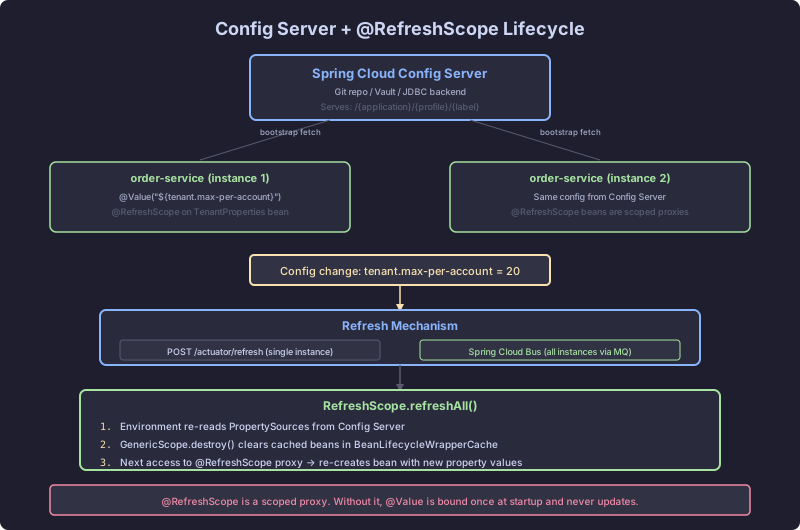
Config Server Architecture
Config Server is a Spring Boot application that serves configuration over HTTP. It reads from a backend (Git, Vault, JDBC, file system, or composite) and exposes properties at predictable URLs:
GET /{application}/{profile}
GET /{application}/{profile}/{label}
GET /{application}-{profile}.yml
GET /{application}-{profile}.properties
For the SaaS backend, the Config Server serves:
order-service-dev.ymlfor developmentorder-service-prod.ymlfor productionapplication.ymlfor shared defaults
The Git backend is the most common. Config Server clones a Git repository and serves files from it:
# Config Server's application.yml
spring:
  cloud:
    config:
      server:
        git:
          uri: https://gitlab.example.com/config-repo.git
          default-label: main
          search-paths: "{application}"
          clone-on-start: true
clone-on-start: true clones the repository at startup instead of on the first request. Without this, the first client to request configuration waits for the clone. In production, that first request can time out.
The search-paths: '{application}' placeholder means Config Server looks for files in a subdirectory named after the application. order-service gets its config from the order-service/ directory in the Git repo.
When a client requests GET /order-service/prod, Config Server:
- Pulls the latest from the Git remote (if
clone-on-startis true, it fetches; otherwise it clones). - Reads
order-service/application.yml,order-service/application-prod.yml, and the rootapplication.yml. - Merges them with profile-specific properties taking precedence.
- Returns the merged result as JSON.
The response is an Environment object:
{
  "name": "order-service",
  "profiles": ["prod"],
  "propertySources": [
    {
      "name": "order-service/application-prod.yml",
      "source": {
        "spring.datasource.url": "jdbc:postgresql://prod-db:5432/orders",
        "app.feature.bulk-orders": true
      }
    },
    {
      "name": "order-service/application.yml",
      "source": {
        "app.max-items-per-order": 100
      }
    }
  ]
}
Property sources are ordered. Profile-specific sources override general ones. This is the same ordering mechanism from CH1’s Environment and CH7’s property binding, applied remotely.
Client Bootstrap: spring.config.import
In Spring Boot 3 and Spring Cloud 2023.x, the bootstrap context is deprecated. The recommended approach uses spring.config.import:
# order-service's application.yml
spring:
  application:
    name: order-service
  config:
    import: "configserver:http://config-server:8888"
  cloud:
    config:
      fail-fast: true
      retry:
        initial-interval: 2000
        max-attempts: 5
        max-interval: 10000
During Environment preparation (the earliest phase of Spring Boot startup, covered in CH1-S1), Spring Boot processes spring.config.import. The configserver: prefix triggers ConfigServerConfigDataLocationResolver, which creates a ConfigServerConfigDataLoader.
The loader makes an HTTP call to the Config Server at http://config-server:8888/order-service/default (using the application name and active profiles). The returned properties are added to the Environment as a PropertySource with a precedence between system properties and local application properties.
This means Config Server properties override your local application.yml values. If Config Server has app.max-items-per-order: 50 and your local file has app.max-items-per-order: 100, the Config Server value wins.
To override Config Server values locally (useful for development), use system properties or environment variables, which have higher precedence.
Encryption and Decryption
Config Server can encrypt and decrypt sensitive values. Store encrypted values in Git with the {cipher} prefix:
# In the config repository
spring:
  datasource:
    password: "{cipher}AQBhY2...encrypted...base64"
Config Server decrypts these values before sending them to clients. The client receives the plaintext value. Encryption uses either symmetric keys or asymmetric (RSA) key pairs:
# Config Server's encryption configuration
encrypt:
  key-store:
    location: classpath:keystore.p12
    password: ${KEYSTORE_PASSWORD}
    alias: config-key
    type: PKCS12
The alternative: skip Config Server encryption and use Vault as a backend. Vault handles secrets management with lease-based access, rotation, and audit logging. For the SaaS backend, database credentials go in Vault; feature flags go in Git.
spring:
  cloud:
    config:
      server:
        vault:
          host: vault.internal
          port: 8200
          kvVersion: 2
        composite:
          - type: vault
          - type: git
            uri: https://gitlab.example.com/config-repo.git
The composite backend tries Vault first, then Git. Properties from Vault take precedence.
@RefreshScope: Live Configuration
@RefreshScope is a custom bean scope. Beans in this scope are created lazily and cached until a refresh event destroys them. On the next access, they are re-created with current property values.
@RefreshScope
@Component
public class FeatureFlagService {

    @Value("${app.feature.bulk-orders:false}")
    private boolean bulkOrdersEnabled;

    @Value("${app.feature.premium-support:false}")
    private boolean premiumSupportEnabled;

    public boolean isBulkOrdersEnabled() {
        return bulkOrdersEnabled;
    }

    public boolean isPremiumSupportEnabled() {
        return premiumSupportEnabled;
    }
}
When you POST to /actuator/refresh, the following sequence runs:
ContextRefresher.refresh()is called.- It re-fetches properties from all property sources (including Config Server).
- It compares old and new property values.
- It publishes an
EnvironmentChangeEventwith the list of changed keys. RefreshScope.refreshAll()destroys all beans in the refresh scope.- It publishes
RefreshScopeRefreshedEvent. - The next time any
@RefreshScopebean is accessed, it is re-created with the new values.
The bean destruction and re-creation is the key mechanism. The old FeatureFlagService instance is discarded. A new one is created, and @Value injection reads the updated app.feature.bulk-orders value from the refreshed Environment.
Spring Cloud Bus
/actuator/refresh refreshes a single instance. In the SaaS backend with 10 instances of order-service, you would need to call refresh on all 10. Spring Cloud Bus solves this with a message broker:
spring:
  cloud:
    bus:
      enabled: true
  rabbitmq:
    host: rabbitmq.internal
POST to /actuator/busrefresh on any instance, and it broadcasts the refresh event over RabbitMQ (or Kafka). All instances in the cluster receive the event and refresh themselves. This is how you update a feature flag across the entire fleet in seconds.
The @RefreshScope Trap
Not all beans belong in @RefreshScope. The scope destroys and re-creates beans on refresh. If the bean holds expensive resources, those resources are destroyed and re-acquired.
// BROKEN: DataSource in @RefreshScope
// On every /actuator/refresh, the connection pool is destroyed.
// All active connections are closed. In-flight transactions fail.
@RefreshScope
@Bean
public DataSource dataSource(
        @Value("${spring.datasource.url}") String url,
        @Value("${spring.datasource.username}") String username,
        @Value("${spring.datasource.password}") String password) {
    HikariDataSource ds = new HikariDataSource();
    ds.setJdbcUrl(url);
    ds.setUsername(username);
    ds.setPassword(password);
    return ds;
}
// CORRECT: Only lightweight configuration beans in @RefreshScope.
// DataSource stays as a regular singleton.
// Feature flags go in @RefreshScope.
@RefreshScope
@Component
public class FeatureFlagService {
@Value("${app.feature.bulk-orders:false}")
private boolean bulkOrdersEnabled;
// Lightweight. No resources. Safe to destroy and re-create.
}
@Bean
public DataSource dataSource(DataSourceProperties properties) {
// Regular singleton. Never destroyed on refresh.
return properties.initializeDataSourceBuilder()
.type(HikariDataSource.class)
.build();
}If you genuinely need to update a DataSource URL at runtime (for database failover), use a RoutingDataSource or listen for EnvironmentChangeEvent and reconfigure the connection pool without destroying it.
The rule: @RefreshScope is for beans that are cheap to destroy and re-create. Configuration holders, feature flags, rate limit settings. Not connection pools, thread pools, or scheduled task registrations. If destroying the bean has side effects beyond garbage collection, it does not belong in @RefreshScope.