Property Binding Internals: @ConfigurationProperties, Relaxed Binding, and the Binder API
Property Binding Internals: @ConfigurationProperties, Relaxed Binding, and the Binder API
You write @ConfigurationProperties(prefix = "app.tenant") on a class, define some fields, and Spring Boot populates them from your YAML files, environment variables, or system properties. The question is how. The answer involves a dedicated BeanPostProcessor, a binding API that most developers never touch directly, and a set of name-matching rules that Spring calls “relaxed binding.”
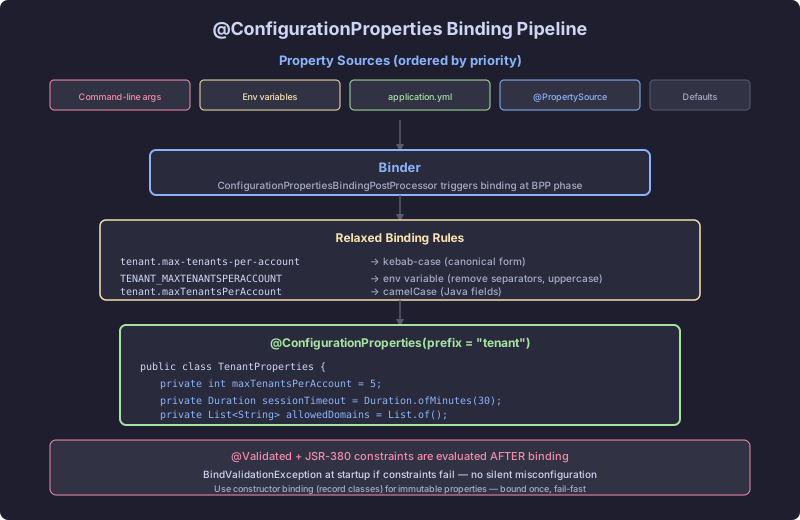
The Annotation
@ConfigurationProperties marks a class as a target for external configuration binding. It declares a prefix, and Spring Boot maps every property under that prefix to a field on the class.
@ConfigurationProperties(prefix = "app.database")
public class DatabaseProperties {
    private String url;
    private String username;
    private int maxPoolSize;

    // getters and setters
}
The corresponding YAML:
app:
  database:
    url: jdbc:postgresql://localhost:5432/saas
    username: admin
    max-pool-size: 20
Notice max-pool-size in YAML maps to maxPoolSize in Java. That mapping is not magic. It is relaxed binding, and it follows precise rules.
The Mechanism: ConfigurationPropertiesBindingPostProcessor
The class responsible for populating @ConfigurationProperties beans is ConfigurationPropertiesBindingPostProcessor. It implements BeanPostProcessor, which means it intercepts every bean after instantiation.
Here is the sequence:
- Spring creates the bean (either through component scanning or
@Beanmethod). ConfigurationPropertiesBindingPostProcessor.postProcessBeforeInitialization()fires.- It checks whether the bean’s class (or the
@Beanmethod) carries@ConfigurationProperties. - If yes, it delegates to
ConfigurationPropertiesBinder. ConfigurationPropertiesBindercreates aBinderfrom the currentEnvironmentand binds the properties to the bean.
The post-processor is registered automatically by ConfigurationPropertiesAutoConfiguration, which is pulled in through Spring Boot’s auto-configuration machinery. You do not need to register it yourself.
Registration Paths
There are two ways to register a @ConfigurationProperties class as a bean:
@EnableConfigurationProperties: Explicit registration on a configuration class.
@Configuration
@EnableConfigurationProperties(DatabaseProperties.class)
public class PersistenceConfig {
}
This registers DatabaseProperties as a bean definition in the application context. The post-processor then binds it during initialization.
@ConfigurationPropertiesScan: Classpath scanning for @ConfigurationProperties classes.
@SpringBootApplication
@ConfigurationPropertiesScan("com.saas.config")
public class SaasApplication {
}
This scans the specified package for classes annotated with @ConfigurationProperties and registers each one as a bean. Starting with Spring Boot 2.2, this is the preferred approach for applications with many configuration classes.
A third path exists: annotating a @Bean method’s return type with @ConfigurationProperties. This is useful when you cannot modify the class itself.
@Configuration
public class ThirdPartyConfig {

    @Bean
    @ConfigurationProperties(prefix = "app.vendor")
    public VendorSettings vendorSettings() {
        return new VendorSettings();
    }
}
The Binder API
The actual binding work happens in org.springframework.boot.context.properties.bind.Binder. This is a public API that you can use directly.
The core types:
Binder: The engine. Created from a set ofConfigurationPropertySourceinstances (usually derived from theEnvironment).Bindable<T>: Describes the target type. Wraps aClass,ResolvableType, or an existing instance.BindResult<T>: The result of a bind operation. Contains the bound object or indicates that no properties matched.
Programmatic usage:
@Component
public class TenantConfigLoader {

    private final Environment environment;

    public TenantConfigLoader(Environment environment) {
        this.environment = environment;
    }

    public DatabaseProperties loadTenantDatabase(String tenantId) {
        Binder binder = Binder.get(environment);
        String prefix = "app.tenants." + tenantId + ".database";
        return binder.bind(prefix, DatabaseProperties.class)
                      .orElseThrow(() -> new IllegalStateException(
                          "No database configuration for tenant: " + tenantId));
    }
}
BindResult behaves like Optional. It offers orElse(), orElseThrow(), map(), and isBound().
Relaxed Binding Rules
Spring Boot’s relaxed binding converts property names to a canonical form before matching them to Java fields. The canonical form is lowercase with hyphens separating words.
The mapping table:
| Source Format | Example | Canonical Form |
|---|---|---|
| kebab-case (YAML/properties) | max-pool-size | max-pool-size |
| camelCase (Java) | maxPoolSize | max-pool-size |
| SCREAMING_SNAKE_CASE (env vars) | MAX_POOL_SIZE | max-pool-size |
| dot-separated (properties) | max.pool.size | max.pool.size |
For environment variables, Spring Boot applies additional rules. The prefix APP_DATABASE_MAX_POOL_SIZE maps to app.database.max-pool-size. Underscores become dots at the prefix level and hyphens at the property level.
The class ConfigurationPropertyName handles canonical form conversion. When the Binder encounters a property source, it converts both the source key and the target field name to canonical form, then matches them.
What Does Not Work
Environment variables have a restricted character set. You cannot use dots or hyphens in environment variable names on most operating systems. The format APP_DATABASE_MAXPOOLSIZE does not match maxPoolSize because there is no separator between “max”, “pool”, and “size.” You must use underscores: APP_DATABASE_MAX_POOL_SIZE.
Constructor Binding vs Setter Binding
Spring Boot supports two binding strategies.
Setter Binding (JavaBean Binding)
The default strategy. The Binder creates an instance (or uses an existing one), then calls setter methods for each matched property.
@ConfigurationProperties(prefix = "app.database")
public class DatabaseProperties {
    private String url;
    private int maxPoolSize;

    public void setUrl(String url) { this.url = url; }
    public void setMaxPoolSize(int maxPoolSize) { this.maxPoolSize = maxPoolSize; }

    public String getUrl() { return url; }
    public int getMaxPoolSize() { return maxPoolSize; }
}
Constructor Binding
When a @ConfigurationProperties class has a single parameterized constructor, Spring Boot 3 uses constructor binding automatically. No @ConstructorBinding annotation needed (that annotation moved to org.springframework.boot.context.properties.bind.ConstructorBinding and is only required to disambiguate when multiple constructors exist).
@ConfigurationProperties(prefix = "app.database")
public record DatabaseProperties(
    String url,
    String username,
    @DefaultValue("10") int maxPoolSize
) {}
Constructor binding creates immutable objects. The Binder reads the constructor parameters, matches each parameter name to a property using relaxed binding, and invokes the constructor with the resolved values.
@DefaultValue provides fallback values when no matching property exists. Without it, missing properties for primitive types result in their Java defaults (0, false), and missing properties for object types result in null.
Validation Integration
@ConfigurationProperties classes support JSR-303 (Bean Validation) annotations when annotated with @Validated.
@Validated
@ConfigurationProperties(prefix = "app.database")
public record DatabaseProperties(
    @NotBlank String url,
    @NotBlank String username,
    @Min(1) @Max(100) int maxPoolSize
) {}
During binding, ConfigurationPropertiesBinder checks for @Validated. If present, it wraps the binding in a validation step. If any constraint is violated, Spring Boot throws a BindValidationException, which prevents the application from starting.
The stack trace includes every violated constraint:
***************************
APPLICATION FAILED TO START
***************************

Description:

Binding to target org.springframework.boot.context.properties.bind.BindException:
  Failed to bind properties under 'app.database' to com.saas.config.DatabaseProperties:

    Property: app.database.url
    Value:
    Reason: must not be blank

    Property: app.database.max-pool-size
    Value: -5
    Reason: must be greater than or equal to 1
This is fail-fast behavior. The application refuses to start with invalid configuration.
The Failure Mode
A mutable @ConfigurationProperties class with no validation:
// BROKEN: mutable, no validation, silently accepts wrong values
@ConfigurationProperties(prefix = "app.database")
public class DatabaseProperties {
    private String url;
    private String username;
    private int maxPoolSize;

    public void setUrl(String url) { this.url = url; }
    public void setUsername(String username) { this.username = username; }
    public void setMaxPoolSize(int maxPoolSize) { this.maxPoolSize = maxPoolSize; }

    public String getUrl() { return url; }
    public String getUsername() { return username; }
    public int getMaxPoolSize() { return maxPoolSize; }
}
Problems with this approach:
- No validation:
maxPoolSizecan be 0 or negative.urlcan be null. The application starts, then fails at runtime when it tries to create a connection pool. - Mutable state: Any component can call
setMaxPoolSize(-1)after initialization. Configuration should be read-only after binding. - Silent defaults: If you misspell
max-pool-sizeasmax-pool-sisein YAML,maxPoolSizedefaults to 0 with no warning. The application starts and creates a zero-size connection pool. - No startup feedback: Failures surface minutes later in production, not at startup.
The Correct Pattern
An immutable record with validation:
// CORRECT: immutable, validated, fails fast at startup
@Validated
@ConfigurationProperties(prefix = "app.database")
public record DatabaseProperties(
    @NotBlank String url,
    @NotBlank String username,
    @NotBlank String password,
    @Min(1) @Max(200) @DefaultValue("10") int maxPoolSize,
    @NotNull @DefaultValue("30s") Duration connectionTimeout
) {}
Register with scanning:
@SpringBootApplication
@ConfigurationPropertiesScan
public class SaasApplication {
    public static void main(String[] args) {
        SpringApplication.run(SaasApplication.class, args);
    }
}
Why this pattern works:
- Immutable: Record fields are final. No setter exists. Configuration cannot change after binding.
- Validated: Missing or invalid values prevent startup. A missing
urltriggersBindValidationExceptionbefore any database connection is attempted. - Constructor binding: Spring Boot 3 detects the single canonical constructor and uses constructor binding automatically.
- Type-safe defaults:
@DefaultValue("10")provides a compile-time-visible default formaxPoolSize.@DefaultValue("30s")leverages Spring Boot’sDurationconversion. - Debuggable: When binding fails, the exception message names the exact property and the constraint that was violated.
Debugging Binding Issues
Enable debug logging to trace the binding process:
logging:
  level:
    org.springframework.boot.context.properties: DEBUG
    org.springframework.boot.context.properties.bind: TRACE
At TRACE level, the Binder logs every property it attempts to bind, the source it resolved it from, and any conversion applied. This is the fastest way to diagnose “my property is not being picked up” issues.
The ConfigurationPropertiesReportEndpoint (exposed via Actuator at /actuator/configprops) lists all @ConfigurationProperties beans, their prefix, and their current bound values. Sensitive values are sanitized by default.
For programmatic inspection, inject ConfigurationPropertiesBean to introspect any @ConfigurationProperties bean at runtime:
Map<String, ConfigurationPropertiesBean> beans =
    ConfigurationPropertiesBean.getAll(applicationContext);
beans.forEach((name, bean) -> {
    System.out.println(name + " -> " + bean.getAnnotation().prefix());
});
This chapter covers the mechanism. The next two sections dive into the Binder API for advanced programmatic binding and into constructor binding with validation for production-grade configuration.