Serialization Performance: JSON, Protobuf, and the Parsing Cost Nobody Measures
Serialization Performance: JSON, Protobuf, and the Parsing Cost Nobody Measures
Every request to the content platform’s article API serializes data. The article service reads from PostgreSQL, constructs a Java object, converts it to JSON, writes it to the HTTP response body, and the receiving service parses that JSON back into a Java object. This happens on every request. At 15,000 requests per second, the platform serializes and deserializes 30,000 payloads per second. The serialization layer consumes 12% of total CPU time.
Nobody profiles serialization. Teams profile database queries. They profile business logic. They add caching. But they leave the default Jackson ObjectMapper with default settings, creating a new instance per request, parsing entire payloads into tree models when they need three fields. The serialization tax compounds silently.
The content platform’s article API returns payloads ranging from 2 KB (article metadata) to 500 KB (full article with embedded content). The article feed endpoint returns arrays of 50 articles, producing 1-2 MB responses. At this scale, the choice of serialization format, parser configuration, and parsing strategy determines whether the service fits on 4 nodes or requires 12.
The ObjectMapper Creation Tax
The single most common Jackson performance mistake: creating a new ObjectMapper per request.
// SLOW: ObjectMapper creation on every request
public Article getArticle(String id) {
    ObjectMapper mapper = new ObjectMapper(); // 50-100us overhead
    String json = articleRepository.getJson(id);
    return mapper.readValue(json, Article.class);
}

// FAST: Shared, immutable ObjectMapper
private static final ObjectMapper MAPPER = new ObjectMapper()
    .registerModule(new JavaTimeModule())
    .disable(DeserializationFeature.FAIL_ON_UNKNOWN_PROPERTIES)
    .disable(SerializationFeature.WRITE_DATES_AS_TIMESTAMPS);

public Article getArticle(String id) {
    String json = articleRepository.getJson(id);
    return MAPPER.readValue(json, Article.class);
}
ObjectMapper is thread-safe after configuration. Creating a new instance involves reflection-based module scanning, annotation introspection caching, and serializer/deserializer registry construction. The first call is expensive. Subsequent calls on the same instance reuse cached metadata.
@BenchmarkMode(Mode.AverageTime)
@OutputTimeUnit(TimeUnit.MICROSECONDS)
@Warmup(iterations = 5, time = 1)
@Measurement(iterations = 5, time = 1)
@Fork(2)
@State(Scope.Benchmark)
public class ObjectMapperCreationBenchmark {

    private String articleJson;
    private ObjectMapper sharedMapper;

    @Setup(Level.Trial)
    public void setup() throws Exception {
        sharedMapper = new ObjectMapper()
            .registerModule(new JavaTimeModule());
        Article article = new Article(
            "perf-engineering-101",
            "Performance Engineering for Java",
            "Full article body with enough content to be realistic...",
            List.of("java", "performance"),
            Instant.now(),
            45000L
        );
        articleJson = sharedMapper.writeValueAsString(article);
    }

    @Benchmark
    public Article newMapperPerCall() throws Exception {
        // SLOW: 85us average
        ObjectMapper mapper = new ObjectMapper()
            .registerModule(new JavaTimeModule());
        return mapper.readValue(articleJson, Article.class);
    }

    @Benchmark
    public Article sharedMapper() throws Exception {
        // FAST: 1.8us average
        return sharedMapper.readValue(articleJson, Article.class);
    }
}
Results on an 8-core server:
| Approach | Avg Time | Allocation |
|---|---|---|
| New ObjectMapper per call | 85 us | 180 KB |
| Shared ObjectMapper | 1.8 us | 1.2 KB |
The shared mapper is 47x faster. The allocation difference is the real story: 180 KB of garbage per deserialization call. At 15,000 req/s, that is 2.7 GB/s of garbage from ObjectMapper construction alone.
Jackson vs Gson vs Moshi: JSON Library Comparison
The content platform evaluated three JSON libraries for the article API. The test payload: a single article with title, body (4 KB of text), categories, timestamps, and view count.
@BenchmarkMode(Mode.AverageTime)
@OutputTimeUnit(TimeUnit.MICROSECONDS)
@Warmup(iterations = 5, time = 1)
@Measurement(iterations = 5, time = 1)
@Fork(2)
@State(Scope.Benchmark)
public class JsonLibraryBenchmark {

    private String articleJson;
    private byte[] articleBytes;

    // Pre-configured, reused instances
    private ObjectMapper jacksonMapper;
    private Gson gson;

    @Setup(Level.Trial)
    public void setup() throws Exception {
        jacksonMapper = new ObjectMapper()
            .registerModule(new JavaTimeModule())
            .disable(SerializationFeature.WRITE_DATES_AS_TIMESTAMPS);

        gson = new GsonBuilder()
            .registerTypeAdapter(Instant.class, new InstantAdapter())
            .create();

        Article article = createRealisticArticle();
        articleJson = jacksonMapper.writeValueAsString(article);
        articleBytes = articleJson.getBytes(StandardCharsets.UTF_8);
    }

    @Benchmark
    public Article jacksonDeserialize() throws Exception {
        return jacksonMapper.readValue(articleBytes, Article.class);
    }

    @Benchmark
    public Article gsonDeserialize() {
        return gson.fromJson(articleJson, Article.class);
    }

    @Benchmark
    public byte[] jacksonSerialize() throws Exception {
        return jacksonMapper.writeValueAsBytes(createRealisticArticle());
    }

    @Benchmark
    public String gsonSerialize() {
        return gson.toJson(createRealisticArticle());
    }
}| Library | Deserialize (us) | Serialize (us) | Alloc/op |
|---|---|---|---|
| Jackson (byte[]) | 1.8 | 2.1 | 1.2 KB |
| Jackson (String) | 2.4 | 2.8 | 2.9 KB |
| Gson | 4.2 | 5.1 | 4.8 KB |
Jackson with byte[] input is 2.3x faster than Gson for deserialization. The byte[] vs String difference in Jackson (1.8 us vs 2.4 us) comes from avoiding the UTF-8 decode step: Jackson can parse directly from bytes. When the input arrives as an HTTP response body (which is bytes), passing the byte array directly to Jackson avoids a wasteful conversion.
Streaming vs Tree Model: The Large Payload Problem
The article feed endpoint returns 50 articles in a JSON array. Total payload: 1.5 MB. The client often needs only the article IDs and titles for display. Parsing the entire payload into objects wastes time and memory.
Jackson provides three parsing approaches:
- Data binding:
mapper.readValue(json, ArticleList.class). Parses everything into objects. - Tree model:
mapper.readTree(json). Parses into a generic JsonNode tree. - Streaming:
JsonParsertoken-by-token processing. Parses only what you need.
@BenchmarkMode(Mode.AverageTime)
@OutputTimeUnit(TimeUnit.MILLISECONDS)
@Warmup(iterations = 5, time = 1)
@Measurement(iterations = 5, time = 1)
@Fork(2)
@State(Scope.Benchmark)
public class ParsingStrategyBenchmark {

    private byte[] feedJson; // 1.5 MB, 50 articles
    private ObjectMapper mapper;

    @Setup(Level.Trial)
    public void setup() throws Exception {
        mapper = new ObjectMapper().registerModule(new JavaTimeModule());
        List<Article> articles = new ArrayList<>();
        for (int i = 0; i < 50; i++) {
            articles.add(createArticleWithBody(i, 30_000)); // ~30KB body each
        }
        feedJson = mapper.writeValueAsBytes(articles);
    }

    @Benchmark
    public List<Article> fullDataBinding() throws Exception {
        // SLOW: Parses everything, allocates all objects
        return mapper.readValue(feedJson,
            new TypeReference<List<Article>>() {});
    }

    @Benchmark
    public List<ArticleSummary> streamingExtract() throws Exception {
        // FAST: Only extracts id and title, skips body content
        List<ArticleSummary> summaries = new ArrayList<>(50);
        try (JsonParser parser = mapper.getFactory().createParser(feedJson)) {
            if (parser.nextToken() != JsonToken.START_ARRAY) {
                throw new IOException("Expected array");
            }
            while (parser.nextToken() == JsonToken.START_OBJECT) {
                String id = null;
                String title = null;
                while (parser.nextToken() != JsonToken.END_OBJECT) {
                    String field = parser.getCurrentName();
                    parser.nextToken();
                    if ("id".equals(field)) {
                        id = parser.getText();
                    } else if ("title".equals(field)) {
                        title = parser.getText();
                    } else {
                        parser.skipChildren(); // Skip body, categories, etc.
                    }
                }
                summaries.add(new ArticleSummary(id, title));
            }
        }
        return summaries;
    }

    @Benchmark
    public List<ArticleSummary> treeModelExtract() throws Exception {
        // MEDIUM: Parses everything into tree, then extracts
        JsonNode root = mapper.readTree(feedJson);
        List<ArticleSummary> summaries = new ArrayList<>(50);
        for (JsonNode node : root) {
            summaries.add(new ArticleSummary(
                node.get("id").asText(),
                node.get("title").asText()
            ));
        }
        return summaries;
    }
}| Strategy | Avg Time | Allocation | Parsed |
|---|---|---|---|
| Full data binding | 8.2 ms | 12.4 MB | Everything |
| Tree model extract | 6.8 ms | 9.8 MB | Everything (as tree) |
| Streaming extract | 0.9 ms | 0.3 MB | Only id + title |
Streaming is 9x faster and allocates 41x less memory. The advantage grows with payload size because skipChildren() skips over tokens without creating objects. For the content platform’s feed endpoint, this means the API gateway that fans out to 6 downstream services and aggregates results can parse feed responses in under 1 ms instead of 8 ms per service.
The trade-off: streaming code is verbose and fragile. Field ordering assumptions break when the schema evolves. For small payloads (under 10 KB), the complexity is not justified. For large payloads processed at high throughput, streaming parsing is the highest-impact optimization available.
Protobuf: The Wire Size and Speed Advantage
The content platform’s article service communicates with the search indexing service, the recommendation engine, and the analytics pipeline. These are internal services. No browser client parses the response. The team switched internal communication from JSON to Protocol Buffers.
syntax = "proto3";
package content;

message Article {
  string id = 1;
  string title = 2;
  string body = 3;
  repeated string categories = 4;
  int64 published_at = 5;  // epoch millis
  int64 view_count = 6;
}

message ArticleFeed {
  repeated Article articles = 1;
  string next_cursor = 2;
}
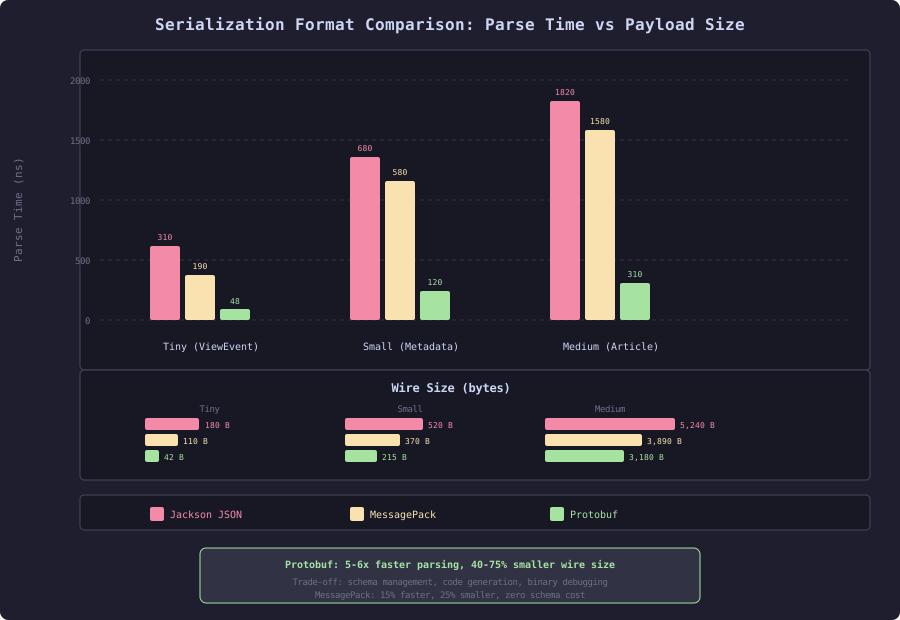
The Protobuf advantage is twofold: smaller wire size (no field names, varint encoding for integers) and faster parsing (schema-driven code generation, no reflection).
@BenchmarkMode(Mode.AverageTime)
@OutputTimeUnit(TimeUnit.MICROSECONDS)
@Warmup(iterations = 5, time = 1)
@Measurement(iterations = 5, time = 1)
@Fork(2)
@State(Scope.Benchmark)
public class JsonVsProtobufBenchmark {

    private byte[] jsonBytes;
    private byte[] protobufBytes;
    private ObjectMapper jacksonMapper;

    @Setup(Level.Trial)
    public void setup() throws Exception {
        jacksonMapper = new ObjectMapper().registerModule(new JavaTimeModule());

        // Create equivalent payloads
        var jsonArticle = new JsonArticle(
            "perf-101", "Performance Engineering",
            "Article body content repeated to reach realistic size..."
                .repeat(100),
            List.of("java", "performance", "jvm"),
            Instant.now().toEpochMilli(), 45000L
        );
        jsonBytes = jacksonMapper.writeValueAsBytes(jsonArticle);

        var protoArticle = Content.Article.newBuilder()
            .setId("perf-101")
            .setTitle("Performance Engineering")
            .setBody("Article body content repeated to reach realistic size..."
                .repeat(100))
            .addAllCategories(List.of("java", "performance", "jvm"))
            .setPublishedAt(Instant.now().toEpochMilli())
            .setViewCount(45000L)
            .build();
        protobufBytes = protoArticle.toByteArray();
    }

    @Benchmark
    public JsonArticle jacksonDeserialize() throws Exception {
        return jacksonMapper.readValue(jsonBytes, JsonArticle.class);
    }

    @Benchmark
    public Content.Article protobufDeserialize() throws Exception {
        return Content.Article.parseFrom(protobufBytes);
    }

    @Benchmark
    public byte[] jacksonSerialize() throws Exception {
        return jacksonMapper.writeValueAsBytes(createJsonArticle());
    }

    @Benchmark
    public byte[] protobufSerialize() {
        return createProtoArticle().toByteArray();
    }
}| Format | Serialize (us) | Deserialize (us) | Wire Size |
|---|---|---|---|
| Jackson JSON | 2.1 | 1.8 | 5,240 bytes |
| Protobuf | 0.4 | 0.3 | 3,180 bytes |
Protobuf serializes 5x faster, deserializes 6x faster, and produces a payload 39% smaller. For the content platform’s internal traffic (article service to search indexer: 2,000 msg/s, article service to recommendation engine: 5,000 msg/s), the CPU savings are substantial: 14 ms/s of serialization CPU reduced to 2.5 ms/s.
The wire size reduction matters for the analytics pipeline, which processes 50,000 view events per second. Each event is small (200 bytes JSON, 80 bytes Protobuf), but at volume the 60% size reduction translates to 6 MB/s of saved network bandwidth.
Schema Evolution: The Hidden Cost of Change
Binary protocols like Protobuf require schema management. Adding a field to a JSON API is adding a key. Adding a field to a Protobuf message requires:
- Adding the field with a new field number in the
.protofile - Regenerating code for all consuming services
- Deploying consumers before producers (for required fields) or producers before consumers (for optional fields)
Protobuf handles backward compatibility through field numbering. Old consumers ignore unknown fields. New consumers use default values for missing fields. But this only works if you follow the rules:
message Article {
  string id = 1;
  string title = 2;
  string body = 3;
  repeated string categories = 4;
  int64 published_at = 5;
  int64 view_count = 6;
  // Added in v2: reading time estimate
  int32 reading_time_minutes = 7;  // Default: 0
  // Added in v3: content format
  ContentFormat format = 8;        // Default: UNKNOWN (0)
}

enum ContentFormat {
  UNKNOWN = 0;  // Must be first, used as default
  MARKDOWN = 1;
  HTML = 2;
  RICH_TEXT = 3;
}
Rules that prevent data corruption:
- Never reuse field numbers (even from deleted fields)
- Never change field types (int32 to string breaks wire format)
- Never add required fields to existing messages
- Always use
reservedfor retired field numbers
message Article {
  reserved 9, 10;  // Previously: deprecated_field, removed_field
  reserved "deprecated_field", "removed_field";
  // ...
}
The schema evolution cost is real: it adds a code generation step to the build pipeline, requires coordinated deployments, and means every service needs the proto files. For the content platform, the team maintains a shared content-protos repository that publishes generated Java code as a Maven artifact. CI builds fail if proto changes break backward compatibility (enforced by buf breaking).
The trade-off table:
| Concern | JSON | Protobuf |
|---|---|---|
| Parse speed | Baseline | 5-6x faster |
| Wire size | Baseline | 40-60% smaller |
| Schema evolution | Add fields freely | Requires proto versioning |
| Debugging | Human-readable | Binary, needs tooling |
| Client compatibility | Universal | Requires code generation |
| Build complexity | None | Proto compilation step |
For internal service-to-service communication at high throughput, Protobuf wins. For public APIs consumed by browsers and third parties, JSON is the practical choice. The content platform uses both: JSON for the public article API, Protobuf for internal service mesh communication.
Measuring Serialization Cost in Production
Serialization cost hides in CPU profiles. To find it, instrument the serialization layer:
public class InstrumentedObjectMapper {
    private static final ObjectMapper DELEGATE = new ObjectMapper()
        .registerModule(new JavaTimeModule());

    private static final Timer SERIALIZE_TIMER = Timer.builder("serialization")
        .tag("operation", "serialize")
        .tag("format", "json")
        .register(Metrics.globalRegistry);

    private static final Timer DESERIALIZE_TIMER = Timer.builder("serialization")
        .tag("operation", "deserialize")
        .tag("format", "json")
        .register(Metrics.globalRegistry);

    private static final DistributionSummary PAYLOAD_SIZE =
        DistributionSummary.builder("serialization.payload.bytes")
            .tag("format", "json")
            .publishPercentileHistogram()
            .register(Metrics.globalRegistry);

    public <T> T readValue(byte[] src, Class<T> type) throws Exception {
        return DESERIALIZE_TIMER.record(() -> {
            PAYLOAD_SIZE.record(src.length);
            return DELEGATE.readValue(src, type);
        });
    }

    public byte[] writeValueAsBytes(Object value) throws Exception {
        return SERIALIZE_TIMER.record(() -> {
            byte[] result = DELEGATE.writeValueAsBytes(value);
            PAYLOAD_SIZE.record(result.length);
            return result;
        });
    }
}
The content platform’s production metrics revealed that serialization consumed 12% of total CPU before optimization and 3% after applying ObjectMapper reuse, streaming for large feeds, and Protobuf for internal communication. On a 4-node cluster at 15,000 req/s, that 9% CPU reduction deferred a $4,800/month capacity expansion by 6 months.
Serialization is infrastructure code that most teams configure once and forget. The performance difference between naive and optimized serialization is 5-50x depending on payload size and access patterns. The two highest-impact changes: reuse your ObjectMapper, and use streaming parsing for payloads over 100 KB. Everything else is optimization at the margins.