Distributed Tracing for Performance: Finding the Slow Thing Across Service Boundaries with OpenTelemetry
Distributed Tracing for Performance: Finding the Slow Thing Across Service Boundaries with OpenTelemetry
A user loads an article page on the content platform. The request hits the API gateway, which calls the article service to fetch content, the recommendation service to generate related articles, and the analytics service to record the page view. Total response time: 1,340ms. The SLO is 400ms.
The article service reports 45ms average latency. The recommendation service reports 120ms. The analytics service reports 15ms. Add those up: 180ms. Where are the other 1,160ms?
The per-service metrics are telling the truth. Each service measures the time between receiving a request and sending a response. But the metrics do not capture what happens between services: serialization overhead, network transit, connection pool wait time, retry delays, the fact that the API gateway calls services sequentially when it could call them in parallel. The gap between summed service latency and end-to-end latency is invisible to metrics. That gap is where the performance problem lives.
Distributed tracing solves this by recording the full timeline of a request as it crosses service boundaries. Each unit of work becomes a span with a start time, duration, and parent reference. Spans nest to form a tree. The tree spans the entire request lifecycle from the moment the user’s HTTP request arrives to the moment the response leaves. Every millisecond is accounted for.
The OpenTelemetry Model
OpenTelemetry defines three primitives for tracing: traces, spans, and context.
A trace is an identifier (128-bit trace ID) that groups all work related to a single logical operation. When the API gateway receives a request, it generates a trace ID. Every downstream service receives this trace ID and attaches it to the spans it creates.
A span represents a single unit of work: an HTTP request, a database query, a cache lookup, a message publish. Each span records:
traceId: which trace this span belongs tospanId: unique identifier for this spanparentSpanId: the span that caused this span to existoperationName: what the span represents (GET /articles/{id},SELECT article)startTimeandendTime: wall-clock timestamps with microsecond precisionattributes: key-value metadata (http.status_code=200,db.statement=SELECT...)events: timestamped annotations within the span (cache.miss,retry.attempt)status: OK, ERROR, or UNSET
Context propagation is the mechanism that carries the trace ID and parent span ID across service boundaries. When service A calls service B over HTTP, the trace context is injected into HTTP headers. Service B extracts the context and creates child spans under the propagated parent. OpenTelemetry uses the W3C Trace Context standard by default, encoding the trace in traceparent and tracestate headers.
traceparent: 00-4bf92f3577b34da6a3ce929d0e0e4736-00f067aa0ba902b7-01
             ── ────────────────────────────── ──────────────── ──
             ver         trace-id                 parent-id     flags
                    (128-bit, hex)              (64-bit, hex)   (sampled)
Setting Up OpenTelemetry in Spring Boot
The content platform runs four Spring Boot services. The fastest way to instrument all of them is the OpenTelemetry Java Agent, a JAR that attaches to the JVM and automatically instruments HTTP clients, HTTP servers, JDBC, gRPC, and dozens of other libraries.
# Download the agent
curl -L -o opentelemetry-javaagent.jar \
  https://github.com/open-telemetry/opentelemetry-java-instrumentation/releases/latest/download/opentelemetry-javaagent.jar
# Dockerfile for the article service
FROM eclipse-temurin:21-jre
COPY opentelemetry-javaagent.jar /opt/otel/
COPY article-service.jar /opt/app/
ENV OTEL_SERVICE_NAME=article-service
ENV OTEL_EXPORTER_OTLP_ENDPOINT=http://jaeger:4317
ENV OTEL_TRACES_SAMPLER=parentbased_traceidratio
ENV OTEL_TRACES_SAMPLER_ARG=0.1
ENTRYPOINT ["java", \
"-javaagent:/opt/otel/opentelemetry-javaagent.jar", \
"-jar", "/opt/app/article-service.jar"]That is the entire setup for automatic instrumentation. The agent intercepts every inbound HTTP request, every outbound HTTP call via RestTemplate or WebClient, every JDBC query, and every Redis command. Each intercepted operation becomes a span with appropriate attributes. No code changes required.
// SLOW: No instrumentation, debugging latency with scattered log timestamps
2024-03-15 10:23:45.123 INFO  ArticleController - Received request for article 7291
2024-03-15 10:23:45.168 INFO  ArticleRepository - Query completed in 45ms
2024-03-15 10:23:46.463 INFO  ArticleController - Response sent

Latency: 1340ms
What happened between 45ms query and 1340ms response? Unknown.

// FAST: OpenTelemetry traces show the full breakdown
Trace 4bf92f35: article-page-load (1340ms)
├── api-gateway.route (1338ms)
│   ├── article-service.getArticle (47ms)
│   │   ├── redis.GET article:7291 (2ms) [cache.miss]
│   │   └── postgres.SELECT (43ms)
│   ├── recommendation-service.getRelated (122ms)    // starts after article-service completes
│   │   ├── qdrant.search (89ms)
│   │   └── article-service.batchGet (31ms)
│   ├── analytics-service.recordView (18ms)           // starts after recommendation completes
│   │   └── kafka.produce (16ms)
│   └── [GAP: 1151ms]                                 // sequential execution overhead
└── response.serialize (2ms)

Root cause: sequential fan-out. Three independent calls executed one after another.
The trace reveals the problem in seconds. The API gateway calls each downstream service sequentially. The recommendation service waits for the article service to finish. The analytics service waits for the recommendation service to finish. The 1,151ms gap is pure sequencing waste.
Context Propagation Across Service Boundaries
Context propagation works automatically for HTTP calls when using instrumented HTTP clients. The OpenTelemetry agent wraps RestTemplate, WebClient, and HttpClient to inject the traceparent header on outbound requests and extract it on inbound requests.
For async messaging (Kafka, RabbitMQ), propagation requires the trace context to be embedded in message headers:
// Producer side: context injected into Kafka headers automatically by the agent
// No code change needed for standard KafkaTemplate usage

// Consumer side: the agent extracts context from Kafka headers
// and creates a span linked to the producer span
@KafkaListener(topics = "page-views")
public void handlePageView(ConsumerRecord<String, PageViewEvent> record) {
    // This method executes inside a span that is a child of the producer span
    // The trace context was propagated through Kafka record headers
    analyticsRepository.save(record.value());
}
For gRPC calls between services, the agent handles propagation through gRPC metadata. For custom protocols or message brokers without built-in support, you inject and extract context manually:
// Manual context injection for a custom HTTP call
TextMapSetter<HttpRequest> setter = (carrier, key, value) ->
    carrier.setHeader(key, value);

GlobalOpenTelemetry.getPropagators()
    .getTextMapPropagator()
    .inject(Context.current(), request, setter);

// Manual context extraction on the receiving side
TextMapGetter<HttpServletRequest> getter = new TextMapGetter<>() {
    public Iterable<String> keys(HttpServletRequest carrier) {
        return Collections.list(carrier.getHeaderNames());
    }
    public String get(HttpServletRequest carrier, String key) {
        return carrier.getHeader(key);
    }
};

Context extracted = GlobalOpenTelemetry.getPropagators()
    .getTextMapPropagator()
    .extract(Context.current(), httpRequest, getter);

try (Scope scope = extracted.makeCurrent()) {
    // All spans created here are children of the extracted context
    processRequest(httpRequest);
}
Fixing the Sequential Fan-Out
The trace identified the root cause: sequential service calls. The fix is parallel execution with CompletableFuture:
// SLOW: Sequential calls (1340ms total)
public ArticlePage loadArticlePage(String articleId) {
    Article article = articleClient.getArticle(articleId);           // 47ms
    List<Article> related = recommendationClient.getRelated(articleId); // 122ms
    analyticsClient.recordView(articleId);                           // 18ms
    return new ArticlePage(article, related);                        // Total: 187ms + overhead
}

// FAST: Parallel calls (128ms total)
public ArticlePage loadArticlePage(String articleId) {
    CompletableFuture<Article> articleFuture =
        CompletableFuture.supplyAsync(() -> articleClient.getArticle(articleId));

    CompletableFuture<List<Article>> relatedFuture =
        CompletableFuture.supplyAsync(() -> recommendationClient.getRelated(articleId));

    // Fire-and-forget for analytics, don't block the response
    CompletableFuture.runAsync(() -> analyticsClient.recordView(articleId));

    Article article = articleFuture.join();         // 47ms (in parallel)
    List<Article> related = relatedFuture.join();   // 122ms (in parallel)
    return new ArticlePage(article, related);        // Total: max(47, 122) = 122ms + ~6ms overhead
}
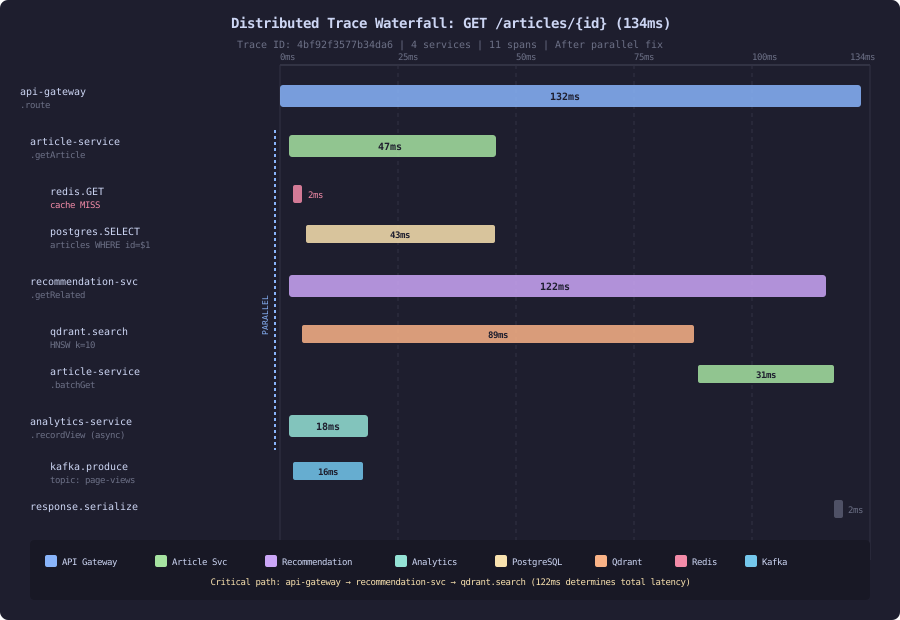
After deploying the parallel version, a new trace confirms the fix:
Trace a1b2c3d4: article-page-load (134ms)
├── api-gateway.route (132ms)
│   ├── article-service.getArticle (47ms)        // parallel
│   ├── recommendation-service.getRelated (122ms) // parallel
│   └── analytics-service.recordView (18ms)       // fire-and-forget
└── response.serialize (2ms)

p50: 134ms   p99: 289ms   SLO target: 400ms   Status: PASSING
Response time dropped from 1,340ms to 134ms. A 10x improvement from changing three lines of orchestration logic. No service was individually slow. The bottleneck was in the composition layer, and only a distributed trace could reveal it.
Trace Sampling for High-Traffic Systems
The content platform serves 12,000 requests per second. Each request generates 8-15 spans across four services. At full capture, that is 120,000-180,000 spans per second. Jaeger’s storage (Elasticsearch) can handle roughly 30,000 spans per second on the current cluster. Tracing everything is not an option.
Sampling strategies control which traces to keep:
Head-based sampling decides at the entry point whether to sample the trace. All downstream services respect the decision via the sampled flag in the traceparent header.
# Sample 10% of traces
OTEL_TRACES_SAMPLER=parentbased_traceidratio
OTEL_TRACES_SAMPLER_ARG=0.1

# Result: 12,000 * 0.1 = 1,200 traces/sec
# At 10 spans/trace = 12,000 spans/sec (within budget)
The problem with head-based sampling: you randomly discard 90% of traces, including traces that contain the performance anomalies you need to find. The slow request that took 3 seconds has a 90% chance of being dropped.
Tail-based sampling collects all spans, holds them in memory briefly, then decides which complete traces to keep based on their characteristics. The OpenTelemetry Collector supports tail sampling:
# otel-collector-config.yaml
processors:
  tail_sampling:
    decision_wait: 10s
    num_traces: 100000
    policies:
      # Keep all traces with errors
      - name: errors
        type: status_code
        status_code:
          status_codes: [ERROR]

      # Keep all traces slower than 500ms
      - name: slow-traces
        type: latency
        latency:
          threshold_ms: 500

      # Keep 5% of normal traces for baseline
      - name: baseline
        type: probabilistic
        probabilistic:
          sampling_percentage: 5
Tail sampling keeps every interesting trace (errors, slow requests) and a small random baseline for comparison. The trade-off: the Collector must buffer all spans for the decision_wait period, which requires significant memory. At 180,000 spans/second with a 10-second wait, that is 1.8 million spans in memory. Each span averages 500 bytes, so the buffer needs roughly 900MB of RAM.
The Trace-to-Metric Bridge
Individual traces show what happened in a single request. But you need aggregates to answer “is this getting worse?” OpenTelemetry’s span metrics connector generates RED metrics (Rate, Errors, Duration) from span data:
# otel-collector-config.yaml
connectors:
  spanmetrics:
    histogram:
      explicit:
        buckets: [5ms, 10ms, 25ms, 50ms, 100ms, 250ms, 500ms, 1s, 2.5s]
    dimensions:
      - name: http.method
      - name: http.route
      - name: http.status_code
    exemplars:
      enabled: true    # Link metrics to example traces
This generates Prometheus metrics from trace data. When you see a latency spike in Grafana, click the exemplar link to jump directly to the trace that caused the spike. The trace shows the exact span breakdown. No grep, no log correlation, no guesswork.
Grafana dashboard → p99 latency spike at 14:23 → exemplar link
→ Jaeger trace 7f8e9d0c: article-page-load (2,847ms)
  ├── article-service.getArticle (2,790ms)
  │   └── postgres.SELECT articles WHERE id = $1 (2,785ms)
  │       attributes: db.statement="SELECT * FROM articles WHERE id = $1"
  │                   db.postgresql.rows_affected=1
  └── recommendation-service.getRelated (45ms)

Root cause: PostgreSQL query took 2,785ms for a single row lookup.
Next step: check for missing index, table bloat, lock contention.
Trade-Offs
Storage cost vs visibility. Full tracing at 12,000 req/s generates roughly 50GB/day of span data in Elasticsearch. Tail sampling at the policies above reduces this to roughly 4GB/day. You lose the ability to inspect arbitrary normal-path requests, but you keep every anomaly.
Agent overhead. The OpenTelemetry Java Agent adds 2-5% CPU overhead and 30-80MB of heap per service. On the content platform (4 services, 2 CPU / 4GB each), this costs 0.4 CPU cores and 200MB RAM total. The performance insights it provides save orders of magnitude more resources than it consumes.
Context propagation completeness. Every service in the request path must propagate context. A single service that drops the traceparent header breaks the trace into disconnected fragments. The broken trace still has useful per-service spans, but you lose the ability to see cross-service timing relationships. Audit all services and middleware for header forwarding.
Tail sampling memory. The Collector’s span buffer must hold all in-flight traces for the decision window. A traffic spike that doubles throughput doubles the buffer. Set memory limits on the Collector and configure a fallback to probabilistic sampling when the buffer is full:
processors:
  memory_limiter:
    check_interval: 1s
    limit_mib: 2048
    spike_limit_mib: 512
Clock skew. Distributed tracing relies on wall-clock timestamps from different machines. Clock skew between services causes spans to appear to start before their parent or overlap incorrectly. Run NTP on all hosts and verify synchronization. The OpenTelemetry SDK records clock offsets when available, but skew beyond 10ms starts to distort the trace visualization.