Payload Optimization: Compression, Partial Responses, and the Wire Cost of Chattiness
Payload Optimization: Compression, Partial Responses, and the Wire Cost of Chattiness
The content platform’s article list API returns 37KB of JSON per request. With Brotli compression, that drops to 4.1KB. A 9x reduction in bytes on the wire translates directly to faster page loads on bandwidth-constrained mobile connections. But compression has a CPU cost that varies 100x between algorithms and levels. Choosing the wrong level burns server CPU for marginal compression gains.
Beyond compression, the platform’s mobile app makes 8 separate API calls to render the home screen. Each call carries its own connection overhead, TLS negotiation (amortized with HTTP/2), header bytes, and round-trip latency. Consolidating those 8 calls into 1 aggregation endpoint cuts P50 page load from 340ms to 95ms.
This chapter quantifies the costs of unoptimized payloads and demonstrates the fixes.
The Wire Cost Breakdown
Every API response carries overhead beyond the application data:
HTTP response overhead per request:
  TLS record header:       5 bytes
  HTTP/2 frame headers:    9 bytes per 16KB chunk
  HTTP headers:           ~200 bytes (compressed via HPACK after warmup)
  Total framing:          ~230 bytes per response

Content platform article list (50 articles):
  Raw JSON:               48,230 bytes (pretty-printed)
  Minified JSON:          37,450 bytes
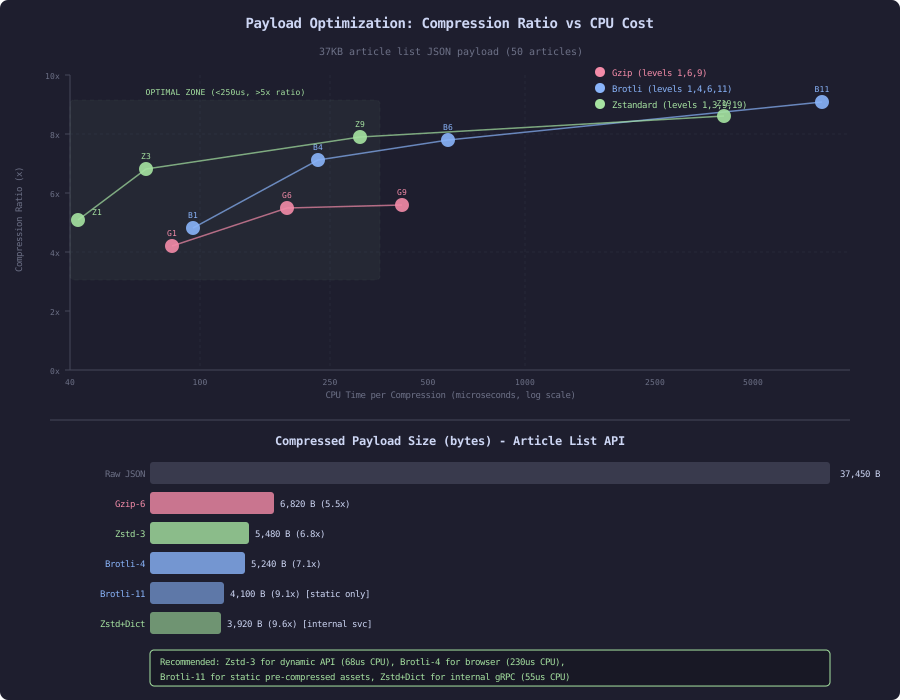
  Gzip (level 6):         6,820 bytes (5.5x compression)
  Brotli (level 4):       5,240 bytes (7.1x compression)
  Brotli (level 11):      4,100 bytes (9.1x compression)
  Zstandard (level 3):    5,480 bytes (6.8x compression)
  Zstandard (level 19):   4,350 bytes (8.6x compression)
For a user on a 3G connection (400KB/s effective throughput):
Time to download article list response:
  Uncompressed (37KB):   92ms
  Gzip level 6 (6.8KB):  17ms
  Brotli level 4 (5.2KB): 13ms
  Savings: 79ms per request (before server even starts processing next one)

Full page (15 requests, 511KB total uncompressed):
  Uncompressed:          1,278ms download time
  Brotli compressed:       148ms download time
  Savings: 1,130ms (nearly 1 second saved purely on transfer)
Compression Algorithm Comparison
Three algorithms dominate server-side HTTP compression:
// Gzip (RFC 1952): Universal support, balanced performance
// - Supported by every HTTP client since 1999
// - DEFLATE algorithm (LZ77 + Huffman coding)
// - Levels 1-9 (higher = better ratio, more CPU)
// - Content-Encoding: gzip

// Brotli (RFC 7932): Better ratios, slower compression
// - Supported by all modern browsers (95%+ coverage)
// - Uses a pre-built dictionary of common web content
// - Levels 0-11 (vastly different CPU costs across levels)
// - Content-Encoding: br

// Zstandard (RFC 8478): Best speed/ratio trade-off
// - Browser support limited (Firefox only natively, others via CDN)
// - Designed by Facebook for fast compression with good ratios
// - Levels 1-22 (with negative levels for ultra-fast compression)
// - Content-Encoding: zstd
Benchmark on the article list response (37KB JSON), measured on server-class hardware (AMD EPYC 7763, single core):
Algorithm     Level  Ratio   Compress Time  Decompress Time  Compressed Size
Gzip           1     4.2x      82 us           34 us           8,917 bytes
Gzip           6     5.5x     185 us           35 us           6,820 bytes
Gzip           9     5.6x     420 us           35 us           6,680 bytes
Brotli         1     4.8x      95 us           28 us           7,802 bytes
Brotli         4     7.1x     230 us           29 us           5,240 bytes
Brotli         6     7.8x     580 us           29 us           4,800 bytes
Brotli        11     9.1x   8,200 us           28 us           4,100 bytes
Zstandard      1     5.1x      42 us           18 us           7,343 bytes
Zstandard      3     6.8x      68 us           18 us           5,480 bytes
Zstandard      9     7.9x     310 us           19 us           4,740 bytes
Zstandard     19     8.6x   4,100 us           18 us           4,350 bytes
Key observations:
- Zstandard level 3 achieves Gzip-6 ratios at 2.7x less CPU cost (68us vs 185us)
- Brotli level 11 gets the best ratio (9.1x) but costs 8.2ms per response (unacceptable for dynamic content)
- Decompression is cheap for all algorithms (18-35us) because the client does this once
- Brotli level 4 offers the best ratio in the sub-300us budget (7.1x at 230us)
Optimal Level Selection Strategy
// Strategy: different compression for different contexts
//
// Static assets (pre-compressed at build time, served from CDN):
//   Use Brotli level 11 (best ratio, CPU cost paid once)
//   CSS, JS, fonts compressed during build, stored compressed
//
// Dynamic API responses (compressed per-request):
//   Use Zstandard level 3 (best speed/ratio) if client supports it
//   Fallback to Brotli level 4 (good ratio, acceptable CPU)
//   Fallback to Gzip level 6 (universal support)
//
// Implementation: content negotiation based on Accept-Encoding

@Configuration
public class CompressionConfig {

    @Bean
    public WebFilter compressionFilter() {
        return (exchange, chain) -> {
            String acceptEncoding = exchange.getRequest().getHeaders()
                .getFirst("Accept-Encoding");

            if (acceptEncoding == null) {
                return chain.filter(exchange);
            }

            // Priority: zstd > br > gzip
            String encoding;
            if (acceptEncoding.contains("zstd")) {
                encoding = "zstd";
            } else if (acceptEncoding.contains("br")) {
                encoding = "br";
            } else if (acceptEncoding.contains("gzip")) {
                encoding = "gzip";
            } else {
                return chain.filter(exchange);
            }

            ServerHttpResponse response = exchange.getResponse();
            response.getHeaders().set("Content-Encoding", encoding);
            response.getHeaders().set("Vary", "Accept-Encoding");

            return chain.filter(exchange.mutate()
                .response(new CompressingResponse(response, encoding))
                .build());
        };
    }
}
Partial Responses: Send Only What the Client Needs
The article list API returns 8 fields per article. The mobile home screen uses only 4: title, excerpt, thumbnail_url, and view_count. Sending all 8 fields wastes 40% of the payload:
// SLOW: Full response always (37,450 bytes for 50 articles)
@GetMapping("/api/articles")
public ResponseEntity<ArticleListResponse> listArticles(
        @RequestParam(defaultValue = "50") int pageSize,
        @RequestParam(required = false) String cursor) {
    return ResponseEntity.ok(articleService.list(pageSize, cursor));
}

// FAST: Field selection (22,100 bytes for same 50 articles, 4 fields)
@GetMapping("/api/articles")
public ResponseEntity<ArticleListResponse> listArticles(
        @RequestParam(defaultValue = "50") int pageSize,
        @RequestParam(required = false) String cursor,
        @RequestParam(required = false) Set<String> fields) {

    var articles = articleService.list(pageSize, cursor);

    if (fields != null && !fields.isEmpty()) {
        articles = articles.withFieldMask(fields);
    }

    return ResponseEntity.ok(articles);
}

// Client request:
// GET /api/articles?page_size=50&fields=title,excerpt,thumbnail_url,view_count
//
// Payload reduction: 37,450 -> 22,100 bytes (41% smaller before compression)
// After Brotli-4:    5,240  ->  3,120 bytes (40% smaller compressed)
Field mask implementation:
public record ArticleListResponse(
    List<ArticleSummary> articles,
    String nextCursor,
    int totalCount
) {
    public ArticleListResponse withFieldMask(Set<String> fields) {
        var filtered = articles.stream()
            .map(a -> a.withFieldMask(fields))
            .toList();
        return new ArticleListResponse(filtered, nextCursor, totalCount);
    }
}

@JsonFilter("fieldMask")
public record ArticleSummary(
    String id,
    String title,
    String excerpt,
    long viewCount,
    long publishedAtEpoch,
    List<String> categories,
    String author,
    String thumbnailUrl
) {
    public ArticleSummary withFieldMask(Set<String> fields) {
        // Always include id (needed for client-side keying)
        return new ArticleSummary(
            id,
            fields.contains("title") ? title : null,
            fields.contains("excerpt") ? excerpt : null,
            fields.contains("view_count") ? viewCount : 0,
            fields.contains("published_at_epoch") ? publishedAtEpoch : 0,
            fields.contains("categories") ? categories : null,
            fields.contains("author") ? author : null,
            fields.contains("thumbnail_url") ? thumbnailUrl : null
        );
    }
}

// Jackson configuration to skip nulls:
@Configuration
public class JacksonConfig {
    @Bean
    public ObjectMapper objectMapper() {
        return new ObjectMapper()
            .setSerializationInclusion(JsonInclude.Include.NON_NULL)
            .setSerializationInclusion(JsonInclude.Include.NON_DEFAULT);
    }
}
The N+1 API Problem
The mobile app renders the home screen with data from multiple services:
// SLOW: Mobile app makes 8 sequential API calls
// Call 1: GET /api/articles?page_size=10           (article list)
// Call 2: GET /api/articles/trending                (trending articles)
// Call 3: GET /api/recommendations                  (personalized recs)
// Call 4: GET /api/user/reading-progress             (continue reading)
// Call 5: GET /api/categories/popular                (popular categories)
// Call 6: GET /api/user/preferences                  (display settings)
// Call 7: GET /api/notifications/unread-count         (badge count)
// Call 8: GET /api/articles/bookmarked?limit=5       (bookmarks)
//
// At 80ms RTT (even with HTTP/2 multiplexing and concurrent requests):
// - Server processing: 8 * 15ms avg = 120ms
// - Network minimum: 80ms (one RTT, all concurrent on HTTP/2)
// - Total P50: 340ms (includes serialization, compression, scheduling)
// - 8 separate compression operations, 8 response headers

// FAST: Single aggregation endpoint
// Call 1: GET /api/home-feed
// - Server assembles all 8 data sources internally (in-process, ~0ms network)
// - Returns single compressed response
// - Total P50: 95ms
The aggregation endpoint (Backend-For-Frontend pattern):
@RestController
@RequestMapping("/api")
public class HomeFeedController {

    private final ArticleService articleService;
    private final RecommendationService recommendationService;
    private final UserService userService;
    private final NotificationService notificationService;

    @GetMapping("/home-feed")
    public ResponseEntity<HomeFeedResponse> getHomeFeed(
            @AuthenticationPrincipal UserPrincipal user) {

        // Execute independent data fetches concurrently
        var articlesFuture = CompletableFuture.supplyAsync(() ->
            articleService.list(10, null));
        var trendingFuture = CompletableFuture.supplyAsync(() ->
            articleService.trending(5));
        var recsFuture = CompletableFuture.supplyAsync(() ->
            recommendationService.forUser(user.id(), 10));
        var progressFuture = CompletableFuture.supplyAsync(() ->
            userService.readingProgress(user.id()));
        var categoriesFuture = CompletableFuture.supplyAsync(() ->
            articleService.popularCategories(8));
        var prefsFuture = CompletableFuture.supplyAsync(() ->
            userService.preferences(user.id()));
        var notifFuture = CompletableFuture.supplyAsync(() ->
            notificationService.unreadCount(user.id()));
        var bookmarksFuture = CompletableFuture.supplyAsync(() ->
            articleService.bookmarked(user.id(), 5));

        // Wait for all (bounded by slowest, not sum)
        CompletableFuture.allOf(
            articlesFuture, trendingFuture, recsFuture, progressFuture,
            categoriesFuture, prefsFuture, notifFuture, bookmarksFuture
        ).join();

        var response = new HomeFeedResponse(
            articlesFuture.join(),
            trendingFuture.join(),
            recsFuture.join(),
            progressFuture.join(),
            categoriesFuture.join(),
            prefsFuture.join(),
            notifFuture.join(),
            bookmarksFuture.join()
        );

        return ResponseEntity.ok()
            .cacheControl(CacheControl.maxAge(30, TimeUnit.SECONDS).mustRevalidate())
            .eTag(generateETag(response))
            .body(response);
    }
}
Performance comparison:
8 separate API calls (HTTP/2, concurrent, 80ms RTT):
  Client-side wall time P50: 340ms
  Total bytes transferred:   52,400 bytes (8 responses, 8 sets of headers)
  Server CPU per page view:  8 * serialization + 8 * compression = 1.8ms

Single aggregation endpoint:
  Client-side wall time P50: 95ms
  Total bytes transferred:   38,200 bytes (1 response, 1 set of headers)
  Server CPU per page view:  1 * serialization + 1 * compression = 0.4ms

Improvement:
  Latency: 3.6x faster (bounded by slowest subsystem, not sum)
  Bandwidth: 27% less (no repeated headers, better compression of larger payload)
  Server CPU: 4.5x less compression work
ETags and Conditional Requests
The content platform’s category list changes once per hour. Users browsing multiple pages request it repeatedly. Without ETags, every request transfers the full 12KB response:
@GetMapping("/api/categories/popular")
public ResponseEntity<List<Category>> getPopularCategories(
        WebRequest request) {

    List<Category> categories = categoryService.getPopular(20);
    String etag = generateETag(categories);

    // Check if client's cached version is still valid
    if (request.checkNotModified(etag)) {
        // Returns 304 Not Modified (0 bytes body, ~100 bytes headers)
        return null;
    }

    return ResponseEntity.ok()
        .eTag(etag)
        .cacheControl(CacheControl.maxAge(60, TimeUnit.SECONDS).mustRevalidate())
        .body(categories);
}

private String generateETag(List<Category> categories) {
    // Hash based on content, not time (deterministic)
    int hash = categories.stream()
        .mapToInt(c -> Objects.hash(c.id(), c.name(), c.articleCount()))
        .reduce(0, (a, b) -> a * 31 + b);
    return "\"cat-" + Integer.toHexString(hash) + "\"";
}
ETag savings for the content platform:
Scenario: User browses 10 pages in one session (30 minutes)
Category list requested 10 times (once per page via aggregation endpoint)

Without ETags:
  10 requests * 12KB = 120KB transferred
  10 * decompression on client
  10 * serialization + compression on server

With ETags (list changes once per hour):
  Request 1: 200 OK with full body (12KB)
  Requests 2-10: 304 Not Modified (~100 bytes each)
  Total: 12KB + 9 * 100 bytes = 12.9KB transferred
  Savings: 89% bandwidth reduction for this endpoint

Across all cacheable endpoints per user session:
  Categories (12KB, changes hourly): 89% saving
  User preferences (2KB, changes daily): 95% saving
  Popular tags (8KB, changes hourly): 89% saving
  Total saving per session: ~180KB bandwidth, ~15ms server CPU
Cursor Pagination vs Offset
The article list supports pagination. Offset pagination has a hidden wire cost: the response includes a total_count that requires a COUNT(*) query, and deep pages transfer redundant metadata:
// SLOW: Offset pagination
// GET /api/articles?page=50&page_size=50
//
// Problems:
// 1. Server executes OFFSET 2500 LIMIT 50 (scans 2550 rows)
// 2. Response includes "total_count: 125,000" (requires COUNT(*))
// 3. If article inserted between pages, user sees duplicate or misses one
// 4. Every response: {"articles": [...], "page": 50, "total_pages": 2500, "total_count": 125000}
//    The total_count/total_pages metadata is 50 bytes per response, but the COUNT(*) costs 12ms

// FAST: Cursor pagination
// GET /api/articles?cursor=eyJpZCI6ImFydC0yNTAwIn0&page_size=50
//
// Benefits:
// 1. Server executes WHERE id < 'art-2500' LIMIT 50 (index scan, 50 rows)
// 2. No COUNT(*) needed (saves 12ms per request)
// 3. Consistent results regardless of concurrent inserts
// 4. Response: {"articles": [...], "next_cursor": "eyJpZCI6ImFydC0yNTUwIn0"}
//    No total_count overhead

@GetMapping("/api/articles")
public ResponseEntity<CursorPage<ArticleSummary>> listArticles(
        @RequestParam(defaultValue = "50") int pageSize,
        @RequestParam(required = false) String cursor) {

    // Decode opaque cursor (base64-encoded JSON with last seen ID)
    String lastId = cursor != null ? decodeCursor(cursor) : null;

    // Fetch pageSize + 1 to determine if more pages exist
    List<ArticleSummary> articles = articleRepository.findAfter(lastId, pageSize + 1);

    boolean hasMore = articles.size() > pageSize;
    if (hasMore) {
        articles = articles.subList(0, pageSize);
    }

    String nextCursor = hasMore
        ? encodeCursor(articles.getLast().id())
        : null;

    return ResponseEntity.ok(new CursorPage<>(articles, nextCursor, hasMore));
}
Trade-offs Summary
| Technique | Bandwidth Saving | CPU Cost | Complexity |
|---|---|---|---|
| Gzip level 6 | 5.5x | 185us/response | Low (built into servers) |
| Brotli level 4 | 7.1x | 230us/response | Low (supported by CDNs) |
| Zstandard level 3 | 6.8x | 68us/response | Medium (limited browser support) |
| Field selection | 30-50% additional | Negligible | Medium (field mask logic) |
| Aggregation endpoint | 20-30% (fewer headers) | Net negative (less total work) | High (BFF maintenance) |
| ETags/304 | 80-95% for stable data | Negligible (hash check) | Low (Spring built-in) |
| Cursor pagination | 5-10% (no total_count) | Saves 12ms (no COUNT) | Low (cursor encoding) |
The content platform applies all of these in layers: Brotli compression on the CDN for browser clients, Zstandard for internal service communication, field selection for mobile clients, aggregation endpoints for the home screen, and ETags for slowly-changing reference data. Combined, they reduce total bandwidth by 12x and P50 page load time by 4x compared to naive uncompressed full-payload responses.