Container Performance: CPU Throttling, Memory Limits, and the JVM That Does Not Know It Is in a Container
Container Performance: CPU Throttling, Memory Limits, and the JVM That Does Not Know It Is in a Container
The content platform’s article service runs in a container with 2 CPU cores and 4GB memory. Average CPU usage sits at 35%. P50 latency is 12ms. Everything looks healthy. Then, every 100ms, a burst of requests triggers garbage collection, the CFS scheduler throttles the container for 20ms, and P99 latency spikes to 180ms.
This is the fundamental trap of container resource management: average utilization tells you nothing about burst behavior, and Linux cgroup enforcement operates at granularities that collide with JVM internal operations.
This chapter dissects how the Linux Completely Fair Scheduler (CFS) bandwidth controller throttles container CPU in ways that create latency spikes invisible to monitoring dashboards, how JVM memory accounting inside cgroup limits leads to OOM kills even when the heap has room, and how to configure both correctly for latency-sensitive Java services.
The CPU Throttling Timeline
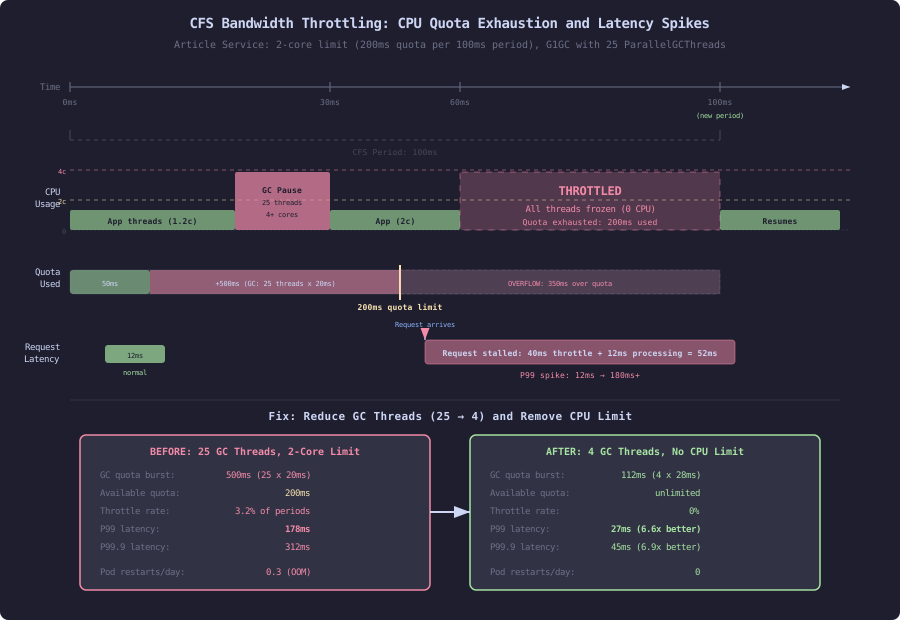
CFS bandwidth control divides time into periods (default 100ms). A container with a 2-core limit gets a quota of 200ms of CPU time per 100ms period. If the container exhausts its 200ms quota in the first 60ms of the period (during a GC pause or JIT compilation burst), it is throttled for the remaining 40ms. Every thread in the container stops. In-flight HTTP requests stall. The P99 latency graph shows a 40ms spike that correlates with nothing in the application metrics.
CFS bandwidth throttling mechanics:

  Period: 100ms (cpu.cfs_period_us)
  Quota:  200ms (cpu.cfs_quota_us) = 2 cores

  Scenario: GC burst consuming 4 cores for 30ms

  Time ───────────────────────────────────────────►
  0ms        30ms       60ms                100ms
  │──────────│──────────│────────────────────│
  │ GC burst │ App work │   THROTTLED        │
  │ 4 cores  │ 2 cores  │   0 cores          │
  │ 120ms    │ 80ms     │                    │
  │ quota    │ quota    │                    │
  │ used     │ used     │                    │
  │          │          │                    │
  Total quota used: 200ms (exhausted at 60ms mark)
  Throttled for: 40ms (until next period starts)

  Result: Any request arriving between 60ms-100ms
          waits 0-40ms before getting CPU time.
          P99 impact: +40ms latency spike.
This is measurable. The kernel exposes throttling statistics in the cgroup filesystem:
# Read CFS throttling stats for the article service container
cat /sys/fs/cgroup/cpu/docker/<container-id>/cpu.stat

nr_periods 86423       # Total CFS periods elapsed
nr_throttled 2847      # Periods where container was throttled
throttled_time 41283000000  # Total nanoseconds spent throttled

# Throttle ratio: 2847/86423 = 3.3% of periods have throttling
# Average throttle duration: 41.28s / 2847 = 14.5ms per throttled period
3.3% sounds low. It is not. If 3.3% of 100ms periods include a 14.5ms throttle, and your service handles 1000 RPS, then approximately 33 requests per second experience an additional 14.5ms of latency. That is your P99.
Why Average CPU Usage Misleads
Dashboard view of article service CPU:
  Average CPU: 35% of 2 cores = 0.7 cores
  "Plenty of headroom" — incorrect conclusion

Reality over a 1-second window (ten 100ms periods):
  Period 1:  0.4 cores  (40ms quota used)   — no throttle
  Period 2:  0.3 cores  (30ms quota used)   — no throttle
  Period 3:  0.3 cores  (30ms quota used)   — no throttle
  Period 4:  2.8 cores  (280ms quota used)  — THROTTLED 80ms
  Period 5:  0.2 cores  (20ms quota used)   — no throttle
  Period 6:  0.5 cores  (50ms quota used)   — no throttle
  Period 7:  0.3 cores  (30ms quota used)   — no throttle
  Period 8:  3.1 cores  (310ms quota used)  — THROTTLED 110ms
  Period 9:  0.2 cores  (20ms quota used)   — no throttle
  Period 10: 0.4 cores  (40ms quota used)   — no throttle

  Average: (40+30+30+200+20+50+30+200+20+40) / 10 = 66ms = 0.66 cores
  Average CPU: 33% — looks fine
  Throttled periods: 2/10 = 20%
  P99 latency impact: 80-110ms spikes
Period 4 and Period 8 are GC pauses. The JVM’s G1 garbage collector pauses all application threads, then uses all available CPU cores to perform collection. A 30ms GC pause using 8 GC threads on a 2-core container consumes 240ms of quota in 30ms of wall time. The quota is exhausted. The container is frozen.
JVM Operations That Cause CPU Bursts
Three JVM subsystems create bursty CPU usage that triggers throttling:
JVM burst sources and their CPU profiles:

  1. Garbage Collection (G1GC)
     Parallel phase: Uses ParallelGCThreads (default: nproc)
     On a 32-core host with 2-core container limit:
       JVM sees 32 cores → spawns 25 GC threads (8 + 3*(32-8)/8)
       25 threads × 20ms pause = 500ms quota consumed
       2-core quota per period = 200ms
       Result: 300ms of throttling

  2. JIT Compilation (C2 Compiler)
     C2 threads run at high priority alongside application threads
     Default C2 threads: ~nproc/2
     On 32-core host: 16 C2 threads
     Heavy compilation bursts: 10-50ms at full parallelism
     Quota impact: 160-800ms consumed in single burst

  3. Class Loading (startup and lazy loading)
     First request to new endpoint triggers class loading
     Verification + linking: 5-20ms of CPU-intensive work
     Multiplied by class count: hundreds of classes per endpoint
     Worst during warm-up: 50+ classes loaded per second
Fixing GC Thread Count
# SLOW: JVM defaults on a 32-core host, 2-core container
java -jar article-service.jar
# JVM auto-detects 32 cores (pre-JDK 10 or with container awareness bug)
# ParallelGCThreads = 25
# CICompilerCount = 16
# GC pause: 25 threads × 20ms = 500ms quota burst

# FAST: Explicit container-aware thread limits
java \
  -XX:+UseContainerSupport \
  -XX:ActiveProcessorCount=2 \
  -XX:ParallelGCThreads=2 \
  -XX:ConcGCThreads=1 \
  -XX:CICompilerCount=2 \
  -jar article-service.jar
# GC pause: 2 threads × 20ms = 40ms quota used (within 200ms budget)
# JIT: 2 compiler threads (1 C1 + 1 C2)
The difference:
Throttle comparison (G1GC, 500MB live heap):

  Default (25 GC threads):
    GC pause wall time:    18ms
    CPU quota consumed:    450ms (18ms × 25 threads)
    Throttle duration:     250ms (450ms - 200ms quota)
    Total stall:           268ms (18ms GC + 250ms throttle)

  Fixed (2 GC threads):
    GC pause wall time:    45ms (longer, but fewer threads)
    CPU quota consumed:    90ms (45ms × 2 threads)
    Throttle duration:     0ms (90ms < 200ms quota)
    Total stall:           45ms (GC only, no throttle)

  Net improvement: 268ms → 45ms P99 (5.9× reduction)
  Trade-off: GC wall-clock time increases (18ms → 45ms)
             but total stall time decreases because
             there is no throttling penalty
This is counterintuitive. Slower GC (longer pause, fewer threads) produces lower latency than faster GC (shorter pause, more threads). The throttling penalty dominates the pause time.
Container-Aware JVM Configuration
JDK 10+ includes container awareness via UseContainerSupport (enabled by default since JDK 11). The JVM reads cgroup limits instead of host hardware:
# Verify container awareness
java -XX:+PrintFlagsFinal -version 2>&1 | grep -i container
# bool UseContainerSupport = true

# What the JVM detects inside a 2-core, 4GB container:
java -XshowSettings:system -version 2>&1
# Operating System Metrics:
#   Provider: cgroupv2
#   Effective CPU Count: 2       ← reads from cpu.max
#   Memory Limit: 4294967296     ← reads from memory.max
Container awareness affects these defaults:
JVM setting                        Host (32c/64GB)    Container (2c/4GB)
──────────────────────────────────────────────────────────────────────────
Runtime.availableProcessors()      32                 2
ParallelGCThreads                  25                 2
ConcGCThreads                     6                  1
CICompilerCount                   12                 2
MaxHeapSize (-Xmx auto)           16GB (1/4 host)    1GB (1/4 of 4GB)
ForkJoinPool.commonPool size       31                 1
Netty EventLoopGroup threads       64                 4
When container awareness fails (older JDK, cgroupv2 compatibility issues, or running in privileged mode), the JVM sees the host. This causes:
// SLOW: JVM sees 32 host cores inside a 2-core container
ForkJoinPool.commonPool()  // 31 threads, will burst past quota
Executors.newCachedThreadPool()  // unbounded threads, each consuming quota
new ForkJoinPool()  // defaults to 32 parallelism

// FAST: Explicit parallelism matching container limit
ForkJoinPool pool = new ForkJoinPool(2);
ExecutorService executor = Executors.newFixedThreadPool(2);
Memory: The Three-Way Collision
Container memory management involves three competing systems: the JVM heap, the Linux OOM killer, and the Kubernetes eviction manager. They operate on different data, at different speeds, with different kill thresholds:
Container memory limit: 4GB
  │
  ├── JVM Heap (-Xmx / MaxRAMPercentage)
  │     Managed by GC. Grows until -Xmx, then GC runs.
  │     If GC cannot free enough: OutOfMemoryError (JVM-level)
  │
  ├── JVM Non-Heap
  │     Metaspace (class metadata): 50-200MB typical
  │     Code cache (JIT compiled code): 48-240MB
  │     Thread stacks: nThreads × -Xss (512KB default) = 100-500MB
  │     Direct ByteBuffers (Netty, NIO): 50-500MB
  │     Native memory (JNI, malloc): 20-100MB
  │
  ├── OS overhead
  │     Mapped libraries, page cache, kernel structures: 100-300MB
  │
  └── Linux cgroup enforcement
        If RSS > memory.max: OOM kill (SIGKILL, no graceful shutdown)
        Container restart. All in-flight requests lost.
The critical point: the JVM only controls heap memory. Everything outside the heap (metaspace, thread stacks, direct buffers, native allocations) counts against the container memory limit but the JVM does not track it as part of the heap budget.
Sizing the Heap Correctly
# SLOW: Using -Xmx equal to container limit
java -Xmx4g -jar article-service.jar
# Heap: 4GB. Non-heap: ~800MB. Total: 4.8GB.
# Container limit: 4GB. Result: OOM kill.

# SLOW: Using MaxRAMPercentage too high
java -XX:MaxRAMPercentage=75.0 -jar article-service.jar
# Heap: 3GB. Non-heap: ~800MB. Total: 3.8GB.
# Close to limit. GC pressure + DirectByteBuffer spike = OOM kill.

# FAST: Conservative MaxRAMPercentage with headroom
java -XX:MaxRAMPercentage=50.0 \
     -XX:MaxMetaspaceSize=256m \
     -XX:ReservedCodeCacheSize=128m \
     -XX:MaxDirectMemorySize=256m \
     -Xss512k \
     -jar article-service.jar
# Heap: 2GB. Metaspace cap: 256MB. Code cache: 128MB.
# Direct memory: 256MB. Thread stacks (200 threads): 100MB.
# Total max: ~2.7GB. Headroom: 1.3GB for OS + spikes.
The memory budget for the content platform article service:
Container limit: 4096MB
  Heap (-Xmx via MaxRAMPercentage=50):    2048MB
  Metaspace (MaxMetaspaceSize):            256MB
  Code cache (ReservedCodeCacheSize):      128MB
  Direct memory (MaxDirectMemorySize):     256MB
  Thread stacks (200 threads × 512KB):     100MB
  Native + JNI:                            100MB
  ────────────────────────────────────────────────
  Total JVM:                              2888MB
  Remaining for OS:                       1208MB (29%)
  Safety margin:                          OK (>20% headroom)
Kubernetes Requests vs Limits for Java
Kubernetes requests determine scheduling. limits determine enforcement. Setting them incorrectly causes either throttling (limits too low), wasted resources (requests too high), or node instability (requests too low):
# SLOW: requests == limits (Guaranteed QoS)
resources:
  requests:
    cpu: "2"         # Scheduler reserves 2 cores
    memory: "4Gi"    # Scheduler reserves 4GB
  limits:
    cpu: "2"         # Hard throttle at 2 cores
    memory: "4Gi"    # OOM kill at 4GB
# Problem: Cannot burst above 2 cores during GC.
# Every GC pause triggers throttling.
# Wastes reserved CPU during idle periods (65% of time at 0.7 cores).

# FAST: requests < limits (Burstable QoS, controlled)
resources:
  requests:
    cpu: "1"         # Scheduler reserves 1 core (actual average usage)
    memory: "4Gi"    # Memory is not compressible; always request full amount
  limits:
    cpu: "4"         # Allow burst to 4 cores for GC/JIT
    memory: "4Gi"    # Memory limit must equal request (prevent OOM on other pods)
# GC bursts to 4 cores for 20ms, then drops back.
# No throttling at 4-core quota (400ms per period).
# Scheduler packs more pods per node.
The trade-off with Burstable QoS:
Guaranteed QoS (requests == limits):
  ✓ Predictable latency (no noisy neighbor)
  ✓ Never evicted for resource pressure
  ✗ CPU throttling during bursts
  ✗ Wasted resources (paying for peak, running at average)

Burstable QoS (requests < limits):
  ✓ Can burst past requests when node has capacity
  ✓ Better bin-packing (more pods per node)
  ✗ Burst depends on node headroom (noisy neighbors)
  ✗ Evicted before Guaranteed pods under memory pressure

Content platform choice: Burstable with high memory request
  CPU: request=1, limit=4 (allows GC/JIT burst)
  Memory: request=4Gi, limit=4Gi (memory is not burstable safely)
Removing CPU Limits Entirely
There is a growing practice of setting CPU limits to unlimited (no limits.cpu in the pod spec). This eliminates CFS throttling entirely:
# No CPU limit: eliminate throttling
resources:
  requests:
    cpu: "1"
    memory: "4Gi"
  limits:
    # cpu: omitted (no limit)
    memory: "4Gi"
Before (2 core limit):
P50: 12ms
P99: 180ms (throttling spikes)
Throttled periods: 3.3%
After (no CPU limit):
P50: 12ms
P99: 28ms (GC pause only, no throttle)
Throttled periods: 0%
P99 improvement: 180ms → 28ms (6.4× reduction)Trade-off: Without CPU limits, a misbehaving pod can starve other pods on the same node. The content platform mitigates this with:
- CPU requests sized to actual average usage (scheduling still works)
- Cluster autoscaler adds nodes when total requests exceed capacity
- Pod Priority and PriorityClass ensure critical services are not evicted
- Resource quotas at the namespace level prevent runaway deployments
Measuring Container Performance
# Complete container performance diagnostic script
#!/bin/bash
CONTAINER_ID=$(docker ps --filter name=article-service -q)
CGROUP_PATH="/sys/fs/cgroup"

echo "=== CPU Throttling ==="
cat $CGROUP_PATH/cpu.stat
# nr_periods, nr_throttled, throttled_usec

echo "=== Memory Usage ==="
cat $CGROUP_PATH/memory.current
cat $CGROUP_PATH/memory.max
cat $CGROUP_PATH/memory.stat | grep -E "anon|file|kernel"

echo "=== JVM Memory (inside container) ==="
docker exec $CONTAINER_ID jcmd 1 VM.native_memory summary
# Reports: Heap, Class (Metaspace), Thread, Code, GC, Internal, Symbol

echo "=== JVM Thread Count ==="
docker exec $CONTAINER_ID jcmd 1 Thread.print | grep -c "^\""

echo "=== GC Activity ==="
docker exec $CONTAINER_ID jcmd 1 GC.heap_info
The diagnostic output for a healthy container:
CPU throttling ratio:     < 1% of periods
Memory usage:             < 80% of limit
JVM heap usage after GC:  < 60% of -Xmx
Metaspace:                < 200MB (stable after warm-up)
Thread count:             < 250 (stable)
Direct memory:            < MaxDirectMemorySize
When any of these thresholds is exceeded, the container is heading toward either throttling or OOM kills. Section 1 covers CPU throttling measurement and elimination in detail. Section 2 covers memory accounting and OOM prevention.