Kubernetes Scheduling and Resource Contention: Noisy Neighbors, CPU Pinning, and QoS Classes
Kubernetes Scheduling and Resource Contention: Noisy Neighbors, CPU Pinning, and QoS Classes
The content platform runs 14 pods on a 6-node cluster. Each node has 16 cores and 64GB of RAM. Average cluster CPU utilization is 42%. Average memory utilization is 58%. The scheduler reports zero pending pods. By every aggregate metric, the cluster is healthy.
Then the analytics ingestion pipeline deploys a new batch job. The scheduler places it on the same node as the article-rendering service. Within minutes, the article service’s P99 latency jumps from 18ms to 95ms. CPU usage for the article service has not changed. Memory usage has not changed. Request rate has not changed. Nothing in the application metrics explains the regression.
The cause is invisible to Kubernetes: L3 cache contention. The batch job’s sequential scan through 400MB of event data evicts the article service’s hot data from the shared last-level cache. Every cache miss now goes to main memory at 80ns instead of 4ns from L3. Multiply that across thousands of lookups per request, and 18ms becomes 95ms.
This is the noisy neighbor problem, and Kubernetes does nothing about it by default.
The Scheduling Gap
Kubernetes scheduling operates on two dimensions: CPU milliseconds and memory bytes. The scheduler checks whether a node has enough unreserved CPU and memory to fit a pod’s resource requests. If it does, the pod lands there. The scheduler has no visibility into cache topology, memory bandwidth, NUMA boundaries, or disk I/O contention.
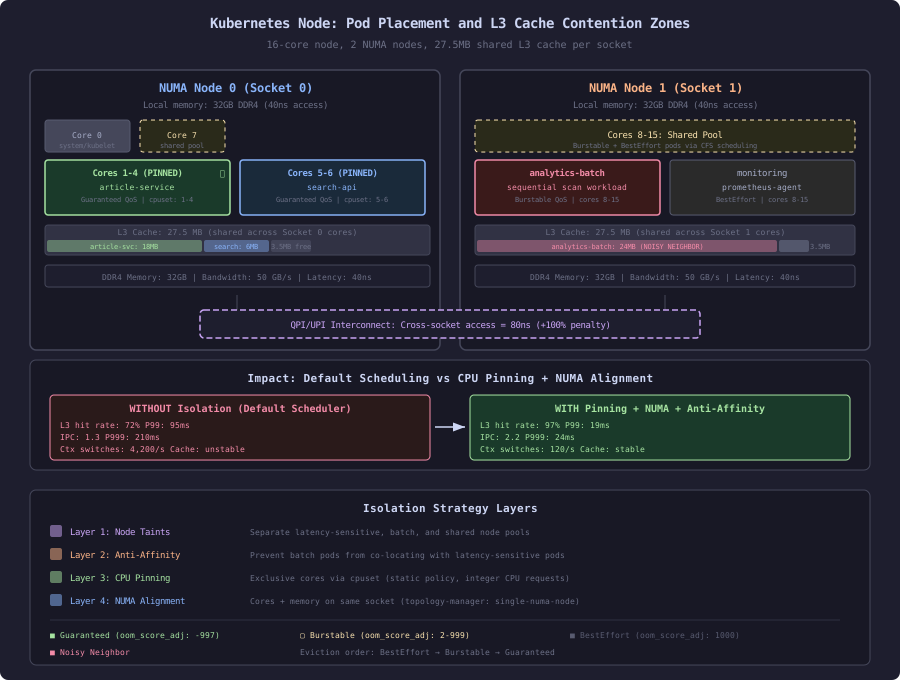
This is a fundamental mismatch. The scheduler optimizes for bin-packing efficiency. Performance-sensitive workloads need isolation. These goals conflict on shared hardware.
Kubernetes scheduling inputs vs actual contention sources:

What the scheduler sees:
  - CPU requests/limits (millicores)
  - Memory requests/limits (bytes)
  - Node taints and tolerations
  - Pod affinity/anti-affinity rules
  - Topology spread constraints

What the scheduler does NOT see:
  - L3 cache occupancy (typically 30-45MB shared across all cores)
  - Memory bandwidth saturation (DDR4: ~50GB/s per channel)
  - NUMA node locality (remote memory access: 1.5-2x local latency)
  - Disk I/O queue depth from other pods
  - Network interrupt coalescing pressure
  - TLB pressure from large working sets
The scheduler treats all millicores as equal. A millicore on a core sharing L3 cache with a memory-intensive batch job is not equal to a millicore on an idle core. The gap between what the scheduler knows and what the hardware does creates the noisy neighbor problem.
QoS Classes: The Eviction Hierarchy
Kubernetes assigns every pod a Quality of Service class based on how its resource requests and limits are configured. This class determines two things: eviction priority when the node runs out of resources, and OOM kill ordering when memory pressure rises.
Three classes exist, and the mapping is mechanical:
# GUARANTEED: requests == limits for every container
# Highest priority. Last to be evicted. Lowest OOM score.
apiVersion: v1
kind: Pod
spec:
  containers:
  - name: article-service
    resources:
      requests:
        cpu: "2"
        memory: "4Gi"
      limits:
        cpu: "2"        # Must equal request
        memory: "4Gi"   # Must equal request

# BURSTABLE: at least one container has requests != limits
# Middle priority. Evicted after BestEffort.
apiVersion: v1
kind: Pod
spec:
  containers:
  - name: search-indexer
    resources:
      requests:
        cpu: "500m"
        memory: "1Gi"
      limits:
        cpu: "2"        # Higher than request = Burstable
        memory: "4Gi"

# BESTEFFORT: no requests or limits set at all
# Lowest priority. First to be evicted. Highest OOM score.
apiVersion: v1
kind: Pod
spec:
  containers:
  - name: log-collector
    resources: {}        # No requests, no limits = BestEffort
The eviction manager runs on the kubelet. When node memory exceeds the eviction threshold (default: 100Mi available), it kills pods in this order:
- BestEffort pods using more memory than their (nonexistent) request
- Burstable pods using more memory than their request
- Guaranteed pods (only if the node is critically low)
Within each class, the kubelet ranks pods by how much they exceed their memory request. The pod using the highest percentage over its request dies first.
OOM Score Adjustment
The kubelet sets the oom_score_adj value for each container process. The Linux OOM killer uses this score when it needs to free memory:
OOM score adjustment by QoS class:

BestEffort:   oom_score_adj = 1000   (always killed first)
Burstable:    oom_score_adj = 2-999  (scaled by memory request ratio)
Guaranteed:   oom_score_adj = -997   (almost never killed)

Formula for Burstable:
  oom_score_adj = 1000 - (1000 * memoryRequest / machineMemory)

Example: 4Gi request on 64Gi node:
  oom_score_adj = 1000 - (1000 * 4 / 64) = 937
The content platform’s article-rendering service runs with Guaranteed QoS because a restart means 3 seconds of cold cache warmup during which every request hits the database. The analytics batch jobs run as Burstable because they can tolerate restarts without user-visible impact.
But QoS class alone does not prevent the noisy neighbor problem. A Guaranteed pod on a node with a memory-bandwidth-hungry neighbor still suffers cache contention. QoS protects against eviction. It does not protect against interference.
The Noisy Neighbor Timeline
Here is what happens when the analytics batch job lands on the same node as the article service, measured with perf stat and Intel RDT (Resource Director Technology):
Before batch job deployment:
  Article service:
    L3 cache hit rate:        94.2%
    L3 cache occupancy:       18.3 MB (of 45 MB total)
    Instructions per cycle:   2.1
    P99 latency:              18ms
    Memory bandwidth:         2.8 GB/s

After batch job placement on same node:
  Article service:
    L3 cache hit rate:        71.8%     (-22.4 percentage points)
    L3 cache occupancy:       6.1 MB    (-12.2 MB stolen by batch job)
    Instructions per cycle:   1.3       (-38%)
    P99 latency:              95ms      (+428%)
    Memory bandwidth:         8.2 GB/s  (+193%, mostly cache miss fills)

  Batch job:
    L3 cache occupancy:       31.4 MB   (consuming 70% of shared cache)
    Memory bandwidth:         22.1 GB/s (saturating memory controller)
The batch job does not use excessive CPU. It does not exceed its memory limit. It does not trigger any Kubernetes eviction. But it destroys the article service’s cache locality, and the scheduler has no mechanism to detect or prevent this.
Pod Placement Controls
Kubernetes provides three mechanisms to influence pod placement. None of them directly address cache contention, but they can be used to create isolation boundaries.
Pod Anti-Affinity
Prevents pods from landing on the same node as other specified pods:
# SLOW: no placement controls
# Scheduler may place batch jobs alongside latency-sensitive services
apiVersion: apps/v1
kind: Deployment
metadata:
  name: article-service
spec:
  template:
    spec:
      containers:
      - name: article-service
        resources:
          requests:
            cpu: "2"
            memory: "4Gi"
          limits:
            cpu: "2"
            memory: "4Gi"
# FAST: anti-affinity keeps batch workloads away
apiVersion: apps/v1
kind: Deployment
metadata:
name: article-service
spec:
template:
spec:
affinity:
podAntiAffinity:
requiredDuringSchedulingIgnoredDuringExecution:
- labelSelector:
matchExpressions:
- key: workload-type
operator: In
values:
- batch
- etl
topologyKey: kubernetes.io/hostname
containers:
- name: article-service
resources:
requests:
cpu: "2"
memory: "4Gi"
limits:
cpu: "2"
memory: "4Gi"The requiredDuringSchedulingIgnoredDuringExecution rule is a hard constraint. The scheduler will not place the article service on any node that already has a pod with workload-type: batch or workload-type: etl. If no node satisfies the constraint, the pod stays Pending.
The weaker variant, preferredDuringSchedulingIgnoredDuringExecution, expresses a preference but allows violations. For latency-critical services, use required. A preference is a suggestion, and the scheduler ignores suggestions when nodes are scarce.
Topology Spread Constraints
Distributes pods evenly across failure domains:
apiVersion: apps/v1
kind: Deployment
metadata:
  name: article-service
spec:
  replicas: 3
  template:
    spec:
      topologySpreadConstraints:
      - maxSkew: 1
        topologyKey: topology.kubernetes.io/zone
        whenUnsatisfiable: DoNotSchedule
        labelSelector:
          matchLabels:
            app: article-service
      - maxSkew: 1
        topologyKey: kubernetes.io/hostname
        whenUnsatisfiable: ScheduleAnyway
        labelSelector:
          matchLabels:
            app: article-service
The first constraint ensures article-service replicas spread across availability zones with at most 1 replica difference between zones. The second spreads across nodes within each zone but allows skew if necessary. This prevents a single noisy node from affecting all replicas simultaneously.
Node Taints and Dedicated Node Pools
The strongest isolation mechanism reserves entire nodes for specific workload classes:
# Create a dedicated node pool for latency-sensitive services
kubectl taint nodes node-1 workload=latency-sensitive:NoSchedule
kubectl taint nodes node-2 workload=latency-sensitive:NoSchedule
kubectl label nodes node-1 node-2 pool=latency-sensitive

# Create a separate pool for batch workloads
kubectl taint nodes node-5 workload=batch:NoSchedule
kubectl taint nodes node-6 workload=batch:NoSchedule
kubectl label nodes node-5 node-6 pool=batch
# Article service tolerates the taint and targets the pool
apiVersion: apps/v1
kind: Deployment
metadata:
name: article-service
spec:
template:
spec:
tolerations:
- key: workload
operator: Equal
value: latency-sensitive
effect: NoSchedule
nodeSelector:
pool: latency-sensitive
containers:
- name: article-service
resources:
requests:
cpu: "2"
memory: "4Gi"
limits:
cpu: "2"
memory: "4Gi"This is a blunt instrument. It wastes resources because the latency-sensitive nodes may run at 30% utilization while batch nodes are overloaded. But it eliminates the noisy neighbor problem entirely at the scheduling layer, because batch pods physically cannot land on latency-sensitive nodes.
CPU Pinning and the Static Policy
Anti-affinity and taints control which node a pod lands on. CPU pinning controls which cores a pod runs on within that node. This is the difference between avoiding your noisy neighbor and having your own room.
When the kubelet’s CPU manager uses the static policy, Guaranteed pods with integer CPU requests receive exclusive access to specific CPU cores. No other pod can use those cores. The kernel’s cpuset cgroup controller enforces the pinning.
# SLOW: default CPU manager policy (none)
# All pods share all cores via CFS scheduling
kubelet --cpu-manager-policy=none

Pod A (Guaranteed, 2 CPU): can run on any of 16 cores
Pod B (Guaranteed, 4 CPU): can run on any of 16 cores
Pod C (Burstable, 1 CPU):  can run on any of 16 cores

Result: all pods contend for L1/L2 cache, TLB, branch predictor
        on every context switch

# FAST: static CPU manager policy
# Guaranteed pods with integer CPU requests get dedicated cores
kubelet --cpu-manager-policy=static \
        --cpu-manager-reconcile-period=10s

Pod A (Guaranteed, 2 CPU): pinned to cores 2-3 exclusively
Pod B (Guaranteed, 4 CPU): pinned to cores 4-7 exclusively
Pod C (Burstable, 1 CPU):  shares remaining cores 0-1, 8-15
The static policy provides three isolation properties:
- No timeslicing: The pinned cores run only the assigned pod’s threads. No CFS scheduling overhead, no context switches from other workloads.
- Warm caches: L1 and L2 caches stay warm because no other process evicts their contents. L1 hit rate improves from ~88% to ~97% in benchmarks.
- Predictable latency: Without context switches, the tail latency floor drops. The article service’s P999 improved from 140ms to 22ms after pinning.
The trade-off is reduced flexibility. Pinned cores sit idle when the pod is not using them. Burstable and BestEffort pods are restricted to the remaining shared pool, which may be small on nodes with many Guaranteed pods.
NUMA Awareness
Modern servers have Non-Uniform Memory Access (NUMA) architecture. Each CPU socket has its own memory controller, and accessing memory attached to the remote socket costs 1.5 to 2x the latency of local memory.
Dual-socket server NUMA topology:

Socket 0                    Socket 1
┌────────────────────┐     ┌────────────────────┐
│ Cores 0-7          │     │ Cores 8-15         │
│ L3 Cache: 25MB     │     │ L3 Cache: 25MB     │
│ Memory: 32GB       │     │ Memory: 32GB       │
│ Local access: 40ns │     │ Local access: 40ns │
└────────┬───────────┘     └────────┬───────────┘
         │                          │
         └──────────┬───────────────┘
                    │
              QPI/UPI Link
          Remote access: 80ns
Without NUMA awareness, the kubelet might pin a pod to cores 0-3 (Socket 0) while the pod’s memory pages are allocated on Socket 1’s memory. Every memory access crosses the QPI link at 80ns instead of 40ns.
The topology manager coordinates CPU and memory allocation:
kubelet --cpu-manager-policy=static \
        --topology-manager-policy=single-numa-node \
        --topology-manager-scope=pod
The single-numa-node policy ensures a Guaranteed pod’s CPU cores and memory pages come from the same NUMA node. The scheduler rejects the pod if no single NUMA node has enough resources. This is strict but eliminates cross-socket penalties.
For the content platform, the article service runs with single-numa-node topology on 4 cores within one NUMA domain. The measured impact:
Article service memory access latency:

Without topology manager (cores on Socket 0, memory split):
  Local memory accesses:    62%
  Remote memory accesses:   38%
  Average memory latency:   55.2ns

With single-numa-node policy:
  Local memory accesses:    99.1%
  Remote memory accesses:   0.9% (kernel metadata only)
  Average memory latency:   41.8ns

Impact on service latency:
  P50: 12ms → 9ms
  P99: 32ms → 19ms
Putting It Together: The Content Platform Configuration
The content platform uses a layered isolation strategy:
Layer 1: Node pools (taints)
  - latency-sensitive pool: article-service, search-api, cdn-origin
  - batch pool: analytics, indexing, content-generation
  - shared pool: monitoring, logging, control plane

Layer 2: Pod anti-affinity
  - article-service replicas spread across nodes and zones
  - search-api never co-located with indexing jobs

Layer 3: CPU pinning (static policy)
  - article-service: 4 dedicated cores per replica
  - search-api: 2 dedicated cores per replica
  - All batch jobs: shared CPU pool, no pinning

Layer 4: NUMA alignment (topology manager)
  - article-service: single-numa-node
  - search-api: single-numa-node
  - Others: best-effort NUMA alignment
The combined result:
Before (default scheduling, no isolation):
  Article service P50:    12ms
  Article service P99:    95ms   (during batch job bursts)
  Article service P999:   210ms
  Cache hit rate:         71-94% (variable)

After (full isolation stack):
  Article service P50:    9ms
  Article service P99:    19ms   (stable regardless of batch load)
  Article service P999:   24ms
  Cache hit rate:         96-98% (stable)
The cost is ~15% lower cluster utilization efficiency. The latency-sensitive nodes run at 35-40% CPU utilization because their pinned cores cannot be shared. The batch nodes occasionally queue pods waiting for resources that are reserved but idle on the latency-sensitive pool.
This is the correct trade-off for a content platform where tail latency directly affects user engagement. A 95ms P99 means 1 in 100 page loads feels sluggish. A 19ms P99 means the slowest response is still imperceptible. The cost of dedicated hardware is lower than the cost of lost readers.
The next two sections detail the QoS eviction mechanics and the CPU pinning benchmarks.