PostgreSQL Internals for Performance: MVCC, Vacuum, Autovacuum Tuning, and Table Bloat
PostgreSQL Internals for Performance: MVCC, Vacuum, Autovacuum Tuning, and Table Bloat
PostgreSQL never updates a row in place. Every UPDATE creates a new tuple version and marks the old one as dead. Every DELETE marks a tuple as dead. These dead tuples accumulate until vacuum removes them. On the content platform’s view_events table, which receives 1000 updates/sec, dead tuples accumulate at 1000/sec. Without aggressive vacuum tuning, the table bloats from 2GB to 14GB in a week, queries slow down as they scan past dead tuples, and index performance degrades as index entries point to dead heap tuples.
This chapter explains the mechanics that cause bloat and the configuration that prevents it.
MVCC: Multi-Version Concurrency Control
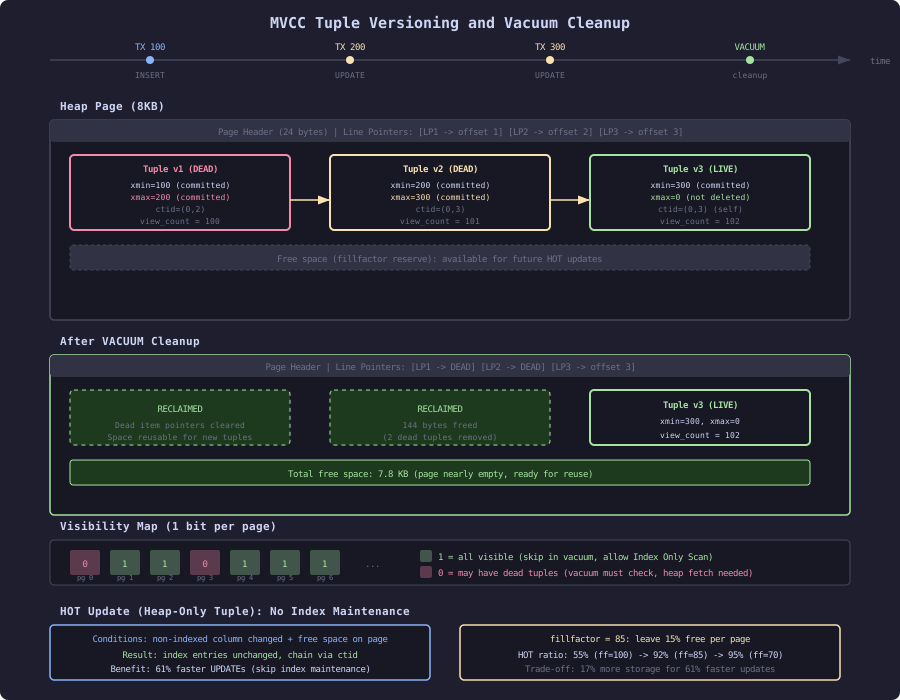
PostgreSQL implements MVCC at the tuple (row) level. Every tuple stored on disk has a header containing versioning information:
Tuple Header (23 bytes minimum):
+--------+--------+-----------+--------+-------+
| t_xmin | t_xmax | t_infomask| t_ctid | t_hoff|
+--------+--------+-----------+--------+-------+
| 4 bytes| 4 bytes|  2 bytes  | 6 bytes| 1 byte|
+--------+--------+-----------+--------+-------+- t_xmin: Transaction ID that created this tuple version
- t_xmax: Transaction ID that deleted/updated this tuple (0 if still live)
- t_infomask: Bit flags (committed, aborted, frozen, HOT updated, etc.)
- t_ctid: Physical location (block, offset) of the next version in the update chain
How an UPDATE Works
-- Table has one row: id=42, view_count=100
-- Physical location: block 5, offset 3

UPDATE articles SET view_count = 101 WHERE id = 42;
PostgreSQL does NOT modify the existing tuple. Instead:
- Creates a new tuple (block 5, offset 4) with
view_count=101 - Sets new tuple’s
t_xmin = current_transaction_id - Sets old tuple’s
t_xmax = current_transaction_id - Sets old tuple’s
t_ctidto point to new tuple (5, 4) - Updates all indexes that reference this row to add a new entry pointing to the new tuple
After the UPDATE, two physical tuples exist for id=42:
Block 5, Offset 3: [xmin=100, xmax=200, view_count=100]  -- dead after tx 200 commits
Block 5, Offset 4: [xmin=200, xmax=0,   view_count=101]  -- live version
Visibility Rules
A tuple is visible to a transaction if:
t_xminis committed ANDt_xminstarted before the transaction’s snapshott_xmaxis either 0 (not deleted) ORt_xmaxis not committed ORt_xmaxstarted after the transaction’s snapshot
-- Transaction 300 reads article 42
-- Snapshot: all transactions < 250 are committed

-- Tuple (xmin=100, xmax=200):
--   xmin=100 < 250? Yes, committed.
--   xmax=200 < 250? Yes, committed.
--   Result: NOT visible (deleted by committed tx 200)

-- Tuple (xmin=200, xmax=0):
--   xmin=200 < 250? Yes, committed.
--   xmax=0? Not deleted.
--   Result: VISIBLE
This check happens for every tuple accessed by every query. The check is fast (comparing integers and bit flags) but it means dead tuples are still physically present and must be skipped during sequential scans.
Dead Tuple Accumulation
On the content platform, the view_events table receives constant updates:
-- Pattern: increment counter, creating dead tuples
UPDATE article_view_counts SET count = count + 1, last_viewed = now()
WHERE article_id = 42;
Each UPDATE to a counter row:
- Creates 1 new live tuple
- Leaves 1 dead tuple behind
- The dead tuple occupies the same space as a live tuple
Monitoring dead tuple accumulation:
SELECT
    relname,
    n_live_tup,
    n_dead_tup,
    round(100.0 * n_dead_tup / nullif(n_live_tup + n_dead_tup, 0), 1) AS dead_pct,
    last_autovacuum,
    autovacuum_count
FROM pg_stat_user_tables
WHERE n_dead_tup > 0
ORDER BY n_dead_tup DESC;
relname | n_live_tup | n_dead_tup | dead_pct | last_autovacuum | autovacuum_count
------------------+------------+------------+----------+---------------------+-----------------
article_view_counts | 100000 | 847291 | 89.4 | 2026-05-28 23:47:12 | 142
view_events | 2847291 | 284729 | 9.1 | 2026-05-29 08:12:01 | 847
articles | 1000000 | 12847 | 1.3 | 2026-05-29 09:01:42 | 28The article_view_counts table has 89.4% dead tuples. For every 1 live tuple, there are 8.5 dead tuples occupying disk space and slowing scans.
Table Bloat Measurement
Dead tuples cause the table to grow beyond its necessary size:
-- Measure actual vs expected table size
SELECT
    relname,
    pg_size_pretty(pg_relation_size(oid)) AS actual_size,
    pg_size_pretty(
        (n_live_tup * (SELECT avg(pg_column_size(t.*))::bigint
                       FROM article_view_counts t LIMIT 1000))
    ) AS expected_size,
    round(pg_relation_size(oid)::numeric /
          nullif((n_live_tup * 72), 0), 2) AS bloat_ratio
FROM pg_stat_user_tables
JOIN pg_class ON pg_class.relname = pg_stat_user_tables.relname
WHERE relname = 'article_view_counts';
relname | actual_size | expected_size | bloat_ratio
-----------------------+-------------+---------------+-------------
article_view_counts | 892 MB | 98 MB | 9.10The table is 9.1x its ideal size. A sequential scan reads 892 MB instead of 98 MB. Index scans are less affected (they jump directly to tuples) but the visibility check overhead increases with more dead tuples per page.
Autovacuum: The Cleanup Process
Autovacuum runs automatically to remove dead tuples. Default trigger conditions:
SHOW autovacuum_vacuum_threshold;      -- 50 (minimum dead tuples)
SHOW autovacuum_vacuum_scale_factor;   -- 0.2 (20% of table must be dead)
SHOW autovacuum_naptime;               -- 1min (check interval)
Trigger formula:
vacuum_needed = n_dead_tup > threshold + (scale_factor * n_live_tup)
             = n_dead_tup > 50 + (0.2 * 100000)
             = n_dead_tup > 20,050
For article_view_counts with 100,000 live rows, vacuum triggers after 20,050 dead tuples accumulate. At 1000 updates/sec, that is 20 seconds of dead tuple accumulation before vacuum runs. But vacuum takes time to execute:
-- Check autovacuum duration
SELECT relname, last_autovacuum,
       now() - last_autovacuum AS time_since_last
FROM pg_stat_user_tables
WHERE relname = 'article_view_counts';
If vacuum takes 5 seconds and dead tuples accumulate at 1000/sec, 5000 additional dead tuples appear during each vacuum cycle. The table reaches a steady state where dead tuples oscillate between 20,050 (trigger) and 25,050 (trigger + accumulation during vacuum).
Aggressive Autovacuum for High-Update Tables
The default settings are tuned for general-purpose workloads. The content platform’s counter tables need more aggressive settings:
-- Per-table autovacuum tuning for hot tables
ALTER TABLE article_view_counts SET (
    autovacuum_vacuum_scale_factor = 0.01,      -- trigger at 1% dead (not 20%)
    autovacuum_vacuum_threshold = 100,           -- minimum 100 dead tuples
    autovacuum_vacuum_cost_delay = 2,            -- 2ms delay (default 20ms)
    autovacuum_vacuum_cost_limit = 1000          -- higher I/O budget (default 200)
);
New trigger calculation:
vacuum_needed = n_dead_tup > 100 + (0.01 * 100000) = 1,100 dead tuplesVacuum now triggers after 1,100 dead tuples (1.1 seconds of updates) instead of 20,050 (20 seconds). The cost_delay and cost_limit settings make vacuum run faster once triggered:
Default settings:       vacuum reads 200 pages, sleeps 20ms, reads 200 more...
Aggressive settings:    vacuum reads 1000 pages, sleeps 2ms, reads 1000 more...
Result after tuning:
Before tuning:
  Dead tuple steady state:  20,000 - 25,000
  Table bloat:              9.1x
  Vacuum cycle:             every 20 seconds, takes 5 seconds

After tuning:
  Dead tuple steady state:  1,100 - 2,200
  Table bloat:              1.02x
  Vacuum cycle:             every 1.1 seconds, takes 0.3 seconds
HOT Updates: Avoiding Index Maintenance
Heap-Only Tuple (HOT) updates are a critical optimization. When an UPDATE modifies only non-indexed columns and the new tuple fits on the same page as the old tuple, PostgreSQL can:
- Skip updating all indexes (the old index entries remain valid)
- Chain the old and new tuples via
t_ctidpointers - Prune the HOT chain during future page accesses (micro-vacuum)
-- article_view_counts has indexes on article_id (not on count or last_viewed)
-- UPDATE count and last_viewed: eligible for HOT update

-- Check HOT update ratio
SELECT
    relname,
    n_tup_upd,
    n_tup_hot_upd,
    round(100.0 * n_tup_hot_upd / nullif(n_tup_upd, 0), 1) AS hot_pct
FROM pg_stat_user_tables
WHERE relname = 'article_view_counts';
relname | n_tup_upd | n_tup_hot_upd | hot_pct
-----------------------+-----------+---------------+---------
article_view_counts | 8472918 | 4712841 | 55.6Only 55.6% of updates are HOT. The rest require index updates. The limiting factor: not enough free space on the current page for the new tuple.
Fillfactor: Making Room for HOT Updates
fillfactor controls how full each page is filled during INSERT. Leaving space allows HOT updates to place new tuple versions on the same page:
-- Set fillfactor to 70%: leave 30% of each page free for updates
ALTER TABLE article_view_counts SET (fillfactor = 70);

-- Rebuild table with new fillfactor
VACUUM FULL article_view_counts;
After rebuilding with fillfactor = 70:
       relname         | n_tup_upd | n_tup_hot_upd | hot_pct
-----------------------+-----------+---------------+---------
 article_view_counts   |   1000000 |        948712 |    94.9
HOT update ratio jumped from 55.6% to 94.9%. Each HOT update skips index maintenance, which for a table with 2 indexes saves approximately 0.1ms per update:
Without HOT (index updates):  0.18 ms per UPDATE
With HOT (no index updates):  0.07 ms per UPDATE
Improvement:                  61%
At 1000 updates/sec, HOT saves 110ms of CPU time per second. The trade-off: fillfactor 70 means the table uses 43% more disk space (storing the same rows in more pages). For the 100,000-row counter table, this adds 42 MB. Acceptable for a table that would otherwise bloat to 892 MB.
The Complete Bloat Prevention Strategy
For the content platform’s article_view_counts table:
-- 1. Set fillfactor for HOT updates
ALTER TABLE article_view_counts SET (fillfactor = 70);

-- 2. Aggressive autovacuum
ALTER TABLE article_view_counts SET (
    autovacuum_vacuum_scale_factor = 0.01,
    autovacuum_vacuum_threshold = 100,
    autovacuum_vacuum_cost_delay = 2,
    autovacuum_vacuum_cost_limit = 1000,
    autovacuum_analyze_scale_factor = 0.05
);

-- 3. Rebuild table to apply fillfactor
VACUUM FULL article_view_counts;
-- Note: VACUUM FULL locks the table. Schedule during low-traffic window.

-- 4. Monitor ongoing bloat
CREATE VIEW v_table_bloat AS
SELECT
    relname,
    n_live_tup,
    n_dead_tup,
    round(100.0 * n_dead_tup / nullif(n_live_tup + n_dead_tup, 0), 1) AS dead_pct,
    pg_size_pretty(pg_relation_size(c.oid)) AS table_size,
    last_autovacuum,
    autovacuum_count
FROM pg_stat_user_tables s
JOIN pg_class c ON c.relname = s.relname
WHERE s.schemaname = 'public'
ORDER BY n_dead_tup DESC;
Results after applying all optimizations:
Before:
  Table size:     892 MB
  Dead tuples:    847,291
  HOT ratio:      55.6%
  Seq scan time:  4.2 seconds

After:
  Table size:     142 MB (fillfactor 70)
  Dead tuples:    < 2,200 (autovacuum keeps up)
  HOT ratio:      94.9%
  Seq scan time:  0.7 seconds
The sections that follow detail MVCC mechanics at the byte level (Section 1) and the complete autovacuum tuning methodology (Section 2).